
@snoglobe/helios
v0.4.7
Published
Autonomous ML research agent TUI

Maintainers
 snoglobe
Readme
Helios
[!CAUTION] Important: Helios does not currently have a permissions/security model. The agent runs basically unrestricted. You are responsible for any losses of data/other adverse outcomes from running it. If you have stuff you care about, then back it up (whether or not you use Helios, backing up is a good idea!), configure Helios to SSH into a container, or wait until it has a permissions system.
Claude mode will not work if you are running as root. It is recommended to instead run Helios on your local computer and set up your remote machine within Helios' SSH configuration. It will forward everything to your remote machine, no server required.
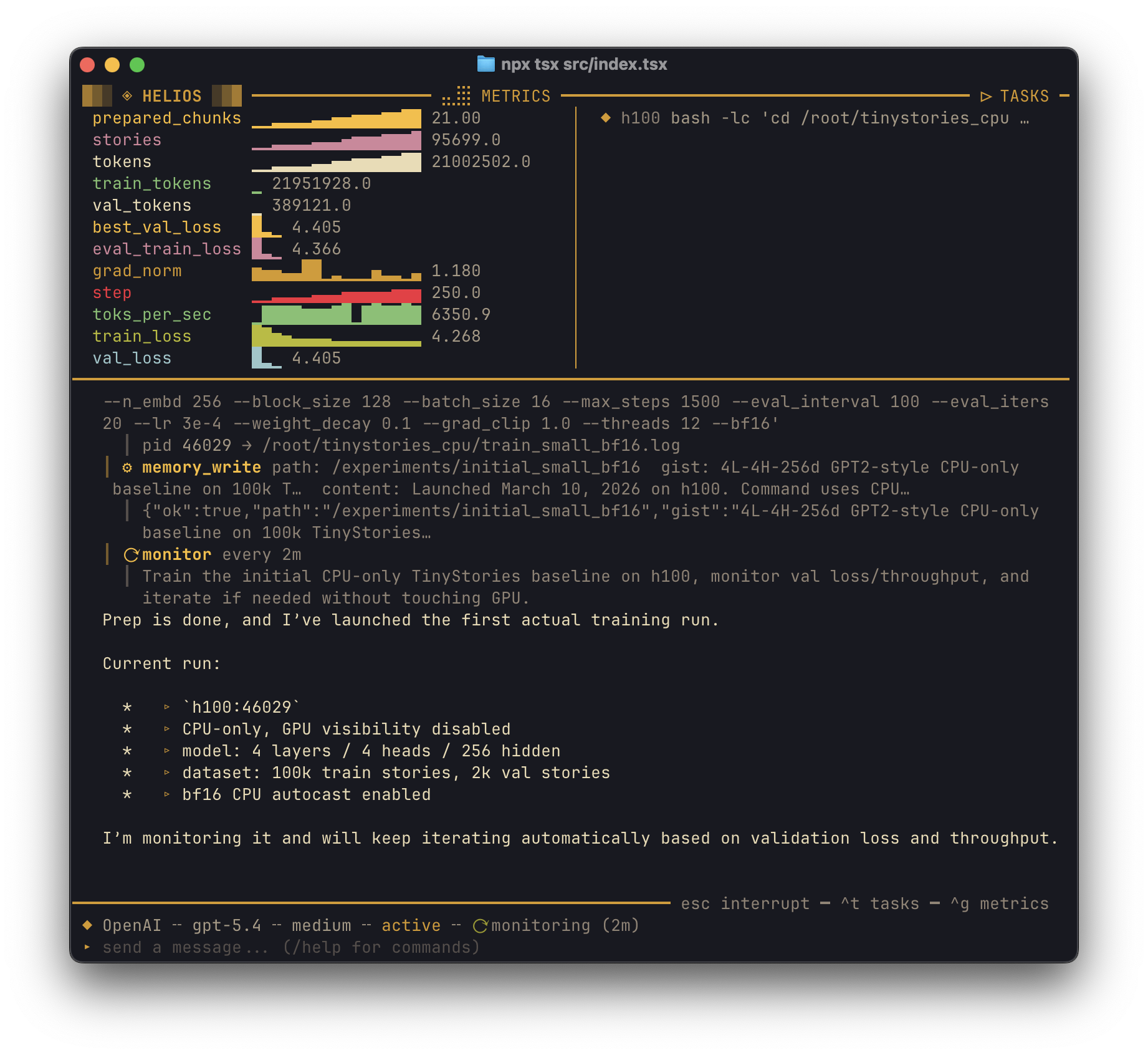
An autonomous research agent inspired by Andrej Karpathy's 'autoresearch'. Autoresearch works very well within Helios, just have to tune the prompt slightly.
It can operate seamlessly over SSH (even multiple machines), keeps the model in a loop, has tools to view/compare metrics, shows metrics directly in the UI, and has a memory system.
You can leave it to work overnight and don't have to worry about it exiting the loop early to stupidly ask you something or because it has to wait for something. And hopefully you'll wake up to results.
Install
npm install -g @snoglobe/heliosRequires Node.js 20+.
Auth
Claude (default) — either:
- Install the Claude CLI and run
claude login - Or set
ANTHROPIC_API_KEYand use/claude-mode api - Claude CLI usage is ban-free; conforms to Anthropic's usage policy
OpenAI — OAuth login on first run (requires ChatGPT Plus or Pro).
Usage
helios [options]                    Interactive TUI
helios "prompt"                     TUI with initial prompt
helios -p "prompt"                  Print response and exit
helios -c                           Continue most recent session
helios -r <session-id>              Resume specific session

Options:
  -p, --provider <claude|openai>    Model provider (default: claude)
  --claude-mode <cli|api>           Claude auth mode (cli = Agent SDK, api = API key)
  -m, --model <model-id>            Model to use
  --headless                        Run without TUI (for scripting/hub agents)
  -v, --version                     Show version
  -h, --help                        Show help
Type a goal and Helios takes over:
> Train a 125M parameter GPT on TinyStories to loss < 1.0It will write training scripts, launch runs, parse metrics from stdout, set up monitoring intervals, compare experiments, and keep iterating until the goal is met or you interrupt.
CLI Subcommands
| Command | Description |
|---|---|
| helios auth login\|logout\|status | Manage provider authentication |
| helios sessions | List recent sessions |
| helios watch <machine:pid> | Stream task output + metrics live |
| helios replay <session-id> | Replay a past session |
| helios report [session-id] | Generate experiment writeup |
| helios discover [interests] | Background literature discovery (runs until Ctrl+C) |
| helios init | Initialize project config (helios.json) |
| helios doctor | Diagnose setup (auth, machines, storage, config) |
| helios search "query" | Full-text search across session histories |
| helios export [session-id] | Export data to CSV/JSON |
| helios kill <machine:pid> | Kill a running task |
Slash Commands
| Command | Description |
|---|---|
| /switch <claude\|openai> | Switch model provider |
| /model <model-id> | Set model |
| /models | List available models |
| /reasoning <level> | Set reasoning effort (Claude: medium high max / OpenAI: none minimal low medium high xhigh) |
| /claude-mode <cli\|api> | Switch Claude auth mode |
| /machine add <id> <user@host[:port]> | Add remote machine (--key <path>, --auth <agent\|key>) |
| /machine rm <id> | Remove machine |
| /machines | List machines and connection status |
| /metric [name ...] | Show metric sparklines |
| /metrics clear | Clear all metrics |
| /resume [n] | List or resume a past session |
| /writeup | Generate experiment writeup |
| /sticky <text> | Pin a note to the sidebar (always visible to model) |
| /stickies [rm <n>] | List or remove sticky notes |
| /memory [path] | Browse the agent's memory tree |
| /skills | List available skills |
| /hub [connect\|disconnect\|status] | AgentHub collaboration |
| /status | Provider, model, cost, state |
| /clear | Clear conversation |
| /help | Show all commands |
Skills are also invocable as slash commands — e.g. /discover, /paper <url>, /ablation.
Keys
| Key | Action |
|---|---|
| Ctrl+T | Task output overlay |
| Ctrl+G | Metrics overlay |
| Escape | Interrupt / close overlay |
| Ctrl+C | Interrupt / exit |
| Tab | Autocomplete command |
| Up Down | History / menu navigation |
| PageUp PageDown | Scroll conversation |
| Ctrl+A Ctrl+E | Start / end of line |
| Ctrl+W | Delete word backward |
| Ctrl+U | Clear line |
Mouse scroll works in terminals that support SGR mouse reporting.
Remote Machines
Helios can run workloads on remote machines over SSH. The local machine is always available.
# Add a GPU box
/machine add gpu1 [email protected] --key ~/.ssh/id_rsa

# Add with custom port
/machine add gpu2 user@hostname:2222
Machines are stored in ~/.helios/machines.json and auto-connect on startup.
The agent prefers remote machines for heavy compute and uses local for lightweight tasks. Or if you don't have a remote machine.
How It Works
Helios runs an autonomous loop:
- Understand the goal — break it into experiments
- Launch via
remote_exec_background— stdout is captured, metrics are parsed live - Monitor via
start_monitor— periodic check-ins review progress - Compare via
compare_runs— keep improvements, discard regressions - Iterate — plan and launch the next experiment
- Stop only when the goal is achieved or it hits an unrecoverable error
Metric Tracking
Training scripts print metrics to stdout. Helios parses them automatically:
# key=value format (detected via metric_names)
print(f"loss={loss:.4f} acc={acc:.4f} lr={lr:.6f}")

# Custom patterns (detected via metric_patterns)
print(f"Step {step}: Loss {loss:.4f}")
Live sparklines appear in the dashboard. The agent uses show_metrics and compare_runs to make decisions.
Memory
Long sessions get checkpointed when the context window fills up. The agent's memory persists as a virtual filesystem:
/goal                    -> "Train TinyStories to loss < 1.0"
/best                    -> "Run #3: lr=3e-4, cosine -> loss=0.83"
/experiments/
  4521                   -> config, metrics, verdict
  4380                   -> config, metrics, verdict
/observations/
  cosine-schedule-helps  -> "cosine decay outperforms linear by ~15%"
After a checkpoint, the agent receives its memory tree and continues where it left off.
Skills
Skills are reusable prompt templates with tool access controls. Helios ships with bundled skills that are copied to ~/.helios/skills/ on first launch — edit them to customize.
| Skill | Description |
|---|---|
| discover | Background literature discovery — loops continuously, browses papers, stores findings in memory |
| paper <url> | Read a paper and plan reproduction of key results |
| ablation | Systematic ablation study on the current best configuration |
| writeup | Generate a structured experiment writeup |
| consult | Ask the other AI provider for a second opinion |
Create your own skills as Markdown files in ~/.helios/skills/ or .helios/skills/ (project-local). See the bundled skills for the format.
Consult
The agent can ask the other provider for a second opinion:
# If running on Claude, consult asks OpenAI (and vice versa)
consult("I'm stuck at loss=0.9 — what should I try next?")
Sleep & Wake
The agent can put itself to sleep with composable triggers:
sleep(reason: "waiting for training to finish", triggers: [
  { type: "process_exit", machine_id: "gpu1", pid: 4521 },
  { type: "metric", metric_name: "loss", threshold: 1.0, direction: "below" },
  { type: "timer", minutes: 120 }
])
When any trigger fires, the agent wakes up with context about what happened while it slept.
Project Config
Run helios init to create a helios.json in your project root:
{
  "provider": "claude",
  "model": "claude-opus-4-6",
  "defaultMachine": "gpu1",
  "metricNames": ["loss", "acc", "lr"],
  "metricPatterns": {
    "loss": "Loss:\\s+([\\d.]+)"
  },
  "instructions": "This project uses PyTorch Lightning. Always use pl.Trainer.",
  "experimentDir": "experiments",
  "notifications": {
    "channels": [{ "type": "desktop" }],
    "events": ["experiment_complete", "error"]
  }
}
Config is auto-discovered by walking up the directory tree. The instructions field is appended to the system prompt — use it for project-specific context.
Models
Claude (200k context):
claude-opus-4-6— higher-end reasoning/coding (default)claude-sonnet-4-6— balanced speed vs reasoning
OpenAI (~400k context):
gpt-5.4— latest flagship, recommended (default)gpt-5.3-codex— codexgpt-5.3-codex-spark— research preview, text-onlygpt-5.2-codex— codexgpt-5.2gpt-5.1-codex-max— max computegpt-5.1gpt-5.1-codex— codex
Tools
The agent has access to 37 tools (33 core + 4 conditional AgentHub tools):
| Tool | What it does |
|---|---|
| remote_exec | Run a quick command (ls, pip install, git clone) |
| remote_exec_background | Launch a long-running process with metric tracking |
| remote_upload / remote_download | rsync files between machines |
| read_file / write_file / patch_file | File operations on any machine |
| list_machines | Show configured machines |
| task_output | Tail stdout/stderr of a background task |
| kill_task | Kill a running process |
| show_metrics | Query metrics with sparklines and trends |
| compare_runs | Side-by-side comparison of two runs |
| clear_metrics | Wipe stale metric data |
| start_monitor / stop_monitor | Periodic monitoring loop |
| memory_ls / memory_read / memory_write / memory_rm | Persistent memory filesystem |
| web_search | Search the web (maps to provider's native search) |
| web_fetch | Fetch web pages, docs, papers |
| env_snapshot | Capture full environment snapshot (Python, GPU, CUDA, etc.) |
| sweep | Launch parameter grid search across machines |
| exp_branch / exp_commit / exp_diff / exp_branches / exp_checkout | Git-based experiment branching |
| consult | Ask the other AI provider |
| writeup | Generate structured experiment report |
| sleep | Sleep with composable triggers (timer, process exit, metric threshold, file change, resource usage) |
| hub_push / hub_fetch / hub_log / hub_leaves / hub_diff | AgentHub git collaboration (if configured) |
| hub_post / hub_read / hub_reply | AgentHub discussion (if configured) |
Data
Everything is stored locally in ~/.helios/:
~/.helios/
  helios.db          SQLite database (sessions, metrics, memory)
  machines.json      Remote machine configs
  auth/
    auth.json        OAuth tokens and API keys
  skills/            Skill templates (editable)
  preferences.json   Last provider, claude mode
Development
git clone https://github.com/snoglobe/helios.git
cd helios
npm install
npm run dev          # tsx src/index.tsx
npm run build        # tsc
npm start            # node dist/index.js
License
Apache-2.0