
@sparkdreamnft/react-avatar-edit
v1.2.1
Published
ReactJS component to upload, crop, and preview avatars


Readme
react-avatar-edit
👤 Load, crop and preview avatar with ReactJS component
- Works from the box
- Fully typed with TypeScript
- Drag and Drop support
- A lot of customization
- Powered with KonvaJS
Demo
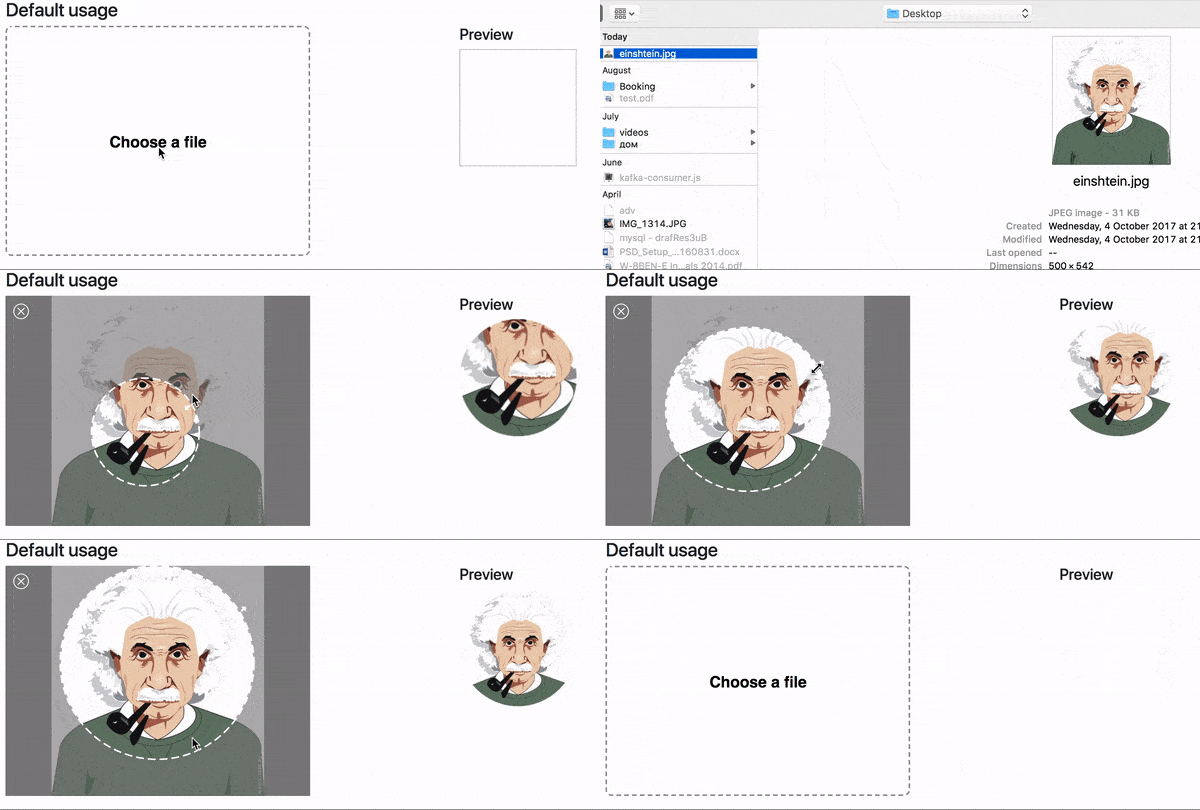
Demo website
Install
npm i react-avatar-edit
Usage
import React from "react";
import ReactDOM from "react-dom";
import Avatar from "react-avatar-edit";

class App extends React.Component {
  constructor(props) {
    super(props);
    const src = "./example/einshtein.jpg";
    this.state = {
      preview: null,
      src,
    };
    this.onCrop = this.onCrop.bind(this);
    this.onClose = this.onClose.bind(this);
    this.onBeforeFileLoad = this.onBeforeFileLoad.bind(this);
  }

  onClose() {
    this.setState({ preview: null });
  }

  onCrop(preview) {
    this.setState({ preview });
  }

  onBeforeFileLoad(elem) {
    if (elem.target.files[0].size > 71680) {
      alert("File is too big!");
      elem.target.value = "";
    }
  }

  render() {
    return (
      <div>
        <Avatar
          width={390}
          height={295}
          onCrop={this.onCrop}
          onClose={this.onClose}
          onBeforeFileLoad={this.onBeforeFileLoad}
          src={this.state.src}
        />
        <img src={this.state.preview} alt="Preview" />
      </div>
    );
  }
}

ReactDOM.render(<App />, document.getElementById("root"));
Component properties
| Prop | Type | Description | | ---------------------- | ------------- | ------------------------------------------------------------------------------------------------------------------------------------------- | | img | Image | The Image object to display | | src | String/Base64 | The url to base64 string to load (use urls from your domain to prevent security errors) | | width | Number | The width of the editor | | height | Number | The height of the editor (image will fit to this height if neither imageHeight, nor imageWidth is set) | | imageWidth | Number | The desired width of the image, can not be used together with imageHeight | | imageHeight | Number | The desired height of the image, can not be used together with imageWidth | | cropRadius | Number | The crop area radius in px (default: calculated as min image with/height / 3) | | cropColor | String | The crop border color (default: white) | | lineWidth | Number | The crop border width (default: 4) | | minCropRadius | Number | The min crop area radius in px (default: 30) | | backgroundColor | String | The color of the image background (default: white) | | closeIconColor | String | The close button color (default: white) | | shadingColor | String | The shading color (default: grey) | | shadingOpacity | Number | The shading area opacity (default: 0.6) | | mimeTypes | String | The mime types used to filter loaded files (default: image/jpeg,image/png) | | label | String | Label text (default: Choose a file) | | labelStyle | Object | The style object for preview label (use camel case for css properties fore example: fontSize) | | borderStyle | Object | The style for object border preview (use camel case for css properties fore example: fontSize) | | onImageLoad(image) | Function | Invoked when image based on src prop finish loading | | onCrop(image) | Function | Invoked when user drag&drop event stop and return cropped image in base64 string | | onBeforeFileLoad(file) | Function | Invoked when user before upload file with internal file loader (etc. check file size) | | onFileLoad(file) | Function | Invoked when user upload file with internal file loader | | onClose() | Function | Invoked when user clicks on close editor button | | exportAsSquare | Boolean | The exported image is a square and the circle is not cut-off from the image | | exportSize | Number | The size the exported image should have (width and height equal). The cropping will be made on the original image to ensure a high quality. | | exportMimeType | String | The mime type that should be used to export the image, supported are: image/jpeg, image/png (Default: image/png) | | exportQuality | Number | The quality that should be used when exporting in image/jpeg. A value between 0.0 and 1.0. |
Contributing
- To start developer server please use
npm run start - To build production bundle use
npm run build