
@spktr/sidecar
v1.14.1
Published
Review documents with your AI agent, locally: comments, suggestion cards with word-level diffs, and rich-text editing on your own files.

Maintainers
 spktr
spktrReadme


A better way to work on documents with your AI agent.
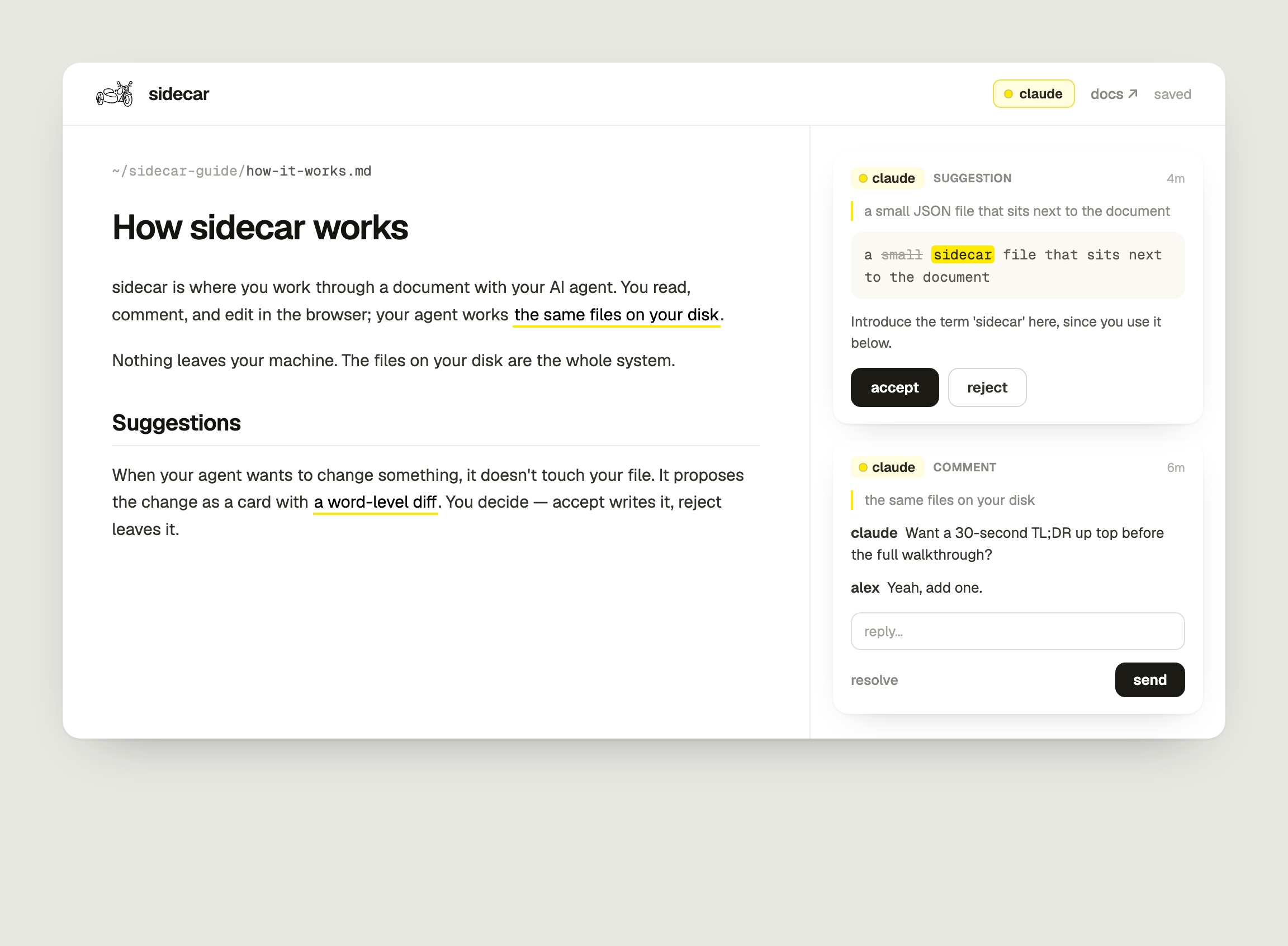
Reviewing a document your agent drafted can be clumsy. The file lives on your disk, the conversation about it lives in a chat window, and marking up raw markdown by hand is annoying.
The tools actually built for review, like Google Docs and Notion, do it well, but they live in the cloud. Your agent only reaches them through a connector, every change crosses the network, and your document sits on someone else's server.
Sidecar brings the review to the file instead: suggestion cards, word-level diffs, and comment threads you can drop a screenshot into, on the markdown already on your disk. 100% local, and as modern as any SaaS tool.
Why sidecar
- 100% local. No upload, no network requests, no account. The files on your disk are the whole system.
- Real files, real diffs. Edits write the actual markdown, and untouched blocks keep their exact original bytes, so
git diffshows just what changed, and git is your undo. - Any agent with a shell. Claude Code, Cursor, Codex, and the rest. One small CLI, no plugin, no API key.
- A live loop, not a mailbox. Your agent can watch the review and answer inside your comment threads the moment you act, and the thread shows claude is replying while the answer is being written.
- A folder, not one file. Serve a project directory and the review is the whole project: a panel lists its documents, and badges say which ones are waiting on you. Your agent watches the folder with one
wait --dir. - Anchored to content, not line numbers. If text moves, anchors follow; if it's gone, the item goes orphaned, loudly, instead of editing the wrong place.
- Cheap turns. After the first read, your agent sees only what changed since its last look, so a long review doesn't mean re-reading the document every turn.
- Mobile friendly. One
tailscale serveline puts the review on your phone over your own tailnet, where a comment can carry the screenshot you just took.
When not to use it: multi-user editing (this app is single-user by design), non-markdown files, or a review synced across two machines mid-flight.
Quickstart
Start here. You can copy and paste this in your project directory:
npx skills add smithavt14/sidecarThat installs the skill where your agent looks for it. Now tell your agent "review draft.md in sidecar", and it fetches the tool, starts the server, and opens the review at localhost:4880. Node ≥ 20; nothing else to set up.
To run the server yourself instead:
npm i -g @spktr/sidecar@latest   # or prefix everything with npx @spktr/sidecar
sidecar ~/path/to/your/docs      # a single file or a whole directory
sidecar help                     # every command
sidecar doctor                   # is a server running, and is this install the latest version
sidecar skill                    # the agent protocol, on stdout, no install
Behind "review draft.md in sidecar," your agent runs commands like:
sidecar suggest draft.md \
  --quote "ship all six features in week one" \
  --replacement "ship the three core features" \
  --note "Overcommit."
…and the card appears in your browser, live, as a diff with accept/reject. See AGENTS.md for the full command set.
Each turn your agent reads a digest rather than the document: the decisions you made with your reasons, new comments and replies in full, and the document's changed hunks. Reviewing this README, the file runs about 8,800 characters while the digests ran between 180 and 1,800. The first look of a session is still a full read; everything after it just costs whatever has changed.
Review on your phone (optional): tailscale serve --bg 4880 proxies sidecar onto your private
Tailscale tailnet. The picture button opens your camera roll there, so a comment
can carry the screenshot you just took. Tailnet-only: sidecar has no auth, so never tailscale funnel
it publicly.
The loop
- Your agent drafts a markdown file (or you open one of yours).
- It seeds the review with suggestion cards and comments anchored to real text.
- You read, accept, reject, reply, and edit rich text in place. Desk or phone.
- The agent, backgrounded on
sidecar wait(orsidecar wait --dirfor a whole folder), answers the moment you act, proposing rewrites right inside your comment threads. While it composes, the thread it's answering shows a quiet claude is replying, which clears as each reply lands. - You click done reviewing → the agent makes one commit. The dirty diff was the review state.
What you can do
Move around a folder. The panel down the left lists every document in the folder you are reading,
and clicking one opens it in place. Sort by spine (summary.md first, brief.md second, then
alphabetical), by last updated, or by waiting on you; the choice sticks per folder. The folder's
name opens its whole path as a menu, every level a click, the panel collapses to an icon strip, and below 780px it becomes a drawer. Relative
links between documents work too: [the research](./market-research.md) opens in sidecar rather than
in a download, so following a citation keeps you in the review, and browser back returns you to the
paragraph you left.
See what is still waiting on you. Each row carries a count of the items on that document whose
next move is yours: an open comment whose latest message is your agent's, plus every pending
suggestion card. A document waiting on the agent shows a neutral dot, and a settled one shows
nothing. Your agent sees the same folder from its side:
sidecar wait --dir <folder> is one process over every document in it, so nothing sits unwatched
while you read. sidecar watchers lists what is armed and whether each one is still running, with
--clean to clear the records of watchers that died with the session that started them.
Edit. The rendered document is the editor.
- Type-to-format:
#/##/###+ space for headings,-/1.for lists,>for a quote,```for a code block, and inline**bold**/*italic*/`code`as you type. Type##in front of an existing heading to re-level it. - Block styles: highlight text, then the toolbar's text-style dropdown converts the block between body text and H1 / H2 / H3.
- Lists: Tab and Shift+Tab nest and unnest the item you are in. Enter on an empty item takes it out of the list, and Backspace at the start of an item turns that item into a paragraph, so a second Backspace merges it into the line above.
- Select text for a floating toolbar: bold, italic (⌘B/⌘I), link, comment.
Read. Two controls in the header, and they are independent. Reading mode (⌘⇧F, Escape to leave) takes away the folder, the review rail, the highlights and the rest of the header, and centres the column in the window; the document is still editable, so a typo you spot is still one keystroke away. Typewriter scrolling holds the line you are writing at 45% of the window instead of letting the caret climb to the top. Scroll with the wheel or a finger and it stands aside until you type again.
Comment. Select text, then comment. The comment box is draggable, so you can move it off the text you're commenting on. Threads reply and resolve. To resume a resolved comment, expand it in archived and choose restore. It returns to active with its conversation and past suggestion decisions intact. Every open comment or suggestion softly highlights its span in the document; tap the highlight to open its card, tap a card's quote to jump to the text. The review rail has two tabs: active threads (open, editable) and archived threads (settled), and an icon at the right end of that bar switches how much of it is drawn: every card full, or compact (a thread waiting on you stays full and the rest rest as pills you can click open). Inside a card, a thread of more than four messages draws its opening comment, a row saying how many replies are folded away, and the last two, and a single message longer than about twelve lines clips with a more under it; the row and the toggle open either one in place.
Screenshots. Paste or drop an image into any comment or reply box, or use the picture button beside
resolve; click it to see it full size. Showing a broken layout beats describing one. Your agent can
attach images with --image and read the ones you attach, so "here's what it does at 375px" is a
thing you can hand it directly. They live as files in <doc>.sidecar.assets/ next to the review, so they
commit with the document and delete with it.
Suggest (your agent). Suggestion cards propose a replacement for a quoted span, shown as a word-level diff. Accept applies it to the real file; reject leaves it.
Show a flow, and comment on it. A ```flow fence renders as a diagram, and clicking a box opens a
comment thread on that step rather than on the line of markdown describing it, which is usually the
thing you actually wanted to say. A --> B is an edge, -->|label| labels it, {…} is a decision, a
leading LR turns it sideways. The source stays plain text in your file, so it still reads in a
git diff. Raw HTML renders too (inline styles only), and relative image paths like  resolve against the document.
Review a poster or a wireframe. Open an .html file and it renders as designed inside a sandboxed
frame, none of its own scripts running. Hover outlines the element under the cursor, a click opens a
comment pinned to that element, and Option steps down through the layers under the pointer when the
thing you want is behind a scrim. A wide design is scaled to fit the column, and the zoom icon in the
header shows it at natural size instead, scrolling sideways inside its own frame.
A plain click is always a comment; hold Shift to follow a link instead, and a label at the foot of the
page names the destination while you hover. Your agent reaches the same elements from the terminal with
comment --element.
Save. Edits autosave to the real file (debounced), preserving the exact bytes of every block you didn't touch.
Safety mechanics
Hardened for exactly its threat model, which is single-user, single-machine, localhost, and no auth:
- Binds to
127.0.0.1and validates theHostheader against an allowlist (SIDECAR_HOSTS), because loopback binding alone doesn't stop DNS rebinding. - Rendered markdown is sanitized with DOMPurify, so a hostile
<img onerror>in a file can't execute. - File access is confined to the served directory (path-traversal guarded), and
git diffruns without a shell, so a crafted filename can't inject commands. - Sidecar writes are atomic and merge by id; saves take an optimistic lock (409 on a stale file) and never silently clobber changes made on disk.
Single-machine matters: finish a review before syncing clones. Merge-by-id reconciles concurrent writes
to one file, not two divergent histories. (The agent also keeps a <file>.sidecar.seen.json cursor of what
it has read and a <file>.sidecar.seen.base.<agent> copy of the doc as of its last look, which its digest
diffs against. That is local agent state rather than review content; gitignore both as *.sidecar.seen*.)
Upgrading from 1.6 or earlier: these siblings were named <file>.review.* and are renamed the first
time sidecar opens the document. Update a *.review.seen* line in your .gitignore to
*.sidecar.seen*; sidecar doctor says so too, along with anything still on the old names.
Development
To hack on sidecar itself, clone and run from source:
git clone https://github.com/smithavt14/sidecar && cd sidecar
npm install
npm start -- ~/path/to/your/docs      # → http://localhost:4880
npm test                              # end-to-end tests against a real server + temp fixture repo, plus round-trip/anchor units
It's a ~7,700-line tool with no build step: public/index.html is the frontend, with a handful of
pure modules beside it, and server.js is the whole backend. The shared matcher (public/anchor.js),
serializer (public/serialize.js), turn rule (public/turn.js), and link router (public/doclink.js)
run in both the browser and Node, so the tests exercise the real logic.
Credits
Built by spktr, an applied-AI studio. We help small businesses put AI to work, and we build tools for the people building with AI. Sidecar is one of those tools.