
@squawk/adsbscope
v0.1.1
Published
ATC-style radar scope web UI for live ADS-B traffic, built on @squawk/adsb-feed

Maintainers
 neilcochran
Readme
@squawk/adsbscope


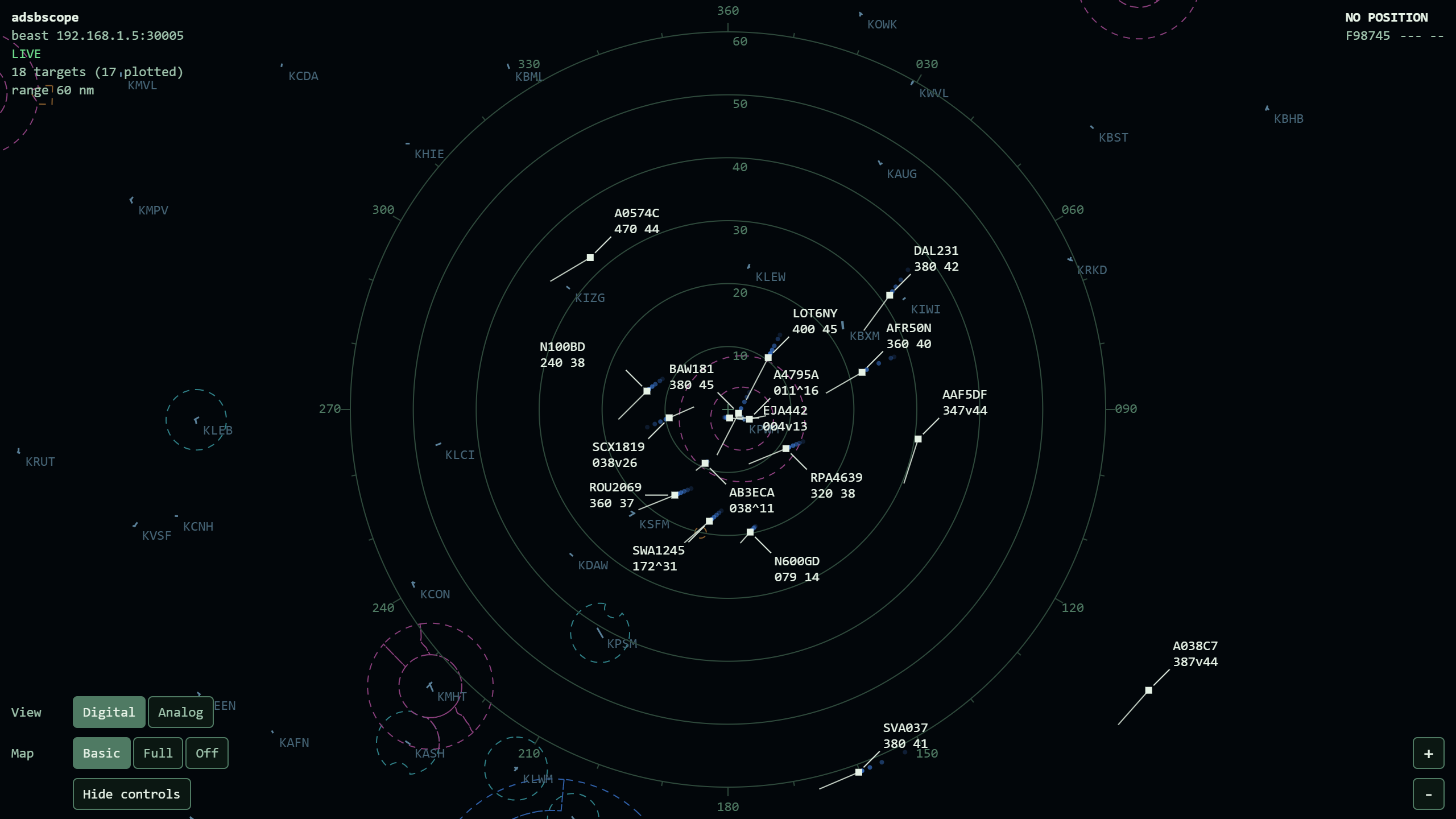
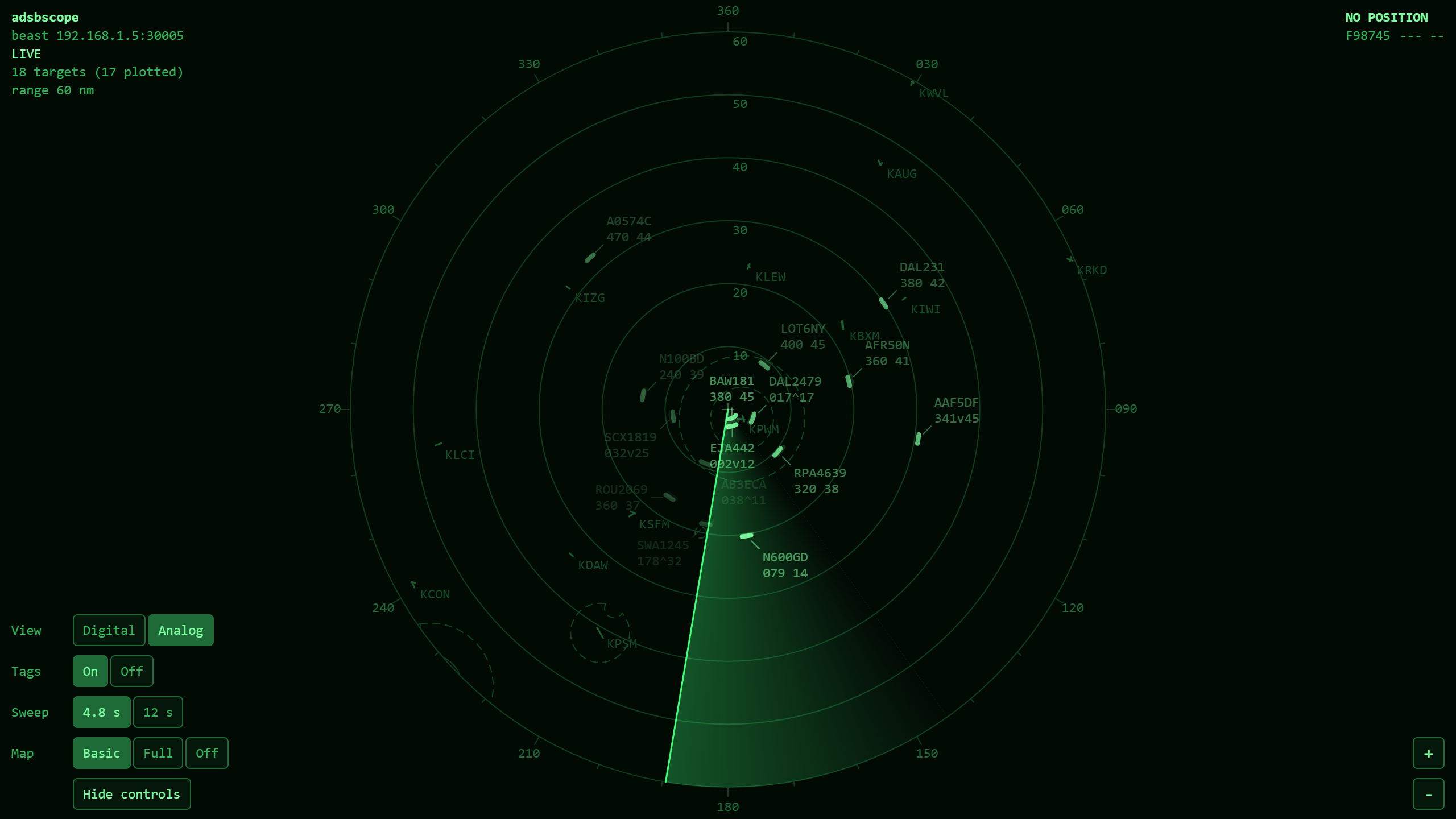
An ATC-style radar scope for live ADS-B traffic, in your browser. adsbscope is a small command-line tool: it connects to a local dump1090-fa station through @squawk/adsb-feed, and serves a web page that plots every tracked aircraft on a scope centered on your receiver, over a video map of the airports, runways, navaids, fixes, and airspace around it. The scope has two view styles you can switch between while it runs: a modern digital scope with data blocks, and a sweep-era analog scope with a rotating beam and fading returns.
Installation
npm install -g @squawk/adsbscopeUsage
adsbscope --host 192.168.1.50 --lat 40.6413 --lon -73.7781Then open the address it prints (http://127.0.0.1:8090 by default).
--lat/--lon are your receiver's own position. They are required: the scope is centered on the receiver, and every aircraft is plotted by its bearing and range from that point. With the default Beast source they are also what lets aircraft on the ground resolve a position.
Options
| Flag | Description | Default |
| ---------------------- | ----------------------------------------------------------------------------------------------- | --------------------------------------------- |
| --lat <lat> | Receiver latitude in decimal degrees - the center of the scope (required) | - |
| --lon <lon> | Receiver longitude in decimal degrees - the center of the scope (required) | - |
| --source <source> | Feed to connect to: json, sbs, or beast | beast |
| --host <host> | dump1090-fa station hostname/IP | localhost |
| --port <port> | Station port to connect to | 8080 (json), 30003 (sbs), 30005 (beast) |
| --url <url> | Full aircraft.json URL, overriding --host/--port (--source json only) | - |
| --replay <file> | Play back an adsbtop --record file instead of connecting to a station - see Replay | - |
| --mode <mode> | View style to start in: digital or analog - see View styles | digital |
| --range <nm> | Scope range to start at, in nautical miles from the center to the edge | 60 |
| --listen-port <port> | Port to serve the scope on | 8090 |
| --bind <address> | Local address to serve the scope on - see Network exposure | 127.0.0.1 |
| --stale-after <ms> | Drop an aircraft after this long without an update | 60000 |
| --no-registry | Do not load the aircraft registry - see Aircraft models | registry on |
| -h, --help | Show usage | - |
The three sources are the same ones @squawk/adsb-feed and adsbtop offer; see @squawk/adsb-feed's README for how they differ.
Controls
Everything you can change while the scope is running has both an on-screen control and a key. The zoom buttons sit in the bottom-right corner. In the bottom-left is the view style selector, followed by a selector for each setting the current view style has. A selector shows all of its options side by side with the active one filled in - Digital | Analog, Tags On | Off - so it always shows both what is selected and what else can be; press an option to select it. The keys step to the next option instead.
Under the selectors is a Hide controls button (H). It folds the view style and setting selectors away, leaving just a Show controls button and the zoom buttons, which makes room on a small screen; the keys all keep working while the selectors are hidden. On a phone-sized screen the scope starts with them hidden.
| Key | Action |
| ---------------- | ------------------------------------------------- |
| +, =, or ] | Zoom in to the next smaller scope range |
| -, _, or [ | Zoom out to the next larger scope range |
| M | Step to the next view style |
| V | Step the video map: basic, full, off |
| T | Analog only: step the Tags setting (on, off) |
| R | Analog only: step the Sweep setting (4.8 s, 12 s) |
| H | Hide or show the view style and setting controls |
| . and , | Select the next or previous aircraft |
| Esc | Clear the selection |
The range steps are 5, 10, 20, 40, 60, 80, 100, 150, 200, and 250 nm, and each zoom button disables itself at the end of its travel. Keys held with Ctrl, Alt, or Cmd are left to the browser, so Ctrl+R still reloads the page.
Screen sizes
The scope fits whatever window it is given - the range circle always fills the shorter dimension, so it works in a desktop window, on a tablet, or on a phone in either orientation, and follows a resize or rotation. On a narrow screen the on-screen buttons grow to full-size touch targets. Everything on the scope, including its text and symbols, also follows your browser's font-size and zoom settings.
View styles
Both view styles share the same scope furniture and the same video map, so nothing moves when you switch: north is up and the receiver is the cross at the center, range rings are labeled in nautical miles and spaced so that no more than six are drawn at any range, and a compass rose around the outermost ring is marked every 10 degrees and labeled every 30 in degrees true. The range, and each view style's own settings, are kept when you switch.
An aircraft can be heard from for some time before it sends a position - or, with a Mode S-only transponder, never send one - and until it does it cannot be plotted. Those aircraft are listed in the top right corner under NO POSITION, in both view styles: callsign (or ICAO hex) and ground speed, in the same format as a data block. Altitude shows as dashes there, since it arrives with the position. The list names up to eight aircraft, counts any beyond that, and disappears when it is empty. The status readout's 17 targets (14 plotted) is the same split.
Digital
A modern scope: no sweep, and every aircraft is redrawn at its latest position as soon as it arrives. Each aircraft with a known position is drawn as:
- a position symbol - a filled square, or a hollow one for an aircraft on the ground;
- a history trail - up to five fading dots at five-second intervals behind it;
- a velocity vector - a line showing where it will be in one minute at its current track and ground speed (not drawn on the ground);
- a data block on a leader line. Line one is the callsign, or the ICAO hex until the aircraft has sent one. Line two is altitude in hundreds of feet, a climb (
^) or descent (v) marker when the vertical rate is beyond 300 ft/min, and ground speed in tens of knots - so236v42is descending through 23,600 ft at 420 kt. An aircraft on the ground showsGNDfor altitude, and unknown values show as dashes. When the aircraft's model is known, line two time-shares with it, as the type does on a real scope: every block shows altitude and speed for 2.5 seconds, then the model for 1.5, in unison. A block is sized for the wider of the two, so it does not move as they alternate.
Data blocks are kept off one another. A leader line normally runs up and to the right, but when its block would cover another block, another aircraft's symbol, or hang off the edge of the window, it takes whichever of the eight compass directions leaves the block clear - or, in a real crowd, the one that covers the least. A block only moves when it has to, and one that has been moved aside stays there, as it does on a real scope when a controller moves it, so blocks do not flicker between directions as traffic shifts.
An aircraft that has not been heard from for 15 seconds is dimmed until it either updates or is dropped at the --stale-after threshold.
Analog
A sweep-era PPI scope in monochrome green. A beam rotates clockwise from north, trailing an afterglow, and an aircraft is only painted at the moment the beam crosses its bearing - as a short arc, like a real return - at wherever it was right then. The blip then fades, with a half-life of a little under half a rotation, so a moving aircraft leaves a trail of its previous returns until the beam comes round to repaint it. Only aircraft inside the range circle are painted.
Switching to the analog style starts from a dark scope that fills in over one rotation, the way a tube warms up; so does resizing the window. If the page is left in a background tab, the scope repaints everything once when it comes back rather than spinning to catch up.
The analog style has two settings:
- Tags (
T) - on by default: each aircraft's newest blip gets a faint two-line tag in the same format as the digital data block, on a short leader line. Tags are kept off one another the same way the digital data blocks are, so a leader runs whichever way leaves its tag readable. The scopes of the era had none - identity was tracked on paper strips - so turn them off for the authentic picture of anonymous blips. - Sweep (
R) - 4.8 s per rotation, like a terminal approach radar, or 12 s, like a long-range en-route radar.
Video map
Under the traffic, both view styles draw a map of what is around the receiver, built from the FAA snapshots bundled with the @squawk/*-data packages:
- Airspace boundaries - Class B and C at every range, Class D out to 100 nm, restricted and prohibited areas out to 150 nm. Boundaries are always dashed: most of them are circles, and so are the range rings, so near an airport the two would otherwise be easy to confuse. The
digitalstyle also colors them by class, after the sectional chart - Class B blue, Class C magenta, Class D teal, restricted and prohibited areas amber. - Airports - labeled with their ICAO code (or FAA identifier). Within 60 nm their runways are drawn to scale, end to end; beyond that an airport is a small ring.
- Navaids - diamonds: VORs, VORTACs, VOR/DMEs, and TACANs out to 150 nm, NDBs out to 40 nm.
- Fixes - triangles: the fixes charted on enroute charts, SIDs, and STARs, out to 40 nm, labeled only within 20 nm. Approach-only fixes are left out; there are several times as many of them.
Those distances are scope ranges, not distances from the receiver: the map is rebuilt for each range, and thins out as you zoom out so it never turns into a smear of overlapping labels. Towered airports are shown at every range, airports with an ICAO code out to 80 nm, and small public-use airports only within 20 nm; heliports, seaplane bases, and private fields are never shown. While the map for a new range loads, the previous one stays on screen.
How far the map reaches depends on the view style. The digital style fills the whole window with it, as a modern scope's rectangular display does, so features beyond the outermost range ring are drawn wherever there is room. The analog style ends it at the outermost ring, as the face of a round tube did: boundaries and runways are cut off there, and airports, navaids, and fixes beyond it are left out.
The Map selector, or V, chooses how much of this is drawn. Basic, the default, is airspace and airports only, which keeps the map well behind the traffic. Full adds the navaids and fixes, and Off draws no map. Each view style remembers its own choice.
The bundled data covers the United States only, so a receiver elsewhere gets an empty map. It is also a snapshot: it is as current as the installed data packages, not a live feed of airspace changes.
Inspecting an aircraft
Click or tap an aircraft - its symbol or return, or its data block or tag - to select it. It is ringed on the scope, and a panel in the bottom-right corner writes out what its data block abbreviates or has no room for: ICAO hex, registered model in full, squawk, altitude in feet, vertical rate, ground speed, track, bearing and range from the receiver, and how long ago it was last heard from. Only what the aircraft has actually reported gets a row. If the aircraft is in the registry, its registration, make, operator, and year of manufacture are fetched and added a moment later; for an aircraft the registry does not know, or with --no-registry, those rows are simply absent.
Click empty scope, press Esc, or use the panel's close button to clear the selection. . and , step forwards and backwards through every tracked aircraft in order of callsign, which is also the only way to select one that has no position and so is not on the scope. The selection is kept when you switch view styles, and is dropped when the aircraft stops being tracked: a selection always names an aircraft that is actually there.
Only aircraft the view style draws can be clicked: the digital scope fills the window, so an aircraft beyond the outermost ring can be picked there, while the analog scope ends at it. In the analog style the ring sits on the aircraft's most recent return, which is where the aircraft was when the beam last crossed it.
Bookmarking a view
The view style, the range, and the selected aircraft are kept in the page's URL as you change them - ?mode=analog&range=40&selected=a4ce45 - so a view can be bookmarked or shared, and a reload comes back to it. Whatever matches what the command line asked for is left out, so an untouched scope keeps a clean URL. The URL is rewritten in place, without adding to the browser's history.
On load the URL wins over --mode and --range. It is validated as strictly as the flags are: a view style the scope does not have, a range that is not a positive number up to 500 nm, or a selection that is not a six-digit ICAO hex is ignored and tidied out of the URL. A selection is only honored once a snapshot shows the aircraft is being tracked, so a bookmark from another day - naming an aircraft that is long gone - opens with nothing selected and drops the parameter, rather than claiming a selection that is not there. Each view style's own settings are not part of the URL.
Emergencies
An aircraft is treated as being in an emergency when it squawks 7500, 7600, or 7700, when its transponder broadcasts an emergency state, or while it has an active ACAS/TCAS Resolution Advisory - the same test adsbtop applies, from @squawk/adsb-feed. Which of those a station can report depends on the source; see @squawk/adsb-feed's README. When more than one applies, the squawk wins, then the declared state.
The aircraft's callsign is followed by a code, everywhere it is shown: EM for a general emergency (7700), RF for radio failure (7600), HJ for unlawful interference (7500) - the codes a real scope uses - and MED, FUEL, DOWN, and RA for a medical flight, minimum fuel, a downed aircraft, and a Resolution Advisory. Each view style then marks it in its own way:
- Digital - the symbol, leader line, and data block flash red once a second, and the aircraft is never dimmed for going quiet.
- Analog - a monochrome tube has no red, so the return blooms into a stack of three arcs, as the return of a transponder squawking 7700 did on a real scope, and its tag flashes at full brightness instead of fading with the blip.
In both, the aircraft is also named under EMERGENCY at the top of the window (below the readout on a narrow screen), with its squawk. That list does not depend on the aircraft being in view: one beyond the selected range, or with no position at all, is listed just the same.
Aircraft models
The model in a data block comes from the FAA aircraft registry bundled with @squawk/icao-registry-data, looked up by the aircraft's ICAO hex. It is the model the aircraft is registered as - PA-28-181, 737-8H4 - cut to twelve characters. Registered models run to twenty; twelve shows more than nine in ten of them whole, and only the blocks that need the width take it. That is not the four-character ICAO type designator (P28A, B738) a real scope shows; the FAA registry does not carry designators. It covers aircraft on the US register only, and is as current as the installed data package.
The registry is loaded in the background once the scope is serving, so models appear a second or so after the first aircraft do. It holds over 300,000 records: parsing them briefly needs several hundred megabytes of memory, and the records then stay in memory for as long as adsbscope runs. On a small host, --no-registry skips it: the scope runs exactly the same, and data blocks simply never show a model. If the registry cannot be loaded, adsbscope says so once and carries on without it.
The readout
The readout in the top-left corner shows the source and station, link health, how many aircraft are tracked and how many of those have a position to plot, and the current range. Link health reads LIVE, STATION RECONNECTING when adsbscope has lost its connection to dump1090-fa, or NO LINK TO SERVER when the browser has lost its connection to adsbscope; both reconnect on their own.
Replay
--replay <file> plays back a session recorded with adsbtop --record instead of connecting to a station, with the recording's original timing. When the recording ends the scope clears and the replay starts over. --lat/--lon are still required, since a recording does not carry the receiver's position - pass the position of the receiver that made it.
adsbtop --host 192.168.1.50 --record session.jsonl
adsbscope --replay session.jsonl --lat 40.6413 --lon -73.7781
Network exposure
adsbscope runs a small HTTP server on your machine. What it serves includes live traffic around your receiver and the receiver's coordinates, so it is deliberately conservative:
- It binds to
127.0.0.1by default, so only the machine running it can open the scope. Pass--bind 0.0.0.0(or a specific local address) to view it from another device on your network; anyone who can reach that address can then see it, andadsbscopeprints a reminder when started that way. It has no authentication, so do not expose it to the internet. - It refuses any request whose
Hostheader is not an IP address,localhost, or the machine's own hostname (with or without.local). This blocks DNS rebinding, where a hostile web page points its own domain at your machine to read the responses. - It only ever reads from the station (or recording) it was started with, and the video map and aircraft models come from data bundled with the install. It makes no other outbound requests and cannot be used as a proxy.
- Two endpoints take input. The video map's range accepts only a number up to 500 nm, and at most 16 ranges' maps are kept in memory, so requests cannot grow it without bound. The aircraft details endpoint accepts only a six-digit ICAO hex, and answers from the registry already in memory.
- It answers
GETandHEADonly, serves nothing outside its own bundled UI files, and sends aContent-Security-Policythat limits the page to its own origin.
Development
Build the package, then run the CLI out of dist/:
npx turbo run build --filter=@squawk/adsbscope
node apps/adsbscope/dist/server/cli.js --replay session.jsonl --lat 40.6413 --lon -73.7781
For UI work, npm run dev:ui -w @squawk/adsbscope serves the UI with hot reload and proxies /api to an adsbscope instance running on its default port.
The patterns the code follows are in CONVENTIONS.md.