
@srothgan/sanity-plugin-autocomplete-input
v3.1.2
Published
Autocomplete input plugin for Sanity

Maintainers
 srothgan
Readme
@srothgan/sanity-plugin-autocomplete-input




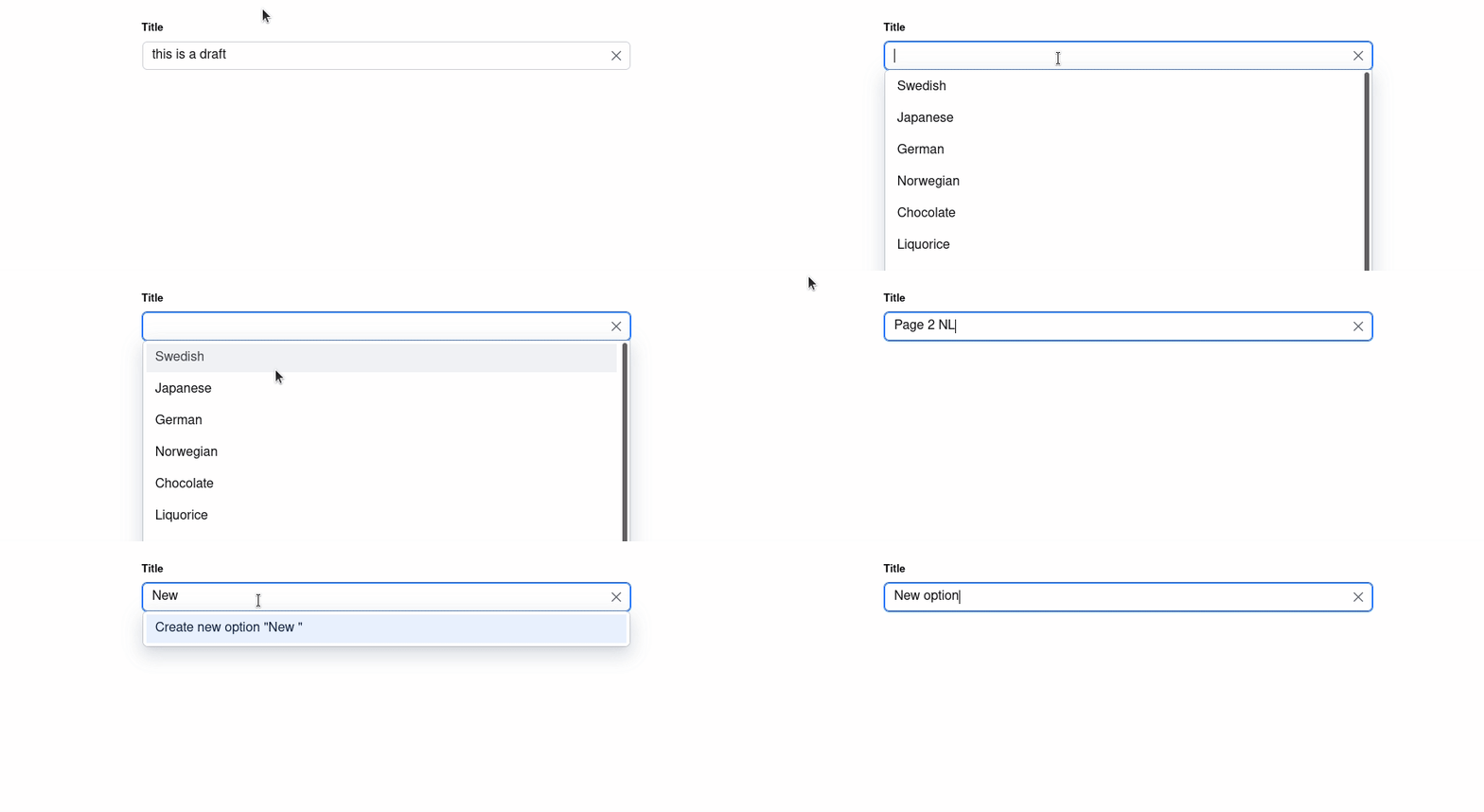
This plugin is similar to the Autocomplete Tags Plugin, but it acts as a single text input as opposed to an array of tags. The input can also be customized to change the autocomplete options.
Successor to sanity-plugin-autocomplete-input
Original by @LiamMartens (last updated 2023).
This maintained fork adds Sanity v4 & v5 compatibility and modern tooling.
Note: A PR with these changes was submitted to the original repository.
If the original becomes active again, this fork may redirect users back.
Compatibility
- v3.x: Sanity Studio v4 & v5 (Node.js v20.19+, React 18 or 19)
- Fully compatible with both Sanity v4 and v5
- Supports React 18 (Sanity v4) and React 19 (Sanity v5)
- v2.x: Sanity Studio v3 (Node.js v18+, React 18)
- v1.x: Sanity Studio v2
Installation
npm install --save @srothgan/sanity-plugin-autocomplete-inputor
yarn add @srothgan/sanity-plugin-autocomplete-inputUsage
Add it as a plugin in sanity.config.ts (or .js):
import {autocompletInput} from '@srothgan/sanity-plugin-autocomplete-input'

export default defineConfig({
  // ...
  plugins: [autocompletInput()],
})
Configuration Options
You can configure the autocomplete behavior using one of three approaches:
1. Auto-aggregate from Existing Documents
The plugin automatically collects unique values from documents with the same field:
{
  name: "category",
  type: "autocomplete",
  options: {
    autocompleteFieldPath: "category", // aggregates from all documents with this field
    disableNew: false, // optional: prevent users from creating new values
  },
}
2. Manual Options List
Provide a predefined list of options:
{
  name: "status",
  type: "autocomplete",
  options: {
    options: [
      { value: "Draft" },
      { value: "Published" },
      { value: "Archived" }
    ],
  },
}
3. Custom GROQ Query
Define your own query for maximum flexibility:
{
  name: "author",
  type: "autocomplete",
  options: {
    groq: {
      query: '*[_type == $type] { "value": title }',
      params: {
        type: "author",
      },
      transform: (values) => values, // optional: transform results
    },
  },
}
Advanced GROQ parameters
It is also possible to refer to the current parent value (for a top-level field this would be the current document) by passing a function to the params option:
export default {
  fields: [
    {
      name: 'autocomplete-input',
      type: 'autocomplete',
      options: {
        groq: {
          query: '*[_id != $docId]',
          params: (parent) => ({
            docId: parent?._id,
          }),
        },
      },
    },
  ],
}
TypeScript Usage
The plugin is written in TypeScript and exports all necessary types:
import {defineConfig} from 'sanity'
import {autocompletInput} from '@srothgan/sanity-plugin-autocomplete-input'
import type {InputOptions} from '@srothgan/sanity-plugin-autocomplete-input'

export default defineConfig({
  // ...
  plugins: [autocompletInput()],
  schema: {
    types: [
      {
        name: 'myDocument',
        type: 'document',
        fields: [
          {
            name: 'category',
            type: 'autocomplete',
            options: {
              autocompleteFieldPath: 'category',
              disableNew: false,
            } satisfies InputOptions,
          },
        ],
      },
    ],
  },
})
Differences from Original
This maintained fork includes the following enhancements:
Updated Dependencies
- Sanity v4 & v5 Support: Fully compatible with both Sanity Studio v4 and v5
- React 18 & 19 Support: Works with React 18 (Sanity v4) and React 19 (Sanity v5)
- Modern Build Tooling: Migrated from Babel to SWC for faster builds
- TypeScript 5.9: Updated to latest TypeScript with improved type safety
- Rust-based Tooling: Using Oxfmt for formatting and Oxlint for linting
Maintained & Active
- Regular dependency updates for security and compatibility
- Active issue tracking and bug fixes
- Community-driven improvements
All original functionality and API remain unchanged for seamless migration.
Troubleshooting
Plugin not appearing in Studio
Make sure you've added the plugin to your sanity.config.ts:
import {autocompletInput} from '@srothgan/sanity-plugin-autocomplete-input'

export default defineConfig({
  plugins: [autocompletInput()],
})
Autocomplete options not loading
- Verify your GROQ query returns data in the format
[{ "value": "..." }] - Check the browser console for any query errors
- Ensure the
autocompleteFieldPathmatches an existing field in your documents
TypeScript errors
Make sure your tsconfig.json includes:
{
  "compilerOptions": {
    "moduleResolution": "node",
    "esModuleInterop": true
  }
}
Contributing
Contributions are welcome! Please read CONTRIBUTING.md for guidelines on how to contribute to this project.
Changelog
See CHANGELOG.md for a list of changes and version history.
License
MIT License - see LICENSE file for details.
Original work by Liam Martens
Maintained fork by Simon Rothgang