
@strapi-community/bigcommerce
v1.0.0
Published
Official Strapi BigCommerce Plugin


Readme
A powerful Strapi plugin that seamlessly connects your Strapi application with BigCommerce stores through a user-friendly interface. It features a custom BigCommerce field and efficient product synchronization capabilities. The plugin comes with built-in content types and configurable caching mechanisms to optimize performance.
📋 Table of Contents
- ✨ Features
- 📋 Requirements
- 📦 Installation
- ⚙️ BigCommerce Configuration
- 🔧 Plugin Configuration
- 👨💻 Development & Testing
- 🔗 Links
- 💬 Community Support
- 📄 License
✨ Features
- Attach BigCommerce products to Strapi Content Types using dedicated BigCommerce Custom Field
- Map product data between BigCommerce and Strapi
📋 Requirements
- Strapi v5.7.0 or later
- Node.js 18+
- For Redis cache: a running Redis instance
- BigCommerce API credentials:
clientIdclientSecretaccessTokenstoreHash
- At least one BigCommerce Channel ID
- URL for your BigCommerce Address Store API
- Required BigCommerce API Token Scopes:
Products:read-only(To read product data)Storefront API Tokens:manage(To create tokens for storefront product searching)
📦 Installation
npm install @strapi-community/bigcommerce@latest
# or
yarn add @strapi-community/bigcommerce@latest
Then, rebuild your Strapi admin panel:
# Using npm
npm run build

# Using yarn
yarn build
⚙️ Configuring BigCommerce (Step-by-Step with Images)
1. Open Your BigCommerce Store
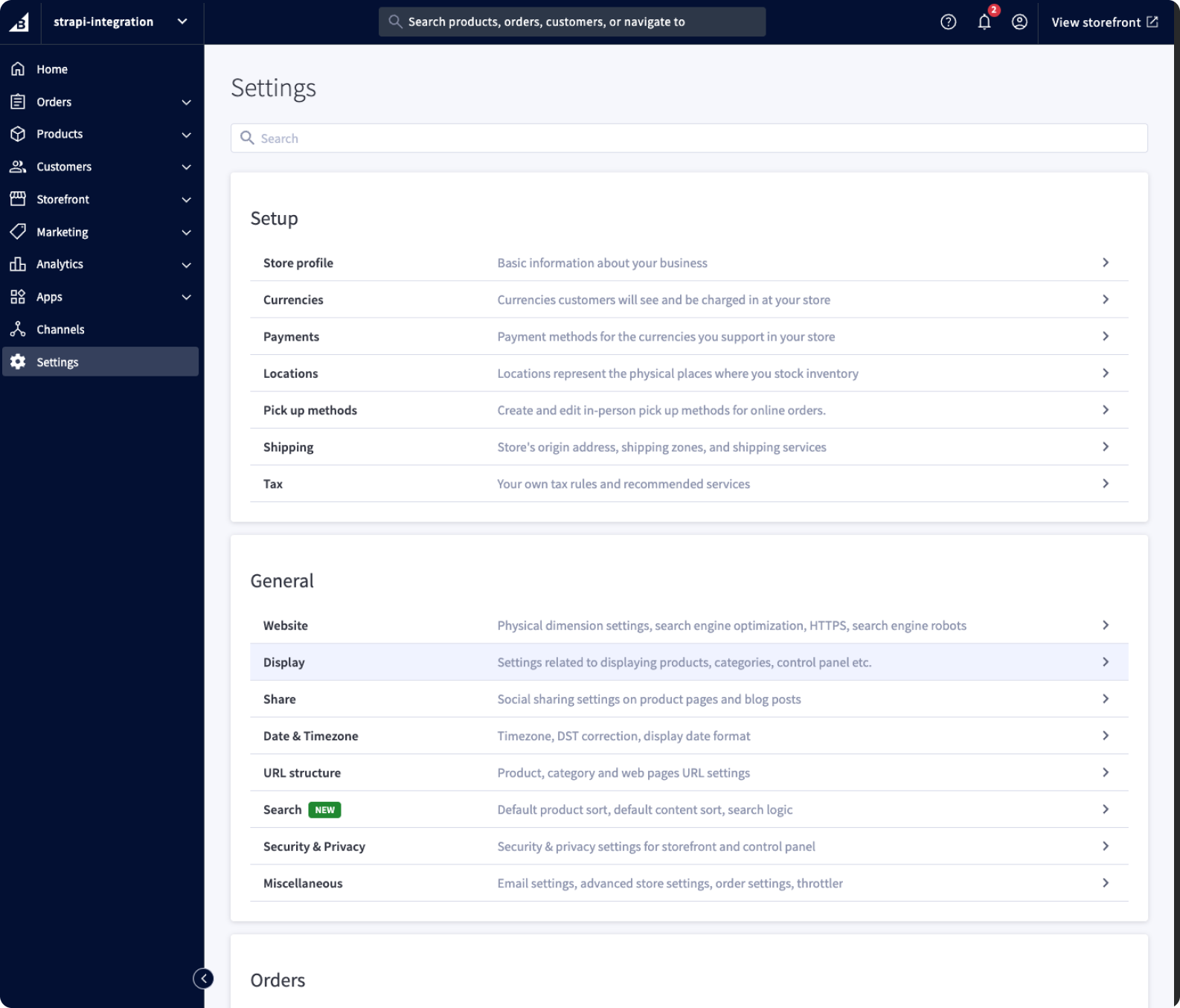
- Log in to your BigCommerce admin dashboard.
2. Go to Store-level API accounts
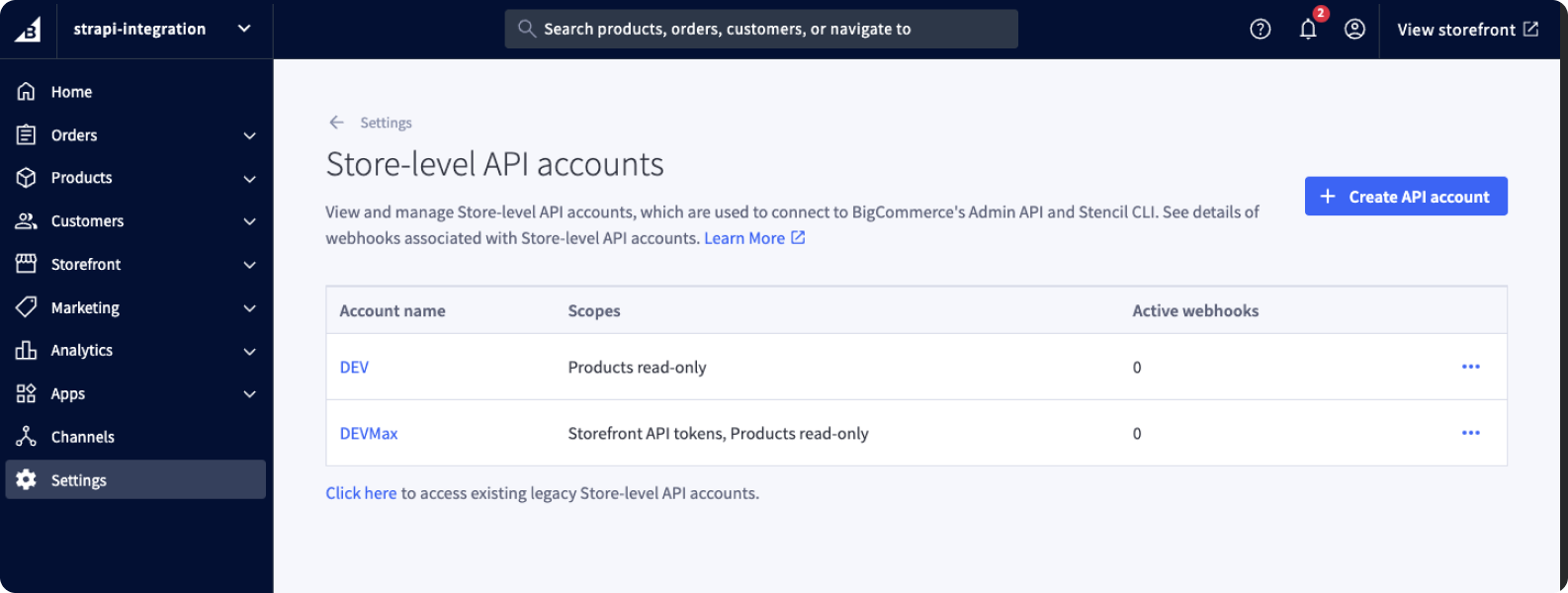
- Search for
Store-level API accountsand got there.
3. Create new account with proper permissions
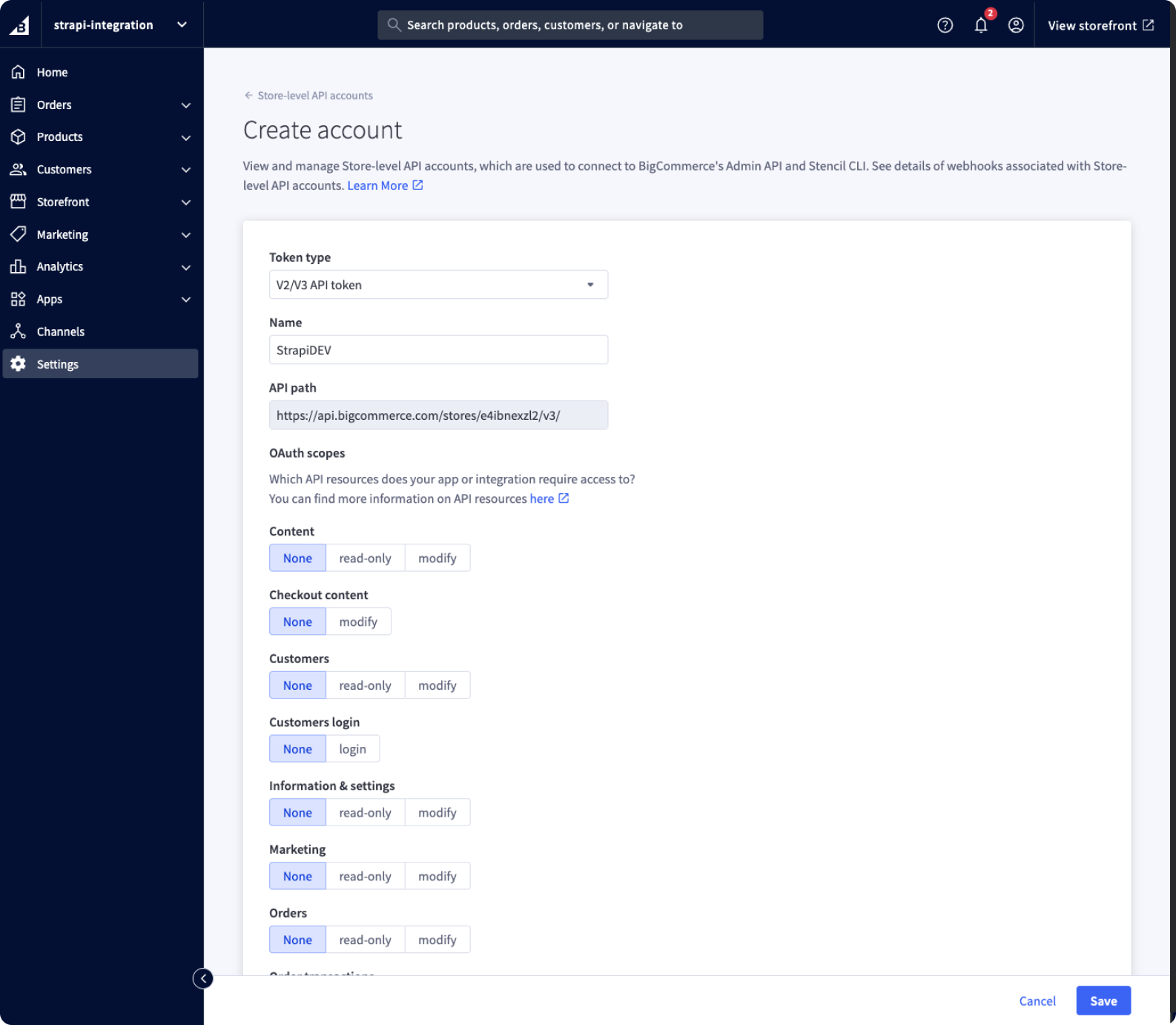
- Create new account with
V2/V3 API Tokentype set.
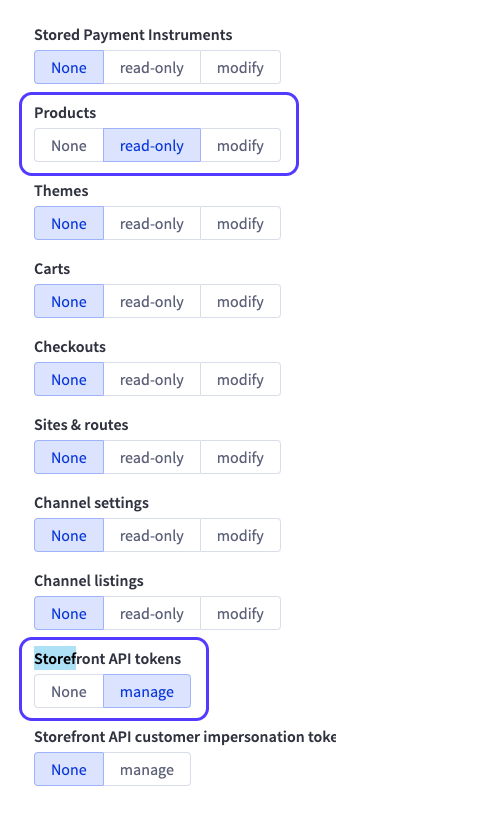
- Set
Productspermissions toread-only. - Set
Storefront API tokenspermissions tomanage.
4. Copy Tokens & Secret to your Strapi Plugin settings page or file
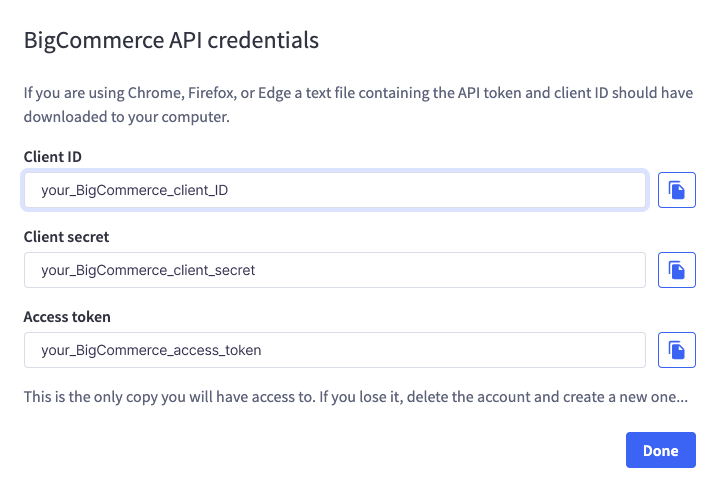
- Copy
ClientID. - Copy
Client secret. - Copy
Access token.
🔧 Plugin Configuration
Required Configuration
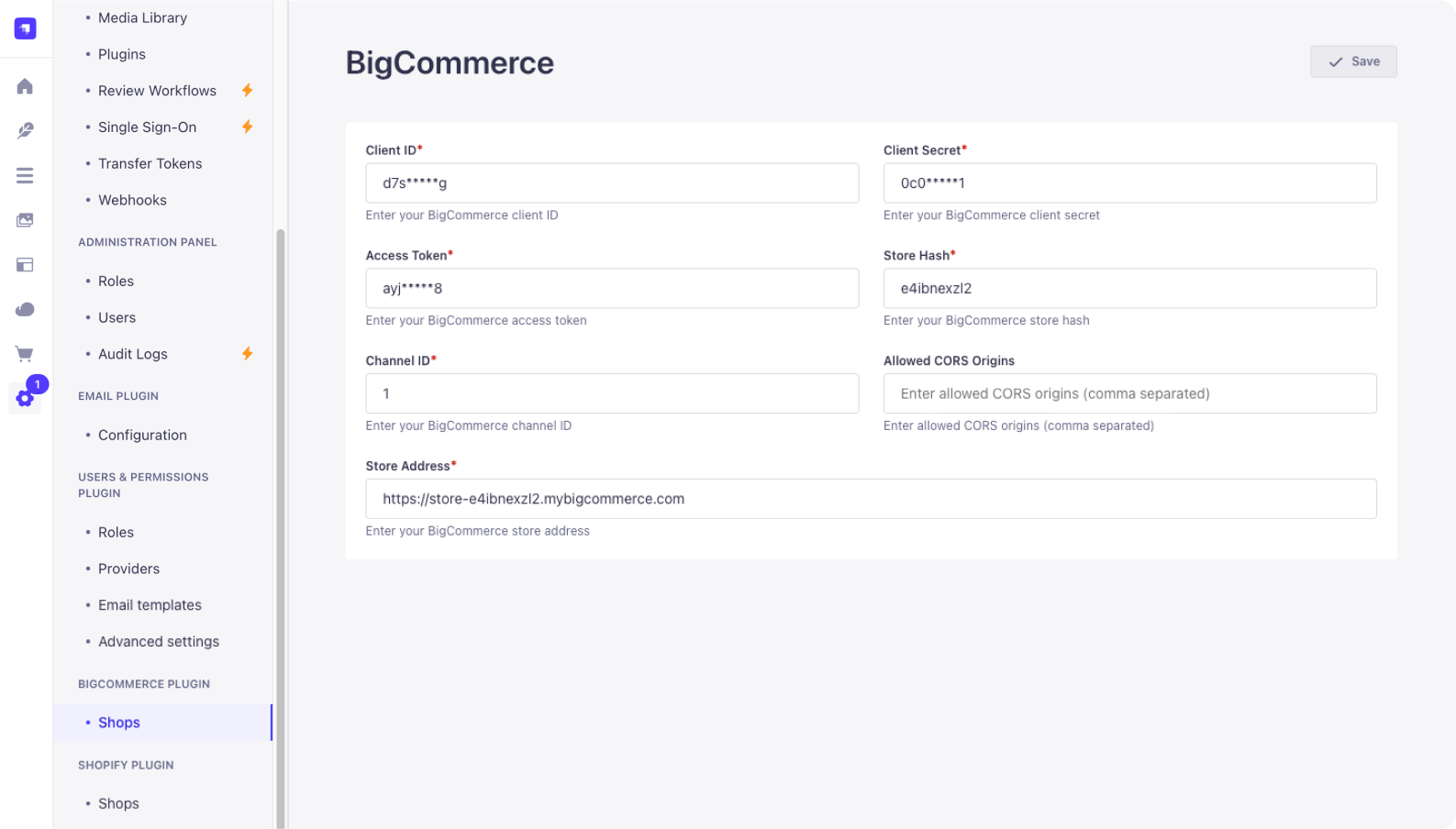
You need to configure the plugin in your Strapi project's ./config/plugins.js file (or ./config/plugins.ts if using TypeScript).
The following fields are required:
clientId(string): Your BigCommerce App Client IDclientSecret(string): Your BigCommerce App Client SecretaccessToken(string): Your BigCommerce API Account Access TokenstoreHash(string): Your BigCommerce Store HashchannelId(array of numbers): An array containing at least one BigCommerce Channel IDaddressStore(string): The URL for your BigCommerce Address Store API endpointencryptionKey(string): A 32-character string used for encrypting sensitive dataengine(string): Specifies the storage engine for session data. Can be either'memory'or'redis'connection(object, required ifengineis'redis'): Contains Redis connection details:host(string)port(number)db(number)password(string, optional)username(string, optional)
Optional fields:
allowedCorsOrigins(array of strings): An array of allowed origins for CORS requests. Defaults to[]
Example Configurations
Create or update the file ./config/plugins.js (or .ts):
Using Memory Engine:
// ./config/plugins.js
module.exports = ({ env }) => ({
  // ... other plugin configurations
  'bigcommerce': {
    enabled: true,
    config: {
      clientId: env('BIGCOMMERCE_CLIENT_ID'),
      clientSecret: env('BIGCOMMERCE_CLIENT_SECRET'),
      accessToken: env('BIGCOMMERCE_ACCESS_TOKEN'),
      storeHash: env('BIGCOMMERCE_STORE_HASH'),
      channelId: [parseInt(env('BIGCOMMERCE_CHANNEL_ID', '1'), 10)], // Ensure it's an array of numbers
      addressStore: env('BIGCOMMERCE_ADDRESS_STORE_URL'),
      allowedCorsOrigins: ['http://localhost:3000'], // Optional
      engine: 'memory',
      encryptionKey: env('BIGCOMMERCE_ENCRYPTION_KEY'),
    },
  },
  // ... other plugin configurations
});
Using Redis Engine:
// ./config/plugins.js
module.exports = ({ env }) => ({
  // ... other plugin configurations
  'bigcommerce': {
    enabled: true,
    config: {
      clientId: env('BIGCOMMERCE_CLIENT_ID'),
      clientSecret: env('BIGCOMMERCE_CLIENT_SECRET'),
      accessToken: env('BIGCOMMERCE_ACCESS_TOKEN'),
      storeHash: env('BIGCOMMERCE_STORE_HASH'),
      channelId: env.array('BIGCOMMERCE_CHANNEL_IDS', [1]).map(Number), // Example parsing env array
      addressStore: env('BIGCOMMERCE_ADDRESS_STORE_URL'),
      allowedCorsOrigins: [], // Optional
      engine: 'redis',
      connection: {
        host: env('REDIS_HOST', '127.0.0.1'),
        port: env.int('REDIS_PORT', 6379),
        db: env.int('REDIS_DB', 0),
        password: env('REDIS_PASSWORD', undefined),
        username: env('REDIS_USERNAME', undefined), // If using Redis ACLs
      },
      encryptionKey: env('BIGCOMMERCE_ENCRYPTION_KEY'),
    },
  },
  // ... other plugin configurations
});
Remember to add the corresponding environment variables to your .env file.
👨💻 Development & Testing
- Build:
yarn build - Test backend:
yarn test:server - Test frontend:
yarn test:ts:front
🔗 Links
💬 Community Support
- GitHub (Bug reports, contributions)
You can also use the official Strapi support platform and search for [VirtusLab] prefixed people (maintainers)
- Discord (For live discussion with the Community and Strapi team)
- Community Forum (Questions and Discussions)
📄 License
See the MIT License file for licensing information.