
@stylusnexus/work-plan
v2026.10.6-1
Published
Track-aware daily work planning over GitHub issues. Shared tracks (git-synced .work-plan/ in each repo), AI clustering (group/auto-triage), VS Code viewer, Claude Code + Codex plugins. Pure Python stdlib.

Maintainers
 evemcgivern
Readme
work-plan toolkit









Track-aware daily work planning for developers running parallel Claude Code / Codex sessions across many GitHub issues.
What this is
A daily work-planning system for developers running parallel AI sessions across many GitHub issues. It's made of three things: a pure-Python stdlib CLI, a set of YAML-frontmattered markdown files ("tracks"), and a SKILL.md that tells your AI how to use the CLI. Together they give you and your agent a shared, live picture of what's in flight — without asking you to maintain it manually.
Installs as a plugin for Claude Code and Codex (see Quick install for the exact commands), as an npm global for any editor or terminal (npm install -g @stylusnexus/work-plan), and as a VS Code extension (search "Work Plan", publisher stylusnexus).
The system derives state live from GitHub (gh), git, and your track files on every run — nothing is mirrored or cached. AI sessions get a paste-ready context block; you stay oriented even when switching between a dozen parallel workstreams.
Why it exists: born from the frustration of building detailed plans that die the moment you open a new agent session and start over. Inspired by Andrej Karpathy's notes on vibe coding and the specific pain of doing enthusiastic work on the wrong thing.
What this is not
- Not a Jira / Linear / GitHub Projects replacement. It doesn't manage sprints, roadmaps, or capacity planning — it helps you and your AI agent stay oriented on GitHub issues you already have.
- Not a standalone issue tracker. GitHub is canonical;
work-planjust reads and references it. - Not zero-setup. Requires Python 3.9+, the
ghGitHub CLI (authenticated), andyq(the Go version, not the Python one). - Not a background service. No daemon, no cache, no sync loop —
git pullis the sync mechanism for shared tracks. - Not a replacement for reading your code. It tells you what to work on and where you left off — not what the code does.
Quick install
Claude Code (recommended):
/plugin marketplace add stylusnexus/agent-plugins
/plugin install work-plan@stylus-nexus
Codex: codex plugin marketplace add stylusnexus/agent-plugins → codex plugin add work-plan@stylus-nexus
npm (any editor / standalone CLI):
npm install -g @stylusnexus/work-planVS Code extension (the visual viewer): search "Work Plan" (publisher stylusnexus) in the Extensions view, or code --install-extension stylusnexus.work-plan-viewer. It drives the CLI above — see VS Code extension.
Cursor / Copilot / direct: clone + ./install.sh (see Install).
Full multi-agent guide: the agent-plugins marketplace README. See Install below for details, the npm path, and updating.
Command names: examples below use the standalone form
/work-plan <subcommand>(whatinstall.shgives you). Installed as a plugin, commands are namespaced —/work-plan brief→/work-plan:brief,/work-plan handoff→/work-plan:handoff, and the long tail is/work-plan:run <subcommand>. On Codex, invoke via@work-plan//skills.
The seven essentials you'll use 80% of the time are:
| Command | When |
|---|---|
| /work-plan brief | Morning. Multi-track snapshot — what's on your plate across every active track. Run from inside a configured repo's checkout and it auto-scopes to that repo (one-line banner; --repo=all shows everything). Add --repo=<key> to scope to a specific project. |
| /work-plan handoff <track> | End of a work block. Captures what you touched. Use --auto-next for an algorithmic priority-sorted next_up (no LLM), --set-next 1,2,3 for explicit numbers, or pair with Claude in chat for a curated pick. |
| /work-plan orient <track> | Switching context. ~15-line paste-block of priority / last session / next pick / git state — drop into a fresh Claude Code terminal. |
| /work-plan reconcile <track> \| --all \| --repo=<key> [--draft] [--yes] | Track frontmatter membership drifted from GitHub labels. Use on label-driven tracks only — for hand-curated tracks, use refresh-md instead. In an --all/--repo sweep it also moves issues relabeled from one track to another in the same repo. --draft previews proposed ADDs/MOVEs/FLAGs; --yes applies without prompting. --repo=<key> scopes the sweep to one repo. |
| /work-plan hygiene [--repo=<key>] | Weekly all-in-one cleanup. Runs five steps: ① refresh-md --all (pull live GitHub state into every active track's status table), ② reconcile --all (sync frontmatter membership against GitHub labels), ③ dedupe-tiers (report shared/private duplicate tracks, no deletes), ④ milestone-drift (report next_up entries that are closed, un-milestoned, or ordered against their milestones), ⑤ duplicates (flag likely-duplicate issues). --repo=<key> scopes every step to one repo; without it, step ⑤ is skipped when more than one repo is configured. |
| /work-plan in-progress <n> [--clear] | Starting or stopping active work on an issue. Adds (or removes with --clear) the work-plan:in-progress label on GitHub. Repo-resolved from the issue number, or pass --repo=<key\|slug> to disambiguate. brief/orient/the VS Code viewer also detect in-progress automatically from a hot feat/<n>-/fix/<n>- branch. |
| /work-plan doctor --fix | Preflight + drift check. First confirms the machine can run work-plan (Python 3.9+, git, gh signed in, mikefarah yq, config, notes_root), naming the fix for anything missing; then detects config drift after a folder rename or GitHub repo move. Checks whether config.yml, local clones, track frontmatter, and GitHub match (renamed local folder, renamed repo, broken path, duplicate entries, stale per-track github.repo). --fix corrects the two safe cases (GitHub-confirmed rename, stale track slug) and re-scans. |
Over forty more subcommands cover slotting new issues into tracks, closing tracks (shipped/abandoned/parked), and one-time priority-label backfill. Three capabilities worth calling out explicitly:
Shared tracks — track files can live inside your repo clone (.work-plan/<slug>.md) so teammates see the same planning state via git pull. The default is private (notes_root/<repo>/); register a local clone with init-repo --local=<path> to opt into shared mode. Pass --private to group or new-track to keep a specific track local; other commands reject the flag. See Shared tracks.
AI-powered clustering (group) — hand a flat list of GitHub issues to your AI and get back thematic track files. Run group --milestone=X to fetch all issues in a milestone, get a clustering prompt, save the JSON answer, then group --apply creates the tracks. Pairs with auto-triage for ongoing maintenance: once tracks exist, auto-triage assigns newly-filed untracked issues back into them.
Coverage + auto-triage — coverage --repo=<key> reports how many open issues fall outside the track model (42% on a real production repo), split into issues already labelled for a track (a reconcile --all fixes those) and the genuinely unassigned ones that need a triage decision. auto-triage --repo=<key> then produces an AI prompt to assign those orphans to existing tracks. Run both periodically to keep the backlog visible.
Cross-track dependencies — set depends_on: [<track-slug>] in a track's frontmatter to declare explicit dependencies between tracks. The VS Code viewer renders these as thick amber ==> edges in the dependency graph, and the detail panel shows clickable dependency chips that navigate directly to the dependent track. Set via /work-plan set <track> depends_on=slug1,slug2 or the "Edit Track Fields" right-click menu in VS Code. Complementary to the issue-derived "owns" edges already inferred from blockers.
Beyond issue tracking, plan-status answers a different question — which of your accumulated plan/spec docs actually shipped, half-shipped, or died. It correlates each plan's declared file-manifest (Create:/Modify:/Test: paths) against git and the filesystem rather than trusting checkboxes (which are routinely left unchecked even for shipped work). Read-only by default; optionally stamp the verdict into each doc (--stamp), get an AI verdict on prose/ambiguous docs (--llm), and act on the results behind confirmation gates (--archive dead plans, --issues for partial ones). See Plan & doc liveness.
How it works
The toolkit treats GitHub as the canonical source of issue state and never tries to mirror it. Track markdown files are lightweight references — they list issue numbers and a few pieces of derived metadata (priority, milestone, next_up, depends_on, last session timestamp). The CLI re-derives everything else live from gh, git, and the markdown body.
flowchart TB
    subgraph sources["Data sources (canonical)"]
        direction LR
        gh["GitHub issues<br/>(via gh CLI)"]
        git["git state<br/>(branch, commits, modified files)"]
        md["Track markdown<br/>(YAML frontmatter + body)"]
    end

    subgraph cli["work-plan CLI (Python stdlib)"]
        direction LR
        brief["brief<br/><i>multi-track view</i>"]
        handoff["handoff<br/><i>capture session + algorithmic or LLM next_up</i>"]
        orient["orient<br/><i>paste-block context for new session</i>"]
        hygiene["hygiene<br/><i>weekly drift + dup sweep</i>"]
    end

    subgraph outputs["Outputs"]
        direction LR
        paste["Paste-ready blocks<br/>(relayed verbatim to chat)"]
        update["Updated frontmatter<br/>(next_up, session log, status table)"]
        sync["GitHub label sync<br/>(reconcile, refresh-md)"]
    end

    sources --> cli
    cli --> outputs
    update -.->|"next day"| md
Daily rhythm:
- Morning →
briefshows multi-track plate, thenorient <track>produces a ~15-line paste-block to drop into a fresh agent session. - End of work block →
handoff <track>captures what you touched. Three ways to setnext_upfor tomorrow:handoff <track> --auto-next— algorithmic (no LLM): top-3 by priority then most-recently-updated, blockers excluded. Interactive[Y/n/edit]prompt — accept, edit, or skip. (--suggest-nextis the read-only, non-interactive sibling: it prints the same suggestion as JSON and writes nothing — the feed the VS Code Set Next-Up (auto-suggest) picker confirms, since the TTY prompt can't run under the extension.)handoff <track> --set-next 4167,4148— explicit numbers when you know exactly which issues are next.- Free-form via Claude in your agent session, which can review project memory and write a curated list back. The two
--*-nextflags are the no-LLM paths. - For tracks where you don't want to bother curating at all, set
next_up_auto: truein the track's frontmatter —briefwill then derive the list live each invocation, ignoring whatever's stored. - Ranking presets — when
next_up_auto: trueis on, the default ranking isflow(milestone → dependency → priority → recency). Override per-track withset-next-up <track> --preset=<name>, or setnext_up_default: <name>in your config for a global fallback. Named presets:flow(the default),priority-driven(priority first, no milestone bias — good for backlogs with no milestones),backlog(oldest issues first — surfaces stalled work). Custom criterion order:set-next-up <track> --order=aging,priority,dependency. Clear a track's override with--clear. Toggle auto-derivation itself with--auto=on|off(no hand-editing frontmatter required).
- Weekly →
hygienerunsrefresh-md --all+reconcile --all+dedupe-tiers(report-only) +milestone-drift(report-only) +duplicatesin sequence to keep status icons, GitHub labels, tier dedup, next-up freshness, and issue-dedup state honest.- Frontmatter comments survive writes (#491): unchanged frontmatter is kept byte-for-byte and changed keys are edited in place. A comment between list entries travels with a neighbouring entry, so comments on an entry you remove may be dropped — the write prints a warning with the count. Rationale in the body (
lift-rationale) is still the only place it renders or reaches the VS Code viewer.
- Frontmatter comments survive writes (#491): unchanged frontmatter is kept byte-for-byte and changed keys are edited in place. A comment between list entries travels with a neighbouring entry, so comments on an entry you remove may be dropped — the write prints a warning with the count. Rationale in the body (
When should I run
refresh-md? Any time you close or merge issues and want the track body to reflect the new state.handoffrewrites the status table for one track on every run, butbriefreads GitHub live without writing anything back — so a track you haven'thandoff'd recently stays stale on disk.refresh-md <track>(or Refresh Track from GitHub in VS Code) fixes that on-demand;hygienesweeps all tracks weekly.
briefandorientannotate blocked issues with⊘ blocked by #N— read-only, surfaced from GitHub's native dependency edges, nothing is written back. Cross-repo blockers show asowner/repo#N; same-repo duplicates of manually-declared blockers are deduplicated.
A manual
blockers:entry can be a free-text note, not just an issue number. Normally a blocker is an issue number (- 5550or- "#5550"), which the VS Code dependency graph draws as ablocksedge. But it can also be prose (e.g.- "gated on the cost go/no-go verdict") for when the blocker isn't a single issue. Free-text blockers still mark the track blocked and render as prose inbrief/orientand the detail panel — but they don't draw a graph edge, so prefer an issue number when there is one.
GitHub access is read-only by default, with four explicit, opt-in write actions. Issue data always comes from read-only
ghcalls (gh issue list,gh issue view), and every routine write (frontmatter, status table, session log) goes to your local markdown files only. The four GitHub-mutating actions are all opt-in and gated:suggest-priorities --applyadds apriority/PNlabel to each issue in your saved answers (gh issue edit);plan-status --issuescreates a GitHub issue per partial plan (gh issue create, prompts before opening);close-issue(#305) closes an issue viagh issue close— for the common case where a PR merged todevleft its issue OPEN (GitHub auto-closes only from the default branch), with the VS Code viewer firing a mandatory "Close on GitHub? — cannot be undone" modal on every close; andin-progress(#271) adds or removes thework-plan:in-progresslabel on an issue, public-repo gated via the confirm-token flow. Nothing else touches GitHub state.
Shared tracks
By default track files live under notes_root/<repo>/ — local only, never committed. Shared tracks live inside the repo clone itself (.work-plan/<slug>.md) and travel with the repo via git pull/git push. Teammates see the same planning state without a separate notes sync.
Set up shared tracks for a repo:
# Register the local clone path in your config
/work-plan init-repo myproject --github=org/myproject --local=/path/to/clone
Once local: is set and points to a valid git repo, all new tracks for that repo go into .work-plan/ automatically.
Syncing:
git pull                          # pull teammates' track changes
git add .work-plan/ && git commit && git push  # share your own
The CLI never auto-pushes. When you create or update a shared track, it prints a reminder:
↑ shared — commit + push to share with teammates.Canonical plan branch (plan-branch)
Storing the plan as files in the repo makes it branch-scoped — but a track's status and priorities are facts about the project, not about a code branch. On a repo with dev + main + feature branches that means cross-branch plan divergence, merge conflicts on status-table edits, and planning churn polluting feature PRs and the deploy diff.
plan-branch pins the shared tier to one canonical branch per repo, read and written through a dedicated git worktree, so the plan lives off your code branches entirely — yet the CLI and VS Code viewer always show it from any checkout.
/work-plan plan-branch init myproject        # orphan branch `work-plan/plan` + skeleton (local only)
/work-plan plan-branch status myproject      # exists? published? how many unpushed commits?
/work-plan plan-branch push myproject        # share it — gated with a confirm token on PUBLIC repos
The default branch is an orphan work-plan/plan (no shared history with your code, like gh-pages) — override with --branch=<name>. init is local only; a teammate who already published the branch is auto-connected instead of re-created. Once plan_branch is set, every shared-track write is committed onto that branch via the worktree (never your working branch), and push is the one deliberate step that shares it. push --dry-run previews exactly what would be exposed first.
Tip: exclude the plan branch from CI by adding
!work-plan/**to your workflow'son: pushbranch filter, so planning commits never trigger builds or deploys.
Opt out per-command: pass --private to route a specific track to notes_root instead:
/work-plan group --milestone='v1.0' --private   # keep clusters local
/work-plan new-track myproject exploration       # --private for one-off tracks
Multi-repo disambiguation: if the same track slug exists in two repos, qualify with @<repo> or --repo=<key>:
/work-plan slot 4234 auth-flow@myproject
/work-plan close auth-flow --repo=myproject
Plan & doc liveness (plan-status)
The track commands above are about issues. plan-status is about documents — the plans, specs, and design docs that pile up in a repo (especially the ones planning workflows like Superpowers generate) and then quietly go to die. Months later, nobody can tell what actually got built, what's half-done, and what was abandoned.
The problem is specific and measurable: the checkboxes lie. A plan's - [ ] / - [x] boxes are supposed to track completion, but the agent executing the plan tracks progress in its own scratchpad and rarely edits the file. So boxes stay empty even when the whole feature shipped. On one real repo, 134 of 140 shipped plans showed fewer than 25% of their boxes checked — they looked abandoned; they were done.
plan-status ignores the checkboxes and reads a quieter, honest signal. A well-formed plan declares the exact files it will create, modify, and test — so every plan is really a manifest of files that should exist. The tool asks git and the filesystem: of the files this plan promised, how many now exist and were committed? That number is the real completion.
$ /work-plan plan-status --repo=myproject

# plan-status — /path/to/myproject
332 docs · 140 shipped · 20 partial · 172 manifest-less
lie-gap (shipped but <25% boxes checked): 134

## ✅ shipped (140)
  docs/plans/2026-03-16-idea-mode-ui.md
      9/9 declared files present (boxes stale)
  ...
## 🟡 partial (20)
  docs/plans/2026-05-01-v0.4.0-one-week-closeout.md
      19/40 declared files present
  ...
Each doc reaches one of these verdicts:
| Verdict | Meaning | |---|---| | ✅ shipped | (nearly) all declared files present — done, even if the boxes say otherwise | | 🟡 partial | some files present — genuinely in progress; this is your to-do list | | 💀 dead | no files, long untouched — an abandonment candidate | | 👻 manifest-less | a prose doc with no file-manifest (e.g. a design spec) — needs a judgment call | | 🧳 foreign | a misfiled plan whose declared files live in another repo — not this repo's work at all |
Judging the ambiguous ones (--llm). Prose specs (no manifest) and plans whose files look absent get a two-step AI pass: --llm gathers each candidate plus its git evidence and prints a prompt; you save the model's JSON verdicts to the cache; --llm --apply merges them in. The CLI never calls an LLM itself — same two-step contract as group/suggest-priorities.
Acting on the results (gated). Once you trust the verdicts:
--archivemoves 💀 dead plans intoarchive/abandoned/(history-preservinggit mv).--issuesopens a GitHub issue per 🟡 partial plan, listing its unsatisfied files.
Both are confirmation-gated and honor --draft (preview, zero side effects).
Stamping (--stamp). Add --stamp and the verdict is written into the doc itself as a small, idempotent header, so the truth lives next to the plan:
# Idea Mode UI — Implementation Plan

<!-- plan-status: BEGIN -->
> **Status:** ✅ shipped · 9/9 files · last touched 2026-03-20
<!-- plan-status: END -->
The block is derived entirely from evidence (no timestamp), so re-stamping unchanged docs produces zero diff — run it as often as you like. --draft previews exactly which docs would change and writes nothing.
Safety: read-only by default — it mutates nothing unless you pass --stamp, --archive, or --issues, and those last two prompt before acting. Git is the only local state it touches, so stamps and archives are reversible with git restore. Point it at a repo with --repo=<key> (from your config) or just run it from inside the repo. In a Claude session you don't need the flags — ask in plain language ("which plans in this repo are done vs unfinished?", "stamp the plan statuses", "archive the dead plans") and the skill maps it to the right command.
Requirements
The toolkit is a Python CLI that shells out to standard tools. You need all four installed before running install.sh / install.ps1:
| Tool | Min version | Why |
|---|---|---|
| Python | 3.9+ | The CLI itself. Uses PEP 585 generics (list[dict], dict[int, str]), no 3.10+ features, no third-party libraries (stdlib only — no pip install step). |
| gh | recent | Live GitHub state queries (issues, milestones, labels). Must be authenticated: gh auth login once before first run. |
| git | any 2.x | Detects current branch, ahead-of-upstream count, modified files. |
| yq (mikefarah/yq, Go-based) | 4.x | Reads + edits YAML frontmatter and config. Note: Python yq (kislyuk/yq, the jq wrapper) won't work — install the Go version. |
Install per platform (one-liners):
# macOS (Homebrew)
brew install python@3 gh git yq

# Linux (Debian/Ubuntu)
sudo apt update && sudo apt install python3 git
# gh: https://github.com/cli/cli/blob/trunk/docs/install_linux.md
# yq: sudo wget -qO /usr/local/bin/yq https://github.com/mikefarah/yq/releases/download/v4.53.2/yq_linux_amd64 && sudo chmod +x /usr/local/bin/yq

# Linux (Arch)
sudo pacman -S python github-cli git go-yq

# Windows (PowerShell with winget)
winget install Python.Python.3 GitHub.cli Git.Git MikeFarah.yq
install.sh and install.ps1 both verify all four are on PATH before doing anything else, check that Python is 3.9 or newer and that yq is the mikefarah build, and print install hints if anything is missing. Run /work-plan doctor at any time to re-check the whole machine (Python, git, gh and its sign-in, yq, config, notes_root, plan-branch worktrees); each failure names the fix.
After installing, authenticate gh once:
gh auth login # follow the prompts; needs `repo` scope to read issuesCompatible tools
A skill has two distinct contracts: (1) the underlying CLI that does the work, and (2) the SKILL.md prompt-engineering that tells the LLM how to use it (when to relay output verbatim, how to pick next_up, etc.). The CLI is portable; the prompt-engineering is model-specific. Honest split:
| Layer | What it is | Claude Code | Codex | Cursor | GitHub Copilot |
|---|---|---|---|---|---|
| 1. Python CLI | work_plan.py + subcommands. Pure stdlib, shells out to gh/git/yq. | ✅ Proven | ✅ Proven | ✅ Direct invocation | ✅ Direct invocation |
| 2. Skill auto-discovery | LLM client reads SKILL.md frontmatter, surfaces skill on relevant prompts | ✅ Proven via ~/.claude/skills/ | ⚠️ Per spec via ~/.agents/skills/ — unverified | ❌ No native skill system; use the Cursor shim (see below) | ❌ No native skill system; use the Copilot shim (see below) |
| 3. Instruction compliance | Model follows prompt-engineered rules (verbatim relay, Claude-driven next_up flow, two-step AI subcommands) | ✅ Tested with Opus 4.x and Sonnet 4.x | ⚠️ Likely with GPT-4 class, may degrade with smaller models | ⚠️ Depends on which model Cursor is set to; less reliable than purpose-built skill systems | ⚠️ Copilot Chat models often ignore long context; basic CLI usage works, prompt-engineered behaviors don't |
Install per platform
| Tool | Install command | Then invoke as |
|---|---|---|
| npm (standalone CLI / any editor) | npm install -g @stylusnexus/work-plan (requires python3 + yq + gh already on PATH — the CLI warns on first run if any are missing). | work-plan <subcommand> |
| Claude Code | Plugin (recommended): /plugin marketplace add stylusnexus/agent-plugins → /plugin install work-plan@stylus-nexus. Or script: ./install.sh / .\install.ps1 | Plugin: /work-plan:brief … /work-plan:run <sub>. Script: bare /work-plan <subcommand> |
| Codex | Plugin: codex plugin marketplace add stylusnexus/agent-plugins → codex plugin add work-plan@stylus-nexus. Or script: ./install.sh --target=$HOME/.agents | Plugin: @work-plan / /skills. Script: direct CLI |
| Cursor | Skip installer. Clone repo + copy shims/cursor/work-plan.cursorrules into your project's .cursorrules (or merge it in) | python3 <toolkit>/skills/work-plan/work_plan.py <sub> — alias wp recommended |
| GitHub Copilot | Skip installer. Clone repo + copy shims/copilot/work-plan-copilot-instructions.md into your project's .github/copilot-instructions.md (merge if it already exists) | Direct CLI as above |
| Any other tool | Skip installer. Just git clone. | Direct CLI |
Shell rc alias for the direct-CLI cases:
# bash/zsh (~/.bashrc, ~/.zshrc)
alias wp="python3 /path/to/work-plan-toolkit/skills/work-plan/work_plan.py"

# PowerShell ($PROFILE)
function wp { python "C:\path\to\work-plan-toolkit\skills\work-plan\work_plan.py" @args }
To install for both Claude Code AND Codex, run the installer twice with different --target values.
VS Code extension
The Work Plan extension is the visual face of the CLI — a sidebar tree (repos → tracks, with per-track open/closed counts and an activity-bar badge for blocked/open status), a Mermaid dependency graph (with focus toggle and repo-scoped full map) that draws GitHub-native blocked-by edges, per-track detail with an open/closed progress bar, a one-click Plan link, a per-issue in-progress badge + toggle, expandable blocked-by / blocking dependency chips, the Untracked bucket, cross-track dependency chips, per-issue move/close buttons, keyword issue search (%wildcard% substitution, results in a dedicated tab), the daily-driver Brief / Re-orient / Handoff commands, next-up controls — a Set Next-Up button and a Change Next-Up Ranking… preset picker (flow / priority-driven / backlog) with the active preset shown inline, an inline active lens + sort indicator under the view title, a Plans view with confirm-gated frontmatter writes (verdict / acknowledge / drift-baseline) and a fast-fail GitHub-auth banner, and full read/write (slot/close/edit/move/new-track/push-track/…) with a public-repo confirm modal.
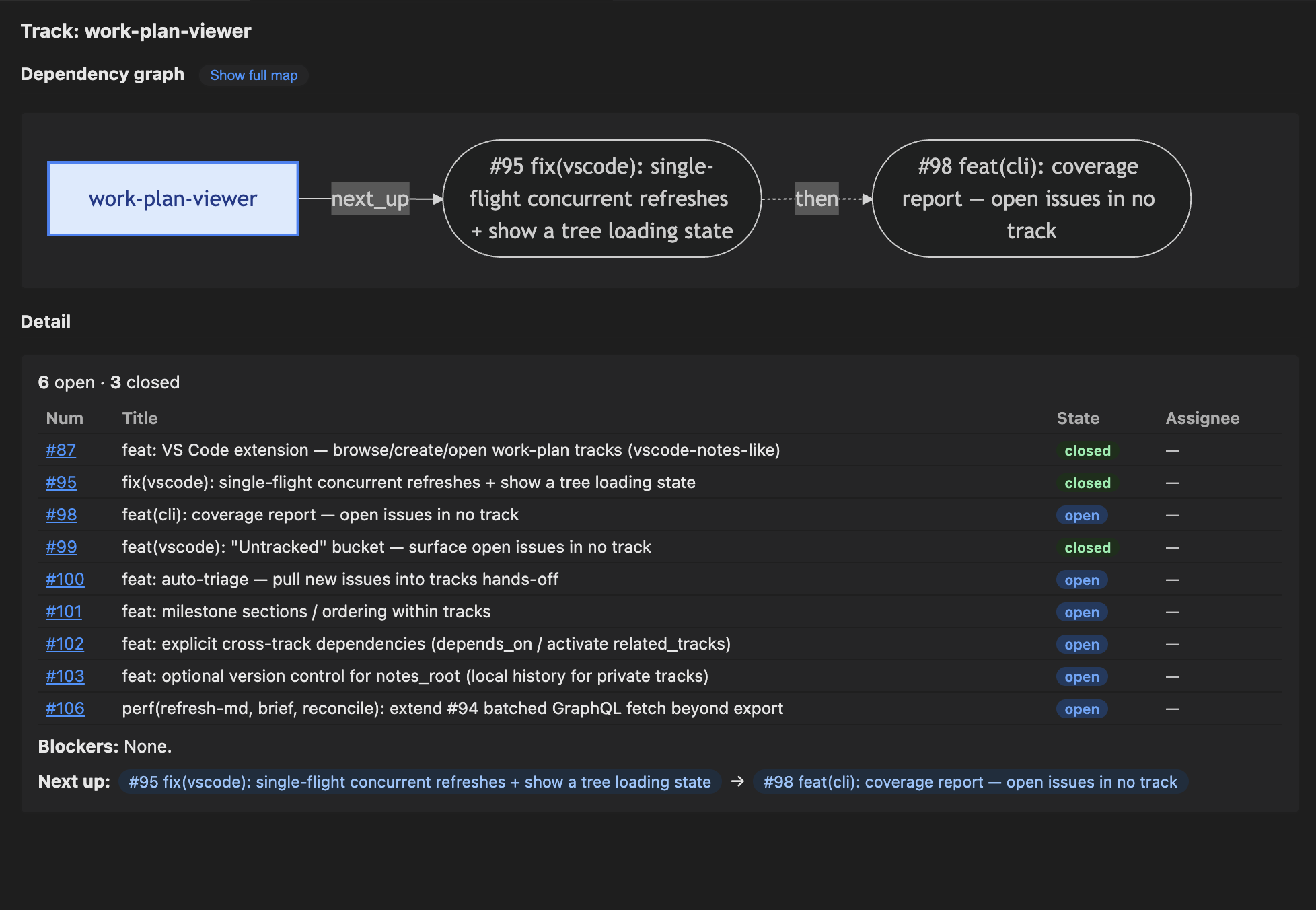
Install it from either registry:
- VS Code Marketplace: Extensions view → search "Work Plan" (publisher
stylusnexus), orcode --install-extension stylusnexus.work-plan-viewer. - Open VSX (VS Codium / Cursor / Windsurf): search "Work Plan", or
ovsx get stylusnexus.work-plan-viewer.
The extension shells out to the work-plan CLI, so install the CLI too (npm or any method above). If work-plan isn't on your editor's PATH — common when VS Code is launched from the Dock/Finder rather than a terminal — set workPlan.cliPath in Settings to an absolute launcher path (e.g. /path/to/work-plan-toolkit/bin/work-plan, or the npm global bin), then reload the window. Extensions auto-update from the registry.
Windows + WSL (and Remote-SSH / dev containers): install the CLI where the extension runs, not where you clicked. When you open a folder in WSL — e.g.
code .from a WSL shell, or Reopen in WSL (the window showsWSL: <distro>at the bottom-left) — VS Code runs the extension inside WSL, so it looks forwork-plan,gh,python3, andyqon the WSLPATH. A CLI installed on Windows-native is invisible to it, and you'll see a "work-plan CLI not found" banner (or, on older builds, a misleading "Not signed in to GitHub" one) even thoughghis signed in. Fix: open the WSL terminal and runnpm install -g @stylusnexus/work-plan(plusgh,python3,yq) there, then reload the window. The same rule applies to Remote-SSH and dev containers — the CLI must live in the remote, not on your local machine. (gh authis likewise per-environment:gh auth logininside WSL authenticates the WSLgh, which is what the extension reads.)
Also in the extension: a Stale tracks lens and Least recently touched sort for finding tracks that quietly went quiet, label search in Search Issues (label:security, label:priority/%), and Work Plan: Run Diagnostics for a one-click dependency check. See the extension README for the full list.
Useful settings:
| Setting | Default | What it does |
|---|---|---|
| workPlan.cliPath | "work-plan" | Absolute path to the CLI, if it's not on the editor's PATH |
| workPlan.trackStaleDays | 14 | Days without activity before an active track counts as stale (drives the Stale tracks lens; display only) |
| workPlan.autoRefreshInterval | 0 (off) | Re-poll the CLI silently in the background (seconds). Set to 30, 60, 300, or 900 if teammates are pushing shared-track changes and you want the tree to stay current without manual refresh |
| workPlan.expandReposByDefault | false | Expand all repo groups on load (single-repo workspaces always expand) |
Shared tracks show a shared tag in the tree description so you can tell at a glance which tracks travel via git push/pull and which are local-only.
Updating
| Installed via | Update with |
|---|---|
| npm | npm install -g @stylusnexus/work-plan@latest (or npm update -g @stylusnexus/work-plan) |
| Claude Code / Codex plugin | /plugin update work-plan@stylus-nexus (Codex: codex plugin update …) |
| Script (install.sh) | git pull in the toolkit repo, then re-run ./install.sh (or .\install.ps1) |
| VS Code extension | Auto-updates; or Extensions view → update manually |
Check your version any time with work-plan --version.
What the shims do
For tools without a native skill system (Cursor, Copilot), shims/ contains drop-in files that give the LLM the same prompt-engineered behavior the SKILL.md provides on Claude Code: condensed CLI usage, when to relay verbatim, the two-step AI subcommand pattern, and a pointer to the full toolkit docs.
The shims are per-project — copy them into each repo where you want the work-plan tool surfaced to your agent. They don't auto-load globally.
Install
Pick the path for your tool. All three install the same CLI + skills.
Claude Code (recommended) — plugin, easy updates
/plugin marketplace add stylusnexus/agent-plugins
/plugin install work-plan@stylus-nexus
Commands are namespaced under the plugin: /work-plan:brief, /work-plan:handoff,
/work-plan:orient, /work-plan:hygiene, /work-plan:status, and
/work-plan:run <subcommand> for everything else. Update with
/plugin update work-plan@stylus-nexus. Works in the CLI and the VS Code / JetBrains extensions.
Codex — plugin
codex plugin marketplace add stylusnexus/agent-plugins
codex plugin add work-plan@stylus-nexus
Cursor / direct / other — script
git clone <this-repo> work-plan-toolkit
cd work-plan-toolkit && ./install.sh          # macOS / Linux / WSL
# or, on Windows native PowerShell:  .\install.ps1
# or, for Codex's skills dir:        ./install.sh --target=$HOME/.agents
Gives the single bare /work-plan <subcommand> (no namespace). Re-run after git pull to refresh
(the plugin paths above update themselves).
The installer:
- Copies (not symlinks — for Windows compatibility)
skills/work-planandskills/repo-activity-summaryinto~/.claude/skills/ - Installs the
work-planlauncher (bin/work-plan+bin/work-plan.cmdon Windows) and copies the standalone dispatcher (installer/work-plan.md) into~/.claude/commands/work-plan.md(the per-verb suite is plugin-only) - Self-seeds
~/.claude/work-plan/config.ymlon first run if absent (one config home for every install mode), withnotes_rootat~/.claude/work-plan/notes - Drops
.installed-fromownership markers. Skill copies retain their source marker; launchers use a stable product marker plus a SHA-256 of the installed bytes, so modified or unmanaged launchers are preserved by default on both reinstall and uninstall
External dependencies (verified by the installer): gh, git, yq, python3.
Versioning: releases use CalVer (
YYYY.MM.DD+<sha>, auto-bumped on deploy and synced into the plugin manifests) — not SemVer.
What gets created
After clone, the toolkit looks like this:
work-plan-toolkit/
├── README.md
├── LICENSE
├── .gitignore
├── install.sh / install.ps1            # macOS+Linux+WSL / Windows
├── uninstall.sh / uninstall.ps1
├── skills/
│   ├── work-plan/
│   │   ├── SKILL.md
│   │   ├── work_plan.py                # CLI entry
│   │   ├── commands/                   # 49 subcommand modules
│   │   ├── lib/                        # config, frontmatter, gh, git, prompts, …
│   │   └── tests/                      # 1,600+ unittest cases
│   └── repo-activity-summary/
│       └── SKILL.md                    # bundled companion skill
├── commands/                           # plugin slash commands (/work-plan:brief, :run, …)
├── installer/
│   └── work-plan.md                    # standalone /work-plan dispatcher (install.sh)
├── docs/
│   └── usage-examples.md
├── shims/                              # Drop-in instruction files for non-skill-aware tools
│   ├── README.md
│   ├── cursor/work-plan.cursorrules
│   └── copilot/work-plan-copilot-instructions.md
└── notes/
    └── README.md                       # track-folder layout reference (not the default notes_root)
After running install.sh (or install.ps1), the installer creates this in your home directory:
~/.claude/
├── skills/
│   ├── work-plan/                      # copy of toolkit's skills/work-plan/
│   │   ├── SKILL.md
│   │   ├── work_plan.py
│   │   ├── commands/
│   │   ├── lib/
│   │   ├── tests/
│   │   └── .installed-from             # marker file (toolkit absolute path)
│   └── repo-activity-summary/
│       ├── SKILL.md
│       └── .installed-from             # marker file
├── commands/
│   └── work-plan.md                    # copy of toolkit's installer/work-plan.md
└── work-plan/
    └── config.yml                      # auto-seeded on first run, notes_root set
                                        # to ~/.claude/work-plan/notes (edit this one)
Then, when you run /work-plan init-repo myproject --github=your-org/myproject, your notes_root gets a per-repo subdir:
<notes_root>/
└── myproject/                          # created by init-repo
    ├── archive/
    │   ├── shipped/.gitkeep            # close mv's shipped tracks here
    │   └── abandoned/.gitkeep          # close mv's abandoned tracks here
    └── <track-slug>.md                 # active tracks live at top level
Configure
After install, bootstrap your first repo with the init-repo subcommand:
/work-plan init-repo myproject --github=your-org/myproject --local=/path/to/checkoutThis creates <notes_root>/myproject/archive/{shipped,abandoned}/ and adds the repo block to your ~/.claude/work-plan/config.yml (idempotent; errors if the key already exists). Skip --github / --local to be prompted interactively.
You can also edit ~/.claude/work-plan/config.yml directly:
notes_root: /absolute/path/to/your/notes/    # or keep the bundled default
repos:
  myproject:
    github: your-org/myproject
    local: /path/to/local/checkout           # optional, enables in-progress detection
notes_vcs:
  auto_commit: true                          # opt-in local history for notes_root (set by `notes-vcs init`)
notes_vcs.auto_commit is added by /work-plan notes-vcs init (or enable) — when on, every track-mutating command commits notes_root so private-tier edits are undoable. Absent → off.
Where your config lives
The active config the skill reads is ~/.claude/work-plan/config.yml — seeded by the CLI on its first run (install.sh / install.ps1 trigger that run; npm and plugin installs seed it the first time you use the CLI). There's no template file in the repo to confuse with the runtime config; the CLI just writes the right two lines directly.
After a fresh install, it looks like:
# work-plan config — auto-seeded on first run. Edit to customize.
# Run /work-plan init-repo <key> --github=<org/repo> to populate repos:.
notes_root: /Users/you/.claude/work-plan/notes
repos: {}
notes_root is the absolute path of ~/.claude/work-plan/notes (created on first run), so the default works out of the box. To change it (e.g., to ~/Documents/Project Notes/), edit this file or run set-notes-root.
That folder stays empty until you run /work-plan init-repo <key>, which adds a per-repo subdir + writes the repo block back into this same config file via yq.
Security & data handling
- No credentials stored. All GitHub access goes through your existing
gh auth. This toolkit never reads, writes, or stores GitHub tokens. - Writes are local by default; every remote/GitHub write is opt-in and gated. The skill writes to
~/.claude/skills/work-plan/,~/.claude/skills/repo-activity-summary/,~/.claude/commands/work-plan.md,~/.claude/work-plan/config.yml, and yournotes_root. Repo-confined writes: theplan-statusaction flags (--stampwrites a status header into discovered plan docs;--archivegit mvs dead plans intoarchive/abandoned/; all honor--draftand prompt), and the frontmatter-only plan writersplan-confirm(verdict_override),plan-ack(acknowledged),plan-baseline(verdict_baseline) — each writes one key into a plan doc's YAML frontmatter only (never its body/checkboxes/manifest), public-repo gated. GitHub-mutating (opt-in, gated):suggest-priorities --applyaddspriority/PNlabels;plan-status --issuescreates an issue per partial plan;close-issuecloses an issue (gh issue close); andin-progressadds or removes thework-plan:in-progresslabel on an issue. Remote git push (opt-in, public-repo gated):plan-branch pushandpush-trackpublish the shared plan branch. Nothing else. - No telemetry, no network calls beyond
gh. All GitHub operations go throughgh(your authenticated session); no direct HTTP requests are made. - Four commands put repo content in a prompt that goes to your AI session (Claude, via Claude Code's existing integration):
groupandsuggest-prioritiessend each issue's number, title, labels and milestone.auto-triagesends the same issue fields plus every active track's slug, name, milestone, priority andscope/descriptiontext from your track notes (auto-triage --heuristicsends nothing).plan-status --llmsends, for each plan or spec doc it cannot judge mechanically, the path, title, last-touched date and the first 1,500 characters of the document. Issue bodies, code and PR contents are never sent. If your repo is private and you're cautious about what reaches the model, skip these subcommands or use--heuristic. init-repowrites to your config viayq -i. Inputs are JSON-encoded before being passed toyq, so a maliciously crafted--github=value can't break out of the YAML edit.install.sh/install.ps1only touch user-owned dirs. Nosudo, no system-wide changes, no privilege escalation.- Plan and shared-track paths are repository-contained. Plan discovery, stamping, export badges, and the VS Code opener reject absolute, traversal, and symlink escapes; stamped docs are atomically replaced so a hard link cannot write through to an outside inode. Shared
.work-plan/creation likewise refuses a symlinked or escaping tier root. - Cross-repo identity stays explicit. The export model and VS Code viewer qualify tracks and issues by repository, so same-named tracks and same-numbered issues in different repos cannot collide in graph state, selections, or write actions.
- Installer ownership is content-verified. Script-installed launchers carry a stable product marker plus a SHA-256 of the installed bytes. Reinstall and uninstall preserve unmanaged or user-modified launchers by default, and an incomplete required-skill install or failed smoke test exits nonzero.
- Least-privilege tool access. The
work-planandrepo-activity-summaryskills declareallowed-toolsfrontmatter, so Claude Code grants them a scoped allowlist —work-plangetsBash(work-plan:*),Bash(python3:*), andWrite(the two-step AI subcommands' JSON cache);repo-activity-summarygetsBash(gh:*)— rather than unrestricted shell.
For vulnerability reporting, threat model, and past advisories, see SECURITY.md.
Usage walkthrough
See docs/usage-examples.md for end-to-end scenarios (morning brief, mid-work handoff, fresh-session orient, weekly hygiene).
Subcommand reference
| Subcommand | What it does |
|---|---|
| brief [--repo=<key> \| --repo=all] | Multi-track snapshot of all active tracks across configured repos. When --repo is omitted and you're inside a configured repo's checkout, brief auto-scopes to that repo (resolved by clone path, then git remote) and prints a one-line banner; --repo=all forces the full cross-repo view. --repo=<key> filters to one project explicitly (matches the folder name under notes_root or the org/repo GitHub slug). In all cases the archived-reopen callouts are scoped to the same repo. Disable cwd auto-scope with brief_auto_scope: false in config.yml. |
| which-repo [--json] | Resolve the current directory to one configured repo — by local clone path first, then the git origin remote. Prints the matched config key + GitHub slug, or reports no match. Read-only; it's the shared resolver behind brief's cwd auto-scope and the VS Code viewer's repo auto-focus. |
| handoff <track> [--auto-next \| --set-next 1,2,3 \| --suggest-next] [--repo=<key>] | Wrap up a work block. Writes a ### Session — <ts> entry. --auto-next suggests a priority-sorted top-3 from open issues (interactive: apply / edit / skip). --set-next 1,2,3 is the explicit form — note it writes the session entry too; for a field-only next_up change with no session log, use set next_up=…. Without either flag, just captures the session summary and reads any pre-existing next_up. |
| orient [track] [--pick] [--repo=<key>] (alias: where-was-i) | Read-only paste block. With a track name: ~15-line track summary (priority, last session, next pick, git state). With no track: cwd snapshot (branch, recent commits, modified files) for non-track work. Add --pick for the interactive track picker. |
| slot <issue-num> [track] | A new GitHub issue should belong to a track — adds it to the track's github.issues ownership list. Use batch-slot <issues> <track> --reference to add cross-track coordination scope under github.references without changing ownership; the viewer labels those issues separately and excludes them from status/progress. Non-interactive flags: --move/--no-move (relocate the issue off its prior track, or leave it; default no-move), --confirm=<token> (public-repo gate, see below), --expect=<fp> (compare-and-swap: the fingerprint of the track's issue list as the caller last saw it — if the on-disk list changed since, the write aborts with a {stale} JSON signal instead of clobbering; used by the viewer's assisted-slot flow, #241). The write always re-reads the file and merges onto fresh disk; for a shared-tier track on a plan_branch it fetch+rebases the worktree first and aborts with {needs_rebase} on an un-rebasable divergence. |
| batch-slot <issue-num>... <track> [--move \| --no-move \| --reference] [--repo=<key>] [--confirm=<token>] [--expect=<fp>] | Slot several issues into one track at once. --reference adds them under github.references (cross-track coordination scope) without changing ownership; --move relocates ownership off their current track. Same --confirm/--expect gates as slot. |
| demote-to-reference <issue-num>... <track> | Migrate issues a track lists in github.issues purely to surface counts into github.references, once a specialist track has taken real ownership (the cleanup step after adopting cross-track references). All-or-nothing preflight: refuses (no changes to the target track) if ANY requested issue isn't currently owned by the target, or has no other active owning track in the same repo — never creates an orphan. Idempotent: an issue already in github.references is reported as skipped rather than refused, so a repeat run is safe. Same non-interactive flags as slot/batch-slot: --confirm=<token> (public-repo gate), --expect=<fp> (CAS — the fingerprint of the track's combined issues+references state; a concurrent change aborts with {stale} instead of clobbering), --repo=<key>. |
| move <issue-num> <from-track> <to-track> [--repo=<key>] [--confirm=<token>] | Move an issue from one track to another (removes it from the source frontmatter, adds it to the destination). Both tracks must be active and in the same repo. Public-repo gated. |
| close <track> [--state=shipped\|parked\|abandoned] [--note=<text>] [--repo=<key>] [--confirm=<token>] | Mark track shipped, parked, or abandoned. Moves to archive/<state>/ for shipped/abandoned. Pass --state= (and an optional --note=) to run without prompts. |
| refresh-md <track> \| --all \| --repo=<key> [--yes] | Sync issue STATE (open/closed, status labels) from GitHub into the track body's status table. Does NOT change track membership — this is the right tool for "refresh the work I just completed." For a canonical table it re-derives the whole block from live data, milestone-ordered (active milestone first; see canonicalize), so the table self-heals and stays grouped instead of decaying; narrative (non-canonical) tables are updated conservatively in place. If the live fetch comes back incomplete (GitHub timeout/permission error, or a frontmatter issue that no longer resolves), that track is skipped and left untouched rather than rewriting valid rows as (not fetched), and the command exits nonzero so sweeps can flag the degraded run. --all sweeps every active track; --repo=<key> scopes the sweep to one repo. |
| hygiene [--repo=<key>] [--yes] [--no-duplicates] [--timeout=N] | Weekly all-in-one: refresh-md + reconcile + dedupe-tiers (report-only) + milestone-drift (report-only) + duplicates. With --repo=<key>, every step scopes to that repo; without it, the duplicates step is skipped when more than one repo is configured. --yes applies the refresh/reconcile steps without prompting; --no-duplicates skips step 5; --timeout=N sets its gh timeout (default 30s). |
| doctor [--json] [--fix] | Detect config drift: a renamed local folder or GitHub repo that config.yml no longer matches, a non-git local path, duplicate entries, an invalid/missing notes_root, an orphaned notes folder, or a stale per-track github.repo. Run this right after any rename/move. --fix corrects only the two mechanically-safe cases (a GitHub-confirmed rename, a stale track slug) and always re-scans afterward. --json for machine output. Also runs a read-only preflight first (#427): Python 3.9+, git, gh and its sign-in, mikefarah/yq (a missing yq and a wrong one are separate checks), config loading, notes_root access, the installed version, and the plan-branch worktree of each repo that has one (wrong branch, stuck rebase/merge, stale directory; always a warning, since it only degrades the shared tier). Each failed check names itself and its fix. Text mode exits 0 healthy, 1 warning (drift or an unverified check), 2 blocking (a required tool is missing/too old, or config cannot load); --json always exits 0 and carries status and a checks list ({id, status, message, remediation}) beside the existing findings. |
| dedupe-tiers [--repo=<key>] [--apply] | Remove private track copies that a shared twin in a repo's .work-plan/ supersedes (#359). When a track is promoted to the shared tier, its private original under notes_root is sometimes left behind (bulk/manual promotion, or a failed unlink during push-track) — discover_tracks then warns exists in both shared and private on every run with no cleanup path. This removes the safe orphans and refuses any whose private copy references issue numbers the shared one lacks (no silent data loss; the invariant is issue_refs(private) ⊆ issue_refs(shared)). Covers active and archived tiers. Default is a dry-run report; --apply deletes (auto-committed to notes_root, so undoable via notes-vcs undo). --repo=<key> scopes to one repo. |
| lift-rationale [--repo=<key>] [--track=<name>] [--apply] | Move a track's rationale out of YAML frontmatter comments into a ## Ranking rationale body section (#491). Writes now preserve frontmatter comments, but the body is the only place rationale is visible — frontmatter comments never render as markdown, never reach the VS Code viewer, and never appear in export --json. Comments attached to a next_up entry become bullets naming that issue; section headers become paragraphs. The body is also the only place rationale is visible — frontmatter comments never render as markdown, never reach the VS Code viewer, and never appear in export --json. Dry-run by default; --apply writes. |
| milestone-drift [--repo=<key>] [--unranked] | Audit each track's hand-curated next_up queue against live GitHub (#489). Reports three kinds of rot that are invisible from inside the file, because the list still reads like a plausible order: ranked but closed (finished work still occupying the queue — one real track's entire HEAD was closed issues), milestone inversion (an issue ranked above another while carrying a later milestone, so the ranking and the release plan disagree), and ranked with no milestone. Milestone order comes from due_on, falling back to title; when a repo's milestones can't be read the inversion check is skipped rather than guessed. --unranked adds open track issues absent from next_up — off by default because next_up is a shortlist for most tracks (measured: ~1000 findings vs ~30 without it). Report-only always — either side of an inversion can be the wrong one, so the fix is a judgement call. |
| list [--all] [--sort=recent\|priority] | List active tracks (or all including parked/archived). --sort=recent orders by last_touched (most recent first); --sort=priority orders by launch_priority (P0→P3) with recency as tiebreaker. Default keeps discovery order. |
| init <path> [--priority=P0..P3] [--milestone=<m>] [--confirm=<token>] | Add frontmatter to a brand-new track .md file (the file must already exist). Pass --priority=/--milestone= to skip the prompts. |
| init-repo <key> --github=<slug> [--local=<path>] [--update [--clear-local]] | Bootstrap a new repo: create <notes_root>/<key>/archive/{shipped,abandoned}/ and add the repo block to your config. --github is required for an add; --local is optional. --update on an existing key changes its local/github; --update --clear-local forgets the saved local path (keeps github + other fields). --clear-local and --local are mutually exclusive. |
| remove-repo <key> | Unregister a repo: delete its block from your config. Config-only — the notes folder, any tracks, and the local clone are left untouched (a notes folder or tracks that referenced it are now orphaned and can be removed by hand). Completes the add/update/remove trio with init-repo. |
| new-track <repo> <slug> [--priority=P0..P3] [--milestone=<m>] [--private] [--commit] [--confirm=<token>] | One-shot, non-interactive: create a new track file for <repo> (a config key or an org/repo slug) with frontmatter — in the repo's shared .work-plan/ when it has a local clone, else under notes_root (--private forces notes_root; --commit commits a shared track). Public-repo gated. Unlike init, it makes the file for you — the headless creation path the VS Code viewer uses. |
| rename-track <old-slug \| old@repo> <new-slug> [--repo=<key>] [--fix-refs] [--commit] [--confirm=<token>] | Rename an active track's slug: moves its .md file and updates the frontmatter track field + last_touched. Validates <new-slug> like new-track and rejects a name already taken in the same repo/tier. For shared tracks, --commit stages + commits the move (otherwise it prints a "commit to share" hint). --fix-refs rewrites sibling tracks' depends_on that reference the old slug; without it they're just warned about. Archived tracks are immutable. Public-repo gated. |
| mark-cleanup <track> [--reason=<text>] [--clear] [--confirm] [--repo=<key>] | Flag a track as a cleanup candidate — writes cleanup_candidate: true (+ optional cleanup_reason) into its frontmatter, a reversible earmark that hygiene surfaces (🧹) so stale tracks aren't lost. --clear removes it. Non-destructive; public-repo gated (#329). |
| archive-track <track> [--confirm] [--repo=<key>] | Set a track aside reversibly: move its .md into archive/parked/ so it drops out of the active views but is kept (distinct from close, which is terminal). Git-aware — a shared track archives as a staged git mv (commit & push to share), a private one as a filesystem move. Never touches GitHub (#328). |
| unarchive-track <track> [--confirm] [--repo=<key>] | Restore an archived track (parked/shipped/abandoned) back into the active set — the inverse of archive-track and of close's move (#328). |
| delete-track <track> [--confirm] [--repo=<key>] | DESTRUCTIVE: remove a track's local .md. Never touches GitHub — the issues it referenced outlive the track. Private tier: an undoable notes-vcs commit; shared tier: a staged git rm to commit & push (recoverable from git history until then). Prefer archive-track for a reversible set-aside. The VS Code viewer adds a hard modal + type-to-confirm on shared tracks (#330). |
| set <track> field=value [field=value …] [--repo=<key>] [--confirm=<token>] | Guarded edit of a track's frontmatter fields (status, launch_priority, milestone_alignment, blockers, next_up, plan, depends_on). Writes only the frontmatter field — for next_up plus a session-log entry, use handoff --set-next. Public-repo gated. |
| set-next-up <track> (--preset=<name> \| --order=a,b,c \| --clear \| --auto=on\|off) [--repo=<key>] [--confirm=<token>] | Configure the ranking preset and/or auto-derivation flag for a track's next_up list. --preset sets a named preset: flow (default — milestone → dependency → priority → recency), priority-driven (priority first, ignores milestone bias, for backlogs with no milestones), backlog (oldest issues first — surfaces stalled work), or custom (requires --order). --order=a,b,c sets a custom comma-separated criterion list (milestone, dependency, priority, recency, aging). --clear reverts to the global next_up_default config or the default flow. --auto=on activates next_up_auto so brief/orient/export auto-derive the next-up list live from the ranking preset (ignoring the curated list); --auto=off clears it to revert to the curated list. --auto can be used standalone or combined with --preset/--order/--clear. Writes next_up_order and/or next_up_auto into the track's frontmatter; does NOT touch the next_up issue-list. Global default: add next_up_default: <preset> to ~/.claude/work-plan/config.yml. Public-repo gated. |
| set-notes-root <path> | Relocate where your private track notes live (updates notes_root in config). Does not move existing tracks — it warns if any would be orphaned. |
| notes-vcs <init\|enable\|disable\|status\|undo> [<sha>] [--no-enable] [--json] | Opt-in local version control for the private notes_root tier — history/undo for tracks on your machine, never pushed. init git-inits notes_root as a personal repo (baseline commit of existing tracks) and turns on auto-commit (--no-enable skips that). For safety it refuses a notes_root that already has a git remote or is a repo work-plan didn't create. When on, every track-mutating command (slot/group/handoff/close/set/…) commits only the files it changed (pre-existing uncommitted edits are left alone) as an undoable commit. The shared tier is unaffected — it's versioned by its own repo. status shows whether notes_root is a repo, whether auto-commit is on, and the last commit (--json for the machine shape the VS Code viewer polls). undo [<sha>] reverts a commit (default HEAD) — reverses the last edit. |
| push-track <track\|track@repo> [--repo=<key>] [--no-push] [--confirm=<token>] | Promote a private track to the shared tier and publish it (#306). Moves the track's .md from notes_root into the repo's .work-plan/ (on its plan_branch, via a worktree), removes the private copy so it isn't duplicated, commits to the plan branch, and pushes — unless --no-push. Tier is derived from location, so this is a file move, not a frontmatter edit. Requires a local clone + a configured plan_branch (else hints plan-branch init). Pushing to a public repo makes the track world-visible → confirm-token gated. |
| plan-branch <init\|status\|push> <repo> [--branch=<name>] [--confirm=<token>] [--dry-run] [--json] | Set up and share a repo's canonical shared-tier plan branch. The .work-plan/ tier is pinned to ONE per-repo plan_branch, read/written through a dedicated git worktree, so planning never diverges across code branches or pollutes PR / deploy diffs. init creates that branch + a .work-plan/ skeleton (default an orphan work-plan/plan — zero shared history with code, like gh-pages; override with --branch) and records plan_branch in config — or connects to a teammate's already-published branch if one exists. init is local only (no push). status reports whether the branch exists, is published to origin, and how many commits are unpushed (--json for the machine shape). push shares it: on a public repo it prints a confirm heads-up + token and exits (re-run with --confirm=<token>); --dry-run previews the commits that would push. Requires a repo registered via init-repo with a local clone path. |
| suggest-priorities [--repo=<key>] [--apply] | Two-step AI label backfill: CLI fetches unlabeled issues, Claude proposes priorities, --apply writes labels via gh. |
| group [--milestone=X] [--label=Y] [--repo=Z] [--private] [--apply] [--limit=N] | AI-cluster GitHub issues into thematic track files. Two-step: CLI prints prompt → you save JSON answer → --apply creates the tracks. --private routes to notes_root instead of .work-plan/. --limit controls how many issues are shown in the prompt (default 100). |
| auto-triage [--repo=<key>] [--apply] [--json] [--heuristic] [--limit=N] | AI-assign untracked open issues to existing tracks. Two-step (same pattern as group); the scan stamps a batch_id and writes a per-repo cache file. --json emits the batch (+ prompt + answers path) as one JSON object on stdout for the VS Code viewer's Suggested bucket (#241) instead of the human prompt. --heuristic (#373) skips the LLM: it scores each issue against the candidate tracks with local signals (milestone match, track-label overlap, title/scope keyword overlap) and writes the v2 answers file itself (source: "heuristic", abstain-first) — so suggestions work with no Claude session (lower-trust, offline). --apply accepts the v2 abstain-first answers shape ({version,batch_id,suggestions:[{issue,verdict,track,confidence,margin,rationale}]} — only clear-margin suggest verdicts are slotted; abstains/narrow stay untracked) as well as the legacy v1 [{track,issues}]. Run coverage first to measure the gap. --limit controls how many untracked issues are shown (default 100). |
| coverage [--repo=<key>] [--list] [--limit=N] | Report how many open issues are not in any track, split into those already labelled for an active track (run reconcile --all) and the genuinely unassigned. --list prints titles. Read-only. |
| reconcile <track> \| --all \| --repo=<key> [--draft] [--yes] | Update track MEMBERSHIP (the github.issues list in frontmatter) by syncing against a GitHub label. Read-only on GitHub. Always matches the track's own track/<slug> label, plus any github.labels: [...] in frontmatter (OR semantics; extra labels add to the default, they never replace it). In an --all/--repo sweep it also detects MOVEs — an issue relabeled from one track to another in the same repo is moved (removed from the old track, added to the new); ambiguous targets stay as FLAGs. --draft previews the label drift (ADDs/MOVEs/FLAGs) without prompting or writing. --yes applies without prompting (non-interactive, e.g. the VS Code extension); PUBLIC-repo move destinations are skipped under --yes. --repo=<key> scopes the sweep to one repo. NOT for hand-curated tracks (it'll propose dropping curated issues every run) — use refresh-md if you only want to update issue state. When >50% of frontmatter issues lack the label, reconcile prints a hint pointing to refresh-md. |
| duplicates [--repo=<key>] [--min-similarity=0.7] [--limit=20] [--state=open] [--timeout=N] | Find likely-duplicate issues by title similarity (stdlib difflib). Prints gh issue close consolidation commands. |
| canonicalize <track> \| --all [--force] [--repo=<key>] | Add a canonical issue table to a track file (so refresh-md knows where to update). The table carries a Milestone column and is ordered active-milestone-first — issues in the track's milestone_alignment milestone, then other milestones grouped (blank divider row between groups), then no-milestone last — so "what's next" sits above "someday" (#101). It's one table (not per-milestone sub-tables) so refresh-md re-derives it cleanly. |
| plan-status [--repo=<key>] [--json] [--stamp [--draft]] [--llm [--apply]] [--archive \| --issues] [--draft] [--since-days=N] [--type=plan\|spec] [--stall-days=N] | Reach a verdict on every plan/spec doc in a repo by correlating its declared file-manifest against git + the filesystem: ✅ shipped / 🟡 partial / 💀 dead / 👻 manifest-less / 🧳 foreign. Read-only by default. --stamp writes an idempotent status header into each doc (--draft previews); --llm runs a two-step AI verdict on prose/ambiguous docs; --archive moves dead plans to archive/abandoned/ and `--issues