
@sugarat/es-check
v0.1.2
Published
Check JavaScript&HTML files ES version against a specified ES version 🏆

Maintainers
 atqq
atqqReadme
@sugarat/es-check
Check JavaScript&HTML files ES version against a specified ES version 🏆
reference es-check,but this is strong and friendly
Get Started
By CLI
npm i @sugarat/es-check --save-dev   # locally
npm i @sugarat/es-check -g           # or globally
Check if an array or glob of files matches a specified ES version.
- Note: adds quotation around globs. Globs are patterns like so,
<something>/*.js<something>/*.html.
escheck es5 testProject/**/*.js testProject/**/*.htmlThe ES Check script (above) checks testProject/**/*.js testProject/**/*.html files to see if they're ES5. It throws an error and logs files are that do not pass the check.
output terminal
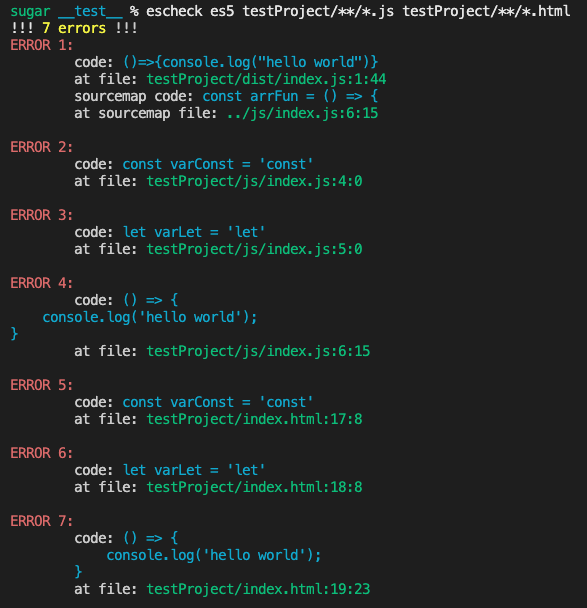
output log file
escheck es5 testProject/**/*.js testProject/**/*.html --out
CLI Options
escheck --helpUsage: bin [options] [ecmaVersion] [files...]
Arguments:
ecmaVersion ecmaVersion to check files against. Can be: es3, es4, es5, es6/es2015, es7/es2016, es8/es2017, es9/es2018, es10/es2019 .etc
files a glob of files to to test the EcmaScript version against(dist/**/*.js dist/**/*.html)
Options:
-V, --version output the version number
-M,--module use ES modules
--allow-hash-bang if the code starts with #! treat it as a comment
-E,--exit-code <code> with Error set process.exit(code)
-O,--out [filename] output error message to [filename] file
-h, --help display help for commandLocal Lib
npm i @sugarat/es-check
# or
yarn add @sugarat/es-check
# or
pnpm add @sugarat/es-check
Usage
// ESM
import { checkCode, checkFile, checkHtmlCode } from '@sugarat/es-check'

// CJS
const { checkCode, checkFile, checkHtmlCode } = require('@sugarat/es-check')
checkCode(jsCode, defaultOptions)
checkHtmlCode(htmlCode, defaultOptions)
checkFile(filepath, defaultOptions)example see test/util.test.ts
more utils see src/util/index.ts
Parser Options
interface ParserOptions {
  /**
   * @default '5'
   * 5|6|...|2015|2022|latest
   */
  ecmaVersion?: EcmaVersion
  /**
   * @default 'script'
   */
  sourceType?: 'module' | 'script'
  /**
   * @default false
   */
  allowHashBang?: boolean
}
More detail See es-check/src/types/index.ts