
@svayam-opensource/gov
v1.2.3
Published
gov-work — the OSS project/workflow CLI for the Governed Agentic Development Framework (Node/TypeScript). Manages projects, workspaces and org registration. Governed catalog/deploy is the separate gov-cicd CLI, and infrastructure the separate gov-infra CL
Downloads
517

Maintainers
 admin-svayam
Readme
@svayam-opensource/gov
Policy-governed, AI-assisted software development on top of GitHub — where the rules a team works by live in the repository, are reviewed like code, and are carried by the tools rather than remembered by people.
The framework has two components — the rules, and the client that acts under them.
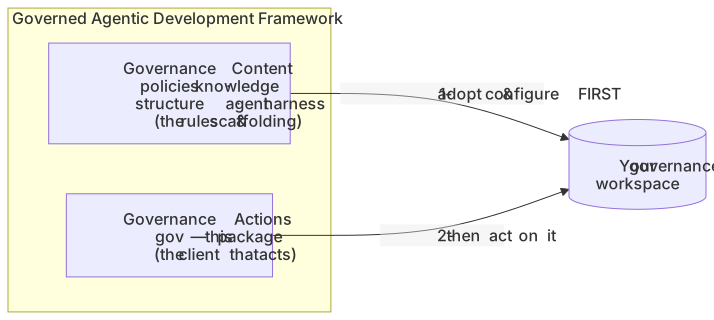
- Governance Content — the policies, the knowledge structure, and the agent harness that
define how your organization governs agentic work. Your org adopts it once and keeps it
current with
gov upgrade. - Governance Actions —
gov, this package: the client you run to take governed actions. Start work, create tasks, land them, close a project — all on GitHub, under the Content's policy.
Install
Start at gov.svayam.ai. It serves a bootstrap installer that also brings its own Node, and the adopter and joiner instructions — which is the part this page cannot usefully carry, because setting up an organization is a different job from installing a binary.
If you already have Node 24 and want only the client:
npm i -g @svayam-opensource/gov
gov                 # the interactive front door — you do not memorise commands
Requires Node 24+, git, and the GitHub CLI (gh) authenticated. gov deps prints per-OS
install hints; gov doctor checks a machine and a workspace and says what is missing.
What it does
gov on its own opens a menu, which is the intended way in. The verbs exist for scripts, for
recovery, and for the day the menu is in your way.
| | |
|---|---|
| Set up | setup · join · org · doctor · upgrade |
| Work a project | work · seed · task · merge · sync · status · anchor |
| Finish | close · pause · resume · cancel |
| Govern | agent · knowledge · manage · validate |
gov work is the one to know. It picks a project up wherever it is, places the session-start
protocol where your agent will read it, and launches the agent with that protocol as its first
message.
Content first, then actions

gov will not invent a governance workspace to act in. Adopt the Content first — one command,
gov setup <org>/<repo> — and everything after that has a policy to act under.
GitHub is the substrate, not a backend

Project state lives on a GitHub Project board: open means active, closed means done. There is no
state file to drift, and no second source of truth to reconcile. Authorization is write access
to that board — not a list gov keeps.
What "governed" means here
- The rules are in the repo. Policies are files on the default branch, changed by pull
request with the owner named in
CODEOWNERSas the approver. - Only the default branch governs. A project branch may propose changes to org knowledge; they carry no force until merged. An agent is told which branch it read, so it cannot mistake its own unratified edit for a rule.
- Every approved agent is governed the same way. The protocol is placed in each agent's own conventional instructions file, verified before launch, and handed over as the agent's first message. No vendor gets a mechanism another lacks.
govinstructs; it does not pretend to enforce. Where it cannot guarantee something, it says so rather than reporting success.
Documentation
Most of it ships into your governance repository, because that is where it is useful — the
policies you actually run under, not the framework's defaults. After gov setup, start at
governance/paths/ and pick the entry point that matches why you are reading.
- gov.svayam.ai — install, and the adopter and joiner journeys
- the framework repo — source for this CLI and the Content, plus design docs and ADRs
The enterprise plugin units (gov-catalog · gov-deploy · gov-data, under the gov-cicd
umbrella) are published separately to an internal registry and are not required for any of the
above.
Contributing
Issues and pull requests go to the
framework repo. Its
CONTRIBUTING.md covers the gates, which grow by drop-in: a new scenario is a file, not a
change to the harness.
The legacy bash client @svayam-opensource/prj is frozen at 0.10.0 and is not published
from this repo any more.