
@svayam-opensource/prj
v0.6.2
Published
Governed Agentic Development Framework CLI (prj). A bash CLI wrapped for npm; operates on a governance workspace resolved via $ADF_WORKSPACE or the nearest org-config.yaml. Runtime prerequisites (not npm deps): bash, git, gh, yq, python3 (use Git Bash on

Maintainers
 admin-svayam
Readme
Governed Agentic Development Framework
Policy-governed, AI-assisted software development on top of GitHub. The framework has two components — the rules, and the client that acts under them.
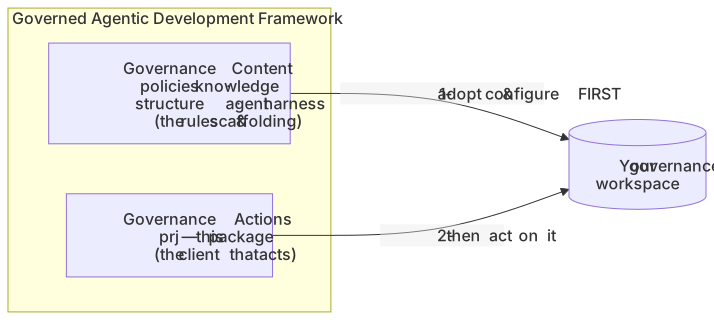
- Governance Content — the policies, knowledge structure, agent harness, and
install manifest that define how your org governs agentic work. Ships in
framework/in this repo; your org adopts it and keeps it current. - Governance Actions —
prj(npm@svayam-opensource/prj): the client you run to take governed actions (start work, assign owners, create tasks, finish) — entirely on GitHub, under the Content's policy. Runprjand follow the menus; you don't memorize commands.
This repo is the source of truth for both components. For who does what — framework maintainers, governance-repo admins, and developers — see the operating model.
Governance Content (framework/)
What it is
Everything that defines your governance, with no org-specific values baked in
(those live in your org-config.yaml, read at runtime):
- Policies —
framework/knowledge/policies/(the agentic-development policy & procedures, roles, data classification, the knowledge-organization standard, …). - Knowledge structure + starters — the
knowledge/taxonomy and seed docs your org builds on. - Agent harness — the canonical session-start protocol
(
agent/session-protocol.md), rendered to each tool's rules file (CLAUDE.md,.cursor/…,AGENTS.md,.clinerules/…, …) byscripts/render-harness.sh, plus the enforcement gate. See docs/session-start-protocol.md for how it runs and how an admin customizes it. - Install manifest —
framework/MANIFEST.yaml: what scaffolds where, and what an upgrade may touch vs. what your org owns (never overwritten).
Adopt & keep it current
- Adopt (new org): seed
framework/into your governance repo and configure it (org-config.yaml, git remotes). Steps: operating model → path (b). - Upgrade:
prj upgrade— pulls the latest content from this repo and 3-way-merges it, preserving yourorg-config.yamland customizations. - Propose a change:
prj knowledgefor org-local knowledge; a PR against this repo'sframework/for changes that should reach all adopters.
Governance Actions (prj)
Purpose
One client for the whole governed project lifecycle on GitHub. Instead of
hand-managing boards, branches, and issues, you run prj, pick what you want to
do, and it performs the action under policy — keeping ownership, status, and
history consistent. The goal is not for you to learn every command — just to
run prj and follow the journeys below.
Install
npm i -g @svayam-opensource/prjRuntime prerequisites (not npm dependencies — prj is bash): bash, git,
gh (authenticated), yq, python3. On Windows, run inside Git Bash.
Sequencing — Content first, then Actions

prj acts on a configured governance workspace. Set up Governance Content
first, then use prj:
- First-time adopter (governance owner/admin): adopt the Content (above) into
your org's governance repo and configure it, then install and run
prj. See operating model → path (b). - Developer in an org that already runs the framework: don't re-adopt or
re-run setup.
npm i -g @svayam-opensource/prj, get the workspace location from your governance admin, and runprjinside it (or point$ADF_WORKSPACEat it). Content questions — policies, knowledge, who owns what — go to your governance admin. See operating model → path (c).
Run prj from anywhere inside the workspace (it finds it via $ADF_WORKSPACE or
the nearest org-config.yaml).
Dependencies — GitHub is the substrate
prj keeps no separate database. Every fact lives in GitHub:

Journeys — how do I…?
You don't need the command list. Run prj and follow the menu (every step is
back-navigable — pick 0) ← back anytime). Common paths:
| I want to… | Do this |
|---|---|
| See the projects | prj → list (ongoing) — or prj manage list-all for the full board universe |
| Assign a project / set its owner | prj manage → Project → owners → add (grants board access + marks the anchor issue's owner) |
| Start working on a project | prj work → pick the project → it ensures the project is set up and opens it in your agent, with the session-start protocol already running |
| Start a task (parallel work on an issue) | prj work → pick project → New branch → pick the issue(s) |
| Continue existing work | prj work → pick project → Existing branch → pick it |
| Finish a task / close a project | prj work → pick project → pick the branch → Finish (merges the task, or closes the project through the governance gate) |
| Propose a policy or knowledge change | prj knowledge |
Fuller, step-by-step journeys live in
framework/knowledge/under paths / development procedures.
Operating model — who does what
- Maintainers / contributors evolve the framework here (Content under
framework/+ theprjCLI at the root) and publish it (content by merge; CLI to npm). - Governance-repo admins adopt the Content into their org's repo,
prj upgradeto stay current, and propose changes back. - Developers
npm i -g @svayam-opensource/prjand use it to do governed work.
Full who-does-what, step by step: docs/operating-model.md.
License
MIT — see LICENSE. Copyright (c) 2026 Svayam Infoware Private Limited and contributors.