
@syckron/wayapi-cli
v1.4.2
Published
Wayapi CLI - Elegant API Tester via Terminal


Readme
🚀 WayAPI CLI
WayAPI CLI is a minimalist and efficient API client that runs directly in your terminal. Built with React and Ink, it provides an interactive interface for making HTTP requests without leaving the command line.
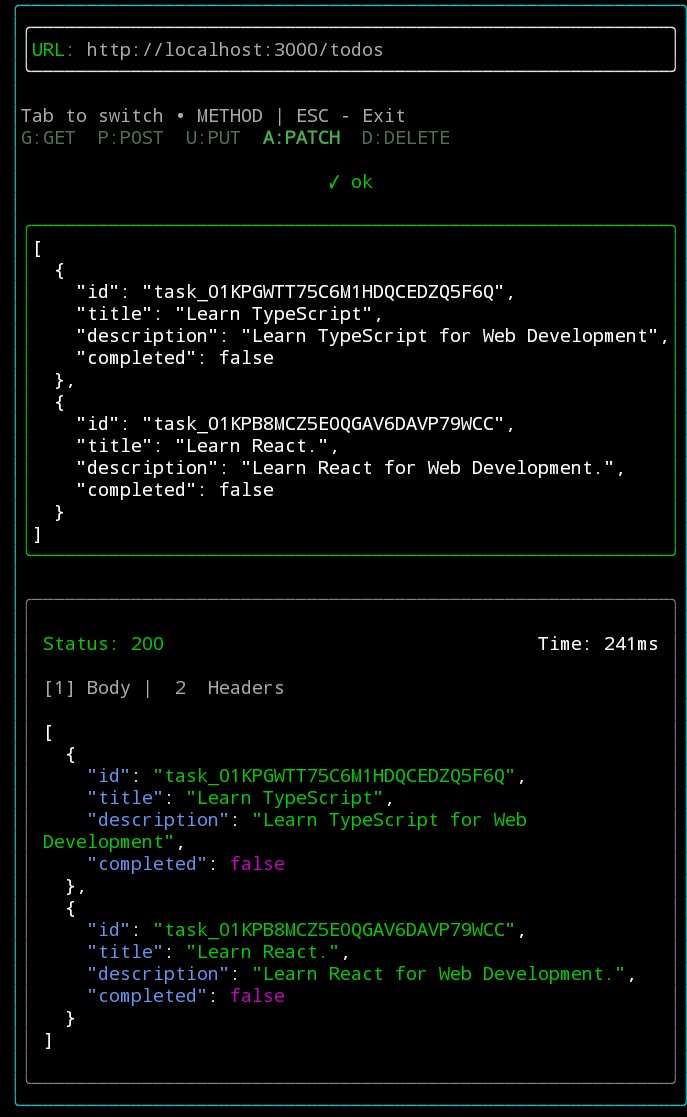
✨ Features
🎯 Interactive Interface
Interactive interface based on React rendered in the terminal via Ink.🌐 HTTP Methods Support
GET, POST, PUT, PATCH, and DELETE with quick selection.📝 Body Editor
Dedicated field for sending JSON in write methods.⚡ Smart Auto-Fill
When selecting PUT or PATCH and entering a URL, the CLI automatically attempts to fetch current data to facilitate editing.📊 Real-Time Feedback
Instant visualization of:- Status Code
- Response time (ms)
- Headers
- Response body
✅ Real-Time JSON Validation
The editor automatically validates the typed JSON after a few seconds of inactivity:- Visual indication (green/red border)
- Status message (
okor error) - Immediate feedback for syntax correction
📦 Installation
Via NPM / PNPM (Recommended)
Install globally and use directly in the terminal:
pnpm add -g @syckron/wayapi-clior with npm:
npm install -g @syckron/wayapi-cli▶️ Usage
After installation, just run:
wayapi⌨️ Commands and Shortcuts
| Key | Action |
|------|------|
| Tab | Switch between fields |
| Esc | Close the application |
| 1 | View response Body |
| 2 | View Headers |
| G | Select GET method |
| P | Select POST method |
| U | Select PUT method |
| A | Select PATCH method |
| D | Select DELETE method |
| Enter | Execute request (on URL field) |
🛠️ Technologies Used
- React & Ink → Terminal interface
- Axios → HTTP requests
- TypeScript → Static typing
📁 Project Structure
wayapi-cli/
├── src/
│   ├── components/
│   │   ├── Content.tsx        # Results display (Body/Headers)
│   │   ├── EditForm.tsx       # Input field for JSON/Body
│   │   ├── JsonViewer.tsx     # JSON colors
│   │   ├── Infos.tsx          # Status and Performance display
│   │   ├── MethodSelector.tsx # HTTP verb selector
│   │   └── RequestForm.tsx    # URL input field
│   ├── services/
│   │   └── api.ts             # Axios configuration
│   ├── utils/
│   │   └── typeGuards.ts      # Type validators and JSON
│   ├── types/
│   │   └── types.ts           # Global interfaces
│   └── app.tsx                # Main orchestrator
🧪 Development
git clone https://github.com/syckron/wayapi-cli.git
cd wayapi-cli
pnpm install
pnpm dev
🏗️ Build
pnpm build📝 Implementation Notes
- Debounce on URL input for pre-loading in PUT/PATCH
- Real-time JSON validation with visual feedback
- Network and parsing error handling
💡 Project Idea
WayAPI CLI was designed for developers who want to test APIs quickly without leaving the terminal — with a fluid UX and without depending on heavy tools.
🔗 Links
📌 License
Apache-2.0