
@t0mer/n8n-nodes-linkwarden
v2026.10.0
Published
n8n community nodes for Linkwarden: save, search and manage links, collections, tags, highlights, archives and RSS subscriptions, and trigger on new links.
Downloads
283

Maintainers
 t0merkle!n
Readme
n8n-nodes-linkwarden



n8n community nodes for Linkwarden, the self-hosted, collaborative bookmark manager that preserves pages as screenshots, PDFs, readable text and single-file HTML.
- Linkwarden: an action node for links, collections, tags, highlights, archives, RSS subscriptions and the current user. It can be used as an AI Agent tool.
- Linkwarden Trigger: a polling trigger that fires when a new link is saved, optionally only for one collection or tag.
The common automation, "save this URL unless it's already saved", is built in with Find by URL and the On Duplicate option of Link → Create.
Tested against Linkwarden v2.16.3 (self-hosted, with and without Meilisearch). It works with self-hosted instances and with Linkwarden Cloud.
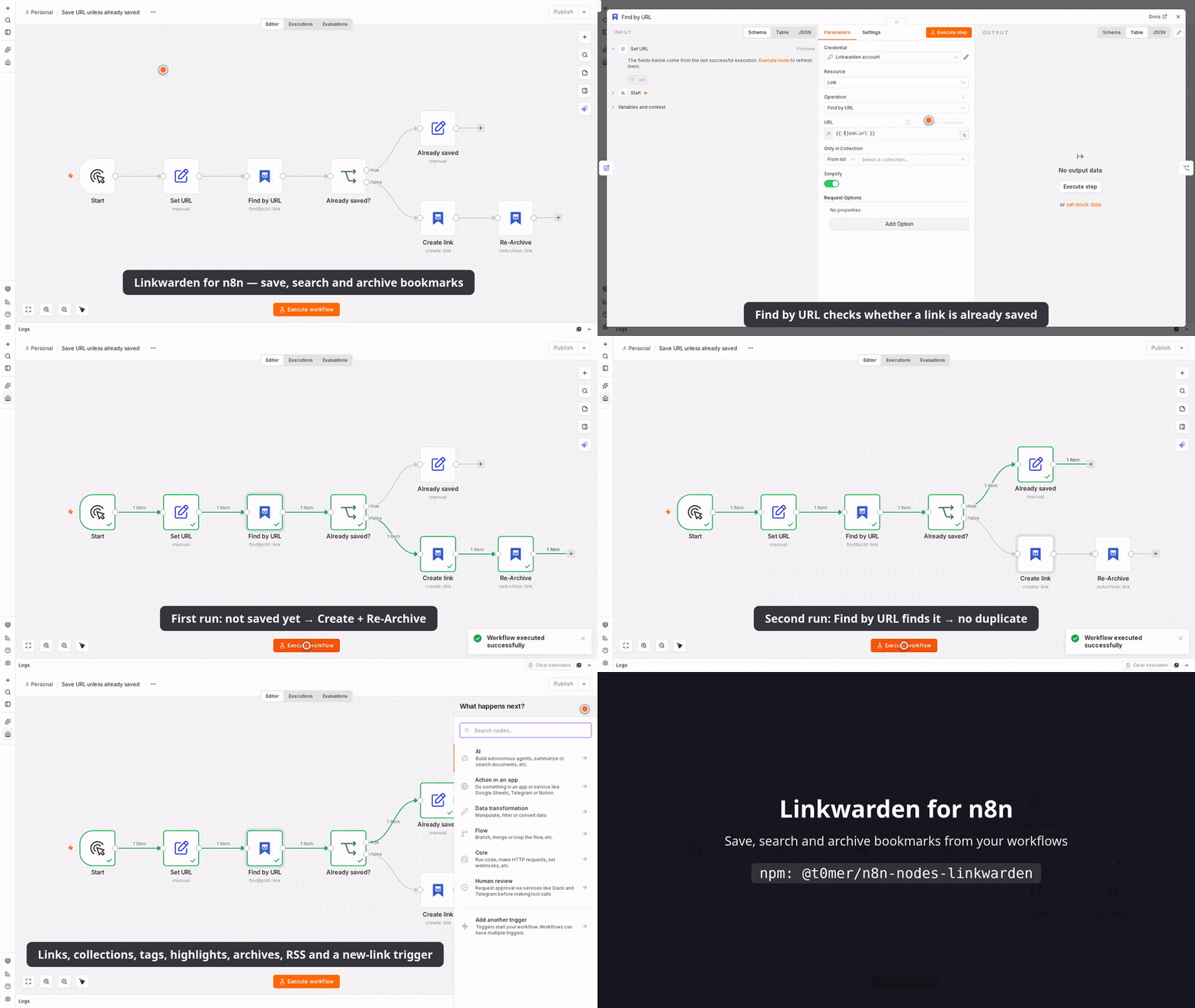
Watch the full demo video (MP4)
This package is unofficial. It is not affiliated with, endorsed by, or supported by the Linkwarden project. "Linkwarden" is used only to describe what the nodes connect to.
- Installation
- Credentials
- Operations
- Search syntax
- Trigger
- Using it as an AI Agent tool
- Errors and troubleshooting
- Known Linkwarden API quirks
- Example workflows
- Security notes
- Linkwarden license and terms
- Development
- Contributing
- License
Installation
From the n8n UI
On a self-hosted n8n instance:
- Go to Settings → Community Nodes.
- Select Install, enter
@t0mer/n8n-nodes-linkwarden, and confirm.
Manually with npm
Use this for queue mode, for instances where the UI install is turned off, or to pin a version.
Install the package in n8n's nodes folder (by default ~/.n8n/nodes) and restart n8n:
mkdir -p ~/.n8n/nodes
cd ~/.n8n/nodes
npm install @t0mer/n8n-nodes-linkwarden
# then restart n8n
With Docker, run the same commands inside the container (for example
docker exec -it n8n sh) and restart the container. Install the package on every worker in
queue mode. See the n8n guides to
installing community nodes
and manual installation.
Credentials
The nodes authenticate with a Linkwarden access token.
- In Linkwarden, open Settings → Access Tokens and create a token. Pick an expiry that fits your workflow. Prefer a token that expires over one that never does, and renew it when it runs out.
- In n8n, create a Linkwarden API credential:
| Field | Description |
|---|---|
| Base URL | Your Linkwarden address, for example https://links.example.com. Use https://cloud.linkwarden.app for Linkwarden Cloud (the default). A trailing slash is fine. |
| Access Token | The token from step 1. It is sent as Authorization: Bearer <token>. |
| Ignore SSL Issues (Insecure) | Turn on only for a self-hosted instance with a self-signed certificate. |
The credential test calls GET /api/v1/users/me. Every node request sends the header
User-Agent: n8n-nodes-linkwarden/<package version> (the credential test doesn't).
Operations
| Resource | Operations | |---|---| | Link | Create, Find by URL, Get, Get Many, Search, Update, Pin, Unpin, Delete, Delete Many, Bulk Update, Re-Archive, Delete Archives | | Collection | Create, Get, Get Many, Update, Delete | | Tag | Create, Get, Get Many, Rename, Delete, Delete Many | | Highlight | Create or Update, Get Many, Delete | | RSS Subscription | Create, Get Many, Delete | | Archive | Download, Upload to Link, Upload as New Link | | User | Get Me |
Collection and tag fields are pickers with From List, By ID, and (collections only)
By Name modes. The list shows nested collections as paths such as Work / Research. By Name
matches a name or a full path, ignoring case. It fails with a clear error when nothing matches,
or when several collections share the name (the error lists their IDs).
Fields that take several IDs or names accept a comma-separated string (12, 13, 20) or an
array from an expression.
Get Many for links, tags, collections and RSS subscriptions, and Link → Search, have Return All and Limit (default 50). Link and tag results stop at 10,000 items, with a hint in the output panel. Highlight → Get Many always returns every highlight of the link.
Operations that take a list of IDs (Delete Many, Bulk Update, Delete Archives, and Tag Create / Delete Many) have a Run Once option, on by default. It reads the IDs (or, for Tag Create, the names) from the first input item only and sends one request. Turn it off to run once per input item.
The Request Options → Max Retries setting (default 3, up to 10) retries on rate limiting
(429), server errors (5xx) and network errors. Waits back off exponentially and honor
Retry-After. Requests that create something (POST) are never retried after a timeout or
network error, and on server errors only for 502, 503 and 504, so a slow server can't make the
node save the same link twice.
Link operations
| Operation | Parameters | Output |
|---|---|---|
| Create | URL; Additional Fields: Collection, Name, Description, Tags; Options: On Duplicate, Check for Duplicates First | The link, plus duplicate |
| Find by URL | URL, Only in Collection | { found, matches, link } |
| Get | Link ID | The link |
| Get Many | Return All, Limit, Sort, Filters (Collection, Tag, Pinned Only) | One item per link |
| Search | Query, Return All, Limit, Sort, Filters (Collection, Tag, Pinned Only) | One item per link |
| Update | Link ID; Update Fields: Collection, Color, Description, Icon, Icon Weight, Name, Tag Mode, Tags, URL | The updated link |
| Pin / Unpin | Link ID | The link (pinned with Simplify on, pinnedBy with it off) |
| Delete | Link ID | { id, deleted: true } |
| Delete Many | Link IDs, Run Once | { deleted, linkIds } |
| Bulk Update | Link IDs, Move to Collection, Tags, Remove Previous Tags, Run Once | { updated, linkIds, message } |
| Re-Archive | Link ID | { linkId, queued: true, message } |
| Delete Archives | Link IDs, Run Once | { linkIds, message } |
Sort is Newest First (default), Oldest First, Name (A–Z) or Name (Z–A). Icon is the name
of a Phosphor icon, such as bookmark; Icon Weight is Thin,
Light, Regular (default), Bold, Fill or Duotone. Every operation that returns links (Create,
Find by URL, Get, Get Many, Search, Update, Pin, Unpin) has a Simplify option, on by
default; see Simplified link output.
Bulk Update needs at least one of Move to Collection, Tags or Remove Previous Tags, and accepts up to 500 link IDs per request. Tags are added to every link; with Remove Previous Tags they replace the existing tags (and with no Tags set, all tags are removed). Tags that don't exist yet are created.
Simplified link output
Simplify is on by default for every operation that returns links. It returns:
{
  "id": 42,
  "name": "Example Article",
  "url": "https://example.com/article",
  "description": "Saved for later",
  "type": "url",
  "collectionId": 3,
  "collectionName": "Read Later",
  "tags": ["news", "dev"],
  "pinned": false,
  "createdAt": "2026-09-01T09:59:00.000Z",
  "updatedAt": "2026-09-01T10:00:00.000Z",
  "preservedAt": "2026-09-01T10:00:00.000Z",
  "archives": { "screenshot": true, "pdf": true, "readable": true, "monolith": false }
}
Turn Simplify off to get the raw Linkwarden object. User → Get Me has its own Simplify
option, which returns id, username, name, email and locale.
Create and duplicates
Link → Create always outputs duplicate: true | false. Options → On Duplicate decides
what happens when the URL is already saved:
| On Duplicate | Result |
|---|---|
| Return Existing Link (default) | Outputs the saved link with duplicate: true |
| Skip | Outputs nothing for that item |
| Throw Error | Fails the item with "Link already exists: …" |
If Linkwarden reports a duplicate but the node can't find the saved link, Return Existing Link
outputs { url, duplicate: true, link: null }.
Linkwarden only rejects duplicates when Prevent duplicate links is on in your Linkwarden settings. When it's off, turn on Options → Check for Duplicates First, which runs Find by URL before saving.
With Meilisearch, Linkwarden indexes a new link a few seconds after saving it. Until then, Find by URL (and so Check for Duplicates First) can't see it. Creating the same URL twice within seconds can therefore still produce a duplicate unless Prevent duplicate links is on.
Without a Collection, the link goes to your default collection ("Unorganized"). Without a Name, Linkwarden uses the page title.
Find by URL never fails when nothing matches. It returns
{ found, matches, link }, where link is the first match or null. It searches for the URL's
host and path, checks the first 5 pages of results, and compares URLs after normalizing them:
- letter case in the scheme and host is ignored;
- a leading
www., trailing slashes and the#fragmentare dropped; - the path and query are compared exactly, and so is the scheme (
httpandhttpsdiffer).
Only in Collection limits the lookup to one collection.
Updating links
Link → Update only changes the fields you add. Linkwarden's API replaces the whole link on update, so the node first reads the link and sends the current value of every field you didn't touch. Tag Mode controls the Tags field:
| Tag Mode | Effect | |---|---| | Add (default) | Keeps the current tags and adds the listed ones | | Remove | Removes the listed tags | | Replace | Sets exactly the listed tags (an empty list clears all tags) |
Tag names are compared ignoring case. Changing the URL makes Linkwarden delete the existing archives and preserve the new page. Only the owner of a collection can move links out of it.
Archive formats
| Format | Download | Upload | MIME type | File name |
|---|---|---|---|---|
| Screenshot (PNG) | ✓ | ✓ | image/png | linkwarden-<id>.png |
| Screenshot (JPEG) | ✓ | ✓ | image/jpeg | linkwarden-<id>.jpeg |
| PDF (default) | ✓ | ✓ | application/pdf | linkwarden-<id>.pdf |
| Readable (JSON) | ✓ | | application/json | linkwarden-<id>.json |
| Single-File HTML | ✓ | ✓ | text/html | linkwarden-<id>.html |
- Download puts the file in the binary field set by Put Output File in Field (default
data) and outputslinkId,format,formatName,fileName,mimeTypeandfileSize. - Download of Readable (JSON) also parses the file into the
readableoutput field. Turn off Options → Parse Readable Content to skip that. - Preview downloads the small thumbnail instead, named
linkwarden-<id>-preview.<ext>. - A missing format returns "This link has no … archive yet. Try Re-Archive or another format."
- Uploads read the file from Input Binary Field (default
data) and check its MIME type against the format before sending. - Upload to Link → As Preview Image uploads a PNG or JPEG as the link's thumbnail instead of an archive.
- Upload as New Link saves the file in your default collection. Source URL optionally stores where the file came from.
- Upload to Link outputs the updated link and Upload as New Link outputs the new link. Each has its own Simplify option, on by default.
- Linkwarden limits upload size (
NEXT_PUBLIC_MAX_FILE_BUFFER, 10 MB by default). The node can't know your server's limit, so it mentions the limit when an upload is rejected.
Collections
Create takes a Name and, optionally, Color, Description, Icon, Icon Weight and a Parent Collection.
Get Many adds a path field (such as Work / Research) to every collection. Its filters
are Parent Collection (direct sub-collections only) and Top Level Only.
Update can change Name, Description, Color, Icon, Icon Weight, Is Public and the parent (Parent Collection, or Move to Top Level). It reads the collection first and resends every field you didn't change, including the current members. Linkwarden requires the member list on every update and replaces sharing with it, so the node always sends the existing members unchanged. Managing members isn't supported yet.
Delete removes the collection and every link inside it. This can't be undone.
Tags
- Create takes one or more Names (up to 50 characters each). Existing names are updated. Preservation Overrides set, for every name, whether links with the tag are archived as a screenshot, PDF, readable text or single-file HTML, sent to the Wayback Machine, and whether the AI tagger may assign the tag. They override your account settings.
- Get Many can filter by Search (name contains) and Sort by newest, oldest, name, most links or fewest links.
- Rename sets a New Name (up to 50 characters, unique among your tags).
- Delete removes the tag; links keep existing without it.
Highlights
Create or Update takes a Link ID, the highlighted Text (exactly as it appears in the readable view, up to 2048 characters), Start Offset and End Offset in the readable text, a Color (Yellow by default, Red, Blue, Green, or Custom with any value up to 50 characters), and an optional Comment. Get Many lists the highlights of a link; Delete takes a Highlight ID.
RSS subscriptions
Create takes a Name (up to 50 characters, unique among your subscriptions), a Feed URL (RSS or Atom) and the Collection that receives the entries. With the collection chosen By Name, the node reuses an existing collection with that name (ignoring case). Linkwarden creates the collection only when none exists. Delete keeps the links the subscription already saved.
Search syntax
Link → Search sends the query to Linkwarden's search.
- With Meilisearch enabled on the server, the query supports field tokens:
url:,name:,description:,type:,collection:,tag:,pinned:,public:,before:andafter:. For example:tag:news after:2025-01-01 kubernetes. - Without Meilisearch the query is a plain "contains" match on the link name, URL, description and tag names.
The Collection, Tag and Pinned Only filters work in both cases.
Trigger
Linkwarden has no outgoing webhooks, so Linkwarden Trigger polls. Every 5–15 minutes is usually enough.
- First activation, or any change to the filters, records the newest link and emits nothing. Later polls emit links saved since then, oldest first. Old links that are later moved into the watched collection, or later get the watched tag, don't fire.
- New links are detected by link ID. Imported links with old dates are still caught.
- Collection and Tag narrow the links that fire the trigger. Options → Include Subcollections also matches links in nested collections.
- Options → Max Links per Poll (default 100, max 500) caps each poll. When more links
arrive, the newest are emitted, older ones in that batch are skipped, and the last item gets
truncated: true. - Simplify (on by default) returns the same compact link shape as the action node.
- The trigger's state is saved only after a poll succeeds, so a failed poll doesn't skip links.
- Fetch Test Event returns up to 5 recent matching links without changing the trigger's state.
Using it as an AI Agent tool
The Linkwarden node can be connected to an AI Agent as a tool, and parameters can be
filled by the model with $fromAI(). See
ai-agent-linkwarden-tool.json
for an agent that finds, searches and saves links. If community nodes don't appear as tools in
your n8n version, set N8N_COMMUNITY_PACKAGES_ALLOW_TOOL_USAGE=true.
Errors and troubleshooting
- "Authorization failed: check your Linkwarden access token": the token is missing, wrong or expired. Create a new one and update the credential.
- "Collection is not accessible." (HTTP 401) on a link: Linkwarden answers this way both for permission problems and for links that don't exist. The node adds "Link … may not exist, or you may not have access to it."
- "Collection … not found": Linkwarden returns an empty result for an unknown collection ID.
- "No collection named … was found" / "More than one collection is named …": fix the
name, use the full path (
Parent / Child), or select the collection by ID. - "Linkwarden rate limit reached, try again later": the retries ran out. Raise Max Retries or slow the workflow down.
- "Could not reach Linkwarden: …": check the Base URL, and Ignore SSL Issues for a self-signed certificate.
- Find by URL misses a link saved seconds ago: see the Meilisearch note under Create and duplicates.
With Continue On Fail, a failed item outputs { error, input } (plus statusCode for HTTP
errors) instead of stopping the workflow.
Known Linkwarden API quirks
These are handled by the node. They matter if you call the API yourself with the HTTP Request node.
- Three response envelopes. Most routes return
{ "response": … }.GET /api/v1/tagsreturns{ "data": { "tags", "nextCursor" } }.GET /api/v1/searchreturns{ "data": { "links", "nextCursor" } }, ordata: []when Meilisearch finds nothing. - Listing links uses search.
GET /api/v1/linksis deprecated (servers can turn it off withDISABLE_DEPRECATED_ROUTES), so Get Many and the trigger callGET /api/v1/searchwithout a query. It takes the same filters and sort. - Pagination. Search and tags return an opaque
nextCursor, which is an offset with Meilisearch and a link ID without it. With Meilisearch, collection and tag filters are applied after paging, so a page can be empty whilenextCursorstill points to more. - Missing items. An unknown link returns
401 "Collection is not accessible."instead of 404, and an unknown collection returns200withnull. The node turns both into clear errors. - Link update replaces the link.
PUT /api/v1/links/{id}needs the full object, includingcollection: { id, ownerId }and the completetagslist. A missing name or description is saved as empty. - Pin and unpin go through the same update route. Pin sends
pinnedBy: [{ id: <your user
id> }]
and unpin sendspinnedBy: [{}]. - Collection create is
POST /api/v1/collections. The OpenAPI spec wrongly documentsPOST /api/v1/collections/{id}. - Collection update requires
membersand replaces all members with it. Sending[]removes all sharing. - Tag create uses
label, notname:{ "tags": [{ "label": "news" }] }. - Archive
previewis treated as true whenever the parameter is present, evenpreview=false. - HTTP 401 means a bad token, but Linkwarden also uses it for permission errors, e.g. "Collection is not accessible.". The node shows those messages as-is.
Example workflows
Download these from
examples/, import them
(Workflow menu → Import from File) and select your credentials:
| File | What it does |
|---|---|
| save-url-unless-saved.json | Chat message → extract URL → Find by URL → create the link if it's new → reply |
| rss-to-linkwarden.json | Every hour: RSS feed items → Create in "News" with tags, skipping duplicates → Re-Archive |
| read-later-digest.json | Trigger on new links in "Read Later" → build a digest → send by email |
| weekly-rearchive-missing-pdf.json | Every Monday: find links without a PDF archive → Re-Archive |
| ai-agent-linkwarden-tool.json | AI Agent that can find, search and save links through Linkwarden |
Security notes
- An access token acts as your Linkwarden account. Store it only in the n8n credential, give it an expiry when you can, and revoke it in Linkwarden if it leaks.
- Use HTTPS for the Base URL. Turn on Ignore SSL Issues only for a trusted self-signed instance.
- Delete operations can't be undone; Collection → Delete also deletes every link inside it. Think twice before giving an AI Agent tools that delete.
- The node talks only to the Base URL in the credential.
Linkwarden license and terms
Linkwarden is developed by the Linkwarden project and licensed under AGPL-3.0. This package only calls its API and contains no Linkwarden code. Linkwarden Cloud is subject to the Linkwarden Terms of Service and Privacy Policy.
Development
npm ci
npm run lint
npm run build     # also writes shared/version.ts from package.json
npm test          # vitest; never calls a real Linkwarden
npm run dev       # n8n with this node loaded, hot reload
Layout: credentials/ (the credential), nodes/Linkwarden/ (action node: descriptions/ for
parameters, actions/ for handlers), nodes/LinkwardenTrigger/ (trigger), shared/ (HTTP
transport, pagination, URL normalization, trigger state) and tests/ (unit tests plus an
OpenAPI drift test against tests/fixtures/linkwarden.openapi.yaml).
CI runs lint, build, tests, the n8n community package scanner and a Trivy scan on every push to
main and on pull requests.
Releases are date-based (YYYY.M.PATCH). Push a tag and the Publish workflow publishes
the package to npm with provenance:
VERSION="$(./scripts/next-version.sh)"
git tag "$VERSION" && git push origin "$VERSION"
Contributing
Issues and pull requests are welcome at
github.com/t0mer/n8n-nodes-linkwarden.
Please run npm run lint, npm run build and npm test before opening a pull request.