
@taehalim/liquid-glass
v0.1.5
Published
Liquid Glass effect using SVG displacement filters and backdrop-filter.

Maintainers
 taehalim
Readme
@taehalim/liquid-glass
Liquid Glass effect using SVG displacement filters and backdrop-filter.
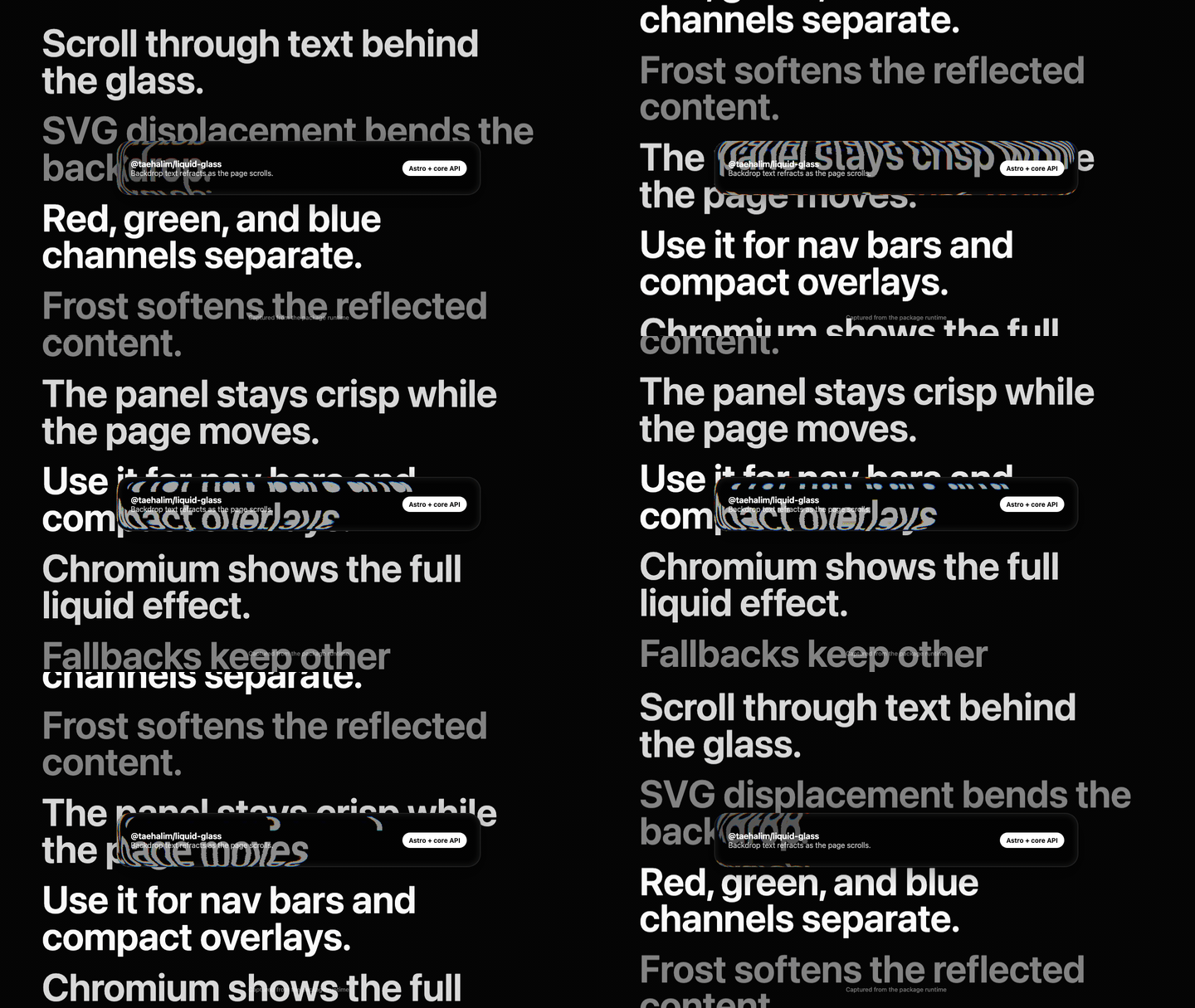
Inspired by Inspira UI's Liquid Glass component, this package exists for projects that want a similar SVG-displacement effect outside a Nuxt/Vue component stack.
Demo
The demo above is captured from the package runtime. It shows the intended effect while content scrolls behind the glass: background text is refracted through separate color channels, then softened by a frosted overlay.
Install
npm install @taehalim/liquid-glassbun add @taehalim/liquid-glassVanilla / Bundler
Use this shape when your project has a bundler such as Vite, Astro, Next.js, or similar.
<div
  class="liquid-glass-effect"
  data-liquid-glass
  data-filter-id="liquid-glass-demo"
  style="--liquid-glass-frost:0.32;border-radius:24px;"
>
  <div class="liquid-glass-slot">Content</div>

  <svg class="liquid-glass-filter" xmlns="http://www.w3.org/2000/svg">
    <defs>
      <filter
        id="liquid-glass-demo"
        color-interpolation-filters="sRGB"
      ></filter>
    </defs>
  </svg>
</div>
import "@taehalim/liquid-glass/styles.css";
if (typeof window !== "undefined") {
import("@taehalim/liquid-glass/auto");
}Use the data-* attributes from the options table when you need to tune the
displacement map.
CDN / No Build
Use this shape for plain HTML without npm, Vite, or another bundler.
<link
  rel="stylesheet"
  href="https://cdn.jsdelivr.net/npm/@taehalim/liquid-glass@latest/dist/styles.css"
/>

<div
  class="liquid-glass-effect"
  data-liquid-glass
  data-filter-id="liquid-glass-demo"
  style="--liquid-glass-frost:0.32;border-radius:24px;"
>
  <div class="liquid-glass-slot">Content</div>

  <svg class="liquid-glass-filter" xmlns="http://www.w3.org/2000/svg">
    <defs>
      <filter
        id="liquid-glass-demo"
        color-interpolation-filters="sRGB"
      ></filter>
    </defs>
  </svg>
</div>

<script type="module">
  import "https://esm.sh/@taehalim/liquid-glass@latest/auto";
</script>
Astro Adapter
---
import LiquidGlass from "@taehalim/liquid-glass/astro";
import "@taehalim/liquid-glass/styles.css";
---

<LiquidGlass id="site-nav" radius={22} frost={0.32}>
  <div>Content</div>
</LiquidGlass>

<script>
  import "@taehalim/liquid-glass/auto";
</script>
Core API
import { mountLiquidGlass, setupLiquidGlass } from "@taehalim/liquid-glass";
import "@taehalim/liquid-glass/styles.css";

setupLiquidGlass();

const element = document.querySelector<HTMLElement>("[data-liquid-glass]");
if (element) {
  mountLiquidGlass(element);
}
Integration Notes
For both humans and coding agents, the effect has three required pieces:
- the CSS classes from
styles.css - a matching
data-filter-idand SVG<filter id="..."> - either
@taehalim/liquid-glass/autoor a directmountLiquidGlass(...)call
The color separation should come from displaced backdrop content. Avoid replacing it with static rainbow overlays; that produces a different effect.
Options
The numeric effect options map to data-* attributes in vanilla markup. as,
class, and containerClass are Astro adapter props.
| Prop | Type | Default |
| ---------------- | ---------------------------------------------------------------- | -------------- |
| id | string | generated |
| as | "div" \| "nav" \| "header" \| "footer" \| "section" \| "aside" | "div" |
| radius | number | 16 |
| border | number | 0.07 |
| lightness | number | 50 |
| blend | string | "difference" |
| xChannel | "R" \| "G" \| "B" | "R" |
| yChannel | "R" \| "G" \| "B" | "B" |
| alpha | number | 0.93 |
| blur | number | 11 |
| rOffset | number | 0 |
| gOffset | number | 10 |
| bOffset | number | 20 |
| scale | number | -180 |
| frost | number | 0.05 |
| class | string | undefined |
| containerClass | string | undefined |
Browser Support
The full SVG displacement backdrop effect is most reliable in Chromium-based
browsers. Safari and Firefox use the CSS fallback defined in styles.css.
Changelog
See CHANGELOG.md.
Development
npm install
npm run build
npm pack --dry-run
Maintainers
npm run build
npm publish --access public