
@tamdevco/soola
v0.12.1
Published
Firebase security posture analysis from your terminal.

Maintainers
 ma_teer
Readme
Soola by TamDevCo



Firebase security configuration analysis from your terminal.
Soola runs up to 42 checks across Firestore, Storage, Authentication, App Check, Cloud Functions, Realtime Database and Google Cloud IAM.
Your Google credentials stay on your machine.
Quick Start
Install Soola:
npm install -g @tamdevco/soolaSign In:
soola loginScan a Firebase project:
soola scan --project my-firebase-projectThat's it.
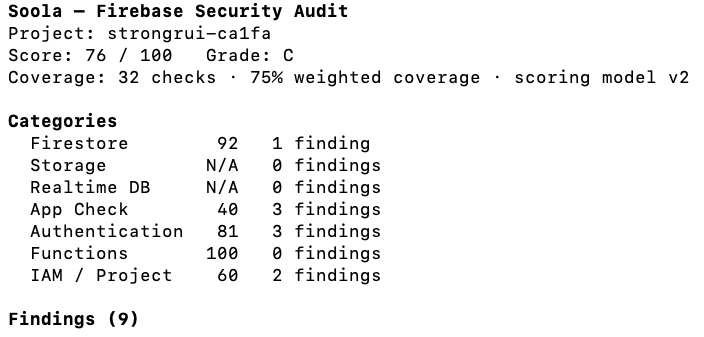
Soola collects supported security configuration locally, sends a limited security snapshot to the Soola analysis service, and returns a scored report with findings, evidence, and recommendations.
What Soola audits
Soola currently performs up to 42 checks across:
- Firestore Security Rules
- Cloud Storage Security Rules
- Firebase Authentication
- Firebase App Check
- Cloud Functions
- Realtime Database
- Google Cloud IAM and service-account posture
Checks that do not apply to a project are reported as not applicable rather than treated as passing.
Privacy & Security
Soola is designed so that your Google credentials remain on your computer.
Soola does not receive or store:
- Google credentials
- Firestore documents
- Realtime Database application data
- Cloud Storage files
- Firebase Authentication user records
- service-account private keys
- secret values
- environment-variable values
Soola receives only the limited security and configuration information required to perform the audit.
Soola is read-only. It does not modify your Firebase Rules, IAM permissions, Authentication configuration, Functions, Storage configuration, or application data.
Learn more at:
https://tamdevco.com
Google Cloud authentication
Soola uses Google Application Default Credentials (ADC) on your computer to read Firebase and Google Cloud security configuration.
If ADC is not already available, Soola can guide you through Google's authentication flow.
You can also authenticate manually:
gcloud auth application-default loginYour Google credentials are used locally and are never sent to Soola.
Account
View your current plan and allowance:
soola accountThis displays your current plan, subscription status, monthly usage, remaining scans, and reset date.
Plans
Free
- 3 scans per month
- Up to 42 security checks per scan
- Fully scored report and recommendations
Pro
- 100 scans per month
- $7/month or $70/year
Upgrade or manage billing at:
https://soola.tamdevco.com/account
Payment processing is handled by Stripe. Soola does not receive or store payment information.
JSON output
For machine-readable output:
soola account --jsonsoola scan --project my-firebase-project --jsonHow it works
When you run a scan:
- Soola checks your account and available scan quota.
- The CLI reads supported Firebase and Google Cloud security configuration locally using your Google credentials.
- A normalized security snapshot is sent to Soola's private analysis engine.
- Soola evaluates the snapshot and returns a score, findings, evidence, and recommendations.
- The report is rendered in your terminal.
Your Google credentials and application data are not sent to the Soola analysis service.
Logout
soola logoutThis removes the locally-stored Soola session from your operating system credential store.
CI & Advanced configuration
Soola supports the following environment overrides:
SOOLA_WEB_ORIGIN
SOOLA_API_ORIGIN
SOOLA_FIREBASE_API_KEY
SOOLA_REFRESH_TOKEN
For non-interactive CI environments, SOOLA_REFRESH_TOKEN can be supplied as a CI secret.
Environment-provided tokens are not written to disk.
Disclaimer
Soola is a security configuration assessment tool. It can identify common security risks and configuration issues, but no automated scanner can guarantee that a Firebase project is secure.
Soola is an independent product and is not affiliated with or endorsed by Google or Firebase.