
@tao-hpu/ccmap
v0.1.16
Published
Coding heatmap for Claude Code + Codex — scan local logs, render a GitHub-style heatmap, push aggregates to a badge endpoint.

Maintainers
 tao-hpu
Readme
ccmap
Coding heatmap for Claude Code + Codex. Scans your local CLI logs and renders a
GitHub-style contribution heatmap — in your terminal, as a local SVG/HTML report, or
published to a public report page (https://.../u/<you>) with an embeddable badge.
Privacy: only per-day token/cost counts and model names ever leave your machine. Never your prompts, code, or project names.
Install
npm i -g @tao-hpu/ccmapThat's the whole install (the command is still just ccmap). Then:
ccmap scan      # see your usage in the terminal — colored heatmap, no upload, no setup
ccmap push      # claim a name + publish → your report page at https://ccmap.fim.ai/u/<you>
ccmap start     # keep it fresh: push once a day in the background
Don't want to install? npx @tao-hpu/ccmap@latest scan runs it once, always latest.
scan/render/reportare fully local and need no setup.push/startpublish to the public badge service athttps://ccmap.fim.ai(baked in — zero config). Running your own is possible too — see Self-hosting.
Commands
Local only — no setup, nothing leaves your machine:
| Command | What it does |
| --- | --- |
| ccmap scan | Summarize local usage (tokens, est. cost, streak, model mix) + terminal heatmap. |
| ccmap render [--out f.svg] [--theme …] [--anim ember\|wave\|cascade] [--metric tokens\|cost] [--weeks 26] [--border] [--rounded] | Render a heatmap SVG locally. |
| ccmap report [--out f.html] | Render a full shareable HTML report (with a live customizer). |
Publish & keep fresh (uses the public badge service at https://ccmap.fim.ai — zero config):
| Command | What it does |
| --- | --- |
| ccmap push [--user <name>] | Publish your aggregates → prints your report page (/u/<you>: heatmap, stats, live badge customizer) and an embeddable badge SVG (/u/<you>.svg). First run auto-claims a username (prompts on a terminal, default = your OS name; set it with --user or CCMAP_USER) — no separate login step. |
| ccmap start [--foreground] | Schedule a daily background push via launchd/cron (survives logout/reboot, no terminal needed). --foreground runs an attached loop. |
| ccmap stop | Remove the scheduled push. |
| ccmap status | Show the schedule + last push. |
Housekeeping:
| Command | What it does |
| --- | --- |
| ccmap config [--interval <min>] [--metric tokens\|cost] [--theme …] [--weeks 26] | View / update saved settings in ~/.ccmap/config.json. |
| ccmap update | Self-update to the latest published version. |
| ccmap version · ccmap help | Print version / usage. |
| ccmap login --user <name> --endpoint <url> [--invite <code>] | Optional / advanced. Only needed to claim a specific username or point at a self-hosted server — plain push already auto-claims against the default service. |
Data sources
- Claude Code:
~/.claude/projects/**/*.jsonl(assistantmessage.usage) - Codex:
~/.codex/sessions/YYYY/MM/DD/rollout-*.jsonl(token_countevents)
Local history (so your heatmap keeps filling up)
Claude Code prunes its own session logs after ~30 days (cleanupPeriodDays,
default 30), and Codex has its own retention — so the raw logs are a rolling
window, not your full past. If a fresh heatmap looks sparse, that's why: the
older transcripts are already gone from disk.
To stop losing history going forward, every scan / render / report /
push snapshots each day's totals into a tiny rollup at ~/.ccmap/history.json
(a few KB/year). Once a day is recorded it stays on the heatmap even after
Claude Code deletes the raw transcript — so the map keeps lighting up over time.
This is fully automatic and local: it touches no Claude Code / Codex config,
and nothing extra leaves your machine.
Run regularly (e.g.
ccmap start, which pushes daily) so each day is captured before the 30-day prune removes it. Already-deleted history can't be recovered — it accumulates from when you start running ccmap.
Pricing
Cost is an estimate from a built-in per-model price table (USD per 1M tokens:
in input, out output, cw 5-min cache write, cr cache read, cw1h 1-hour
cache write). Defaults track current list prices — current Opus is $5/$25, Fable
5 is $10/$50. Cache reads (the dominant cost in agent loops) and the two cache-write
tiers Claude reports are all priced separately. Override any model in
~/.ccmap/config.json:
{ "pricing": { "claude-opus": { "in": 5, "out": 25, "cw": 6.25, "cr": 0.5, "cw1h": 10 } } }Updating
ccmap update # self-update to latest (same as `npm i -g @tao-hpu/ccmap@latest`)The resident daemon (ccmap start) checks npm once a day and prints when a new
version exists; set "autoUpdate": true in ~/.ccmap/config.json to auto-install.
Maintainer: build / publish / version
pnpm build                # tsc -> dist/
pnpm link --global        # dev: `ccmap` points at this working copy
npm version patch         # bump + git tag (patch | minor | major)
npm publish               # runs prepublishOnly (tsc); ships dist/ only
Published as the scoped package @tao-hpu/ccmap (the bare ccmap name is
blocked by npm for similarity to cc-map); the installed CLI command is still
ccmap. Releases use a 2FA-bypassing automation token in .env via pnpm release.
Your report page & badge
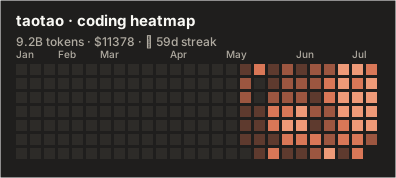
ccmap push gives you a report page at https://ccmap.fim.ai/u/<you> — the full
heatmap, stats, and a live customizer (theme / weeks / animation) that generates
ready-to-paste embed snippets, including the auto light/dark <picture> block below.
Grab the badge SVG from there, or embed it directly (GitHub renders SVG natively):
Query params
| param | values | default |
| --- | --- | --- |
| theme | claude github-dark github-light tokyo-night dracula nord (dark/light aliases) | claude |
| metric | tokens cost | tokens |
| weeks | 1..53 | 26 |
| border | true false | false |
| rounded | true false | false |
Add themes by editing the THEMES registry in src/render.ts — each is just a
palette, instantly available as ?theme=<name>.
Auto light/dark (follow the viewer's GitHub theme)
A single image URL can't detect the viewer's color mode. GitHub's official trick is
<picture> with prefers-color-scheme — serve two themed URLs and the README swaps
automatically:
<picture>
  <source media="(prefers-color-scheme: dark)"
          srcset="https://ccmap.fim.ai/u/taotao.svg?theme=github-dark">
  <source media="(prefers-color-scheme: light)"
          srcset="https://ccmap.fim.ai/u/taotao.svg?theme=github-light">
  <img src="https://ccmap.fim.ai/u/taotao.svg?theme=github-dark" alt="coding heatmap">
</picture>
Self-hosting (optional)
Most people just use the public service. But if you'd rather keep data in-house
(e.g. inside a company), the repo ships the badge server too — point the CLI at it
with ccmap login --endpoint <url> (that's the one reason to use login). Two
interchangeable backends, same API:
- Node —
src/server.ts, zero-dep JSON-file store:node dist/server.js(envCCMAP_DATA,PORT). - Cloudflare Worker —
server/, KV-backed:wrangler deploy.
Optional write gate: set PUSH_SECRET; clients pass ccmap login --invite <code>.
No accounts: your first push mints a local secret and the server stores only its
sha256, never the key itself — so back up ~/.ccmap/config.json.
Status
- ✅ Local:
scan/render/report/login/push/start— verified against real logs. - ✅ Server: live at
https://ccmap.fim.ai(Node,src/server.ts) — claim, per-user auth, badge + HTML report all verified end-to-end. Cloudflare Worker (server/) is an interchangeable alternative. - ⏳ PNG route (
/u/:user.png): SVG covers GitHub/Notion/Slack. PNG (for X/Twitter) is one dep away — add@resvg/resvg-wasmand a.pngroute. - 💡 Ideas backlog: leaderboard, "AI Wrapped" recap card, model fingerprint, streak-only mini badge.