
@tars/node-agent
v2.2.2
Published
TARS Framework Node.js Launcher
Downloads
162


Readme
@tars/node-agent
为了让 Node.js 应用可以运行于 TARS 框架中, node-agent 将作为启动器来启动应用,提供生产环境所需的服务特性。
它主要提供了如下的功能:
- 内置负载均衡(通过 Cluster 模块实现)
- 异常退出的监控与拉起
- 日志搜集与处理
- 支持TARS平台的管理命令
- 支持 HTTP(s) 服务监控上报(在 TARS 平台上运行)
- 支持服务用量上报(在 TARS 平台上运行)
安装
npm install @tars/node-agent -g
由于
node-agent是一个 CLI 程序,所以一般需要使用 -g 参数来安装
用法
node-agent app.js [options]
例子
执行 app.js 文件:
$ node-agent app.js
以 TARS 服务的配置文件来启动:
$ node-agent app.js --config MTT.Test.conf
启动并命名应用为 MTT.Test:
$ node-agent app.js --name MTT.Test
定义日志输出路径
$ node-agent app.js --log ./logs/
传递子进程 node 的启动参数:
$ node-agent app.js --node-args="--debug=7001"
定义子进程数量:
$ node-agent app.js -i 4
入口点
node-agent 启动时传入的第二个参数用来指定服务脚本执行的入口点文件,其中:
可以直接传入脚本文件用于执行,如
./app.js也可以传入脚本文件所在的目录,如
./
当传入的为目录时,入口点根据如下顺序进行确认:
- 目录中存在
package.json文件,则:- 查找
nodeAgent.main - 查找
script.start(此配置节需要以node打头才可识别) - 查找
main
- 查找
- 查找目录中是否存在:
server.js、app.js、start.js、index.js
只要其中的一项匹配则作为入口点文件来执行,并不再往下匹配。
选项
Options:
-h, --help output usage information
-V, --version output the version number
-c, --config specify tars config file. NOTE: independent config will be override this
-n, --name set a for script - e.g. app.servername
-l, --log specify log file
-i, --instances launch [number] instances (for networked app)(load balanced)
--env <environment_name> specify environment to get specific env variables (for JSON declaration)
--http-address <http_address> specify http ip:port address to pass to script - e.g. 127.0.0.1:80
--script-args <script_args> space delimited arguments to pass to script - e.g. --use="https"
--node-args <node_args> space delimited arguments to pass to node - e.g. --node-args="--debug=7001 --trace-deprecation"
--run-as-user <run_as_user> The user or uid to run a managed process as
--run-as-group <run_as_group> The group or gid to run a managed process as
--max-memory-restart specify max memory amount used to autorestart (in megaoctets)
--graceful-shutdown specify graceful shutdown timeout (in millisecond), default is 8000ms
--exception-max <exp_max> The program will be terminated if an exceeding max exception count, default is 5
--exception-time <exp_time> The program will be terminated if an exception occurs within a particular period of time, default is 5000ms
--keepalive-time <detect_time> specify the interval for detecting the worker which could be set to [off] if you want to debug and the default value is 60s
--applog-max-files <applog_max_files> specify max number of rolling log, default is 10
--applog-max-size <applog_max_size> specify max file size for each rolling log, use human readable unit in [K|G|M], default is 10M
--applog-level <applog_level> define log level, default is DEBUG
--tars-node <tars_node> set tars node conncetion string, agent would send notifications to tars node - e.g. tars.tarsnode.ServerObj@tcp -h 127.0.0.1 -p 10000 -t 60000
--tars-local <tars_local> set local interface setup string, agent would receive the notifications from tars node - e.g. tcp -h 127.0.0.1 -p 10000 -t 3000
--tars-monitor <tars_monitor> enable or disable service monitor running in tars platform, and the default value is on
--tars-monitor-http-threshold <http_threshold> if the http(s) status code is large than the preseted threshold then this request will be considered error. default threshold is 400, set it "off" to disabled
--tars-monitor-http-seppath <http_seppath> separate url pathname as interface name, default is on
--tars-monitor-http-socketerr <http_socketerr> considered socket error as error, default is on
--long-stack <long_stack> enable long stack trace to auto append asynchronous stack, default is off
--long-stack-filter-usercode <stack_usercode> filter long stack trace keep user module code only, default is off
-c, --config
如果此服务为 TARS 服务,可在此指定服务的配置文件。
配置文件将会自动读入作为基础配置,通过设置其他的配置参数可覆盖读入的基础配置。
-n, --name
可在此指定服务名。
- 如未配置,则使用 脚本的文件名
- 如为 TARS 服务,则服务名必须为 app.serverName 格式
-l, --log
指定输出的日志文件根目录
如未配置,则所有日志输出采用 stdout/stderr 输出
-i, --instances
node-agent 采用 Node.js 原生的 Cluster 模块来实现负载均衡。
可在此配置 node-agent 启动的子进程(业务进程)数量:
未配置(或配置为
auto、0),启动的子进程数量等于CPU 物理核心个数。配置为
max,启动的子进程数量等于 CPU 个数(所有核心数)。
如果 node-agent 是由 tarsnode 启动的,会自动读取TARS配置文件中的 tars.application.client.asyncthread 配置节。
也可通过 TARS平台 -> 编辑服务 -> 异步线程数 进行调整。
--env
设置服务启动时的 环境变量 , 这里需要使用 JSON 格式进行描述
例如:可以通过这个配置来传入当前的运行环境(开发、生产)
{\"NODE_ENV\":\"production\"}请注意:当作为命令行参数传递时,这里的双引号(")需要进行转义(")
如果此服务为 TARS 服务,则此参数以 tarsnode 可识别的方式读取并设置。
--http-address
设定服务脚本执行所需的 ip:port
在脚本中可以使用环境变量 HTTP_IP(IP)、HTTP_PORT(PORT) 进行获取
process.env.HTTP_IP
process.env.HTTP_PORT
如果此服务为 TARS 服务,则这里的值为配置文件中,第一个非TARS协议的 Servant 指明的 ip:port
--script-args
设置服务脚本执行所需传入的参数
例如:
$ node-agent app.js --script-args="--use="https"
等同于
$ node app.js --use="https"
--node-args
设置 node cluster 子进程所需的启动参数
例如:
$ node-agent app.js --node-args="--debug=7001 --trace-deprecation"
等同于
$ node --debug=7001 --trace-deprecation app.js
--run-as-user, --run-as-group
指定 node cluster 子进程运行的用户(组)
可通过此对服务脚本进行降权执行,如未配置权限等同于 node-agent 启动用户(组)
--max-memory-restart
指定服务所能使用到的最大内存。
如果子进程达到最大内存限制,将会抛出异常并退出。此 (资源形) 异常 也会纳入整体的异常进行处理。
--graceful-shutdown
正常情况下,node-agent 在停止服务(进程)时会通过 worker.disconnect() 通知服务,让服务释放资源并退出。
在这里可以设置超时时间,如果服务(进程)在给定的时间后仍然没有退出,node-agent 则会强制 kill 掉进程。
超时时间默认为 8 秒
如果 node-agent 是由 tarsnode 启动的,会自动读取TARS配置文件中的 tars.application.server.deactivating-timeout 配置节。
--exception-max, --exception-time
如果(服务)子进程出现异常退出,并在一段时间内 (--exception-time) 异常退出的次数没有超过最大值 (--exception-max) 。node-agent 将会自动拉起新的(服务)子进程,否则 node-agent 与服务也将异常退出。
以方便第三方管理工具对服务状态进行监控
--exception-time 默认值为 10s
--exception-max 默认值为 2次
--keepalive-time
如果 node-agent 在一段时间(--keepalive-time)内未收到(服务)子进程发送的心跳,则判定此(服务)子进程为僵尸进程(zombie process),将会直接杀死 kill,并作为异常进行处理。
当服务器 可用内存 过小时不触发此逻辑。
如果您想对服务脚本进行(断点)调试,这需将此设置成为 --keepalive-time=off
其默认值为 5m
--applog-max-files, --applog-max-size, --applog-level
指定服务默认的滚动 日志大小 (--applog-max-size) 、 总数 (--applog-max-files) 与 日志级别 (--applog-level) 。
服务的启动时会创建两份主(滚动)日志:
- app.serverName.log: 所启动服务的
stdout/stderr/console - app.serverName_agent.log:
node-agent的状态信息
这个配置主要影响上面两份主(滚动)日志的输出参数
详见 日志 节
--tars-node, --tars-local
如果 node-agent 是由 tarsnode 启动的,则需要指定 tarsnode 的 RPC 连接参数 (--tars-node) 与本地被调的启动参数 (--tars-local)。
此设置也可通过 TARS配置文件 (--tars-config) 进行指定。
node-agent 会在服务启动时向 tarsnode 上报服务的版本,并在服务运行过程中发送心跳包。
与此同时,node-agent 本地启动的(被调)服务也将从 tarsnode 中接收下发的消息(shutdown/message),并进行响应。
--tars-monitor
如果您的服务是在 TARS 平台上运行的,node-agent 会自动向 tarsstat 上报服务的监控(用量)信息。
默认值为 on,设置为 off 可关闭自动上报功能。
具体详情可查看 监控与用量上报 节。
--tars-monitor-http-threshold
如果您的服务的 HTTP(s) 返回码大于此阈值则此次请求将作为异常访问进行上报。
默认 response.statusCode >= 400 则为异常访问。
设置为 off 可关闭此特性。
具体详情可查看 监控与用量上报 节。
--tars-monitor-http-seppath
HTTP(s) 服务在上报时是否需要区分不同路径。
默认为区分路径,其中 url.pathname 的部分会作为服务的接口名进行上报。
如果您的服务拥有非常多(大基数)的 pathname(如 RESTful),可设置成为 off。
具体详情可查看 监控与用量上报 节。
--tars-monitor-http-socketerr
在默认情况下,HTTP(s) 服务在进行上报时会将 Socket 异常 作为异常访问。
如您想关闭此特性,可设置成为 off
--long-stack, --long-stack-filter-usercode
开启此特性后,会在异常产生时自动附加异步调用堆栈,帮助快速定位异步调用问题。
如您想过滤出用户代码(模块)所产生的堆栈,可以开启 --long-stack-filter-usercode 。
此特性要求 Node.js 版本需大于 v8.2.x
此特性会造成性能损耗,性能敏感代码请勿开启。
具体详情可查看 LongStack 说明。
配置
node-agent 支持以多种配置方式进行启动:
- 命令行参数进行指定
- 在服务脚本的
package.json中指定 - 在
TARS服务的配置文件中指定
其中:
- 在
package.json或TARS配置文件中指定的值,会覆盖掉命令行参数中所指定的配置项。 - 可以通过驼峰式写法将配置参数声明在
package.json中nodeAgent的配置节。 - 在
TARS服务的配置文件中以配置参数原型直接进行声明
例如(以 nobody 用户启动子进程):
命令行参数:
node-agent app.js --run-as-user=nobody
package.json:
{
 "nodeAgent" : {
   "runAsUser" : "nobody"
 }
}
TARS 配置文件:
<tars>
 <application>
   <server>
     run-as-user=nobody
   </server>
 </application>
</tars>
消息与事件
一般情况下,用户代码无需处理(关注)进程消息与事件,但如果您想处理(响应):进程退出、TARS管理命令,则需要进行处理。
process.on('disconnect', function)
关于此事件具体说明请参考 Cluster Event: 'disconnect'
默认情况下 node-agent 会对该事件进行处理,但如果用户代码监听(处理)了该事件则 node-agent 将不再进行处理。
请注意:您在处理完该事件后,请一定显示调用 process.exit() 以确保进程可以正常退出
process.on('message', object)
一旦 node-agent 收到了来自于 tarsnode 的管理命令,将会通过进程消息发送给业务脚本。
传递的消息 object 的格式为:
{
  cmd : String,
  data : String
}
支持的消息 cmd 有:
- tars.viewstatus : 查看服务状态
- tars.setloglevel : 设置日志等级
- tars.loadconfig : PUSH配置文件
- tars.connection : 查看当前链接情况
- 自定义命令
存在有 data 的 cmd 有:
- tars.setloglevel :
INFO、DEBUG、WARN、ERROR、NONE - tars.loadconfig : 配置文件名
- 自定义命令
- process.msg:[all|worker_id] : 跨进程自定义消息对象
* node-agent 会对 自定义命令 进行切分,命令中第一个空格前的字符作为 cmd,而后续的部分则作为 data
process.send(object)
发送命令给主进程以便主进程执行特定的操作。
传递的消息 object 的格式与收到的消息格式相同。
cmd = process.msg:[all|worker_id]
通过此命令,可以将自定义消息发送给参数指定的子进程。
- all : 发送给所有子进程(包括自己)
- worker_id : 发送给特定的子进程,其中 worker_id 为
进程顺序 ID(process.env.WORKER_ID)
所有消息均会通过主进程中转,在大消息量下主进程易成为性能瓶颈,请谨慎使用!
日志
node-agent 会将服务的输出(stdout|stderr 管道以及 console 模块的输出)重定向到指定的文件(当使用 -l --log 参数启动时)或者管道。
日志的输出由 winston-tars 模块实现,其输出的日志格式为:日期 时间|PID|日志级别|文件名:行号|内容
服务脚本可以通过 node 自带的 console 模块输出不同级别的日志。
console.info = INFO
console.log = DEBUG
console.warn = WARN
console.error = ERROR
也可通过服务的 stdout|stderr 管道输出。
process.stdout = INFO
process.stderr = ERROR
日志级别的优先级为: INFO < DEBUG < WARN < ERROR < NONE
其中,默认的日志级别为:DEBUG
环境变量
node-agent 通过环境变量向服务脚本提供所需的变量:
process.env.IP:HTTP(s) 可监听的 IP。process.env.PORT:HTTP(s) 可监听的端口。process.env.WORKER_ID进程顺序 ID(例如启动 8 个进程,第一个为0,第二个为1,以此类推),重新启动的进程仍然使用之前的 ID。
如服务是由 tarsnode 启动的,还支持如下变量:
process.env.TARS_CONFIG:启动服务所使用的TARS配置文件所在的绝对路径。process.env.TARS_MONITOR:是否开启监控(特性)上报(统计)。
请注意:环境变量全为 String 类型
监控与用量上报
如果您的服务是在 TARS 平台上运行的,node-agent 会自动向 tarsstat 上报服务的监控(用量)信息。
监控信息
监控信息的上报与您启动的服务及其调用者有关(可通过 TARS平台 -> 服务监控 查看):
- HTTP(s)
- 服务端:response.statusCode >= 400 为失败,所有请求的超时为 0
更多详情您可访问 @tars/monitor.stat 获取。
用量信息
无论您启动的服务是什么类型,用量信息总是上报(可通过 TARS平台 -> 特性监控 查看):
- memoryUsage: 内存用量,将会上报
rss、heapUsed、heapTotal这三个用量(单位为字节) - cpuUsage: CPU用量,将会上报CPU使用率,数据汇总为逻辑单核(单位为百分比)
- eventloopLag: 事件循环滞后(V8消息队列延迟),每隔2秒采样(单位为毫秒)
- libuv: I/O用量,将会上报
activeHandles、activeRequests这两个用量
所有的用量信息的统计策略均为 Avg、Max、Min
无损操作
如果您的服务是在 TARS 平台上运行的,每次无损重启或发布时:
- 设置流量状态为无流量(包括路由和第三方流量)
- 等待调用方获取配置(默认为 2分13秒)
- 执行对应操作(重启或发布)
- 恢复流量状态
请注意:如果大量节点同时进行无损操作,会同时屏蔽这些节点的流量,可能会造成服务不稳定。建议采用无损分批重启。
预热
在无损操作的服务启动过程中,可以选择是否需要进行预热:
- 服务启动后每秒检查是否所有子进程都监听了端口(所有子进程状态均为 ONLINE)
- 如果超过预热超时时间,且并非所有子进程都监听了端口,则无损操作流程失败并通知用户(邮件通知)
我们强烈建议您:在任何情况下,请完成所有初始化操作后再监听(listen)端口。
架构
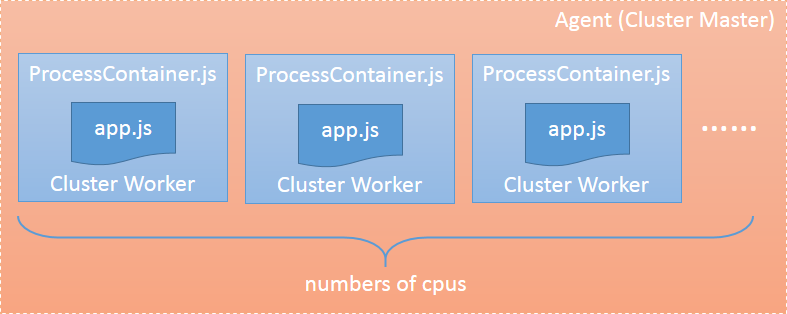
node-agent 在启动(也就是执行 cluster.fork)服务脚本时,并不会直接载入对应脚本,而是载入 node-agent/ProcessContainer.js 来对服务脚本进行包装,之后再调用系统的 require 载入执行脚本