
@tasopen/mcp-alphabanana
v1.4.3
Published
MCP server for image generation using Google Gemini AI

Maintainers
 tasopen
Readme
mcp-alphabanana


English | 日本語
mcp-alphabanana is a Model Context Protocol (MCP) server for generating image assets with Google Gemini. It is built for MCP-compatible clients and agent workflows that need fast image generation, transparent outputs, reference-image guidance, and flexible delivery formats.
Keywords: MCP server, Model Context Protocol, Gemini AI, image generation, FastMCP
Key capabilities:
- Ultra-fast Gemini image generation across Flash and Pro tiers
- Transparent PNG/WebP asset output for web and game pipelines
- Multi-image style guidance with local reference image files
- Flexible file, base64, or combined outputs for agent workflows
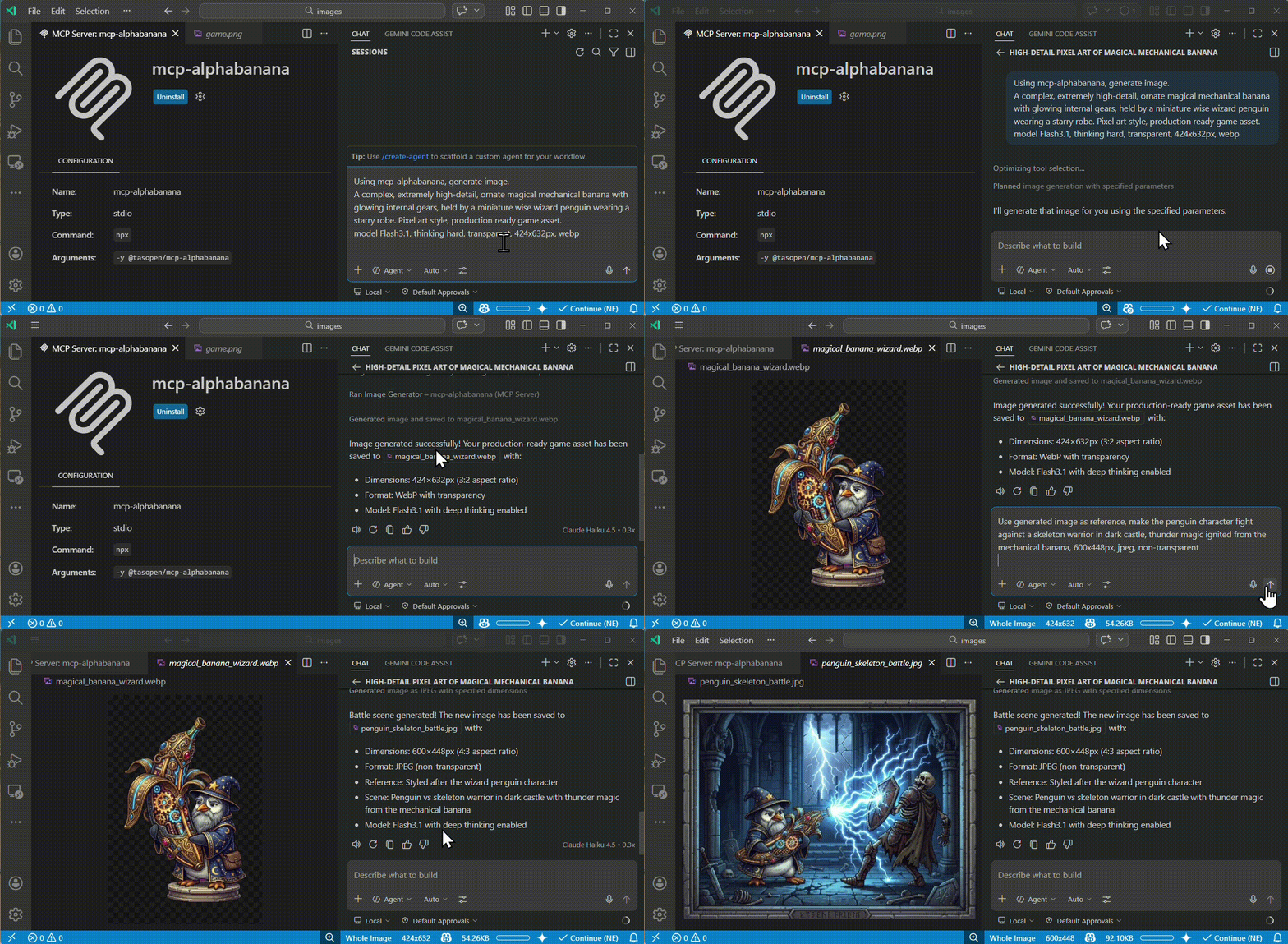
Quick Start
Run the MCP server with npx:
npx -y @tasopen/mcp-alphabananaDownload the latest MCPB bundle for Claude Desktop or registry ingestion:
https://github.com/tasopen/mcp-alphabanana/releases/latest/download/mcp-alphabanana-latest.mcpbGitHub Releases is the canonical distribution channel for .mcpb bundles. Each release publishes both a versioned asset and the stable mcp-alphabanana-latest.mcpb filename.
Or add it to your MCP configuration:
{
  "mcp": {
    "servers": {
      "alphabanana": {
        "command": "npx",
        "args": ["-y", "@tasopen/mcp-alphabanana"],
        "env": {
          "GEMINI_API_KEY": "${env:GEMINI_API_KEY}"
        }
      }
    }
  }
}
Set GEMINI_API_KEY before starting the server.
Claude Registry
The Claude registry / MCPB package metadata is defined in manifest.json and ships with the static 512x512 icon at images/mcp-alphabanana.png.
Native sharp runtime packages are declared as optional dependencies so .mcpb installs can resolve the correct prebuilt binary on each supported platform without relying on postinstall hooks.
- Stable MCPB URL:
https://github.com/tasopen/mcp-alphabanana/releases/latest/download/mcp-alphabanana-latest.mcpb - Versioned MCPB URL pattern:
https://github.com/tasopen/mcp-alphabanana/releases/download/vVERSION/mcp-alphabanana-VERSION.mcpb - Support: GitHub Issues
MCP Server
This repository provides an MCP server that enables AI agents to generate images using Google Gemini.
It can be used with MCP-compatible clients such as:
- Claude Desktop
- VS Code MCP
- Cursor
Built with FastMCP 3 for a simplified codebase and flexible output options.
Glama MCP Server badge:
Available Tools
generate_image
Generates images using Google Gemini with optional transparency, local reference images, grounding, and reasoning metadata.
For Claude Desktop, prefer outputType=file for medium or large images. base64 and combine responses consume Claude context and can hit the client's size limit. On Windows, use the FileSystem extension to choose a writable absolute outputPath and any local referenceImages paths.
Key parameters:
prompt(string): description of the image to generatemodel:Flash3.1,Flash2.5,Pro3,flash,prooutputWidthandoutputHeight: requested final image size in pixels in normal modenoresize+aspectRatio+output_resolution: return Gemini native size without resizingoutput_resolution:0.5K,1K,2K,4Koutput_format:png,jpg,webpoutputType:file,base64,combineoutputPath: required whenoutputTypeisfileorcombinetransparent: enable transparent PNG/WebP post-processingreferenceImages: optional array of local reference image filesgrounding_typeandthinking_mode: advanced Gemini 3.1 controls
Model Selection
| Input Model ID | Internal Model ID | Description |
| --- | --- | --- |
| Flash3.1 | gemini-3.1-flash-image-preview | Ultra-fast, supports Thinking/Grounding. |
| Flash2.5 | gemini-2.5-flash-image | Legacy Flash. High stability. Low cost. |
| Pro3 | gemini-3.0-pro-image-preview | High-fidelity Pro model. |
| flash | gemini-3.1-flash-image-preview | Alias for backward compatibility. |
| pro | gemini-3.0-pro-image-preview | Alias for backward compatibility. |
Parameters
Full parameter reference for the generate_image tool.
| Parameter | Type | Default | Description |
|-----------|------|---------|-------------|
| prompt | string | required | Description of the image to generate |
| outputFileName | string | required | Output filename (extension auto-added if missing) |
| outputType | enum | combine | file, base64, or combine |
| model | enum | Flash3.1 | Model: Flash3.1, Flash2.5, Pro3, flash, pro |
| output_resolution | enum | auto | 0.5K, 1K, 2K, 4K; required when noresize=true |
| noresize | boolean | false | Skip post-generation resize and return Gemini native dimensions |
| aspectRatio | enum | optional | Required when noresize=true; e.g. 1:1, 16:9, 4:5 |
| outputWidth | integer | required unless noresize=true | Final output width in pixels |
| outputHeight | integer | required unless noresize=true | Final output height in pixels |
| output_format | enum | png | png, jpg, webp |
| outputPath | string | required for file / combine | Absolute output directory path |
| transparent | boolean | false | Transparent background (PNG/WebP only) |
| transparentColor | string or null | null | Color key override for transparency extraction |
| colorTolerance | integer | 30 | Transparency color matching tolerance |
| fringeMode | enum | auto | auto, crisp, hd |
| resizeMode | enum | crop | crop, stretch, letterbox, contain |
| grounding_type | enum | none | none, text, image, both (Flash3.1 only) |
| thinking_mode | enum | minimal | minimal, high (Flash3.1 only) |
| include_thoughts | boolean | false | Return model reasoning fields when metadata is enabled |
| include_metadata | boolean | false | Include grounding and reasoning metadata in JSON output |
| referenceImages | array | [] | Up to 14 local reference files (Flash3.1/Pro3), 3 for Flash2.5 |
| debug | boolean | false | Save intermediate debug artifacts |
Why alphabanana?
- Zero Watermarks: API-native clean images.
- Thinking/Grounding Support: Higher prompt adherence and search-backed accuracy.
- Production Ready: Supports transparent WebP and exact aspect ratios for web and game assets.
Features
- Ultra-fast image generation (Gemini 3.1 Flash, 0.5K/1K/2K/4K)
- Advanced multi-image reasoning (up to 14 reference images)
- Thinking/Grounding support (Flash3.1 only)
- Transparent PNG/WebP output (color-key post-processing, despill)
- Multiple output formats: file, base64, or both
- Flexible resize modes: crop, stretch, letterbox, contain
- Multiple model tiers: Flash3.1, Flash2.5, Pro3, legacy aliases
Example Outputs
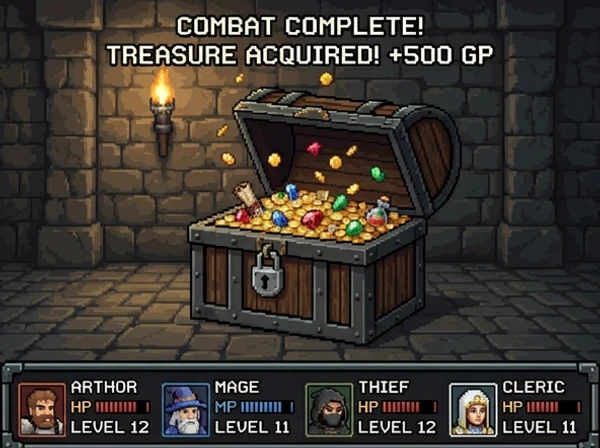
These sample outputs were generated with mcp-alphabanana and stored in images/examples.
| Pixel art asset | Reference-image game scene | Photorealistic generation |
| --- | --- | --- |
|  |
|  |
|  |
|
Configuration
Configure the GEMINI_API_KEY in your MCP configuration (for example, mcp.json).
Examples:
- Reference an OS environment variable from
mcp.json:
{
  "env": {
    "GEMINI_API_KEY": "${env:GEMINI_API_KEY}"
  }
}- Provide the key directly in
mcp.json:
{
  "env": {
    "GEMINI_API_KEY": "your_api_key_here"
  }
}
VS Code Integration
Add to your VS Code settings (.vscode/settings.json or user settings), configuring the server env in mcp.json or via the VS Code MCP settings.
{
  "mcp": {
    "servers": {
      "mcp-alphabanana": {
        "command": "npx",
        "args": ["-y", "@tasopen/mcp-alphabanana"],
        "env": {
          "GEMINI_API_KEY": "${env:GEMINI_API_KEY}"
        }
      }
    }
  }
}
Optional: Set a custom fallback directory for write failures by adding MCP_FALLBACK_OUTPUT to the env object.
Usage Examples
Basic Generation
{
  "prompt": "A pixel art treasure chest, golden trim, wooden texture",
  "model": "Flash3.1",
  "outputFileName": "chest",
  "outputType": "base64",
  "outputWidth": 64,
  "outputHeight": 64,
  "transparent": true
}
Native Size Without Resize
{
  "prompt": "A clean app icon with a banana mascot, flat graphic design",
  "model": "Flash3.1",
  "outputFileName": "banana-icon-native",
  "outputType": "base64",
  "noresize": true,
  "aspectRatio": "1:1",
  "output_resolution": "0.5K",
  "output_format": "png"
}
This mode returns the Gemini native pixel size for the requested ratio and resolution. For example, 1:1 + 0.5K returns 512x512 without any resize pass.
Advanced (Vertical poster and thinking)
{
  "prompt": "A vertical, photorealistic travel poster advertising Magical Wings Day Tours. A joyful young couple flies high above a breathtaking European countryside at golden hour, holding hands as they soar through a partly cloudy sky. Below them are vineyards, villages, forests, a winding river, and a hilltop medieval castle. The poster uses large, elegant typography with the headline FLY THE COUNTRYSIDE at the top and Magical Wings Day Tours branding near the bottom.",
  "model": "Flash3.1",
  "output_resolution": "1K",
  "outputFileName": "photoreal-travel-poster",
  "outputType": "file",
  "outputPath": "/path/to/output",
  "outputWidth": 848,
  "outputHeight": 1264,
  "output_format": "jpg",
  "thinking_mode": "high",
  "include_metadata": true
}
Grounding Sample (Search-backed)
{
  "prompt": "A modern travel poster featuring today's weather and skyline highlights in Kuala Lumpur",
  "model": "Flash3.1",
  "outputFileName": "kl_travel_poster",
  "outputType": "base64",
  "outputWidth": 1024,
  "outputHeight": 1024,
  "grounding_type": "text",
  "thinking_mode": "high",
  "include_metadata": true,
  "include_thoughts": true
}
This sample enables Google Search grounding and returns grounding and reasoning metadata in JSON.
With Reference Images
{
  "prompt": "Use the reference image to create a game screen showing an opened treasure chest filled with coins and treasure, 8-bit dungeon crawler style, after-battle reward scene, dungeon corridor background, four-party status UI at the bottom",
  "model": "Flash3.1",
  "output_resolution": "0.5K",
  "outputFileName": "reference-image-dungeon-loot",
  "outputType": "file",
  "outputPath": "/path/to/output",
  "outputWidth": 600,
  "outputHeight": 448,
  "output_format": "webp",
  "transparent": false,
  "referenceImages": [
    {
      "description": "Treasure chest style reference",
      "filePath": "/path/to/references/pixel-art-treasure-chest.png"
    }
  ]
}
Transparency & Output Formats
- PNG: Full alpha, color-key + despill
- WebP: Full alpha, better compression (Flash3.1+)
- JPEG: No transparency (falls back to solid background)
Development
# Development mode with MCP CLI
npm run dev

# MCP Inspector (Web UI)
npm run inspect

# Build for production
npm run build
License
MIT