
@tavosud/sky-notifications
v1.0.5
Published
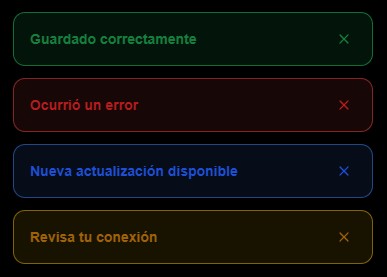
Lightweight zero-dependency toast notification library for React


Readme
sky-notifications






Lightweight, zero-dependency toast notification library for React. No CSS frameworks required — styles are injected automatically.
Technologies
| | |
|---|---|
| React ≥ 18 | Hooks-based API (useNotification) |
| TypeScript | Full type definitions included — works in JS and TS projects |
| tsup | Dual ESM + CJS build output |
| Plain CSS | Styles injected once into <head> at runtime, no stylesheet imports needed |
Features
- 4 notification types:
success,error,info,warning - Auto-dismiss with configurable duration (default 3 s)
- Manual dismiss via close button — cancels the auto-dismiss timer
- 100% responsive — full-width bottom bar on mobile, fixed top-right panel on tablet/desktop
- Slide-in animation (from bottom on mobile, from right on desktop)
- Respects
prefers-reduced-motion— animations disabled for users who prefer it backdrop-filterblur glass effect- No memory leaks — all timers are cancelled on unmount
- SSR safe — style injection skipped when
documentis unavailable - Zero runtime dependencies (React is a peer dependency)
- Compatible with Vite, Next.js, Remix, Astro, CRA, and any other bundler
Installation
npm install @tavosud/sky-notificationsSetup
Vite / CRA — JavaScript (JSX)
// main.jsx
import { NotificationProvider } from '@tavosud/sky-notifications';

ReactDOM.createRoot(document.getElementById('root')).render(
  <NotificationProvider>
    <App />
  </NotificationProvider>
);
Vite / CRA — TypeScript (TSX)
// main.tsx
import { NotificationProvider } from '@tavosud/sky-notifications';

ReactDOM.createRoot(document.getElementById('root')!).render(
  <NotificationProvider>
    <App />
  </NotificationProvider>
);
Next.js App Router
NotificationProvider requiere ser Client Component. En Next.js App Router, metadata y 'use client' no pueden coexistir en el mismo archivo, por lo que hay que crear un componente wrapper separado.
1. Crear app/providers.tsx:
// app/providers.tsx
'use client';

import { NotificationProvider } from '@tavosud/sky-notifications';

export function Providers({ children }: { children: React.ReactNode }) {
  return <NotificationProvider>{children}</NotificationProvider>;
}
2. Usar <Providers> en app/layout.tsx (sin 'use client'):
// app/layout.tsx
import type { Metadata } from 'next';
import { Providers } from './providers';

export const metadata: Metadata = {
  title: 'Mi App',
};

export default function RootLayout({ children }: { children: React.ReactNode }) {
  return (
    <html lang="en">
      <body>
        <Providers>{children}</Providers>
      </body>
    </html>
  );
}
¿Por qué? export const metadata solo funciona en Server Components. 'use client' y metadata no pueden estar en el mismo archivo en Next.js App Router.
Usage
JavaScript (JSX)
import { useNotification } from '@tavosud/sky-notifications';

function MyComponent() {
  const { addNotification } = useNotification();

  return (
    <>
      <button onClick={() => addNotification('Saved!', 'success')}>Success</button>
      <button onClick={() => addNotification('Something went wrong', 'error')}>Error</button>
      <button onClick={() => addNotification('Update available', 'info')}>Info</button>
      <button onClick={() => addNotification('Check your connection', 'warning', 5000)}>Warning</button>
    </>
  );
}
TypeScript (TSX)
import { useNotification, NotificationType } from '@tavosud/sky-notifications';

function MyComponent() {
  const { addNotification } = useNotification();

  const notify = (message: string, type: NotificationType) => {
    addNotification(message, type);
  };

  return (
    <>
      <button onClick={() => notify('Saved!', 'success')}>Success</button>
      <button onClick={() => notify('Something went wrong', 'error')}>Error</button>
      <button onClick={() => notify('Update available', 'info')}>Info</button>
      <button onClick={() => addNotification('Check your connection', 'warning', 5000)}>Warning</button>
    </>
  );
}
API
<NotificationProvider>
Context provider that must wrap the part of the tree where notifications are used. Renders the toast container automatically.
useNotification()
Returns:
| Method | Signature | Description |
|--------|-----------|-------------|
| addNotification | (message: string, type: NotificationType, duration?: number) => void | Show a toast. Default duration is 3000 ms |
| removeNotification | (id: string) => void | Dismiss a specific toast by id |
NotificationType
type NotificationType = 'success' | 'error' | 'info' | 'warning';Responsive behavior
| Breakpoint | Position | Width | Animation |
|---|---|---|---|
| < 480px | Bottom, full width | 100% (with 0.75rem side margin) | Slides up |
| ≥ 480px | Top-right corner | 360px fixed | Slides in from right |
License
MIT