
@technote-space/register-grouped-format-type
v2.2.3
Published
gutenberg's helper to register format type


Readme
Register Grouped Format Type





Read this in other languages: English, 日本語.
これは グループ化された RichText フォーマットタイプを登録する方法を提供する Gutenberg のライブラリです。
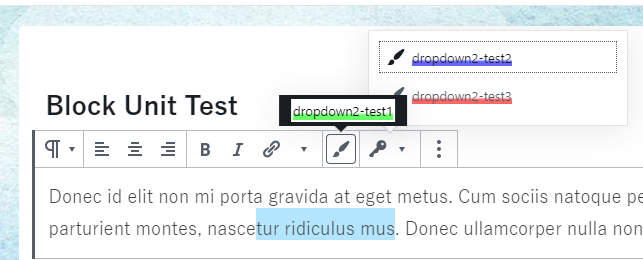
同じグループのフォーマットタイプが複数ある場合に DropDown によってまとまります。
コントロールはフォーマットを切り替えることができるときのみアクティブになります。
Table of Contents
サンプルプロジェクト
使用方法
yarn add @technote-space/register-grouped-format-typee.g. assets/register.js
import { RichText } from '@technote-space/register-grouped-format-type';
import { Helpers } from '@technote-space/gutenberg-utils';

const { registerGroupedFormatType } = RichText;
const { getToolbarButtonProps } = Helpers;

/** register grouped format types
 *
 * - test1 (⇒ not dropdown)
 *     |- format-test1
 *
 * - test2 (⇒ dropdown)
 *     |- format-test2
 *     |- format-test3
 */
registerGroupedFormatType( getToolbarButtonProps( 'test1', 'format-test1', 'admin-customizer' ) );
registerGroupedFormatType( getToolbarButtonProps( 'test2', 'format-test2', 'admin-customizer' ) );
registerGroupedFormatType( getToolbarButtonProps( 'test2', 'format-test3', 'admin-customizer' ) );
<script type="text/javascript" src="/assets/register.js"></script>グループ設定を使用
グループのアイコン、ラベル、ポジションなどの設定をカスタマイズできます。
import { RichText } from '@technote-space/register-grouped-format-type';

const { registerFormatTypeGroup } = RichText;

// register format type group setting
registerFormatTypeGroup( 'test2', {
	icon: 'admin-network',
} );
インスペクタを使用
import { RichText } from '@technote-space/register-grouped-format-type';
import { Helpers } from '@technote-space/gutenberg-utils';

const { registerFormatTypeGroup, registerGroupedFormatType, getRemoveFormatButton } = RichText;
const { getColorButtonProps, getFontSizesButtonProps } = Helpers;

// register format group for inspector
registerFormatTypeGroup( 'inspector', {
	inspectorSettings: {
		title: 'test inspector',
		initialOpen: true,
	},
	// set useContrastChecker = true to show ContrastChecker
	useContrastChecker: true,
	// set additional inspector (function: args => component)
	additionalInspectors: [ getRemoveFormatButton( 'remove all formats' ) ],
} );

// register format type
registerGroupedFormatType( getColorButtonProps( 'inspector', 'font-color', 'Font Color', 'admin-site', 'color' ) );
registerGroupedFormatType( getColorButtonProps( 'inspector', 'background-color', 'Background Color', 'editor-textcolor', 'background-color' ) );
registerGroupedFormatType( getFontSizesButtonProps( 'inspector', 'font-size', 'Font Size', 'edit' ) );
関数
registerGroupedFormatType
グループ化されたフォーマットタイプを追加します。
定義
/**
 * @param {string} name name
 * @param {string} title title
 * @param {string} tagName tag name
 * @param {string} className class name
 * @param {function?} create create component function
 * @param {function?} createInspector create inspector component function
 * @param {string?} group group
 * @param {string?} inspectorGroup inspector group
 * @param {object} settings settings
 * @return {object|null} registered settings
 */
registerGroupedFormatType( {
	name,
	title = name,
	tagName = 'span',
	className = name,
	create,
	createInspector,
	group = name,
	inspectorGroup,
	...settings
} )
引数
- name (required)
- フォーマット名
- 詳細
- title
- フォーマットタイトル
- 詳細
- tagName
- タグ名
- 詳細
- className
- クラス名
- 詳細
- 複数のクラスを指定可能です (スペース区切り)。
- create (required)
ToolbarButtonのようなコンポーネントを返す関数を指定します。
- group (required)
- グループ名
- 同じグループ名のアイテムが複数ある場合に DropDown によってまとまります。
registerFormatTypeGroup
フォーマットタイプグループの設定を行います。
定義
/**
 * @param {string} name group name
 * @param {object} setting setting
 * @returns {object} registered setting
 */
registerFormatTypeGroup( name, setting = {} )
引数
- name (required)
- グループ名
- setting
- グループ設定
default setting
{
	icon: 'admin-customizer',
	position: 'top right',
	label: name,
	className: undefined,
	menuClassName: undefined,
	inspectorSettings: {},
	toolbarGroup: undefined,
	useContrastChecker: false,
	additionalInspectors: [],
}
WPの依存
- wp-block-editor
- wp-components
- wp-data
- wp-element
- wp-i18n
- wp-hooks
- wp-rich-text
- wp-url
- lodash