
@test-station/cli
v0.2.124
Published
Framework-agnostic test orchestration and reporting toolkit.


Readme
test-station


Demo: Latest self-test report | Latest report.json
test-station is a framework- and language-agnostic test orchestration and reporting toolkit.
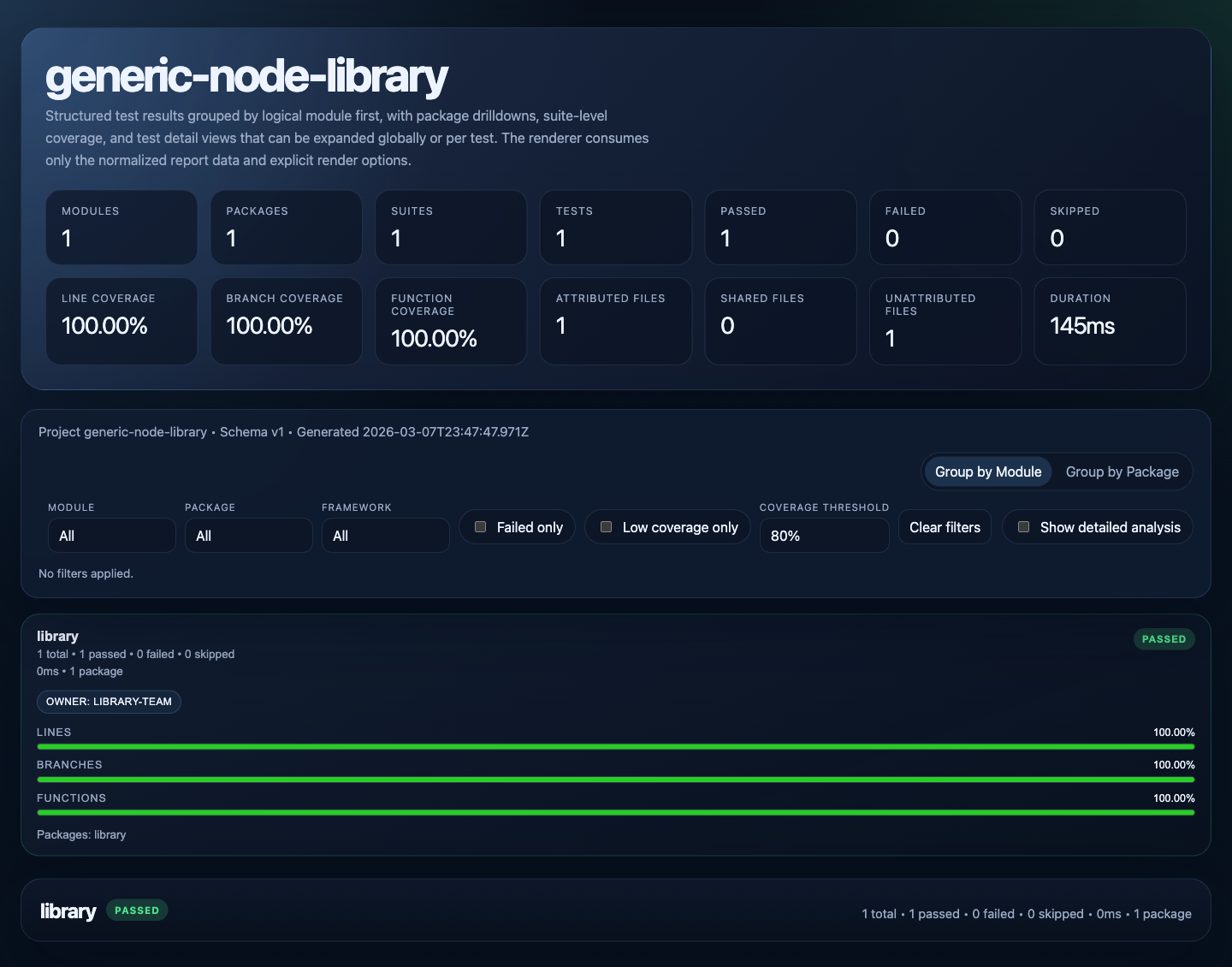
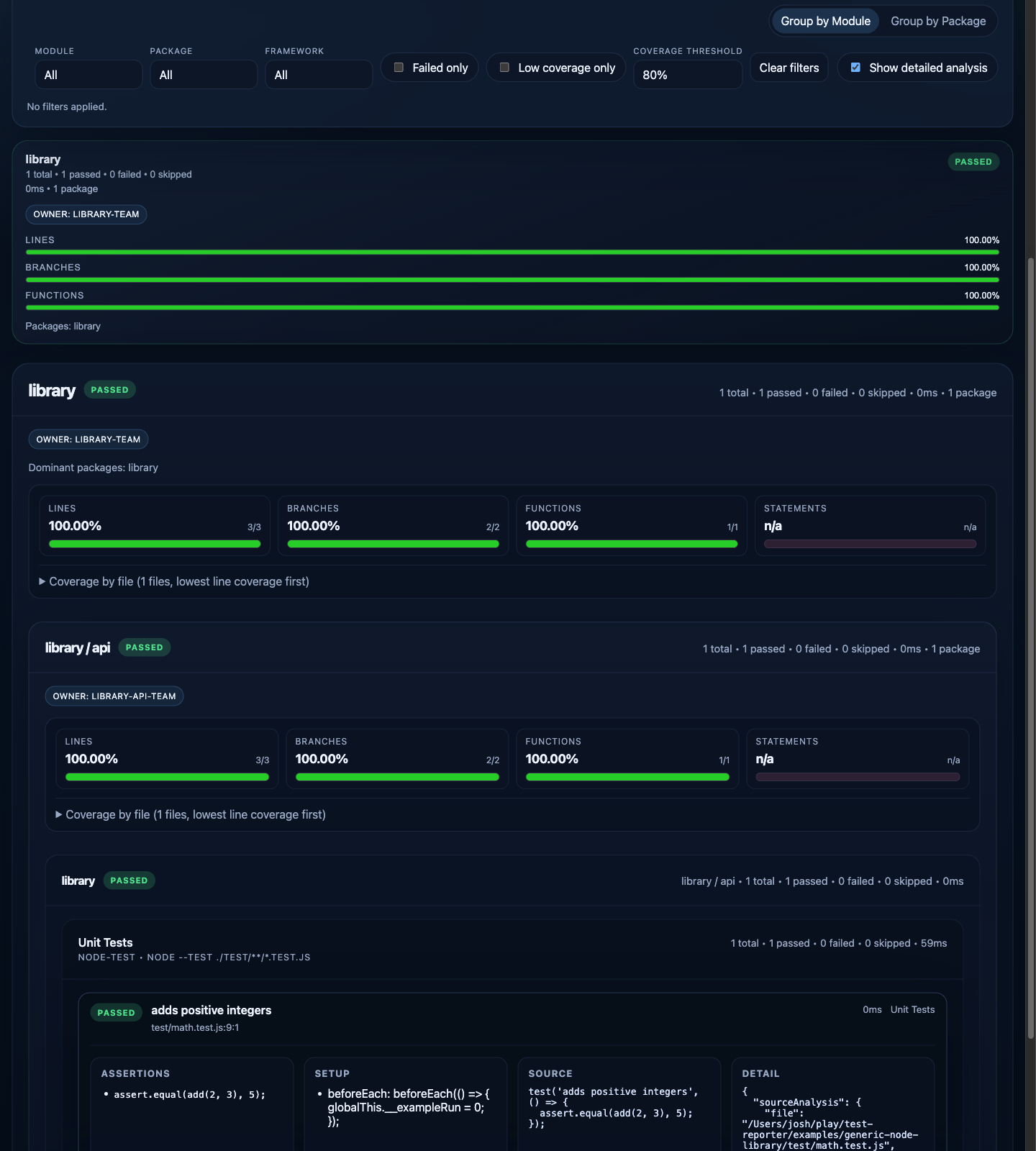
It runs suites from multiple test systems, normalizes the results into a single report.json, and renders a drillable HTML report with module, theme, package, suite, test, and coverage views.
Built-in adapters currently target common JavaScript tooling, but the execution contract is not tied to a specific language or framework. If a project can produce structured test results or can be wrapped by an adapter, it can be reported through test-station.
Purpose
Use test-station when raw test output is too fragmented to be operationally useful.
Typical cases:
- monorepos with multiple packages and mixed frameworks
- projects that combine unit, browser, e2e, and shell-driven validation
- teams that need one report surface for pass/fail, duration, ownership, and coverage
- projects that want policy-aware grouping such as modules, themes, or product areas
What It Produces
A run produces:
report.json: normalized machine-readable resultsmodules.json: module/theme rollups for machine consumersownership.json: module/theme ownership rollupsindex.html: interactive HTML reportraw/: per-suite raw artifacts and framework output
The HTML report supports:
- module-first and package-first views
- progressive drilldown from summary to individual test detail
- pass/fail, duration, and test-count rollups
- coverage rollups and per-file coverage tables
- optional ownership, classification, and source-analysis enrichment
Report Overview
Drilldown View
Architecture
The system is split into small packages with explicit boundaries.
@test-station/cliMain install package. Runs configured suites and writes JSON + HTML artifacts.@test-station/coreLoads config, resolves adapters, executes suites, normalizes results, applies policy, and builds the report model.@test-station/render-htmlRenders the normalized report into the interactive HTML UI.- Built-in adapters
@test-station/adapter-node-test@test-station/adapter-vitest@test-station/adapter-playwright@test-station/adapter-shell@test-station/adapter-jest
- Built-in enrichment/plugin package
@test-station/plugin-source-analysis
Execution Flow
flowchart LR
  A["test-station.config.mjs"] --> B["@test-station/cli"]
  B --> C["@test-station/core"]
  C --> D["Adapters"]
  D --> E["Normalized suite results"]
  E --> F["Policy and plugin pipeline"]
  F --> G["report.json"]
  F --> H["@test-station/render-html"]
  H --> I["index.html"]
Package Responsibilities
@test-station/cli: command entrypoint and artifact writing@test-station/core: config loading, orchestration, normalization, aggregation, coverage rollups, policy pipeline@test-station/render-html: browser report UI and report rendering@test-station/adapter-node-test: directnode --testexecution and normalization@test-station/adapter-vitest: Vitest execution, normalization, and coverage collection@test-station/adapter-playwright: Playwright execution and normalization@test-station/adapter-shell: arbitrary command-backed suites@test-station/adapter-jest: Jest execution, normalization, and coverage collection@test-station/plugin-source-analysis: static enrichment of assertions, setup, mocks, and source snippets
Quickstart
Local Checkout
This is the fastest way to see the reporter running against its own test suite.
git clone https://github.com/smysnk/test-station.git
cd test-station
yarn install
yarn test:coverage
Artifacts are written to:
.test-results/self-test-report/npm Install
For most consumers, install @test-station/cli. It provides the test-station binary and brings in @test-station/core, @test-station/render-html, and the built-in adapters used by the default runtime.
npm install --save-dev @test-station/cliInstall additional packages only when you need them directly:
@test-station/corefordefineConfig(...),runReport(...), or other programmatic control@test-station/render-htmlwhen rendering HTML from an existingreport.json@test-station/plugin-source-analysiswhen importing the enrichment plugin directly@test-station/adapter-*when assembling a custom adapter registry outside the default core bundle
Minimal Consumer Setup
Create test-station.config.mjs in the target project:
const rootDir = import.meta.dirname;

export default {
  schemaVersion: '1',
  project: {
    name: 'my-project',
    rootDir,
    outputDir: 'artifacts/test-report',
    rawDir: 'artifacts/test-report/raw',
  },
  execution: {
    continueOnError: true,
    defaultCoverage: false,
  },
  suites: [
    {
      id: 'unit',
      label: 'Unit Tests',
      adapter: 'node-test',
      package: 'app',
      cwd: rootDir,
      command: ['node', '--test', './test/**/*.test.js'],
      coverage: {
        enabled: true,
        mode: 'same-run',
      },
    },
  ],
};
With @test-station/cli installed, run it with:
npx test-station run --config ./test-station.config.mjs
npx test-station run --config ./test-station.config.mjs --coverage
npx test-station run --config ./test-station.config.mjs --no-coverage
Package Script Integration
Yarn
{
  "scripts": {
    "test": "test-station run --config ./test-station.config.mjs",
    "test:coverage": "test-station run --config ./test-station.config.mjs --coverage",
    "test:fast": "test-station run --config ./test-station.config.mjs --no-coverage"
  }
}
npm
{
  "scripts": {
    "test": "test-station run --config ./test-station.config.mjs",
    "test:coverage": "test-station run --config ./test-station.config.mjs --coverage",
    "test:fast": "test-station run --config ./test-station.config.mjs --no-coverage"
  }
}
pnpm
{
  "scripts": {
    "test": "test-station run --config ./test-station.config.mjs",
    "test:coverage": "test-station run --config ./test-station.config.mjs --coverage",
    "test:fast": "test-station run --config ./test-station.config.mjs --no-coverage"
  }
}
CLI Commands And Overrides
The public CLI surface is:
npx test-station inspect --config ./test-station.config.mjs
npx test-station run --config ./test-station.config.mjs --coverage --workspace app --output-dir ./artifacts/app-report
npx test-station render --input ./artifacts/test-report/report.json --output ./artifacts/test-report
npx test-station pages --input ./artifacts/test-report/report.json --output ./artifacts/test-pages
Useful overrides:
--coverageand--no-coverageoverrideexecution.defaultCoverage--workspace <name>and--package <name>are equivalent repeatable filters--output-dir <path>overridesproject.outputDirand rewritesraw/under that directory
When filters match no suites, the run exits with a clear error. If workspaceDiscovery.packages still lists other workspaces, those unmatched packages remain visible as skipped.
Integration Model
A host project typically owns only three things:
test-station.config.mjs- a classification / coverage attribution / ownership manifest
- optional host-specific plugins or custom adapters when generic ones are not enough
Everything else should be delegated to test-station.
Uniform Runtime Contract
All built-in command-backed adapters follow the same integration rules:
- declare suites explicitly in
test-station.config.mjs - pass per-suite environment variables with
suite.env - consume normalized output from
report.json - use
raw/for framework-native artifacts and intermediate reports
Empty Workspaces And Zero-Test Suites
If workspaceDiscovery.packages lists a package with no matching suites, that package still appears in the report as skipped with zero suites. This is the recommended way to keep explicit monorepo packages visible without inventing synthetic suite results.
If a suite runs and the underlying framework reports zero tests, the suite is normalized as skipped.
Adapter Notes
node-testcoverage works for directnode --test ...commands and package scripts that resolve directly to a singlenode --test ...invocationplaywrightcan collect browser Istanbul coverage whensuite.coverage.strategyisbrowser-istanbulshellsupportsresultFormat: 'single-check-json-v1'for structured single-check outputs with mapped warnings and raw detailsshellsupportsresultFormat: 'suite-json-v1'for full structured suite payloads, including customperformanceStatsfor benchmark reporting
Playwright In CI
Consumers using the built-in Playwright adapter must install Playwright browsers in CI before running the reporter.
Typical prerequisite:
yarn playwright install --with-depsLive UI Performance Benchmarks
This repo also carries a manual Playwright benchmark suite for the deployed web interface. It is intended for live-data navigation checks and is not part of the default CI pass.
Typical usage:
yarn playwright install --with-deps chromium
TEST_STATION_E2E_BASE_URL=https://test-station.smysnk.com yarn test:e2e:performance
What it benchmarks:
- public home-page readiness with live project and run data
- sidebar project focus latency
- run-row navigation into
/runs/[id] - runner-report iframe readiness
- switching from runner report to operations view
- navigation from a run into the related project page
Artifacts:
- summary JSON at
artifacts/e2e-performance/latest.json - timestamped benchmark snapshots under
artifacts/e2e-performance/ - Playwright JSON output at
artifacts/e2e-performance/playwright-results.json
Each benchmark record now also carries a profiling block with:
- server-side page-load timings captured during
getServerSideProps - browser page-ready marks for overview, project, run, operations, and runner-frame milestones
- recent client-side route-transition events
- recent browser-side traced fetches and their upstream response ids
- resource timings for
/graphql,/_next/data/, and runner-report iframe requests
These profiling fields only appear once the target deployment is running a build that includes the instrumentation hooks from this repo.
The traced web responses also expose:
x-request-idx-test-station-trace-idx-test-station-parent-request-idwhen a request is part of a larger chainx-test-station-upstream-request-id/x-test-station-upstream-trace-idon proxied web API responsesServer-Timingfor SSR page loads and GraphQL endpoint timing
Optional environment variables:
TEST_STATION_E2E_BASE_URL: target deployment to benchmarkTEST_STATION_E2E_STORAGE_STATE: optional Playwright storage-state file when the target requires authenticationTEST_STATION_E2E_OUTPUT_DIR: override the benchmark artifact directoryTEST_STATION_E2E_BUDGET_HOME_READY_MSTEST_STATION_E2E_BUDGET_PROJECT_FOCUS_MSTEST_STATION_E2E_BUDGET_PROJECT_CLEAR_MSTEST_STATION_E2E_BUDGET_RUN_NAVIGATION_MSTEST_STATION_E2E_BUDGET_RUNNER_REPORT_READY_MSTEST_STATION_E2E_BUDGET_OPERATIONS_VIEW_SWITCH_MSTEST_STATION_E2E_BUDGET_PROJECT_PAGE_NAVIGATION_MSTEST_STATION_E2E_BUDGET_SUITE_EXPANSION_MSTEST_STATION_E2E_ENFORCE_BUDGETS: set totruein gating jobs; measurements always retain the checked-in defaults
Live UI Interaction Regressions
This repo also carries a separate live-data interaction suite for the visible navigation surfaces. Unlike the benchmark suite, these tests do not fall back to direct route changes, so they fail when a click target stops navigating.
Typical usage:
yarn playwright install --with-deps chromium
TEST_STATION_E2E_BASE_URL=https://test-station.smysnk.com yarn test:e2e:interactions
What it checks:
- clicking a home-page run row opens the run detail page
- clicking a project execution-feed run link opens the run detail page
- clicking
Operations viewswitches from the runner report to the operations template - clicking the project link on a run detail page navigates back to the related project page
Artifacts:
- Playwright JSON output at
artifacts/e2e-interactions/playwright-results.json - traces and screenshots under
artifacts/e2e-interactions/test-results/
Optional environment variables:
TEST_STATION_E2E_BASE_URL: target deployment to exerciseTEST_STATION_E2E_STORAGE_STATE: optional Playwright storage-state file when the target requires authenticationTEST_STATION_E2E_INTERACTIONS_OUTPUT_DIR: override the interaction artifact directory
If the app redirects to /auth/signin and no storage state is provided, or if there are no public runs/projects visible, the benchmark suite skips rather than failing with misleading timing output.
Publishing CI Runs To /api/ingest
The deployed server accepts machine reports at POST /api/ingest with shared-key auth. The checked-in staging release workflow publishes the self-test report to https://test-station.smysnk.com/api/ingest.
What is sent:
report.jsonas the canonical run payload- run metadata from GitHub Actions such as repository, branch, tag, commit SHA, actor, run URL, workflow, run number, attempt, build start/end timestamps, and the default non-secret GitHub Actions environment variables
- artifact metadata for every file under the report output directory, including
report.json,modules.json,ownership.json,index.html, and everything underraw/
Shared-key auth:
- the server reads
INGEST_SHARED_KEY - the staging release workflow reads the GitHub Actions secret
TEST_STATION_INGEST_SHARED_KEY - set them to the same value
Optional S3-backed artifact storage:
- set
vars.S3_BUCKETto enableaws s3 syncof the report directory - optionally set
vars.S3_STORAGE_PREFIXto control the object prefix - optionally set
vars.S3_PUBLIC_URLwhen the uploaded artifacts are browser-accessible through S3 static hosting, CloudFront, or another CDN - set
secrets.S3_AWS_ACCESS_KEY_IDandsecrets.S3_AWS_SECRET_ACCESS_KEYfor the sync credentials - optionally set
vars.S3_AWS_REGIONto override the defaultus-east-1
Current storage model:
- the ingest endpoint stores artifact metadata, storage keys, and source URLs in Postgres
- it does not upload binary artifacts itself
- without S3 or another external artifact host, the server still records artifact inventory but not downloadable remote URLs
Raw Artifact Contract
Suites can attach raw artifacts that will be written under raw/ and linked from the HTML report.
Supported shapes:
rawArtifacts: [
  {
    relativePath: 'web-e2e/playwright.json',
    label: 'Playwright JSON',
    content: JSON.stringify(payload, null, 2),
  },
  {
    relativePath: 'web-e2e/trace.zip',
    label: 'Trace ZIP',
    sourcePath: '/absolute/path/to/trace.zip',
    mediaType: 'application/zip',
  },
  {
    relativePath: 'web-e2e/test-results',
    label: 'Copied test-results directory',
    kind: 'directory',
    sourcePath: '/absolute/path/to/test-results',
  },
]
Use this contract for stable raw links. Do not treat it as a generic process-management or upload system.
Consumer Modes
There are two supported consumer modes:
- Local reference checkout
- useful while the standalone repo is being developed alongside a host project
- stable host-facing entrypoints are:
./references/test-station/config.mjs./references/test-station/bin/test-station.mjs
- Installed package dependency
- install
@test-station/clifor the publishedtest-stationbinary - install
@test-station/coreif you wantdefineConfig(...)orrunReport(...) - install
@test-station/render-htmlonly when rendering from an existingreport.jsonoutside the CLI - install direct adapter or plugin packages only for custom registries and advanced embedding
- install
For local-reference mode, keep host imports pointed at the root-level entrypoints above rather than packages/*/src.
Classification, Coverage Attribution, Ownership, And Thresholds
If you want the report grouped by product or subsystem instead of leaving tests uncategorized, provide a manifest file.
{
  "rules": [
    {
      "package": "app",
      "include": ["test/**/*.test.js"],
      "module": "runtime",
      "theme": "api"
    }
  ],
  "coverageRules": [
    {
      "package": "app",
      "include": ["src/**/*.js"],
      "module": "runtime",
      "theme": "api"
    }
  ],
  "ownership": {
    "modules": [
      { "module": "runtime", "owner": "runtime-team" }
    ],
    "themes": [
      { "module": "runtime", "theme": "api", "owner": "runtime-api-team" }
    ]
  },
  "thresholds": {
    "modules": [
      {
        "module": "runtime",
        "coverage": { "linesPct": 80, "branchesPct": 70 },
        "enforcement": "error"
      }
    ],
    "themes": [
      {
        "module": "runtime",
        "theme": "api",
        "coverage": { "linesPct": 75 },
        "enforcement": "warn"
      }
    ]
  }
}
Reference it from config:
manifests: {
  classification: './test-modules.json',
  coverageAttribution: './test-modules.json',
  ownership: './test-modules.json',
  thresholds: './test-modules.json',
}
Error-enforced threshold failures are reported in report.json, rendered in HTML, and cause test-station run to exit non-zero even when every suite itself passed. Warning-enforced thresholds stay visible in the report but do not fail the process.
Failure Diagnostics
Suites can define an optional diagnostics rerun. When the suite fails, test-station reruns the configured command, captures stdout/stderr, and writes the diagnostic artifacts under raw/diagnostics/.
{
  id: 'web-unit',
  adapter: 'vitest',
  command: ['yarn', 'vitest', 'run', '--config', './vitest.config.js'],
  diagnostics: {
    label: 'Verbose rerun',
    command: ['yarn', 'vitest', 'run', '--config', './vitest.config.js', '--reporter', 'verbose'],
    timeoutMs: 120000,
  },
}
The rerun metadata is attached to the suite result as suite.diagnostics, linked from the HTML report, and summarized in the console output.
Custom Policy Plugins
A plugin can hook into these stages:
classifyTest(...)attributeCoverageFile(...)lookupOwner(...)enrichTest(...)
Register plugins like this:
plugins: [
  {
    handler: './scripts/test-station/my-policy-plugin.mjs',
    options: {
      owner: 'platform-team',
    },
  },
]
Examples
- Generic consumer example:
examples/generic-node-library/test-station.config.mjs - Mixed-framework example:
examples/mixed-framework-monorepo/test-station.config.mjs - Integration guide:
docs/integrating-a-generic-project.md
Development
Run the standalone repo checks with:
yarn lint
yarn test:node
yarn test
yarn build
yarn test:node runs the direct Node test suite. yarn test runs the repository through test-station itself and produces the self-test report.
The current external-consumer smoke path is:
node ./bin/test-station.mjs run --config ./examples/generic-node-library/test-station.config.mjs --coverageVersioning
All publishable @test-station/* packages currently move in lockstep at 0.2.0.
For deeper release and compatibility details, see: