
@thaodangspace/agent-sandbox
v0.1.2
Published
Agent Sandbox CLI - Creates isolated Docker containers with AI development agents

Maintainers
 thaodangspace
Readme
Agent Sandbox



A robust Rust CLI tool that creates isolated Ubuntu Docker containers with development agents pre-installed. Agent Sandbox provides a secure, disposable environment for running AI assistants like Claude, Gemini, Codex, Qwen, and Cursor, ensuring their actions are confined to the container while maintaining a clean, reproducible workspace.
Table of Contents
- Overview
- Features
- Demo
- Prerequisites
- Installation
- Usage
- Configuration
- API
- Troubleshooting
- Contributing
- License
Overview
Why Sandbox an AI Agent?
Running an AI agent with direct access to your host machine is risky. An agent could inadvertently or maliciously:
- Install dangerous packages (
npm install some-malware) - Execute destructive commands (
rm -rf /,pkill) - Run sensitive operations (
git push --force,db:migrate)
Using an isolated container provides critical benefits:
- Security: Protects your host machine by keeping the agent's file system changes and processes separate from your environment.
- Integrity: Ensures a clean, reproducible workspace with all dependencies installed from scratch.
- Flexibility: Makes it easy to experiment with untrusted code or dependencies and then discard the container when finished.
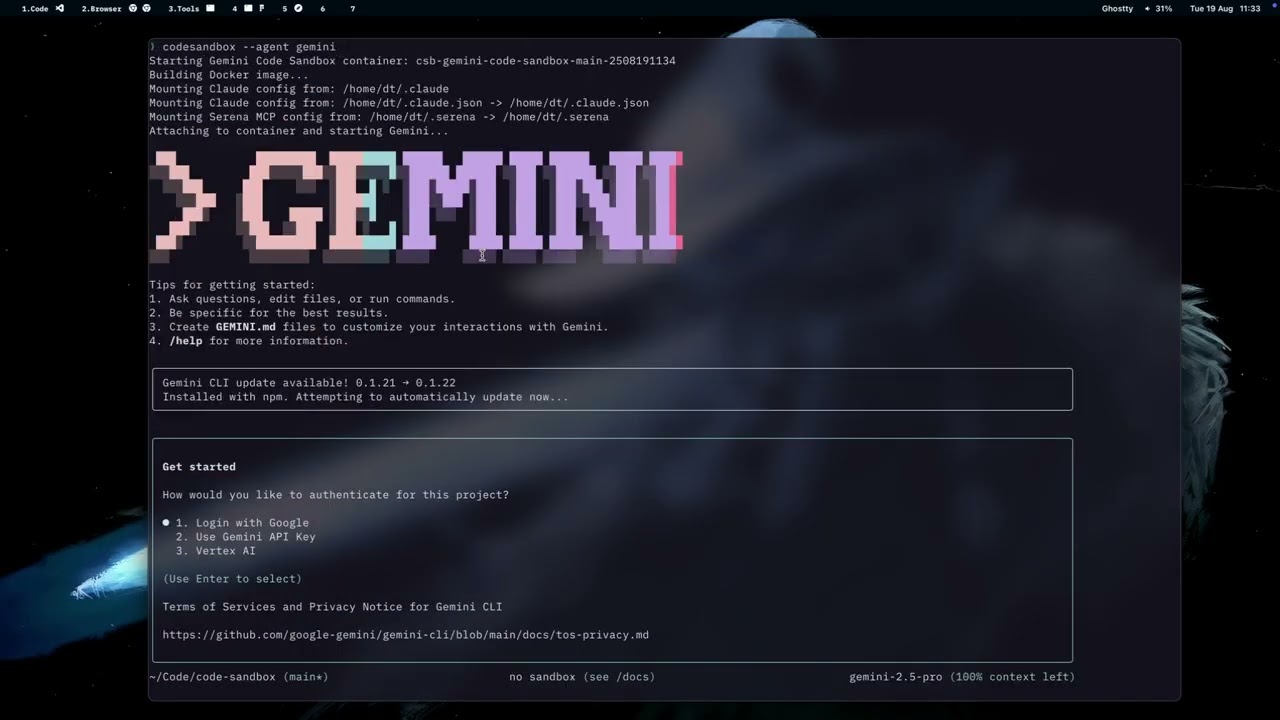
Demo
Features
Core Functionality
- Multi-Agent Support: Compatible with Claude, Gemini, Codex, Qwen, and Cursor development agents
- Automatic Workspace Mounting: Seamlessly mounts your current directory to same path with the host machine in the container
- Node Modules Isolation: For Node.js projects,
node_modulesis overlaid with a container-only volume. Existing hostnode_modulesare copied to the container on first run to accelerate setup. - Configuration Management: Automatically copies and applies your agent configurations
- Intelligent Naming: Generates contextual container names to prevent conflicts (
agent-{agent}-{dir}-{branch}-{yymmddhhmm}) - Language Tooling: Detects common project languages and installs missing package managers like Cargo, npm, pip, Composer, Go, or Bundler
Workflow Management
- Session Continuity: Resume your last container session with
agentsandbox --continue - Global Container Listing: List all running sandbox containers across all projects with
agentsandbox ps - Git Integration: Create and use git worktrees for isolated branch development
- Cleanup Utilities: Efficient container management and cleanup tools
- Directory Mounting: Add additional read-only directories for extended workspace access
Prerequisites
System Requirements
- Docker: Version 20.10 or higher, installed and running
- Rust: Version 1.70 or higher (for building from source)
- Git: For repository cloning and worktree functionality
Platform Support
- Linux (tested on Ubuntu 20.04+, Fedora 35+)
- macOS (Intel and Apple Silicon)
- Windows (with WSL2 and Docker Desktop)
Installation
Method 1: Install via Homebrew (macOS/Linux - Recommended)
# Add the tap (replace with actual repository URL)
brew tap your-username/agentsandbox

# Install agentsandbox
brew install agentsandbox
Method 2: Build from Source
# Clone the repository
git clone https://github.com/your-org/code-sandbox.git
cd code-sandbox

# Build the release binary
cargo build --release

# Install globally (optional)
sudo cp target/release/agentsandbox /usr/local/bin/
Method 3: Install via Cargo
# Install directly from the local repository
cargo install --path .

# Or install from crates.io (when published)
cargo install agentsandbox
Method 4: Download Pre-built Binaries
Visit the Releases page to download pre-built binaries for your platform.
Method 5: Install via npm
npm install -g @thaodangspace/agent-sandboxThis compiles the CLI using Rust and exposes a agentsandbox command via npm.
Usage
Quick Start
Navigate to your project directory and run:
agentsandboxThis command will:
- Create a Container: Generate a new Ubuntu container with a unique identifier
- Mount Workspace: Bind your current directory to
/workspacein the container - Configure Agent: Copy your agent configuration files (e.g.,
.claudefrom~/.claude) - Launch Agent: Start the default agent (Claude) within the container environment
Advanced Usage
Specify a Different Agent
# Use Qwen instead of Claude
agentsandbox --agent qwen

# Use Gemini
agentsandbox --agent gemini

# Use Cursor
agentsandbox --agent cursor
Mount Additional Directories
# Add a read-only reference directory
agentsandbox --add_dir /path/to/reference/repo
Session Management
# Resume the last container from this directory
agentsandbox --continue

# List containers for the current directory and optionally attach
agentsandbox ls

# List all running containers across all projects
agentsandbox ps
Git Workflow Integration
# Create and use a git worktree for isolated branch work
agentsandbox --worktree feature-branch
Connecting to the Container
After the container is created, you can connect to it using:
docker exec -it <container-name> /bin/bashThe container name will be displayed when agentsandbox runs.
Listing Existing Containers
List all sandbox containers created from the current directory and optionally attach to one:
agentsandbox lsTo list all running sandbox containers across all directories, use:
agentsandbox psThis view also allows you to cd directly into the project directory associated with a container.
Container Contents
- Base: Ubuntu 22.04
- Tools: curl, wget, git, build-essential, python3, nodejs, npm
- User:
ubuntuwith sudo privileges - Agent: Claude Code pre-installed (other agents can be started if available)
- Working Directory:
/workspace(your mounted folder)
Configuration
The tool automatically detects and mounts your Claude configuration from:
~/.claude(standard location)$XDG_CONFIG_HOME/claude(XDG standard)
Additional behavior can be configured via settings.json located at
~/.config/agentsandbox/settings.json. Example:
{
    "auto_remove_minutes": 60,
    "skip_permission_flags": {
        "claude": "--dangerously-skip-permissions",
        "gemini": "--yolo",
        "qwen": "--yolo",
        "cursor": "--yolo"
    },
    "env_files": [
        ".env",
        ".env.local",
        ".env.development.local",
        ".env.test.local",
        ".env.production.local"
    ]
}
The skip_permission_flags map assigns a permission-skipping flag to each
agent. When launching an agent, the corresponding flag is appended to the
command.
Environment files listed in env_files that exist in the project directory are
masked from the container by overlaying them with empty temporary files,
keeping sensitive data on the host.
Shell Access
To start a container without launching an agent and open a shell:
agentsandbox --shellCleanup
To remove all containers created from the current directory:
agentsandbox cleanupTo remove the built image:
docker rmi agentsandbox-imageTroubleshooting
- Docker not found: Ensure Docker is installed and running
- Permission denied: Make sure your user is in the
dockergroup - Agent fails to start: You can manually start it with
docker exec -it <container> <agent>
Contributing
We welcome contributions to Agent Sandbox! Here's how you can help:
Getting Started
- Fork the repository on GitHub
- Clone your fork locally:
git clone https://github.com/thaodangspace/code-sandbox.git cd code-sandbox - Create a feature branch from
main:git checkout -b feature/your-feature-name
Development Setup
Install Rust (if not already installed):
curl --proto '=https' --tlsv1.2 -sSf https://sh.rustup.rs | shInstall dependencies and build:
cargo buildRun tests:
cargo test
Building for Different Platforms
For local development, use the provided build script:
# Build for native target in debug mode
./scripts/build.sh

# Build for native target in release mode
./scripts/build.sh --release

# Show all available options
./scripts/build.sh --help
For cross-compilation:
- GitHub Actions: The repository automatically builds for all platforms (Linux, macOS, Windows) when you push tags or trigger the workflow manually
- Local cross-compilation:
- Linux builds work natively
- Windows builds require
mingw-w64toolchain - macOS builds from Linux require osxcross toolchain
# Install Rust targets for cross-compilation
rustup target add x86_64-pc-windows-gnu
rustup target add x86_64-apple-darwin
rustup target add aarch64-apple-darwin

# Cross-compile (requires appropriate toolchain)
cargo build --release --target x86_64-pc-windows-gnuNote: The reqwest dependency has been configured with rustls-tls instead of native TLS for better cross-compilation support.
Building for NPM Distribution
For building binaries ready for npm publishing:
# Build for npm distribution (attempts Linux + macOS targets)
npm run build
# or
./scripts/build.sh --npm

# Build individual targets for npm
npm run build:linux      # Build for Linux x64
npm run build:macos      # Build for macOS x64
npm run build:macos-arm  # Build for macOS ARM64
The build script will:
- Compile in release mode
- Copy binaries to
dist/with npm-compatible naming - Handle missing cross-compilation toolchains gracefully
Supported platforms for npm distribution:
linux-x64→agentsandbox-linux-x64darwin-x64→agentsandbox-darwin-x64darwin-arm64→agentsandbox-darwin-arm64win32→agentsandbox.exe
Making Changes
- Follow Rust conventions: Use
cargo fmtandcargo clippy - Write tests for new functionality
- Update documentation as needed
- Keep commits atomic and write clear commit messages
Submitting Changes
Push your changes to your fork:
git push origin feature/your-feature-nameCreate a Pull Request with:
- Clear description of the changes
- Reference to any related issues
- Screenshots/demos for UI changes
Code Style
- Follow the existing code style
- Run
cargo fmtbefore committing - Ensure
cargo clippypasses without warnings - Add documentation for public APIs
Reporting Issues
When reporting bugs, please include:
- Operating system and version
- Docker version
- Rust version (
rustc --version) - Steps to reproduce the issue
- Expected vs actual behavior
Feature Requests
For new features:
- Check existing issues first
- Clearly describe the use case
- Propose the API/interface if applicable
- Consider backward compatibility
Thank you for contributing to Agent Sandbox!
License
This project is licensed under the MIT License - see the LICENSE file for details.
MIT License Summary
Permission is hereby granted, free of charge, to any person obtaining a copy of this software and associated documentation files (the "Software"), to deal in the Software without restriction, including without limitation the rights to use, copy, modify, merge, publish, distribute, sublicense, and/or sell copies of the Software, and to permit persons to whom the Software is furnished to do so, subject to the following conditions:
The above copyright notice and this permission notice shall be included in all copies or substantial portions of the Software.
THE SOFTWARE IS PROVIDED "AS IS", WITHOUT WARRANTY OF ANY KIND, EXPRESS OR IMPLIED, INCLUDING BUT NOT LIMITED TO THE WARRANTIES OF MERCHANTABILITY, FITNESS FOR A PARTICULAR PURPOSE AND NONINFRINGEMENT. IN NO EVENT SHALL THE AUTHORS OR COPYRIGHT HOLDERS BE LIABLE FOR ANY CLAIM, DAMAGES OR OTHER LIABILITY, WHETHER IN AN ACTION OF CONTRACT, TORT OR OTHERWISE, ARISING FROM, OUT OF OR IN CONNECTION WITH THE SOFTWARE OR THE USE OR OTHER DEALINGS IN THE SOFTWARE.
Made with ❤️ by the Agent Sandbox contributors