
@thinkn/world
v0.1.1
Published
Installable world-model packet for AI coding agents. Scaffolds .world/, installs harness skills, opts in to Thinkn's managed belief engine.

Maintainers
 brycealan
Readme
.world/
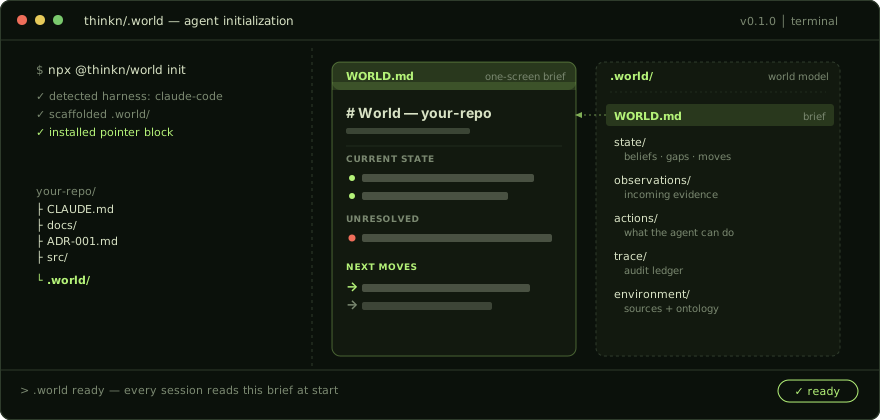
A world model for your codebase. Read by every AI agent session.
A current-state view — synthesized from your CLAUDE.md, ADRs, and
docs, updated as the agent observes — so every session knows:
- What's true now — claims tied to actual code.
- What's uncertain — gaps, assumptions, contradictions surfaced.
- What to do next — moves recommended against current state.
npx dotworld initWorks with Claude Code, Cursor, and Codex. Local-first; managed
mode adds a shared world model for teams. world waitlist for
managed access while it's in private beta.
Naming: the package is dotworld. @thinkn/world is an identical alias (same tarball, same bin) for the scoped name — npx @thinkn/world init works the same. The CLI command is world in both cases.
What lands in your repo
Two things, both reversible.
1. A .world/ folder — your codebase's current-state view, kept
in version control alongside your code.
your-repo/
└── .world/
    ├── WORLD.md              ← One-screen brief for the agent. Regenerated on every apply.
    ├── world.json            ← Manifest. Mode, scope, file paths.
    ├── SKILL.md              ← Protocol for any agent maintaining this directory.
    ├── README.md             ← Layout + propose/review/apply discipline.
    │
    ├── environment/          ← The atlas — sources + ontology.
    │   ├── environment.md    ← Scope, source-of-truth ranking, memory pointers.
    │   └── entities.jsonl    ← Modules, symbols, tests, ADRs the beliefs reference.
    │
    ├── state/                ← The agent's current belief state.
    │   ├── beliefs.jsonl     ← Claims, gaps, assumptions, evidence, risks, goals.
    │   ├── intents.jsonl     ← Goals, decisions, constraints — what we want.
    │   ├── contradictions.jsonl ← Conflicts surfaced as evidence accumulates.
    │   ├── limiting_factors.jsonl ← What's bottlenecking overall clarity.
    │   ├── edges.jsonl       ← Relationships between records.
    │   └── moves.jsonl       ← Suggested next moves (heuristic locally; VOI-ranked managed).
    │
    ├── actions/              ← Action set — what the agent's allowed to do.
    │   ├── catalog.md        ← Class definitions; approval gates.
    │   └── policies.jsonl    ← Local rules + approval requirements.
    │
    ├── observations/         ← Incoming evidence + proposed changes.
    │   ├── log.jsonl         ← Raw signals: code reads, diffs, tool output, user input.
    │   └── pending/          ← Pending patches. Skills drop work here for review.
    │       └── latest/
    │           ├── patch.jsonl   ← Proposed change set.
    │           └── report.md     ← Human-readable summary.
    │
    └── trace/                ← Append-only audit history.
        └── ledger.jsonl      ← Every committed change.
2. A fenced pointer block appended to your CLAUDE.md (or
AGENTS.md for Cursor / Codex). It tells your agent how to use
.world/ — nothing else changes about your existing memory:
<!-- thinkn.world:start id=pointer v=2 -->
## World model (Thinkn `.world/`)

This repo has a `.world/` directory containing a portable world model:
operating brief, current belief state, action set, source map,
observation log, and a reviewable update loop.

**Before non-trivial work**, read `.world/WORLD.md` (operating brief) and
`.world/SKILL.md` (protocol for maintaining the world).

**To populate or refresh the world**, run `/world`. The skill scans the
repo, proposes a patch to `.world/observations/pending/latest/patch.jsonl`, and summarizes
in `report.md`. Review with `world diff`, then `world apply` to write it into
`.world/` state. `world apply` does not touch git — commit `.world/` alongside
your code so the change travels in one reviewable diff.

**To capture a new observation**, run `/world-observe <input>` (path,
diff, text, or structured claim).

**To diagnose contradictions, gaps, and assumptions**, run `/world-check`.

**At session end**, run `/world-handoff` for a durable recap.

**Memory vs. `.world/`** — memory is the durable *prior* store (decisions,
preferences, project context the code can't reconstruct). `.world/` is the
reconciled *current-state view* derived from those priors and the code: it
cites back to the priors and carries only what's sufficient for current and
likely-future work, not every prior. Write durable context to memory; let
`/world` consolidate the relevant priors into current state. Don't copy a
memory fact into `.world/` — cite it (`memory/<file>`).

Confidence is a coarse label locally (`low|medium|high|certain`); calibrated
numbers and value-of-information come from the managed engine, not the agent.

Never write to `.world/state/*.jsonl` directly — go through the
propose / `world diff` / `world apply` flow.
<!-- thinkn.world:end -->
Cursor and Codex get an equivalent block in AGENTS.md. The
opener/closer tags are idempotent — re-running world install
updates in place. No duplicates.
The pointer block adds ~250 tokens to
CLAUDE.md.WORLD.mdis one screen by design — usually smaller than theCLAUDE.mdit sits next to.
Two splits inside .world/ matter:
state/vs.trace/—state/is what the agent currently believes;trace/ledger.jsonlis the full audit trail of every committed change.observations/pending/vs.state/— skills never write tostate/. They propose patches inobservations/pending/latest/.world applyis the only writer to durable state — that's how you avoid silent worldview rewrites.
Your existing memory, source, and tools stay put. Delete the folder and the pointer block to uninstall.
How .world/ fits your existing setup
.world/ is a sibling artifact to your .claude/ directory — not a
replacement. Your skills, CLAUDE.md, settings.json, and MCP
servers all keep working. world install adds four slash commands
to .claude/skills/ and one fenced block to your CLAUDE.md;
nothing else is touched. The .world/SKILL.md inside the world
folder is the protocol the agent follows when maintaining
.world/ — it's not a Claude Code skill.
Commit .world/ to share the world model with teammates.
observations/log.jsonl and trace/ledger.jsonl grow over time;
.gitignore them if you want a lighter footprint and don't need the
audit trail in version control.
Install
npx dotworld init           # no install — scaffold in one shot
npm i -g dotworld           # or install once to put `world` on your PATH
Ships as a compiled CLI (the world binary). Node ≥ 20. No account or
network needed for local mode. (@thinkn/world is the same package under a
scoped name — see the naming note up top.)
First 60 seconds
- Run
npx dotworld initin your repo. It detects your agent harness (Claude Code / Cursor / Codex) and installs the skills — add--askto pick which harnesses instead of auto-installing all. This sets up local mode (no account, fully offline); calibrated confidence and value-ranked moves come later viaworld connect(managed mode — private beta; runworld waitlistfor access). - Open Claude Code (or Cursor / Codex) and ask the agent to orient
(or explore the repo) — or run
/worlddirectly. - Review the proposed patch with
world diff, thenworld applyto write it into.world/state — andgit add .world/to version it with your code.
Once it's populated, your agent reads this brief at the start of every
session. After /world runs, the brief looks like this:
# World

Updated: 2026-05-27T14:02:00.000Z
Mode: local
Kind: codebase
Name: acme-api

## Current State

12 active records · 1 contradiction(s) · 3 open gap(s) · 2 load-bearing · 0 limiting factor(s)

**What seems true**

- Billing webhooks retry via Bull in src/billing/webhook.ts. _(high)_
- Database is Postgres, not MySQL. _(certain)_

## Unresolved

- [contradiction] README says Clerk, code imports Cognito. _(high)_
- [gap] Test coverage absent for the billing-webhook retry path.

## Planning

Suggested next moves:

1. `inspect` Resolve the auth-provider conflict. → `src/auth/middleware.ts` _(risk: low)_ · agent
2. `add_test` Cover the billing-webhook retry path. → `#g_retry` _(risk: medium)_ · agent
(A contested claim — the auth provider — is deliberately absent from What seems true; it's surfaced under Unresolved instead, never as a settled fact.)
Confidence shows as a coarse label (low/medium/high/certain) —
the honest local signal. Connect the managed engine and the same fields
upgrade to calibrated numbers (see below).
The four skills
world init installs four slash commands into your harness. The
agent invokes them; you review and approve patches.
| Skill | What it does for you |
| --- | --- |
| /world | Opens at session start. Your agent picks up where it left off. |
| /world-observe <input> | Fold a file, diff, tool result, or claim into the current state. |
| /world-check | Surface the contradictions, gaps, and drift that would bite later. |
| /world-handoff | Session end — leave a clean baton for the next session. |
Nothing lands in durable state until world apply. No silent
worldview rewrites.
Local or Managed
The split is clean: the open-source package owns the format and the
heuristic loop; the managed engine owns the calibration math. Same
.world/ files in both — world connect upgrades them in place.
Local (free, open source) — a structured belief ledger your agent reads, writes, and reconciles, committed alongside your code. No account, no network, no SDK at runtime. You get:
- The six-bucket
.world/format (environment, state, actions, observations, trace, plus the brief) and the propose / review / apply loop. - Coarse confidence labels (
low/medium/high/certain) the agent authors from what it can see. - A single Unresolved list (gaps, contradictions, limiting factors).
- Next moves, rank-ordered with a risk hint — heuristic, not scored.
/worldreconcile: consolidate priors + code into the current view.
This is "orient & track" — genuinely useful on its own.
Managed (hosted engine) — connect for the calibration that an agent reasoning alone can't produce. The same records gain:
- Calibrated Bayesian confidence (Beta posteriors) in place of labels.
- VOI-ranked moves in place of the heuristic order.
- Multi-channel clarity, NLI contradiction detection, drift,
cross-agent belief fusion, and replay — no git-merge friction on
.world/state/.
This is "simulate & optimize." The math is the product; it stays hosted.
world waitlist — private beta. world connect prepares the local
wiring (sync.json + MCP entry) today; the hosted engine round-trip is
gated behind a beta API key.
Why a world model?
A world model is the sufficient current state an agent can act from. Here, that's a typed belief state the agent reads, writes, and reconciles — same lineage as POMDP-style world models in research, applied to codebases instead of pixels (calibrated and probabilistic once you connect the engine).
Your memory, docs, and ADRs are the priors.
.worldis the reconciliation of those priors plus the code into the most sufficient current view — like "dreaming": consolidating what's accumulated into a coherent present state. It doesn't replace or re-store memory; it cites back to it and carries only what's relevant to current and likely-future work.
Bigger context windows give the agent more history to interpret;
they don't produce a current view of the codebase. Retrieval depends
on what the agent thinks to ask. .world is the missing layer:
the priors reconciled into structured current state, read by every
session, updated as the agent observes.
CLI
The commands you'll reach for by hand:
world init     # scaffold .world/ in this repo
world diff     # review what a skill wants to change
world apply    # write the change into .world/ state (then git add .world/)
The agent runs the rest (observe, ask, status, doctor) as part of
normal skill flow. Full surface in world --help. world apply writes
durable state but never runs git — you commit .world/ with your code.
Pipe-friendly
world ask <topic> returns deterministic state slices for scripts,
CI checks, and custom dashboards:
world ask contradictions | jq '.[] | select(.priority == "high")'
world ask gaps          # what we don't know yet
world ask moves         # ranked candidate next actions
world ask assumptions   # load-bearing claims worth stress-testing
world ask uncertainty   # one merged list — gaps, contradictions, low-confidence
| Command | What it does |
| ----------------------------- | ---------------------------------------------------------------------------------- |
| world | Smart router. Runs init if .world/ is missing, status if present. |
| world init | Scaffold .world/, detect harnesses, optionally install skills + pointer block. |
| world install <harness> | Install skill files + fenced pointer for claude, cursor, or codex. |
| world status | Read-only diagnostic. |
| world diff | Show the pending patch in observations/pending/latest/. |
| world apply | Validate the patch, mutate state, append ledger, regenerate WORLD.md. |
| world doctor | Schema + referential-integrity + harness health check. |
| world observe | Append one observation to observations/log.jsonl. |
| world ask <topic> | Deterministic state slice: contradictions, gaps, moves, assumptions, uncertainty (one merged unresolved list). |
| world connect [--api-key] | Prepare the managed-mode wiring (sync.json + MCP entry). Managed engine is in private beta — run world waitlist for access. |
| world waitlist | Request managed-mode access while it's in private beta. |
Contributing
world/                               # this repository (github.com/thinkn-ai/world)
├── package.json                     # name: dotworld; bin: world; deps: cac, zod, @clack/prompts, picocolors
├── src/                             # TypeScript source
├── templates/                       # copied into user repos at init/install
├── test/                            # vitest specs
└── .world/                          # we eat our own dog food
Node ≥ 20. The published npm tarball ships only dist/,
templates/, README.md, and CHANGELOG.md.
Preview the install animation (from a clone of this repo):
npx tsx examples/boot-demo.ts.
Get involved
v0.1.x — local CLI ships today; managed in private beta.
- Star the repo — cheapest way to tell us we're on the right track.
- Try it in a real repo and open an issue with what broke.
world waitlistfor managed access.
What is Thinkn?
New here? Thinkn builds tools that give AI coding agents a persistent, structured view of the codebase they're working in — so each session starts oriented instead of cold.
dotworld (this package) is the open-source, local-first piece. It
scaffolds .world/, installs the harness skills, and runs the propose / review
/ apply loop entirely on your machine — no account, no network.
Thinkn's managed belief engine (private beta) is the hosted upgrade. The
same .world/ files connect to it via world connect (over MCP,
@thinkn/belief-mcp) and gain calibrated Bayesian confidence, value-ranked
moves, and cross-agent belief fusion. Run world waitlist for access.
- Homepage — thinkn.ai/dev
- GitHub — github.com/thinkn-ai
- Contact — [email protected]
License
Apache-2.0