
@thnonline/agent-workspace
v1.3.14
Published
Cute 3D isometric office that visualises Claude Code sessions and sub-agents in real time.

Maintainers
 thnonline
Readme
🏢 Agent Workspace
Work with fun. Costs zero tokens. 🎉
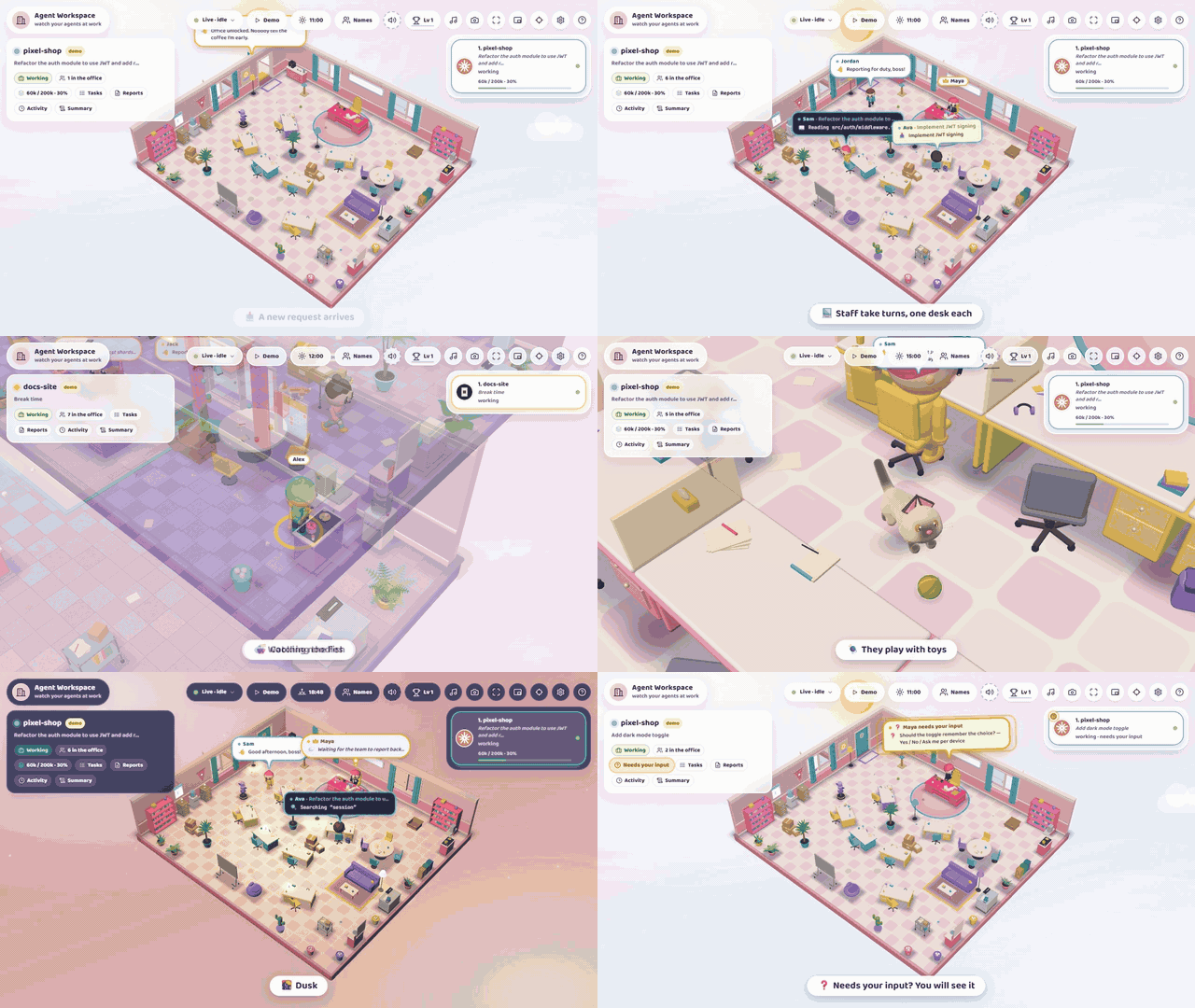
A cute, isometric 3D office that shows your Claude Code, Codex and OpenCode sessions at work, in real time.
⚡ Install in one line
Needs Node.js 20 or newer. Start a Claude Code, Codex or OpenCode session anywhere, then run:
npx @thnonline/agent-workspace@latestYour browser opens on http://localhost:4173 and every running session shows up as a room. Stop it with Ctrl+C. Nothing to configure. Other ways to run it, and how to update: Run.
📑 Table of contents
- ⚡ Install in one line
- Highlights
- How it works
- Life in the office
- Controls
- Run
- 📱 On your phone
- Development
- License
Highlights
How it works
The app reads what your agents already write, so there is nothing to set up:
- Claude Code – tails
~/.claude/projects/**.jsonl, sub-agents and background commands (run_in_background, Monitor) included. - Codex – tails
~/.codex/sessions/YYYY/MM/DD/rollout-*.jsonl. - OpenCode 2.x – reads
~/.local/share/opencode/opencode.dbread-only (needs Node 22.5+).
Every session gets its own room. The characters are not the agents but the staff of the office, and they play out the work:
- The director voices the main agent: your prompt 📥, its thinking 💭 and messages 💬.
- Every task – a sub-agent run or a single tool call – is done by a staff member at their own desk, who hands the report to the director when a sub-agent finishes. A command that runs in the background keeps its staff member at the desk (and the office open) until it reports back, is stopped, or its Claude Code process ends. The staff take turns, so nobody does everything (3 people, up to 6 when all are busy).
- With nothing to do, people take breaks: a drink, a book, the fish tank, noodles, a chat, the sofa, a cat. When the session has no work left everybody goes home and a summary paper opens (the 📜 Summary button brings it back).
- When the agent asks you something, the director shows a pulsing ❓ bubble until you answer (Codex does not report questions).
- A room stays in the list until you release it, or until it has been idle for an hour; continuing the session brings it back.
- Only the room on screen is drawn at full speed, the others stand still, and a hidden tab draws nothing. The monitor stops 30 s after the last browser leaves.
Life in the office
- Looks: soft shadows, lamp glow at night, dust in the sunbeams, rain, storms, snow and fog, and decorations by date (Christmas, Tết, Halloween).
- Day and night follow your system clock (N previews them, or open
?hour=21.5). - Moments: the office cheers when a run finishes;
git commitmakes sparkles,git pusha confetti cannon. - Cats: one or two per room, hopping in through the windows. Click one to follow it.
- Sound: quiet synthesised effects and optional lo-fi music, no audio files to download.
- Context window: every session button shows how full the main agent's context is, e.g.
554k / 1M · 55%(green below 60 %, amber below 85 %, red above). Settings → Context window corrects the guess when a model is unknown. - Names and progress: the 👥 Names button takes your own list of names; finished tasks earn XP, levels and achievements (kept in this browser).
Controls
| Input | Action |
| --- | --- |
| ← → / [ ] / 1–9 | switch room |
| drag / wheel | rotate / zoom the camera |
| click a character | follow it and show its log (Esc to release) |
| R | reset the camera |
| D | toggle the demo |
| N | time of day: auto → day → dusk → night |
| W | weather: clear → cloudy → rain → storm → snow → fog |
| K / M | lo-fi music on / off; mute the sound effects |
| P | save a photo of the office (PNG) |
| C | screensaver: the buttons fade out and the camera tours the rooms (click or Esc to leave) |
| L | level, stats and achievements |
| I | floating always-on-top window (picture-in-picture); needs Chrome or Edge 116+ on https or localhost |
| ? | help |
Click the coffee machine, the water cooler, the fish tank, the printer or the vending machine and they react. Settings (gear button) has the graphics quality (low / medium / high), the weather, the decorations and the sound switches; ?weather=rain and ?season=tet force a value for one page load.
Run
Want it as a command that is always there?
npm i -g @thnonline/agent-workspace
agent-workspace                    # from then on, in any terminal
| Option | Meaning |
| --- | --- |
| -p, --port <n> | Port to listen on (default 4173, or $PORT) |
| --host <ip> | Address to listen on (default 127.0.0.1: this machine only; 0.0.0.0 makes it reachable from your network) |
| --no-open | Do not open the browser |
| -h, --help | Show the options |
The page is only reachable from your own machine unless you pass --host – it shows what your agents are doing, so share it deliberately. With --host, every machine that can reach the address opens the office straight away (there is no token or password): open http://<ip>:<port> on it, or scan the QR code in Settings → Connect a device. Only use --host on a network you trust.
Updating: keep the @latest in the npx command: without it npx can reuse an older copy from its cache. npm update -g @thnonline/agent-workspace updates a global install, npx clear-npx-cache helps if npx still starts an old version, and npm rm -g @thnonline/agent-workspace removes the global install. A copy inside a project's node_modules is used as it is. When npm has a newer version, the page shows a sticky note with the update command (npx @thnonline/agent-workspace@latest plus the options the server was started with; git pull & rebuild for a checkout) (top bar button to open it again; not shown in the Android app). The commands always go on the host, the computer that runs the server, not on a phone or another computer that only opens the page. AGENT_WORKSPACE_NO_UPDATE_CHECK=1 turns the check off.
Environment variables
| Variable | Default | Meaning |
| --- | --- | --- |
| CLAUDE_PROJECTS_DIR | ~/.claude/projects | Folder to watch |
| CLAUDE_CONFIG_DIR | ~/.claude | Used to derive the folder above |
| CODEX_HOME | ~/.codex | Codex home (rollouts are read from sessions/) |
| OPENCODE_DB | ~/.local/share/opencode/opencode.db | OpenCode database |
| OPENCODE_CONFIG | ~/.config/opencode/opencode.json | OpenCode config; its model limits give the context windows |
| SESSION_WINDOW_MIN | 30 | A session gets a room while it was active within this many minutes |
| PORT | 4173 | Port of the web page (same as --port) |
| CONTEXT_WINDOW_TOKENS | (from the model list) | Forces the context window of sessions without a reported size, e.g. 1m or 200k |
| AGENT_WORKSPACE_DB | ~/.agent-workspace/settings.db | SQLite file with your settings (names, progress, mute, music). Needs Node 22.5+; on older Node the settings stay in the browser |
📱 On your phone
The Android app shows the office of a computer on the same network. It is a thin WebView: the page comes from your computer, so a new web version never needs a new app.
- On the computer, start the server for your network:
npx @thnonline/agent-workspace@latest --host 0.0.0.0(allow the port,4173, in the firewall when asked). - Open Settings → Connect a device. It shows the IP and the port, and Show QR code draws the QR code. (On a phone this part of the settings is hidden.)
- Scan the code with the phone's camera:
- app installed – the app opens and connects right away;
- no app yet – the phone downloads the newest APK from the latest GitHub release (allow your browser to install unknown apps). Install it and scan again.
In the app you can also tap Scan QR code, or type the IP and port yourself. It remembers the last computer and connects to it on the next start; Settings → Server → Change server (or back twice) picks another. While it is open, the app checks the latest GitHub release and offers Download when there is a newer version.
The QR code opens http://<ip>:<port>/m: a small page on your computer that hands the address to the app (agentworkspace://connect?h=…&p=…), or offers the APK and the browser version. Anyone on the network who knows the address can watch your sessions; start the server without --host to keep it to this computer.
Building the app
The project is in android/ (Kotlin, no framework; Gradle wrapper included). Needs Android Studio, or a JDK 17+ plus the Android SDK.
npm run apk                  # android/app/build/outputs/apk/debug/app-debug.apk
npm run apk -- release       # release build, signed with the key below (or the debug key when it is not set)
The app's version is the version in package.json.
Releases: pushing a version tag (npm version minor && git push --follow-tags) runs .github/workflows/android.yml. It builds the signed APK and attaches it as agent-workspace.apk to the GitHub release of that tag, creating the release when there is none. (Run it by hand from the Actions tab for an existing tag.) The QR page and the update check both use that file, so every release needs it. The workflow needs one signing key, kept for good – an app signed with another key cannot update the installed one:
keytool -genkeypair -v -keystore release.jks -alias agent-workspace -keyalg RSA -keysize 2048 -validity 10000
base64 -w0 release.jks       # (macOS: base64 -i release.jks)
Add the repository secrets ANDROID_KEYSTORE_BASE64 (that base64 text), ANDROID_KEYSTORE_PASSWORD, ANDROID_KEY_ALIAS (agent-workspace) and ANDROID_KEY_PASSWORD. Keep release.jks out of git and back it up. For a local release build, set AW_KEYSTORE_FILE, AW_KEYSTORE_PASSWORD, AW_KEY_ALIAS and AW_KEY_PASSWORD.
Development
npm install
npm run dev                  # http://localhost:5173  (Vite + transcript monitor, hot reload)
npm run build && npm start   # production build on http://localhost:4173
npm test                     # monitor and server unit tests
npm run apk                  # Android app (see On your phone)
npm run dev starts a demo with three scripted sessions when no session is running. Force it with ?demo, disable it with ?nodemo, or press D; a production build never starts it by itself. Dev only: ?perf adds a small statistics panel (fps, CPU and GPU ms per frame, draw calls, programs, long tasks, heap). In any build, ?catlab and ?wardrobe open turntables for the cats and the characters.
Publishing: npm publish (the prepack script builds dist/; only dist/ and server/ are shipped). Check the contents with npm pack --dry-run. After adding cat sound clips to assets-src/meow/, run npm run meow (needs ffmpeg).
Stack: React 19, Vite, TypeScript, three.js, @react-three/fiber, zustand.
License
MIT © Nam Thai. Bundled third-party software (React, three.js, react-three-fiber, drei, zustand and a few small helpers, all MIT) is listed in THIRD_PARTY_LICENSES.txt; run npm run licenses after changing dependencies. Unofficial – not affiliated with Anthropic.