
@timgunnar/topos-mcp
v0.2.5
Published
Project intelligence tracker for AI Agent-driven development — 3D topology Dashboard for visualizing project status


Readme
Topos MCP
An intelligent project tracking tool for AI Agent-driven development. Track which features have been proposed, which are implemented, which are deprecated, and what the Agent plans to do next.
Project Background
AI Agent-assisted development is becoming the norm, but long-term projects face several core pain points:
- Requirement drift goes unnoticed — The Agent continuously adjusts its approach across conversations; old decisions are overwritten by new instructions. Which features were proposed and then deprecated? Neither the human nor the Agent remembers.
- Context loss — The Agent's context window is limited. Early requirements and design intent from long conversations gradually fade. Across sessions, the Agent struggles to recall "where we left off."
- No single source of truth — Git tracks code change history, but cannot answer "what features are currently implemented and what's still planned?" Code state ≠ project state.
- Humans can't audit Agent work — When a requirement goes through dozens of conversation rounds from proposal to implementation, it's hard to trace back "who proposed this feature, why was it implemented, and what status changes occurred along the way."
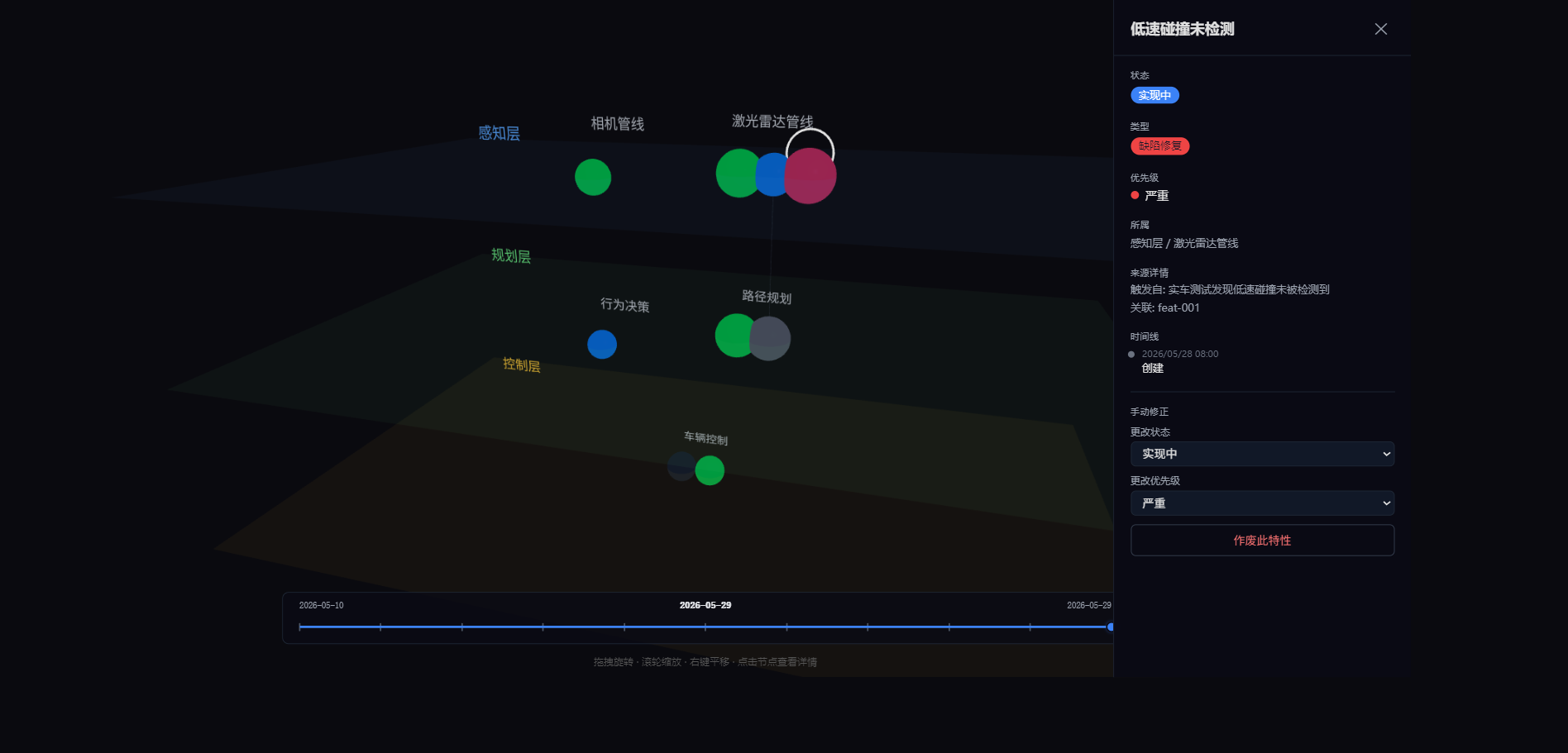
Topos MCP solves this by maintaining a lightweight structured state file (.topos/project.yaml) in the project. The Agent updates feature status on every operation, while a human-readable context summary (agent-context.md) is auto-generated. The Agent reads the context on startup to quickly recover awareness, continuously updates via MCP tools during work, and humans get a bird's-eye view of the entire project through the 3D Dashboard.
Data Management
Topos MCP uses a three-level data model that structurally describes the entire project:
Layer → Module → Feature- project.yaml — Single source of truth, stored in
.topos/. Contains project architecture (layers/modules/features), four feature statuses (active/in progress/implemented/deprecated), four source types (feature request/bug fix/refactor/optimization), dependency relationships, and evolution history - agent-context.md — Auto-generated, read by the Agent on startup. Contains in-progress features, planned items, current plans, and recently deprecated records, helping the Agent quickly regain awareness across sessions
- MCP Tools (7) — Agent interacts via standard MCP protocol: create/update/query features, view plans, record status changes. Each operation automatically writes to YAML and regenerates agent-context.md
Design principle: zero external dependencies (no database, no file watchers). Agent explicitly calls tools to persist; humans can inspect the YAML at any time.
Usage
Start the MCP server and Dashboard:
npx @timgunnar/topos-mcp serveOpen http://localhost:4321 to view the 3D topology. The Dashboard supports multiple concurrent browser tabs.
Install
npm (Recommended)
npx @timgunnar/topos-mcp init    # Initialize in current project
npx @timgunnar/topos-mcp serve   # Start MCP server + Dashboard
From Source (GitHub)
git clone https://github.com/timgunnar/topos-mcp.git
cd topos-mcp
npm install
npm run build
node packages/mcp-server/dist/index.js init    # Initialize in current project
node packages/mcp-server/dist/index.js serve   # Start MCP server + Dashboard
Open http://localhost:4321 to view the 3D topology.
Claude Code Configuration
{
  "mcpServers": {
    "topos": {
      "command": "npx",
      "args": [
        "@timgunnar/topos-mcp",
        "serve"
      ]
    }
  }
}
License
MIT