
@tkirk1/react-native-grid2
v1.0.25
Published
Cross-platform MUI Grid v2 implementation for React Native. Drop-in replacement for Material-UI Grid with breakpoint-aware responsive layouts, TypeScript support, and mobile-first design.

Maintainers
 tkirk1
Keywords
Readme
@tkirk1/react-native-grid2
Cross-platform MUI Grid v2 implementation for React Native. Drop-in replacement for Material-UI Grid with identical API.
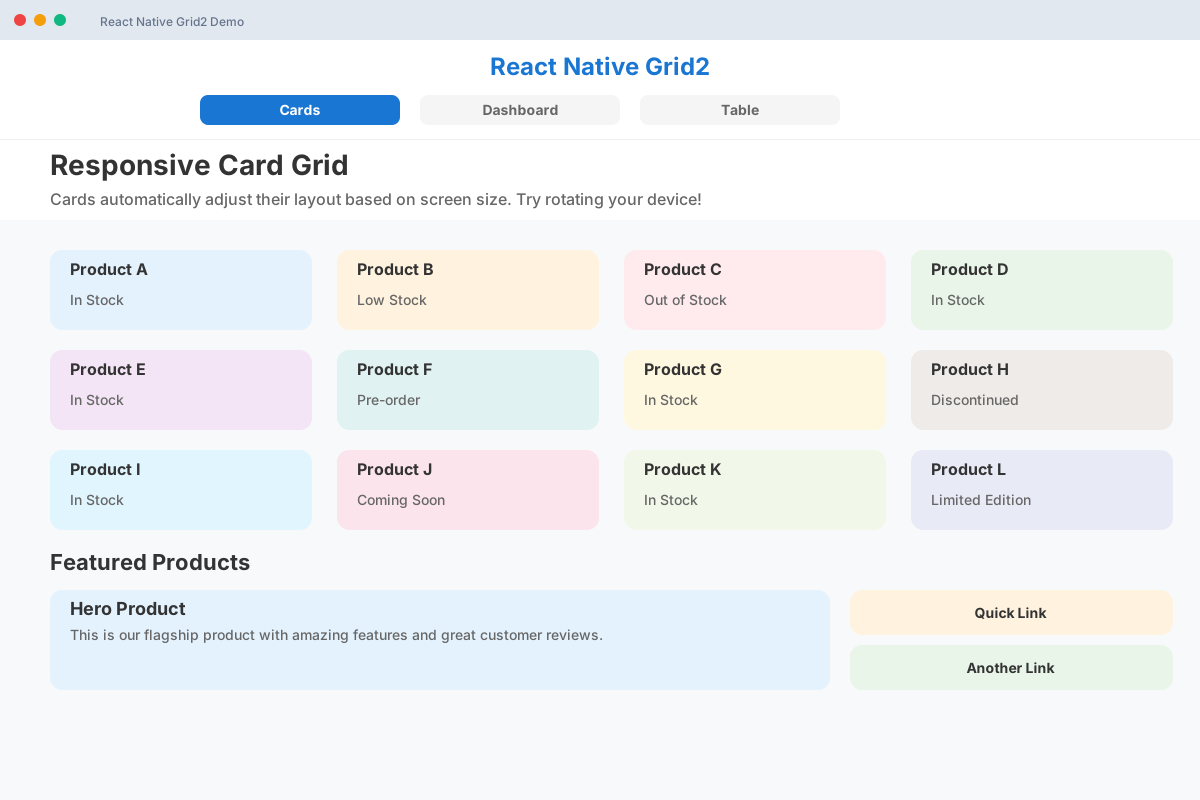
Live Demo Screenshots
Cards Demo - Responsive Product Grid
Dashboard Demo - Analytics Layout
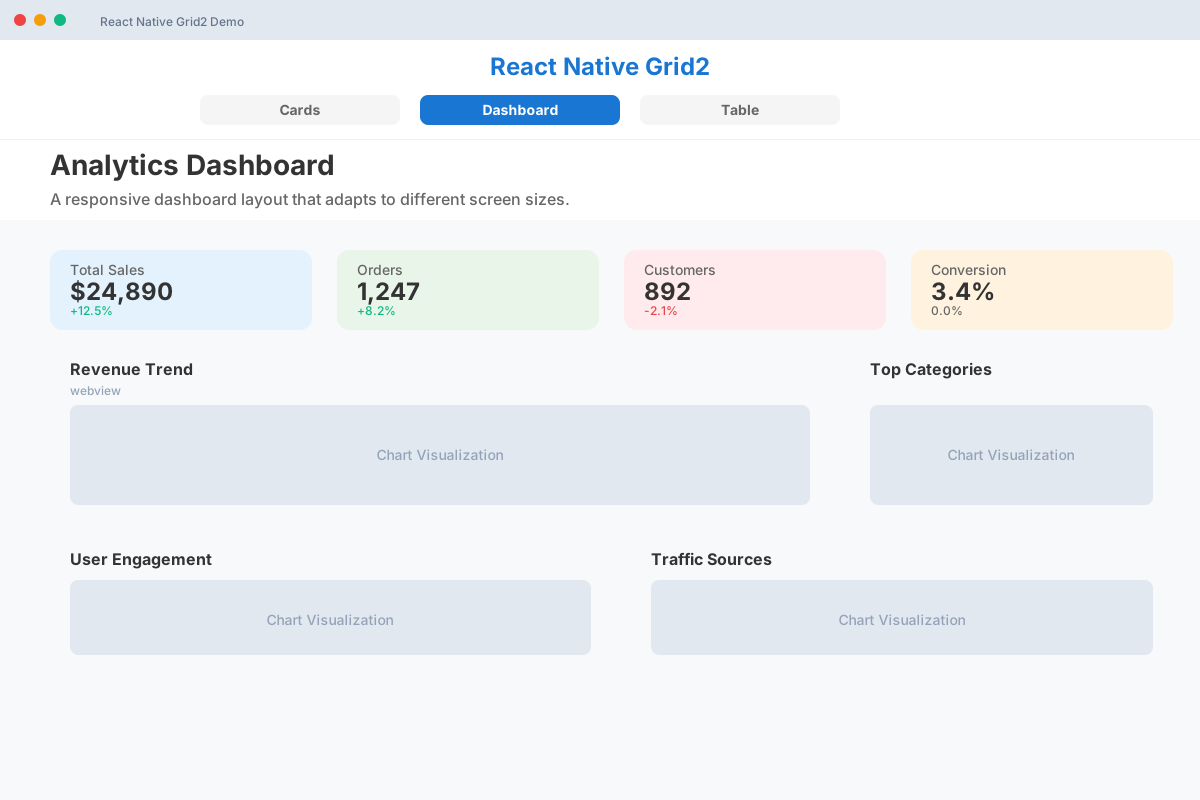
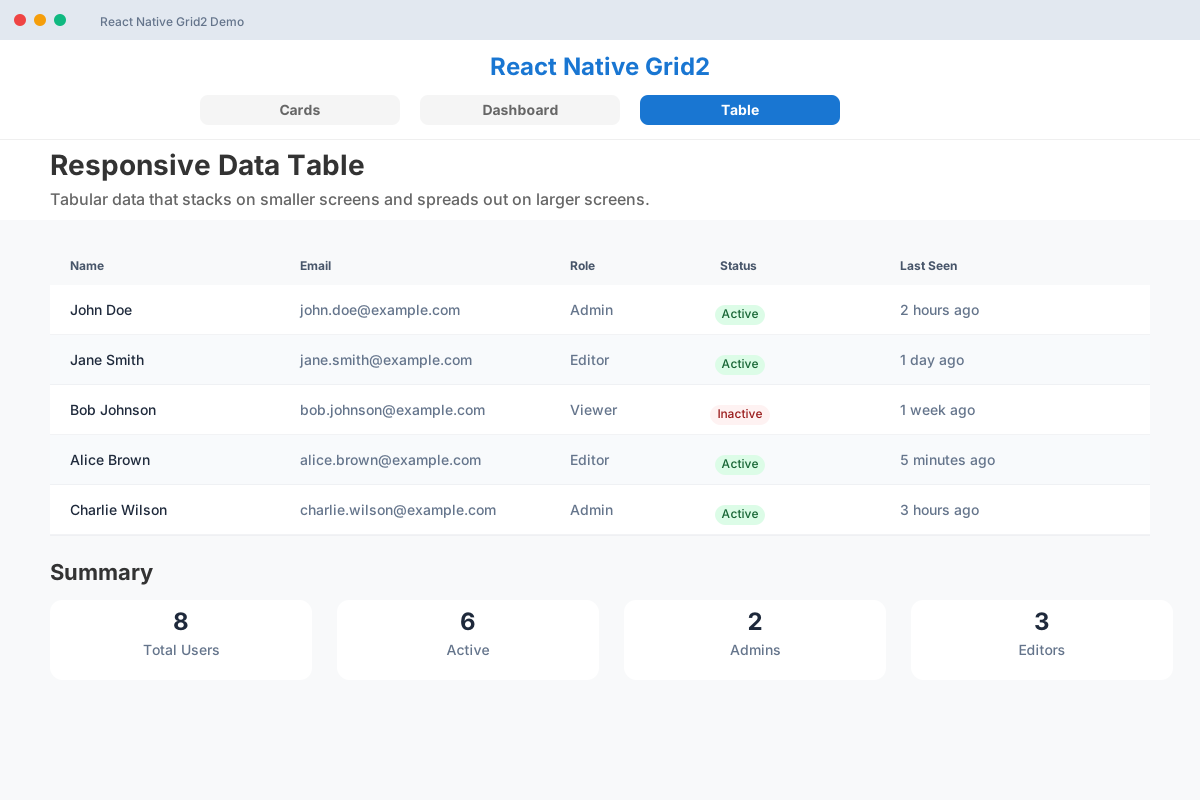
Table Demo - Responsive Data Table
Responsive Breakpoint Visualization
📱 Mobile (xs)     📱 Tablet (md)      💻 Desktop (lg)
┌─────────────┐    ┌──────┬──────┐    ┌───┬───┬───┐
│   Card 1    │    │Card 1│Card 2│    │ 1 │ 2 │ 3 │
│  xs: 12     │    │ md:6 │ md:6 │    │lg:│lg:│lg:│
└─────────────┘    └──────┴──────┘    │ 4 │ 4 │ 4 │
┌─────────────┐    ┌─────────────┐    └───┴───┴───┘
│   Card 2    │    │   Card 3    │
│  xs: 12     │    │   md: 12    │    <Grid container spacing={2}>
└─────────────┘    └─────────────┘      <Grid size={{xs:12, md:6, lg:4}}>
┌─────────────┐                           <YourComponent />
│   Card 3    │    MUI Grid v2 API       </Grid>
│  xs: 12     │    Cross-platform      </Grid>
└─────────────┘    iOS • Android • Web



Features
- 🎯 MUI Grid v2 Drop-in Replacement - Exact API match with Material-UI Grid v2
- 📱 Cross-Platform MUI - Brings Material-UI Grid to React Native (iOS, Android, Web)
- 📱 Responsive Design - Built-in breakpoint system (xs, sm, md, lg, xl)
- ⚡ Performance Optimized - Handles 500+ grid items efficiently
- 🌍 RTL Support - Full right-to-left language support
- 🔧 TypeScript Native - Complete type definitions included
- 📦 Zero Dependencies - Only peer dependencies on React Native core
Installation
npm install @tkirk1/react-native-grid2
# or
yarn add @tkirk1/react-native-grid2
Peer Dependencies
Make sure you have these installed:
npm install react react-native react-native-safe-area-contextQuick Start
📱 Try it Live
Create Your Own Demo: Copy the code below to snack.expo.dev and add @tkirk1/react-native-grid2 as a dependency
Open in Expo Go by scanning the QR code or test directly in your browser. The demo includes:
- Responsive card layouts that adapt to screen size
- Dashboard-style metric grids
- Real-time breakpoint detection
- Interactive examples you can modify
🧪 Test in Expo Snack
- Copy the code from any example below
- Create new Snack at snack.expo.dev
- Add dependency:
@tkirk1/react-native-grid2 - Paste and run - Test on web, iOS, or Android instantly
🚀 Basic Usage
import React from 'react';
import { View, Text } from 'react-native';
import { Grid, BreakpointProvider } from '@tkirk1/react-native-grid2';

export default function App() {
  return (
    <BreakpointProvider>
      <Grid container spacing={2}>
        <Grid size={{ xs: 12, md: 6 }}>
          <Text>Item 1</Text>
        </Grid>
        <Grid size={{ xs: 12, md: 6 }}>
          <Text>Item 2</Text>
        </Grid>
      </Grid>
    </BreakpointProvider>
  );
}
API Reference
Grid Component
The Grid component can act as both a container and an item.
Props
| Prop | Type | Default | Description |
|------|------|---------|-------------|
| container | boolean | false | Makes the component a flex container |
| size | ResponsiveValue<GridSize> | - | Defines the size of grid items |
| offset | ResponsiveValue<number \| 'auto'> | - | Defines the offset for positioning |
| columns | ResponsiveValue<number> | 12 | Number of columns in the grid |
| spacing | ResponsiveValue<number> | 0 | Space between items |
| rowSpacing | ResponsiveValue<number> | - | Vertical space between items |
| columnSpacing | ResponsiveValue<number> | - | Horizontal space between items |
| direction | ResponsiveValue<GridDirection> | 'row' | Flex direction |
| wrap | ResponsiveValue<GridWrap> | 'wrap' | Flex wrap behavior |
GridSize
type GridSize = number | 'auto' | 'grow';number(1-12): Column span'auto': Size based on content'grow': Fill available space
Responsive Values
All props support responsive values using breakpoint objects:
<Grid size={{ xs: 12, sm: 6, md: 4, lg: 3 }} />BreakpointProvider
Provides breakpoint context to the application.
import { BreakpointProvider } from '@tkirk1/react-native-grid2';

<BreakpointProvider breakpoints={{ xs: 0, sm: 600, md: 960, lg: 1280, xl: 1920 }}>
  <App />
</BreakpointProvider>
useBreakpoint Hook
Access current breakpoint information:
import { useBreakpoint } from '@tkirk1/react-native-grid2';

function MyComponent() {
  const { breakpoint, screenWidth } = useBreakpoint();
  return <Text>Current: {breakpoint}</Text>;
}
Live Examples
📱 Create Demo in Expo Snack
- Go to snack.expo.dev
- Add dependency:
@tkirk1/react-native-grid2 - Copy any example code below
- Test on web, iOS, or Android instantly
Basic Grid
import { Grid, BreakpointProvider } from '@tkirk1/react-native-grid2';

<BreakpointProvider>
  <Grid container spacing={2}>
    <Grid size={8}>
      <Text>8 columns</Text>
    </Grid>
    <Grid size={4}>
      <Text>4 columns</Text>
    </Grid>
  </Grid>
</BreakpointProvider>
Responsive Grid
// Copy this complete example to Expo Snack for instant testing
import React from 'react';
import { View, Text, StyleSheet, SafeAreaView } from 'react-native';
import { Grid, BreakpointProvider } from '@tkirk1/react-native-grid2';

export default function ResponsiveDemo() {
  return (
    <SafeAreaView style={styles.container}>
      <BreakpointProvider>
        <Grid container spacing={{ xs: 1, sm: 2, md: 3 }}>
          <Grid size={{ xs: 12, sm: 6, md: 4 }}>
            <View style={[styles.card, { backgroundColor: '#e3f2fd' }]}>
              <Text style={styles.cardText}>Card 1</Text>
              <Text style={styles.subtitle}>xs:12 sm:6 md:4</Text>
            </View>
          </Grid>
          <Grid size={{ xs: 12, sm: 6, md: 4 }}>
            <View style={[styles.card, { backgroundColor: '#f3e5f5' }]}>
              <Text style={styles.cardText}>Card 2</Text>
              <Text style={styles.subtitle}>Responsive sizing</Text>
            </View>
          </Grid>
          <Grid size={{ xs: 12, sm: 12, md: 4 }}>
            <View style={[styles.card, { backgroundColor: '#e8f5e8' }]}>
              <Text style={styles.cardText}>Card 3</Text>
              <Text style={styles.subtitle}>Adapts to screen</Text>
            </View>
          </Grid>
        </Grid>
      </BreakpointProvider>
    </SafeAreaView>
  );
}

const styles = StyleSheet.create({
  container: { flex: 1, padding: 16, backgroundColor: '#fff' },
  card: {
    padding: 20, borderRadius: 8, minHeight: 100,
    justifyContent: 'center', alignItems: 'center',
    elevation: 2, shadowOffset: { width: 0, height: 2 },
    shadowOpacity: 0.1, shadowRadius: 4,
  },
  cardText: { fontSize: 18, fontWeight: 'bold', marginBottom: 4 },
  subtitle: { fontSize: 12, opacity: 0.7 },
});
Auto Layout
<Grid container spacing={2}>
  <Grid size="grow">
    <Text>Grows to fill space</Text>
  </Grid>
  <Grid size="auto">
    <Text>Size based on content</Text>
  </Grid>
  <Grid size={6}>
    <Text>Fixed 6 columns</Text>
  </Grid>
</Grid>
Offset
<Grid container>
  <Grid size={6} offset={3}>
    <Text>Centered with offset</Text>
  </Grid>
  <Grid size={4} offset="auto">
    <Text>Pushed to right</Text>
  </Grid>
</Grid>
Nested Grids
<Grid container spacing={2}>
  <Grid size={8}>
    <Grid container spacing={1}>
      <Grid size={6}>
        <Text>Nested item 1</Text>
      </Grid>
      <Grid size={6}>
        <Text>Nested item 2</Text>
      </Grid>
    </Grid>
  </Grid>
  <Grid size={4}>
    <Text>Sidebar</Text>
  </Grid>
</Grid>
Breakpoints
Default breakpoint values:
{
  xs: 0,    // Extra small devices
  sm: 600,  // Small devices
  md: 960,  // Medium devices
  lg: 1280, // Large devices
  xl: 1920  // Extra large devices
}
Performance
The library is optimized for performance with:
- Style caching for repeated calculations
- Memoized component rendering
- Efficient breakpoint detection
- Minimal re-renders on screen size changes
Tested to handle 500+ grid items maintaining <16ms frame budget.
TypeScript
Full TypeScript support with comprehensive type definitions:
import type { GridProps, Breakpoint, ResponsiveValue } from '@tkirk1/react-native-grid2';Contributing
Contributions are welcome! Please read our contributing guidelines and submit pull requests to our GitHub repository.
License
MIT License - see LICENSE file for details.
Changelog
1.0.0 (2025-06-28)
- Initial release with MUI Grid v2 API compatibility
- Full responsive breakpoint system
- Performance optimizations for 500+ items
- RTL support
- TypeScript definitions