
@tmustier/pi-clean-slides
v0.1.3
Published
PowerPoint CLI skill for Pi — inspect, edit, generate table slides from YAML, render to PNG.


Readme
Clean Slides
An opinionated CLI for AI agents to generate consulting-style PowerPoint slides from YAML. Not a general-purpose slide builder. It produces the kind of minimal, information-dense tables I preferred to write at McKinsey: no graphics, no effects, just structured thinking in a clear, visual format.
Here are two examples, neither touched by me:
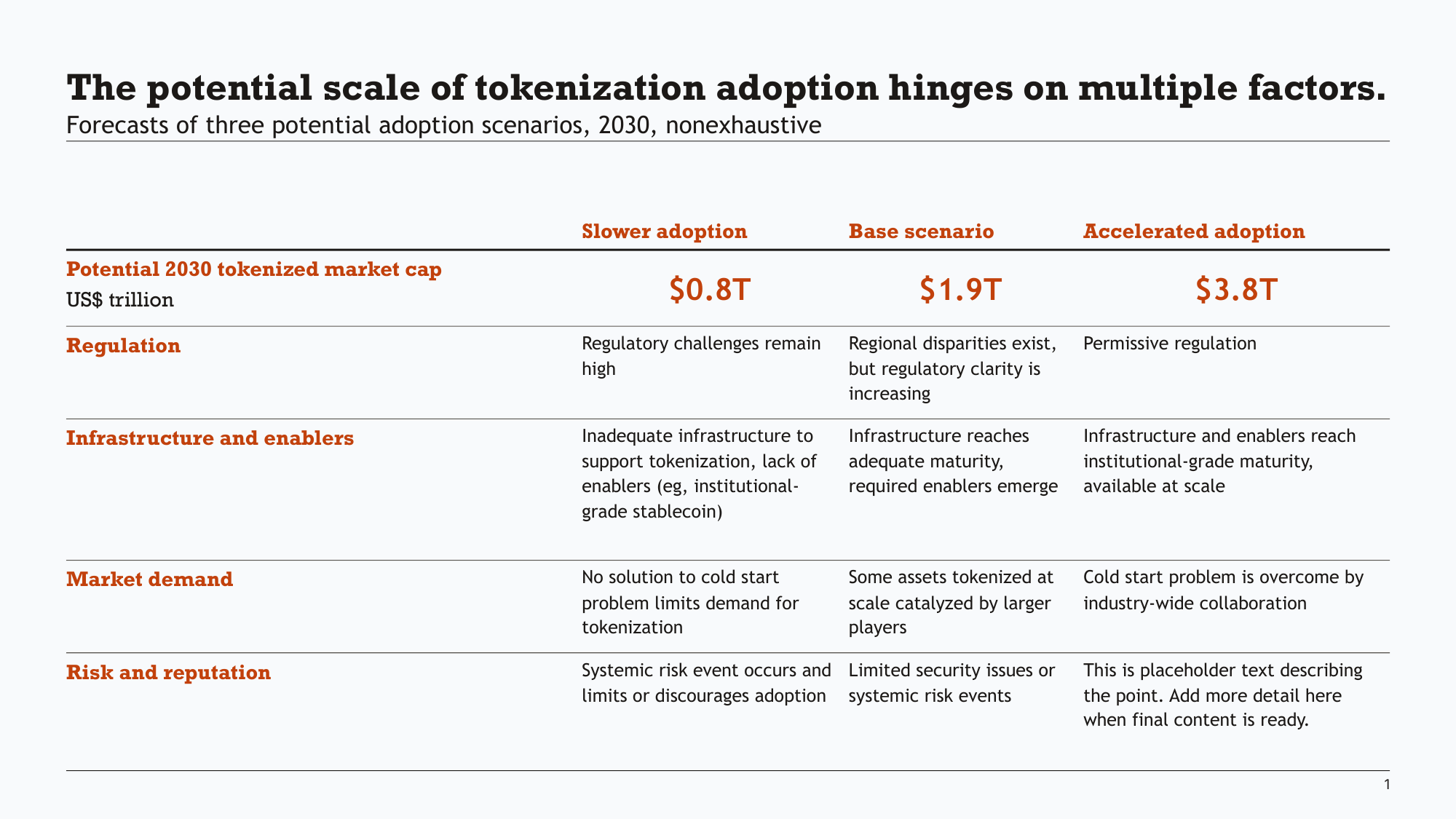
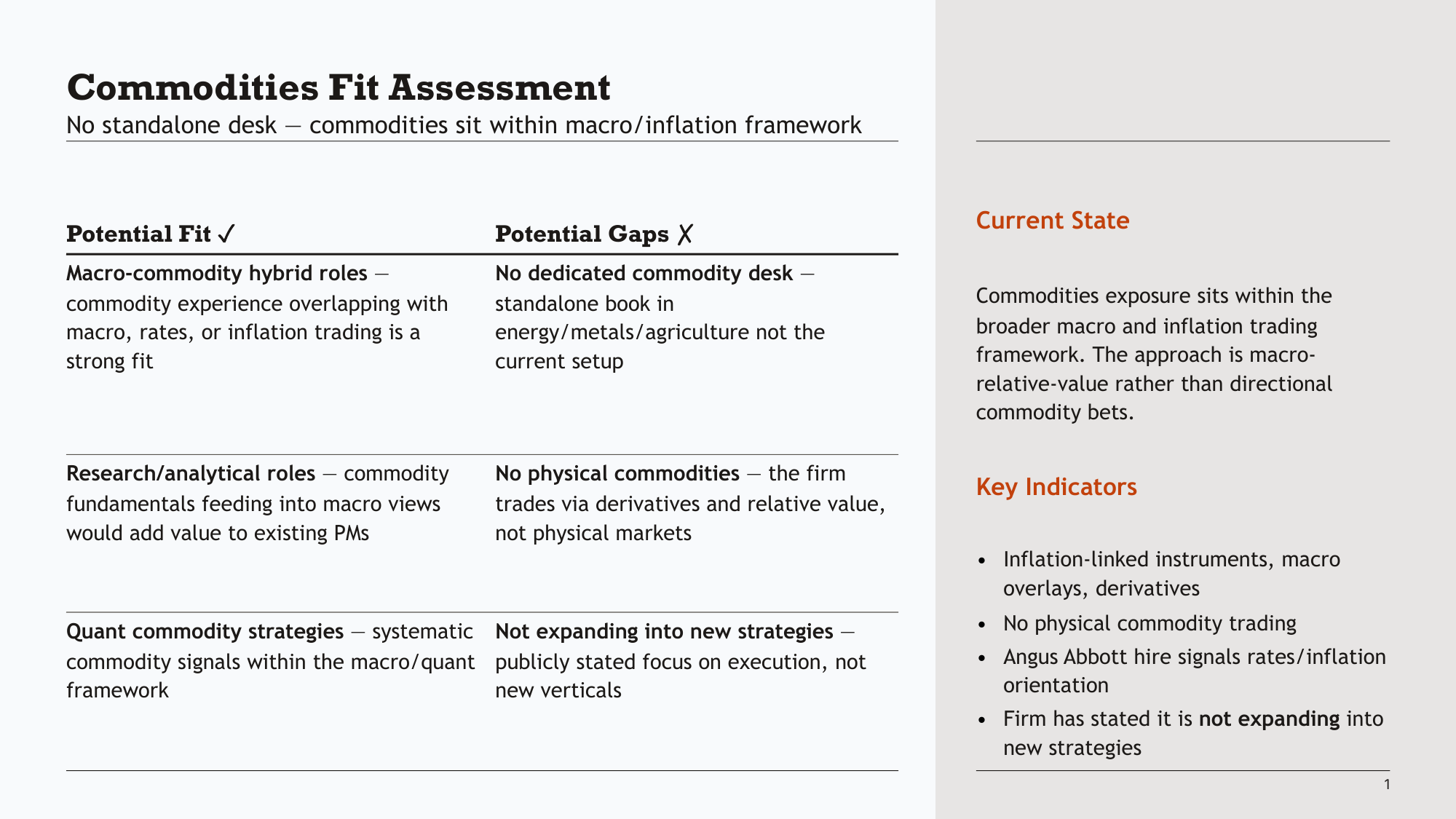
(and see a fun one-shotted deck about the adorable Russian Desman here)
What it does
Your agent writes a YAML spec describing a table's content and structure. Clean Slides handles the layout — column widths, row heights, font sizing, dividers, bullet hierarchy — and produces a .pptx file that looks like it was built by hand.
title: The potential scale of tokenization adoption hinges on multiple factors.
subtitle: Forecasts of three potential adoption scenarios, 2030, nonexhaustive

table:
  rows: 6
  cols: 4
  has_col_header: true
  has_row_header: true
  col_headers: ["Slower adoption", "Base scenario", "Accelerated adoption"]
  col_header_color: accent1
  column_widths: [0, 1, 1, 1]  # custom weights (remove for html-4 style default)

  row_headers:
    - - { text: "Potential 2030 tokenized market cap" }
      - { text: "US$ trillion", color: tx1, bold: false }
    - "Regulation"
    - "Infrastructure and enablers"
    - "Market demand"
    - "Risk and reputation"

  row_overrides:
    0:
      align: ctr
      anchor: ctr
      bold: true
      color: accent1
      size: 20

  cells:
    - ["$0.8T", "$1.9T", "$3.8T"]
    - ["Regulatory challenges remain high", "Regional disparities exist, but regulatory clarity is increasing", "Permissive regulation"]
    - ["Inadequate infrastructure to support tokenization, lack of enablers (eg, institutional-grade stablecoin)", "Infrastructure reaches adequate maturity, required enablers emerge", "Infrastructure and enablers reach institutional-grade maturity, available at scale"]
    - ["No solution to cold start problem limits demand for tokenization", "Some assets tokenized at scale catalyzed by larger players", "Cold start problem is overcome by industry-wide collaboration"]
    - ["Systemic risk event occurs and limits or discourages adoption", "Limited security issues or systemic risk events", ""]
pptx generate tokenization.yaml -o tokenization.pptxThat's mostly it. The tool also handles:
- Inline formatting —
**bold**,*italic*,[links](url)in any cell - Bullet hierarchy — nested paragraphs with configurable indent levels
- Icon indicators — traffic-light circles for RAG status, severity, etc.
- Sidebars — split layouts (2/3, 3/4) with formatted text in the secondary area
- Slide inspection and editing — read shapes, edit text, merge decks
Charts (JSON) — alpha
Clean Slides also includes a chart generator for bar/stacked/waterfall charts driven by JSON. This is alpha — the interface works but the schema and CLI flags may change.
pptx charts spec.json output.pptxSee docs/CHARTS.md for the JSON schema and options.
What it doesn't do
This is a text table tool, not a presentation platform. It won't:
- Generate diagrams or images
- Apply transitions or animations
- Create freeform layouts or infographics
- Auto-generate content — you think the thoughts, the agent helps you structure them and handles formatting
The design is deliberately constrained. Tables are the primary medium because a table is the minimal way to express structured thinking. Even the default bullet style at level zero is no bullet — because bullets add visual clutter that doesn't serve the reader.
If you want a tool that produces polished decks with graphics and imagery, this isn't it. If you want something that takes structured text and produces clean, consistent, professional-looking table slides — fast — this is what it's for.
Template
- Quick start: works out-of-the-box with the bundled example template which is used for the screenshots above
- BYO: load your own template by dropping it in
.clean-slides/template.pptxand creating the config
Quick Start
With Pi:
pi install npm:@tmustier/pi-clean-slidesOr manually:
# clone into your agent skills directory (e.g. ~/.pi/agent/skills/, ~/.claude/skills/)
git clone https://github.com/tmustier/clean-slides && cd clean-slides
pip install -e .
pptx init           # creates .clean-slides/ with a bundled example template
Write a YAML file (see example above), then:
pptx generate slide.yaml -o output.pptxThe template and config in .clean-slides/ are discovered automatically — no flags needed.
Using your own template
Any .pptx works as a template — a corporate deck, a downloaded theme, or something you design.
# Initialise with your template (auto-generates a starter config)
pptx init -t my-template.pptx

# Or do it manually
pptx init-config my-template.pptx -o config.yaml   # inspect + generate config
mkdir .clean-slides
cp my-template.pptx .clean-slides/template.pptx
cp config.yaml .clean-slides/config.yaml
Then edit .clean-slides/config.yaml to map your template's colours, fonts, and placeholder indices. See docs/TEMPLATE-CONFIG.md for the full reference, and examples/custom-template/ for a worked example.
Commands
| Command | Purpose |
|---------|---------|
| pptx generate <yaml...> | Generate slides from YAML specs |
| pptx charts <json> <output> | Generate charts from JSON specs (alpha) |
| pptx validate <yaml...> | Check YAML against schema |
| pptx verify <yaml...> | Check sizing and overflow |
| pptx show <file> [slide] [shape] | Inspect slides and shapes |
| pptx layouts <file> | Show template layouts and content areas |
| pptx theme <file> | Show colour scheme |
| pptx edit <file> <slide> <shape> <text> | Edit shape text |
| pptx insert <deck> <source> | Merge slides from another file |
| pptx render <file> <slide> | Render to PNG |
| pptx init [-t template] | Bootstrap a .clean-slides/ project |
| pptx init-config <template> | Generate config from a template |
Full YAML schema: docs/INPUT-SCHEMA.md
Development
pip install -e '.[dev]'
pre-commit install
python -m pytest -q
pyright clean_slides/
Release gate checklist: docs/RELEASE-CHECKLIST.md
Why this exists
I spent six years writing slides in consulting. Most AI slide tools focus on imagery and visual polish — which has its place, but isn't what makes a consulting slide useful. A good slide is a unit of structured argumentation that happens to be visual. You figure out the narrative first, decompose it into pages, then fill each page with the component parts of your argument.
This tool takes that workflow seriously. You focus on the content and structure; it handles the formatting. When used with an AI agent, it produces first drafts that feel like they belong in the document — consistent style, proper hierarchy, no "generated by AI" aesthetic. The constraint is the point.
More on the design philosophy: mustier.ai/projects/clean-slides
Clean Slides works with any agent, but I use pi.dev with my Agent Teams extension that lets the agent create clones of itself with the same context and manage them — so each clone worked on one page with full context, and the original agent focused on output quality and consistency, similar to how a consulting team would split work after a group problem-solving meeting. You can optionally do this with:
npm install -g @earendil-works/pi-coding-agent
pi install npm:@tmustier/pi-agent-teams