
@togtokh.dev/hipay
v0.0.8
Published
hipay is a library for payment gateway.
Downloads
33


Readme
HIPAY
A wrapper for the HIPAY Mongolia payment system. Easily authenticate, create checkouts, get status, cancel checkouts, and refund payments.
🔧 Installation
npm install @togtokh.dev/HIPAY✨ Example Usage
import HIPAY from "@togtokh.dev/HIPAY";
import { main } from "@togtokh.dev/HIPAY";

async function runTests() {
  try {
    await HIPAY.auth.TOKEN("staging", {
      entityId: "sellerte",
      token: "FQ5ByAS79LwoVtDT3UyDPp",
    });

    const createRes = await main.CREATE({
      redirect_uri: "https://example.com/redirect",
      webhook_url: "https://example.com/webhook",
      amount: 1000.1,
      qrData: false,
      items: [
        {
          itemno: "item001",
          name: "Test Product",
          price: 1000.1,
          quantity: 1,
          brand: "TestBrand",
          measure: "pcs",
          vat: 100,
          citytax: 50,
        },
      ],
    });

    if (!createRes.success || !createRes.data) {
      console.error("❌ CREATE failed:", createRes.message);
      return;
    }

    console.log("✅ CREATE result:", createRes.data);

    const { checkoutId } = createRes.data;

    const statusRes = await main.CHECKOUT_STATUS(checkoutId);

    if (!statusRes.success || !statusRes.data) {
      console.error("❌ CHECKOUT_STATUS failed:", statusRes.message);
    } else {
      console.log("✅ CHECKOUT_STATUS:", statusRes.data);
    }

    const cancelRes = await main.CANCEL_CHECKOUT(checkoutId);

    if (!cancelRes.success) {
      console.error("❌ CANCEL_CHECKOUT failed:", cancelRes.message);
    } else {
      console.log("✅ CANCEL_CHECKOUT:", cancelRes.message);
    }

    const fakePaidPaymentId = "YOUR_REAL_PAID_PAYMENT_ID";
    const refundRes = await main.REFUND_PAYMENT(fakePaidPaymentId);

    if (!refundRes.success || !refundRes.data) {
      console.error("❌ REFUND_PAYMENT failed:", refundRes.message);
    } else {
      console.log("✅ REFUND_PAYMENT:", refundRes.data);
    }
  } catch (error) {
    console.error("🔥 Unexpected error:", error);
  }
}

runTests();
🧩 Hipay API Холболт, хөгжүүлэлтийн заавар
Hipay LLC компаны хөгжүүлэлт болон API холболтын заавар гарын авлага.
1. 🗃️ Үндсэн API
main.ts файлд байрлах үндсэн төлбөрийн API-уудыг агуулсан.
- Checkout үүсгэх
- Нэхэмжлэлийн төлөв шалгах
- Нэхэмжлэл цуцлах
- Гүйлгээ буцаах
- Төлбөр төлөх DEEPLINK
- Төлбөрийн хариу мэдээлэл - WEBHOOK
🔗 Төлбөр төлөх DEEPLINK
GET hipay://pay/:checkoutId| Param | Type | Required | Description |
| ------------ | ------ | -------- | --------------------------------------------------------- |
| checkoutId | string | ✅ | Нэхэмжлэх үүсгэх API-р үүсгэсэн төлбөрийн нэхэмжлэлийн ID |
🔔 Төлбөрийн хариу мэдээлэл - WEBHOOK
GET https://yourdomain.com/webhook?checkoutId=xxx&paymentId=yyy| Query Param | Type | Required | Description |
| ------------ | ------ | -------- | ------------------- |
| checkoutId | string | ✅ | Нэхэмжлэлийн дугаар |
| paymentId | string | ✅ | Гүйлгээний дугаар |
Retry Intervals:
15s / 15s / 30s / 3m / 10m / 20m / 30m / 30m / 30m / 60m / 3h / 3h / 3h / 6h / 6h⚠️ Your server should ensure idempotency to avoid duplicate handling.
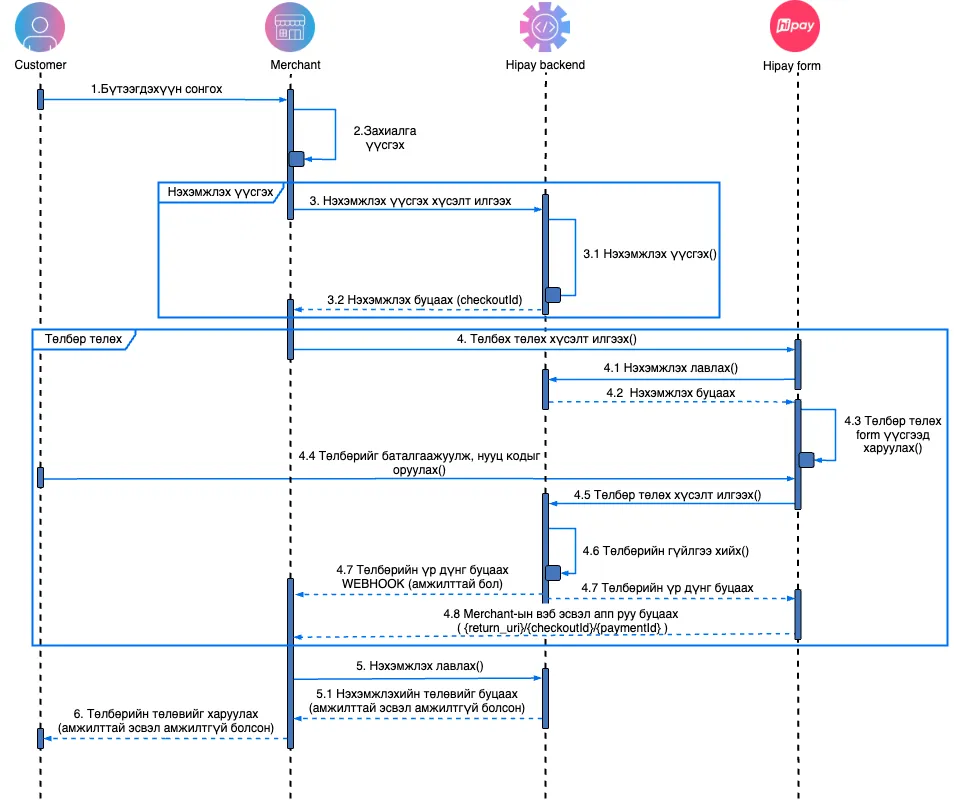
2. 🗃️ E-Commerce
e-commers.ts файлд онлайн төлбөрийн форм үүсгэх логик агуулагдана.
💳 Sequence Diagram
Хэрэглэгчдэд Hipay-д бүртгэлтэй мерчантуудаас онлайн худалдан авалт хийх боломжийг олгоно.
3. 🗃️ POS
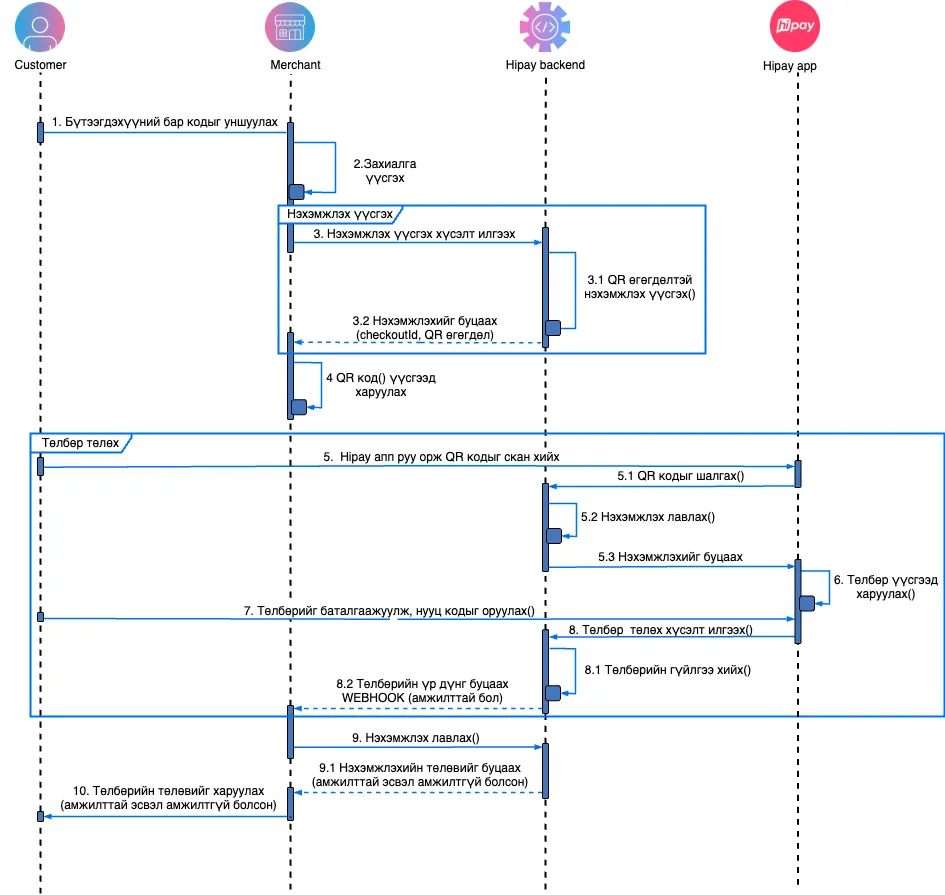
ПОС буюу кассын програмтай холбогдох үндсэн API.
POS систем ашиглан төлбөр хүлээн авахад зориулсан заавар:
4. 🗃️ Mini App
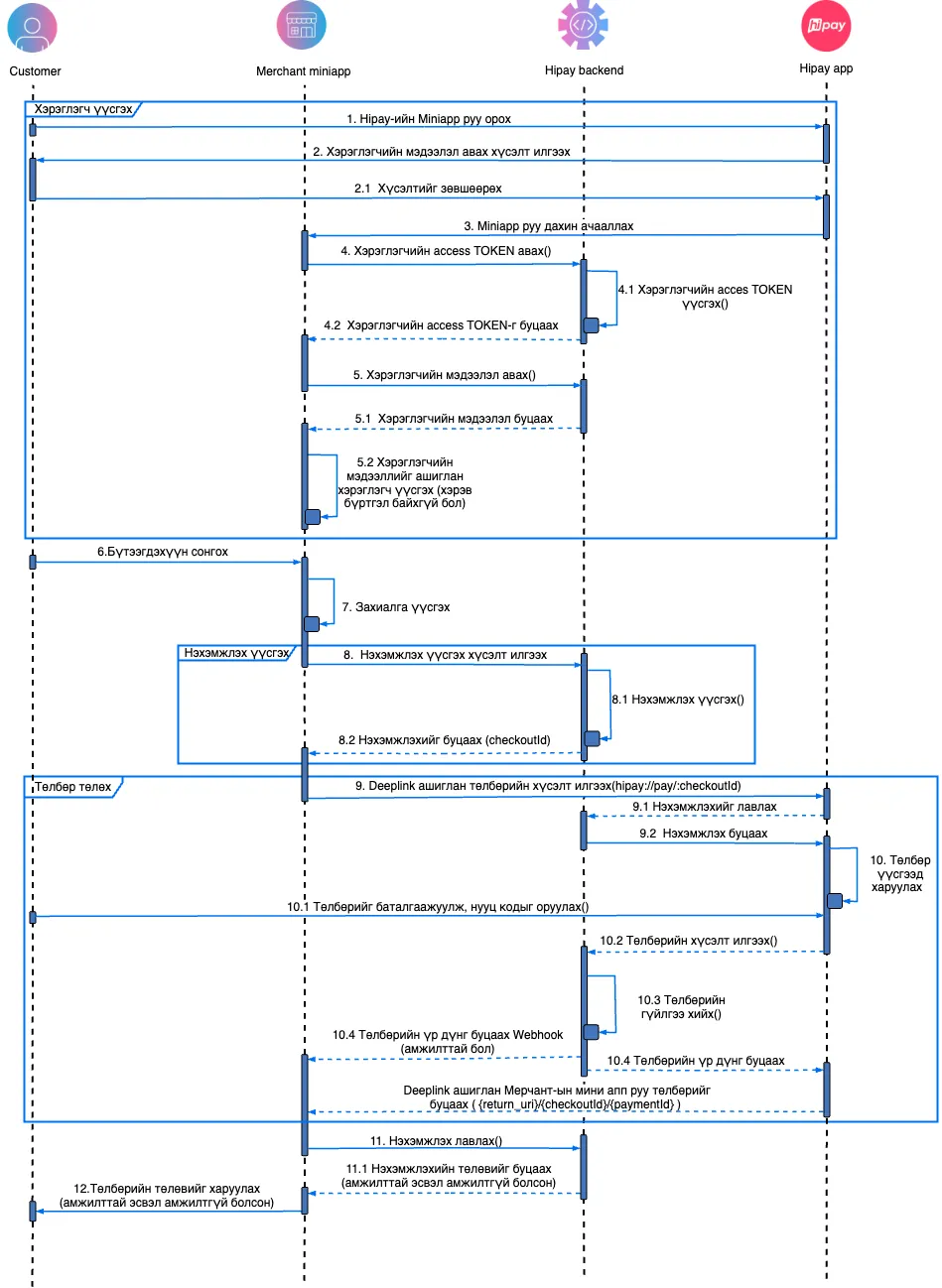
mini-app.ts файлд хэрэглэгчийн токен авах болон мэдээлэл дуудах логик байна.
- access_token авах
- хэрэглэгчийн мэдээлэл авах
🧭 Sequence Diagram
Hipay Wallet аппликэйшн дотор мерчант бүтээгдэхүүн/үйлчилгээг байршуулж, шууд хэрэглэгчид худалдан авалт хийх боломжийг олгоно.
5. 🗃️ Token
auth.ts файл нь HIPAY API-г ашиглахад шаардлагатай client_id + token тохиргоог агуулна.
- Auth тохиргоо (
TOKENsetter) - Mini App access_token авах
- Access_token ашиглан хэрэглэгчийн мэдээлэл авах
📫 Support
If you need help or encounter issues, contact: [email protected]
📄 License
MIT