
@toolwright-adk/linear-bootstrap
v0.1.5
Published
MCP server for bootstrapping Linear projects from natural language descriptions

Maintainers
 lokferris
Readme
linear-bootstrap



Describe a project in plain language, get a fully structured Linear project — milestones, epics, issues, labels, and dependency chains.
The server reads your team's existing conventions (workflow states, labels, cycles) and generates plans that fit how your team already works. Existing labels are reused, not duplicated. Issues start in your team's default state. Project names avoid collisions with active work.
Contents
- Example
- Quick Start
- What It Does
- How It Works
- Project Archetypes
- Environment Variables (self-hosted)
- Tools
- Workflow
- Other MCP Clients
- Security
- Known Limitations
- Programmatic Usage
- Development
- License
Example
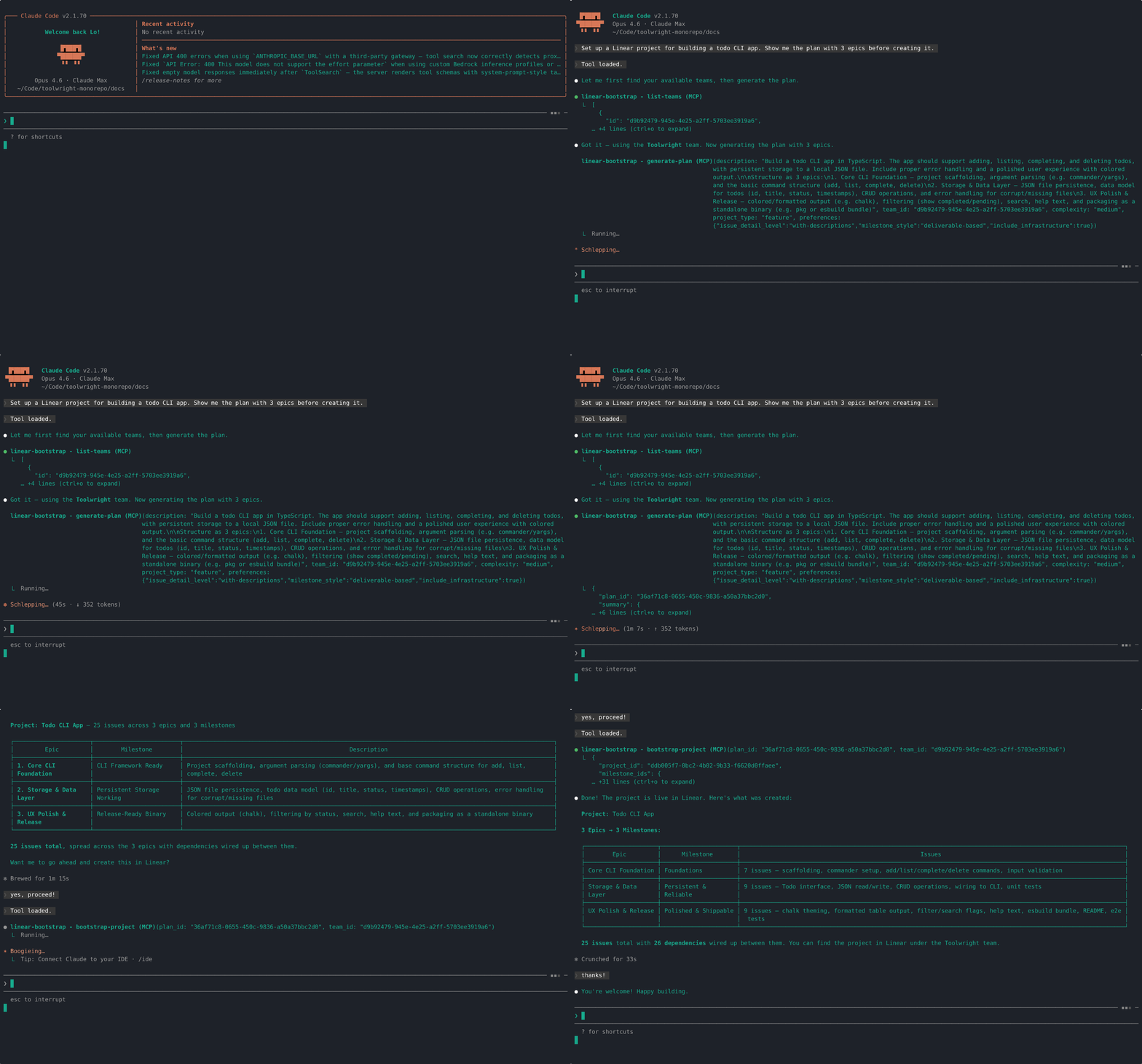
"Set up a Linear project for building a todo CLI app. Show me the plan with 3 epics before creating it."
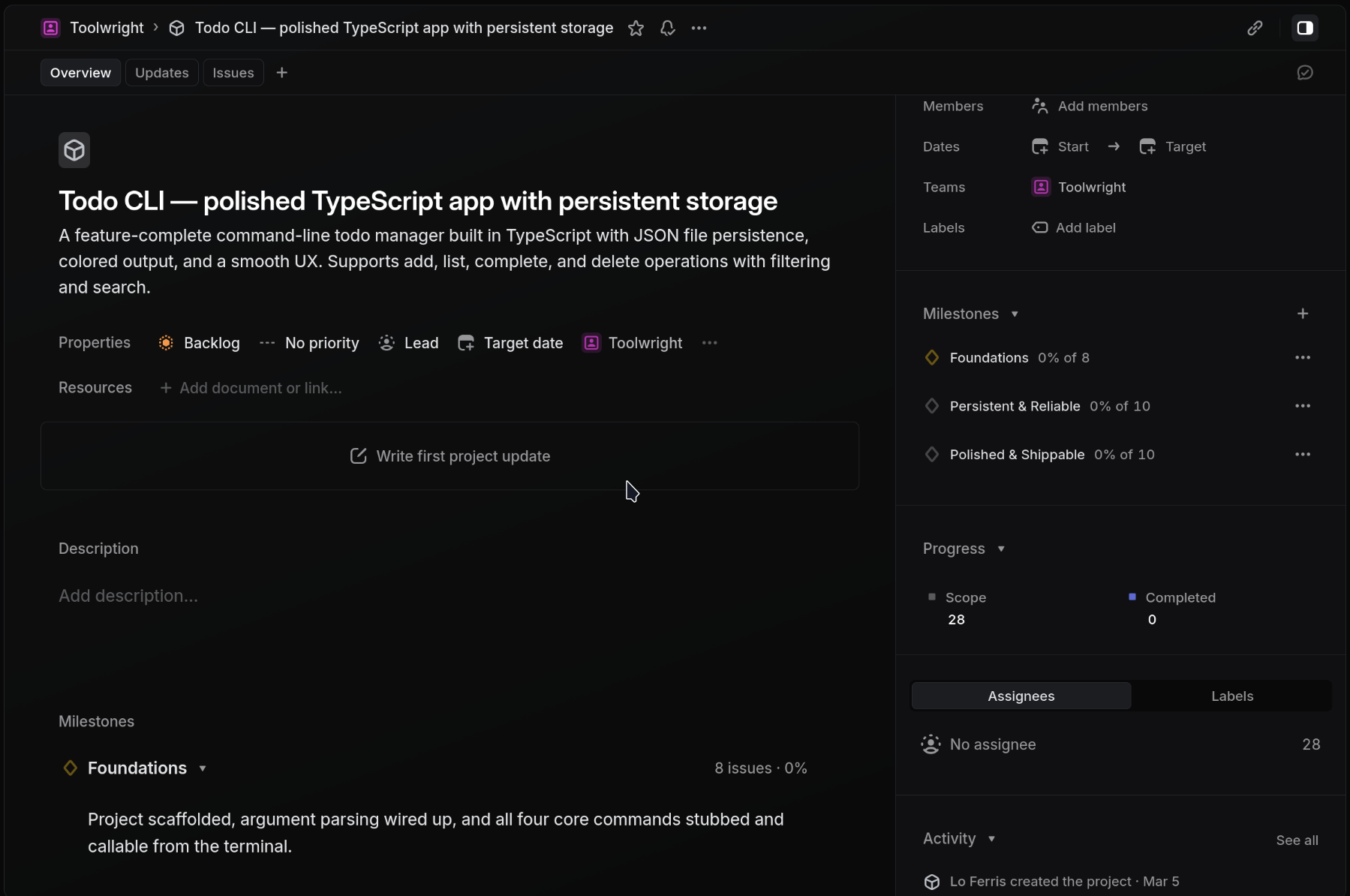
The agent introspects your team's workspace, generates a structured plan, and creates everything in Linear:
Quick Start
Option A: Self-hosted (BYOK)
Add to your MCP client config (Claude Code, Cursor, Windsurf, etc.):
{
  "mcpServers": {
    "linear-bootstrap": {
      "command": "npx",
      "args": ["-y", "@toolwright-adk/linear-bootstrap"],
      "env": {
        "LINEAR_API_KEY": "lin_api_...",
        "LLM_API_KEY": "...",
        "LLM_BASE_URL": "https://openrouter.ai/api/v1",
        "LLM_MODEL": "anthropic/claude-sonnet-4.6"
      }
    }
  }
}
Option B: Hosted on Apify
No LLM keys needed — just your Linear API key. Available as a managed MCP server on Apify with pay-per-event pricing ($0.35 per project bootstrap).
Install the Agent Skill (optional)
The included Agent Skill gives your agent a /linear-bootstrap slash command with step-by-step instructions for team selection, plan review, and project creation.
One-command install (recommended — works with Claude Code, Cursor, Gemini CLI, Goose, OpenCode, and more):
npx skills add toolwright-adk/toolwright-monorepo --skill linear-bootstrapManual install (if you prefer):
npm install @toolwright-adk/linear-bootstrap
cp -r node_modules/@toolwright-adk/linear-bootstrap/.claude/skills/linear-bootstrap .claude/skills/
The skill works with any agent that supports the Agent Skills format. It's tool-agnostic — it describes what needs to happen (find team, generate plan, validate, create), not which specific tool to call. Any agent with the MCP server connected will have the right tools available.
Use it
/linear-bootstrap CLI tool for managing database migrationsThe skill walks you through team selection, plan review, and project creation interactively. Say "just do it" to skip the review step.
The skill is optional — you can also direct your agent to use the tools directly or according to your own agent guidelines. For example: "Bootstrap a Linear project for building a Slack integration."
What It Does
One tool call like this:
{
  "description": "Build a Slack integration for posting Linear updates",
  "team_id": "team-abc123",
  "project_type": "feature"
}
Creates all of this in Linear:
- Project with description
- Milestones (e.g. Spec & design → MVP → Launch → Polish)
- Epics as parent issues (Linear doesn't have a dedicated epic type — these are regular issues with children), each wired to a milestone
- Issues with labels, priorities, and descriptions
- Dependencies between issues (blocks/blocked-by)
- Labels reused from your team when they exist, created only when new
The plan generation is context-aware — it introspects your team's workspace first, so the output respects your existing setup rather than creating a mess of duplicates.
How It Works
Context-aware generation — Before generating a plan, the server reads your team's workspace: workflow states, labels, active cycle, existing projects. This context is injected into the LLM prompt so plans use your team's naming conventions and avoid conflicts.
Label reuse — During bootstrap, existing team labels are matched by name. New labels are only created when there's no match. No duplicates.
Plan caching — The full plan is cached server-side and referenced by plan_id. Only a summary crosses into your agent's context window (~100 tokens vs ~3,000+ for the full plan). This keeps multi-step workflows lean.
Idempotency — bootstrap-project checks for an existing project with the same name before creating. If found, it returns the existing project ID without making changes.
Project Archetypes
The project_type parameter tailors the plan structure:
| Type | When to use | Example milestones |
| ------------------- | ---------------------------------- | ----------------------------------------------- |
| feature (default) | New user-facing functionality | Spec & design → MVP behind flag → Public launch |
| infrastructure | Internal tooling, platform work | Prototype → Dogfood → Org-wide rollout |
| api | Public or internal API development | API design sign-off → Implementation → GA |
| migration | Moving between systems | Dual-write → Backfill → Cutover → Decommission |
Environment Variables (self-hosted)
These apply to Option A. The Apify hosted version only requires a Linear API key.
| Variable | Required | Description |
| ---------------- | -------- | ------------------------------------------------------------------- |
| LINEAR_API_KEY | Yes | Linear API key (create one here) |
| LLM_API_KEY | Yes | API key for an OpenAI-compatible provider |
| LLM_BASE_URL | Yes | Provider's base URL |
| LLM_MODEL | Yes | Model ID for your provider |
Any provider that uses the OpenAI chat completions API works. Common setups:
| Provider | LLM_BASE_URL | LLM_MODEL example |
| -------------- | ------------------------------ | -------------------------------- |
| OpenRouter | https://openrouter.ai/api/v1 | anthropic/claude-sonnet-4.6 |
| Together | https://api.together.xyz/v1 | meta-llama/Llama-3-70b-chat-hf |
| OpenAI | https://api.openai.com/v1 | gpt-4o |
| Ollama (local) | http://localhost:11434/v1 | llama3 |
Tools
list-teams
List all Linear teams accessible to the configured API key. Call this first if you don't know your team ID.
Input: none
Returns: [{ id, name, key }]
API calls: 1 Linear read — teams query
introspect-workspace
Read team conventions from Linear. Called automatically by generate-plan, but available standalone to inspect your team's setup. Results are cached server-side for 30 minutes; subsequent calls for the same team return instantly.
Input: { team_id }
Returns: { team_name, workflow_states, default_state_id, default_state_name, labels, custom_fields, cycles_enabled, active_cycle?, existing_projects }
API calls: 5–6 Linear reads — team info, workflow states, labels (with parent resolution), default issue state, team projects, and active cycle (only if cycles are enabled)
generate-plan
Generate a structured project plan from a natural-language description. The full plan is cached server-side and only a plan_id + summary is returned to keep your agent's context lean.
If LINEAR_API_KEY is set and workspace context isn't already cached, this tool auto-introspects the team first (see introspect-workspace above). The workspace context is injected into the LLM prompt so the generated plan uses your team's existing labels, respects triage states, and avoids project name collisions.
Input:
| Field | Type | Required | Default |
| ------------------------------------ | ------------------------------------------------------------------------ | -------- | ----------- |
| description | string | yes | |
| team_id | string | yes | |
| complexity | "small" | "medium" | "large" | no | "medium" |
| project_type | "feature" | "infrastructure" | "api" | "migration" | no | "feature" |
| preferences.milestone_style | "time-based" | "deliverable-based" | "hybrid" | no | |
| preferences.issue_detail_level | "titles-only" | "with-descriptions" | "full-acceptance-criteria" | no | |
| preferences.include_infrastructure | boolean | no | |
| preferences.include_docs | boolean | no | |
Returns: { plan_id, summary } — summary has total_issues, total_epics, total_milestones, estimated_points
API calls: 1 LLM call (chat completion via LLM_BASE_URL/LLM_MODEL) + 0–6 Linear reads (auto-introspect, skipped if cached)
validate-plan
Check a plan for structural issues before creating anything. No external calls — pure logic.
Input: { plan_id } or { plan } (inline plan object), plus optional complexity and preferences (affects scale-check warnings)
Returns: { valid, errors, warnings }
API calls: none
Checks for: circular dependencies, orphaned dependency references, undefined milestones, empty epics, duplicate titles, oversized epics (>12 issues), high estimates (>5 points).
bootstrap-project
Create a complete Linear project from a plan. Validates the plan first; if validation fails, returns the errors without creating anything.
Input:
| Field | Type | Required | Default |
| --------- | ------- | ------------------- | ------- |
| plan_id | string | one of plan_id/plan | |
| plan | Plan | one of plan_id/plan | |
| team_id | string | yes | |
| dry_run | boolean | no | false |
Returns: { project_id, milestone_ids, label_ids, epic_ids, issue_ids, dependency_count } (when dry_run: false). When dry_run: true, returns { valid, errors, warnings } (the validation result).
API calls: 1 Linear read (project name check for idempotency) + N Linear writes, specifically:
- 1
createProject - 1
createProjectMilestoneper milestone - 0–N
createIssueLabel(only for labels not already on the team) - 1
createIssueper epic + 1 per child issue - 1
createIssueRelationper dependency
Labels that already exist on the team (matched by name from workspace cache) are reused by ID. All issues are created with the team's default workflow state. Label and dependency creation failures are non-critical (logged and skipped).
add-epic
Add a single epic (parent issue with children) to an existing project.
Input: { project_id, team_id, epic, milestone_id?, label_ids? }
Returns: { epic_id, issue_ids }
API calls: 1 Linear read (project issues for idempotency check) + N Linear writes (1 epic issue + 1 per child issue + 1 per dependency)
generate-and-bootstrap
Compound tool — generates a plan, validates it, and creates everything in Linear in one call. Combines generate-plan + validate-plan + bootstrap-project internally. Best for when you don't need to review the plan before execution.
Input: Same as generate-plan plus dry_run (boolean, default false)
Returns: { plan_id, summary, validation, bootstrap? } — bootstrap is omitted if validation fails or dry_run is true
API calls: 1 LLM call + 0–6 Linear reads (introspect) + 1 Linear read (idempotency) + N Linear writes (all resources)
Workflow
Step by step (full control):
- Call
list-teamsand pick yourteam_id. - Call
generate-planwith your description andteam_id. You get back aplan_idand summary. - Call
validate-planwith theplan_idto check for structural issues. - Call
bootstrap-projectwith theplan_idandteam_idto create everything in Linear.
One-shot (skip the review):
Call generate-and-bootstrap — it runs all three steps internally and creates the project in one call.
Both paths auto-introspect the workspace. Context is cached for 30 minutes per team.
Plugin: linear-project-manager
For a higher-level experience, the linear-project-manager plugin adds skills, agents, and commands that teach your agent when to use linear-bootstrap vs the official Linear MCP. It prevents common anti-patterns like creating 3+ issues one-by-one instead of using add-epic.
- Claude Code: install via the toolwright-adk marketplace or
claude --plugin-dir - Cursor / Windsurf / Roo Code / Cline: see the portability snippets
The plugin is optional — the MCP server works standalone with any client.
Other MCP Clients
The Quick Start config works with any stdio-compatible MCP client. Client-specific locations:
- Claude Code:
.claude/mcp.jsonorclaude mcp add - Cursor / Windsurf:
.cursor/mcp.json
For generic stdio clients:
LINEAR_API_KEY=... LLM_API_KEY=... LLM_BASE_URL=... LLM_MODEL=... npx -y @toolwright-adk/linear-bootstrapSecurity
When self-hosted, the server needs two sets of credentials:
- Linear API key — used to read team conventions and create projects. Scoped to one workspace; the key determines which teams are accessible. Create a key with the minimum permissions your workflow needs at linear.app/settings/api.
- LLM API key (self-hosted only) — your project description is sent to whichever LLM provider you configure via
LLM_BASE_URL. No Linear data (issues, comments, user info) is sent to the LLM — only the project description you provide, plus a summary of team labels, workflow states, and project names used to avoid duplicates.
No credentials are logged or cached to disk. Plan and workspace caches are in-memory only and cleared on server restart.
Known Limitations
- One workspace per server instance — the
LINEAR_API_KEYdetermines the workspace. To work across workspaces, run separate server instances. - In-memory caches — plan and workspace caches are process-local and don't survive restarts. A
plan_idis only valid within the same process for 30 minutes. Under horizontal scaling, usegenerate-and-bootstrap(single request) or pass inlineplanobjects instead ofplan_idreferences. - Custom fields — the schema supports them, but the Linear SDK (v37) doesn't expose custom field definitions. The
custom_fieldsarray is always empty. - No import — this server creates new Linear projects; it doesn't import from Jira, GitHub Projects, Asana, etc.
- LLM quality — plan quality depends on your model. Larger models (Claude Sonnet, GPT-4o, Llama 3 70B) produce better-structured plans than smaller ones.
Programmatic Usage
The package also exports core functions for programmatic use:
import { createServer } from "@toolwright-adk/linear-bootstrap";
// Creates a configured McpServer with all tools registered
const server = createServer();

// Or use the core functions directly (no MCP overhead)
import {
  generatePlan,
  validatePlan,
  bootstrapProject,
  introspectWorkspace,
  addEpic,
  generateAndBootstrap,
  listTeams,
} from "@toolwright-adk/linear-bootstrap";
import { createLogger } from "@toolwright-adk/shared";

const logger = createLogger("my-app");

// generatePlan and introspectWorkspace require a logger as second parameter
const { plan_id, summary } = await generatePlan(
  { description: "Build a feature", team_id: "team-123" },
  logger,
);
Development
pnpm build    # compile
pnpm test     # run tests
pnpm lint     # type-check