
@tracelit/tracker
v1.2.7
Published
Tracelit analytics, session replay, and error tracking

Maintainers
 tracelit
Readme
@tracelit/tracker
Session replay, heatmaps, error tracking, real-time visitors, and AI-powered alerts — all in one tiny script.



What does this do?
When you add Tracelit to your website it silently captures everything happening on your site and surfaces what matters through your dashboard and AI-powered alerts.
| What | Why it matters | |------|----------------| | Page views | Every page visit, including SPA route changes | | Clicks & rage clicks | Exactly where visitors tap and where they get frustrated | | Scroll depth | How far people actually read | | Session replay | Watch real recordings of visitor sessions, tagged by feature | | Heatmaps | The most-clicked areas of every page | | JavaScript errors | Alerted the moment something breaks | | API errors | Failing network requests caught before users complain | | Performance metrics | TTFB, LCP, FCP, and page load times | | Form interactions | Where people drop off (no values captured, ever) | | Live visitor count | Who is on your site right now, in real time | | Session summaries | Bounce rate, time on site, scroll depth — automatic | | User identification | Link sessions to your own user IDs and traits — no PII forced |
Zero configuration. No cookies. No PII. Respects Do Not Track.
Quick Start
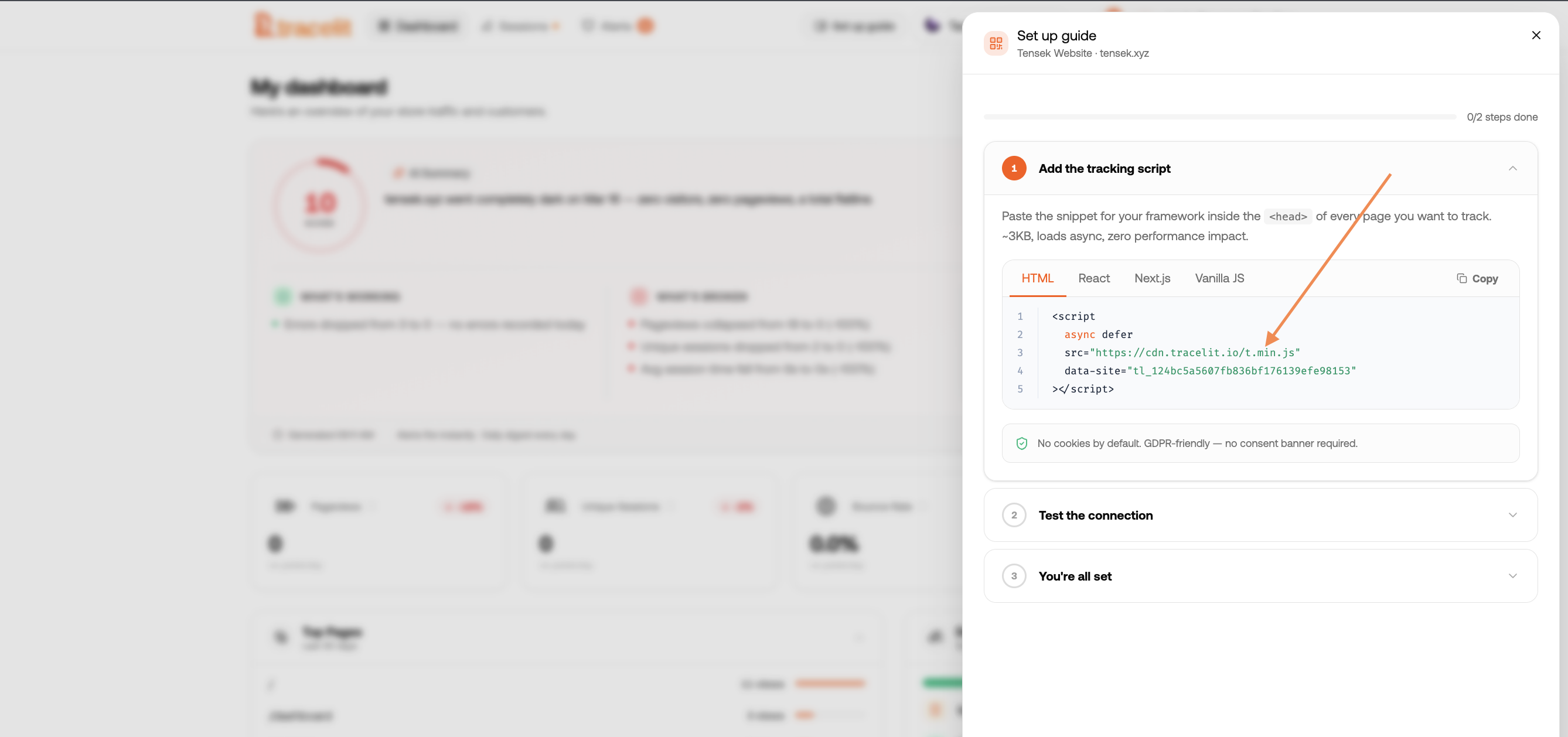
Option 1 — Script tag (any website)
Paste this into the <head> of every page:
<script>
  !function(w,d){
    var t=w.__tl={_q:[],token:'YOUR_TOKEN_HERE'};
    ['init','identify','reset','startReplay','stopReplay','optOut','optIn','destroy']
      .forEach(function(m){t[m]=function(){t._q.push([m,[].slice.call(arguments)])}});
    var s=d.createElement('script');s.async=!0;
    s.src='https://cdn.tracelit.app/t.js';d.head.appendChild(s);
  }(window,document);
</script>
Replace YOUR_TOKEN_HERE with the token from your Tracelit dashboard. That's it. ✅
The snippet queues any API calls you make before the SDK loads and replays them in order once it does — so you can call __tl.identify('user_123') or __tl.startReplay('onboarding') on the very next line and it will work.
Option 2 — React
npm install @tracelit/tracker// src/main.tsx or src/App.tsx
import { init } from '@tracelit/tracker'
init({ token: 'YOUR_TOKEN_HERE' })Option 3 — Next.js (App Router)
npm install @tracelit/trackerCreate a client component:
// components/Tracelit.tsx
'use client'
import { useEffect } from 'react'
import { init } from '@tracelit/tracker'

export function Tracelit() {
  useEffect(() => {
    init({ token: 'YOUR_TOKEN_HERE' })
  }, [])
  return null
}
Add it to your root layout:
// app/layout.tsx
import { Tracelit } from '@/components/Tracelit'

export default function RootLayout({ children }) {
  return (
    <html>
      <body>
        {children}
        <Tracelit />
      </body>
    </html>
  )
}
Option 4 — Next.js (Pages Router)
// pages/_app.tsx
import { useEffect } from 'react'
import { init } from '@tracelit/tracker'

export default function App({ Component, pageProps }) {
  useEffect(() => {
    init({ token: 'YOUR_TOKEN_HERE' })
  }, [])
  return <Component {...pageProps} />
}
Option 5 — Vue 3
// src/main.ts
import { createApp } from 'vue'
import { init } from '@tracelit/tracker'
import App from './App.vue'

init({ token: 'YOUR_TOKEN_HERE' })
createApp(App).mount('#app')
Option 6 — Svelte / SvelteKit
<!-- src/routes/+layout.svelte -->
<script>
  import { onMount } from 'svelte'
  import { init } from '@tracelit/tracker'

  onMount(() => init({ token: 'YOUR_TOKEN_HERE' }))
</script>

<slot />
Option 7 — Angular
// src/app/app.component.ts
import { Component, OnInit } from '@angular/core'
import { init } from '@tracelit/tracker'

@Component({ selector: 'app-root', templateUrl: './app.component.html' })
export class AppComponent implements OnInit {
  ngOnInit() {
    init({ token: 'YOUR_TOKEN_HERE' })
  }
}
API Reference
init(config)
Initialises tracking. Safe to call in SSR — does nothing server-side. Safe to call multiple times — subsequent calls are ignored.
import { init } from '@tracelit/tracker'

init({
  token: 'YOUR_TOKEN_HERE',      // required
  apiBase: 'https://...',        // optional — override ingest endpoint base URL
  debug: true,                   // optional — log events to console
  replay: {                      // optional — session replay settings
    mode: 'always',              // 'always' | 'trigger' | 'off'  (default: 'always')
    idleTimeoutMs: 300000,       // pause after 5min of inactivity (default)
    maxDurationMs: 2700000,      // hard stop after 45min (default)
    blocklist: ['/admin'],       // path patterns where recording stops
  },
})
startReplay(feature?)
Tags the current recording with a feature name and injects a tl:feature_start marker into the rrweb stream. In your dashboard you can filter sessions by feature and jump directly to the timestamped segment.
import { startReplay } from '@tracelit/tracker'

// Mark the start of a feature segment
startReplay('checkout')
startReplay('onboarding')
startReplay('payment-flow')
If replay.mode is 'trigger', recording only starts when startReplay() is first called. If 'always', features are annotation markers on a continuously recording session.
stopReplay(feature?)
Closes the named feature segment by injecting a tl:feature_end marker.
import { stopReplay } from '@tracelit/tracker'

stopReplay('checkout')
If replay.mode is 'trigger' and all features are stopped, the pipeline flushes and recording pauses until startReplay() is called again.
getActiveFeatures()
Returns the currently active feature tags.
import { getActiveFeatures } from '@tracelit/tracker'

console.log(getActiveFeatures()) // ['checkout', 'payment-flow']
identify(userId, traits?)
Links the current session (and all future sessions on this device) to a known user in your system. After calling identify(), every event sent to the Tracelit API will carry the user_id field, so you can filter sessions, replays, and errors by user in your dashboard.
import { identify } from '@tracelit/tracker'

// After your user logs in:
identify('user_abc123')

// With optional traits (any key-value pairs you want visible in the dashboard):
identify('user_abc123', {
  email: '[email protected]',
  plan: 'pro',
  company: 'Acme',
})
Privacy notes:
- You control exactly which traits are sent — nothing is collected automatically.
- Tracelit never captures passwords, payment details, or session tokens. In
debugmode the SDK will warn you if a trait key looks sensitive (e.g.password,token,card). - The
user_idyou supply is whatever key makes sense in your system — an opaque database ID, a hashed email, or a display name. You do not have to send an email address. - The identity is stored in
localStorageso it persists across page loads. Callreset()on logout to clear it.
Script tag usage — safe to call before the SDK loads:
<script>
  // After login resolves:
  __tl.identify('user_abc123', { email: '[email protected]', plan: 'pro' })
</script>
reset()
Clears the stored user identity. Call this when your user logs out. After reset(), new events will be anonymous again (no user_id).
import { reset } from '@tracelit/tracker'

// On logout:
reset()
optOut()
Stops all tracking immediately and persists the opt-out state in localStorage. The next page load will be tracking-free — no data is sent.
import { optOut } from '@tracelit/tracker'

// Call when user declines tracking
optOut()
optIn()
Clears the opt-out flag. Tracking resumes on the next page load.
import { optIn } from '@tracelit/tracker'

optIn()
isOptedOut()
import { isOptedOut } from '@tracelit/tracker'

if (isOptedOut()) {
  // show consent UI or nothing
}
destroy()
Completely tears down the tracker: removes all event listeners, restores monkey-patched globals (fetch, XMLHttpRequest, history.pushState, WebSocket, console.error), cancels all timers, stops rrweb recording, and flushes any remaining buffered events.
import { destroy } from '@tracelit/tracker'

// e.g. in a React cleanup, test teardown, or when user logs out
destroy()
User Identification — Full Examples
Script tag (plain HTML)
<script>
  !function(w,d){
    var t=w.__tl={_q:[],token:'YOUR_TOKEN_HERE'};
    ['init','identify','reset','startReplay','stopReplay','optOut','optIn','destroy']
      .forEach(function(m){t[m]=function(){t._q.push([m,[].slice.call(arguments)])}});
    var s=d.createElement('script');s.async=!0;
    s.src='https://cdn.tracelit.app/t.js';d.head.appendChild(s);
  }(window,document);
</script>

<script>
  // After your auth check resolves — safe to call before t.js loads:
  fetch('/api/me').then(r => r.json()).then(user => {
    __tl.identify(user.id, { email: user.email, plan: user.plan })
  })
</script>
React
import { identify, reset } from '@tracelit/tracker'

function useTracelitIdentity(user: { id: string; email: string; plan: string } | null) {
  useEffect(() => {
    if (user) {
      identify(user.id, { email: user.email, plan: user.plan })
    } else {
      reset()  // user logged out
    }
  }, [user])
}

// Use it in your root component:
function App() {
  const { user } = useAuth()
  useTracelitIdentity(user)
  return <Router />
}
Next.js (App Router)
// components/TracelitIdentity.tsx
'use client'
import { useEffect } from 'react'
import { identify, reset } from '@tracelit/tracker'

export function TracelitIdentity({ userId, traits }: {
  userId?: string
  traits?: Record<string, string>
}) {
  useEffect(() => {
    if (userId) {
      identify(userId, traits)
    } else {
      reset()
    }
  }, [userId])
  return null
}
// app/layout.tsx
import { TracelitIdentity } from '@/components/TracelitIdentity'
import { getServerSession } from 'next-auth'
export default async function RootLayout({ children }) {
const session = await getServerSession()
return (
<html>
<body>
{children}
<TracelitIdentity
userId={session?.user?.id}
traits={{ email: session?.user?.email, plan: session?.user?.plan }}
/>
</body>
</html>
)
}What happens in the dashboard:
- Sessions show a user chip — click it to see all sessions for that user.
- Filter the sessions table by user ID or email trait.
- The replay player header shows the identified user.
- The replay timeline shows a
🔑 Identified as user_abc123marker at the exact momentidentify()was called.
Feature-Tagged Session Replay — Full Example
// React checkout flow
import { startReplay, stopReplay } from '@tracelit/tracker'

function CheckoutFlow() {
  useEffect(() => {
    startReplay('checkout')
    return () => stopReplay('checkout')   // cleanup on unmount
  }, [])

  return <CheckoutSteps />
}
In your Tracelit dashboard you'll see a checkout tag on every session that entered this component, with a timestamp you can click to jump straight to that moment in the recording.
Configuration Reference
init({
  token: string              // required — your site token
  apiBase?: string           // optional — custom API base URL (default: https://api.tracelit.app)
  debug?: boolean            // optional — verbose console logging (default: false)
  monitorConsole?: boolean   // optional — capture console.error / console.warn (default: false)
  replay?: {
    mode?: 'always'          // record everything (default)
           | 'trigger'       // only record between startReplay/stopReplay calls
           | 'off'           // disable replay entirely
    blocklist?: string[]     // path substrings/regexes where recording is paused
    idleTimeoutMs?: number   // ms of inactivity before pausing (default: 300000 = 5min)
    maxDurationMs?: number   // hard stop duration (default: 2700000 = 45min)
    fullSnapshotIntervalMs?: number  // full DOM snapshot interval (default: 300000 = 5min)
    sampleRate?: number      // 0–1 fraction of sessions to record (default: 1)
  }
})
Script Tag Options
Standard (recommended)
<script>
  !function(w,d){
    var t=w.__tl={_q:[],token:'YOUR_TOKEN_HERE'};
    ['init','identify','reset','startReplay','stopReplay','optOut','optIn','destroy']
      .forEach(function(m){t[m]=function(){t._q.push([m,[].slice.call(arguments)])}});
    var s=d.createElement('script');s.async=!0;
    s.src='https://cdn.tracelit.app/t.js';d.head.appendChild(s);
  }(window,document);
  // You can call API methods immediately — they queue until the SDK loads
  __tl.identify('user_123', { email: '[email protected]' })
  __tl.startReplay('landing')
</script>
Pinned to a specific version (immutable CDN cache)
<script src="https://cdn.tracelit.app/[email protected]" async></script>Strict CSP — rrweb bundled in (no external script loading)
Use this if your Content Security Policy blocks dynamically injected <script> tags. The full bundle is larger (~165 KB raw, ~60 KB gzip) but loads no additional scripts at runtime.
<script>
  !function(w,d){
    var t=w.__tl={_q:[],token:'YOUR_TOKEN_HERE'};
    ['init','identify','reset','startReplay','stopReplay','optOut','optIn','destroy']
      .forEach(function(m){t[m]=function(){t._q.push([m,[].slice.call(arguments)])}});
    var s=d.createElement('script');s.async=!0;
    s.src='https://cdn.tracelit.app/t.full.js';d.head.appendChild(s);
  }(window,document);
</script>
Privacy & Compliance
- No cookies — uses
sessionStorageonly, clears on tab close - No form values — field inputs are never read or transmitted
- No PII by default — emails, names, passwords, card numbers never captured automatically
- Identify is opt-in —
identify()only sends what you explicitly pass; nothing is inferred - Sensitive-key warnings — in
debugmode the SDK warns if a trait key looks sensitive (password, token, card, ssn, etc.) - Do Not Track respected — if
navigator.doNotTrack === "1", replay and heatmaps are disabled - Passwords always masked — all
<input type="password">blocked at DOM level - Block any element — add class
tl-blockto exclude from session replay - Ignore any element — add class
tl-ignoreto exclude from click / interaction capture - Opt-out API —
optOut()stops everything and persists the preference - Identity can be cleared —
reset()removes the stored user ID immediately
What errors does Tracelit catch?
| Error type | Example |
|-----------|---------|
| runtime | Uncaught TypeError, ReferenceError, any thrown exception |
| promise | Unhandled Promise.reject() |
| api | Fetch or XHR returning 4xx / 5xx |
| api_slow | Any request taking longer than 3 seconds |
| api_network | Fetch / XHR that fails to connect entirely |
| graphql | GraphQL 200 response with errors array in body |
| console_error | Anything logged with console.error() |
| resource | Broken images, missing fonts, failed script loads |
| network_offline | Browser goes offline mid-session |
| websocket | WebSocket connection failures or abnormal closure |
| long_task | Main thread blocked 150ms+ (with source attribution) |
| memory | Device heap approaching limit (Chrome only) |
Bundle Size
| File | Size |
|------|------|
| t.js (CDN, gzipped) | < 20 KB |
| t.full.js (CDN, gzipped, rrweb bundled) | ~60 KB |
| @tracelit/tracker (ESM) | < 2 KB |
The CDN script loads asynchronously and never blocks rendering. rrweb is loaded separately by the script after page load — not bundled in t.js — keeping the initial download tiny.
FAQ
Does this slow down my website?
No. The script loads with async so it never blocks the page. Event processing runs during browser idle time. rrweb loads 1.5s after window.load, not on initial page load.
Does it work with SPAs (React, Next.js, Vue)?
Yes. Route changes are detected automatically via history.pushState, replaceState, and popstate — no extra setup needed.
Does it work with TypeScript? Yes. The package ships full TypeScript types.
Can I use it in SSR?
Yes. init() is a no-op on the server — no window check needed.
How do I exclude an element from session replay?
Add class tl-block to any element — it is replaced with a placeholder in recordings.
Does it use cookies?
Never. Session IDs live in sessionStorage, visitor IDs and user identities in localStorage.
Is identify() GDPR-safe?
Yes, as long as you treat it like any other user data. The user ID and traits you send are stored on your own Tracelit project — subject to the same retention and deletion policies as the rest of your analytics data. If a user requests deletion, delete their record via the Tracelit API or dashboard. Call reset() client-side on logout so no future sessions are linked to them on that device.
Can I identify users without sending their email? Absolutely. Pass any opaque key — a database UUID, a hashed value, or a display name. Email is just an optional trait, not required.
Can I watch the session that caused an error? Yes. Every error is linked to its session. One click takes you to the session replay at the exact moment the error occurred.
How does feature tagging work in the dashboard?
Every startReplay('feature-name') call injects a timestamped marker into the rrweb stream. The dashboard shows these as clickable tags on each session — clicking jumps the player to that exact timestamp.
Where do I get my token?
Your site token is in the Tracelit dashboard under Settings → Site Token.
Support
- Email: [email protected]
- Website: tracelit.app
License
MIT © Tracelit