@trendcraft/chart
v0.2.0
Published
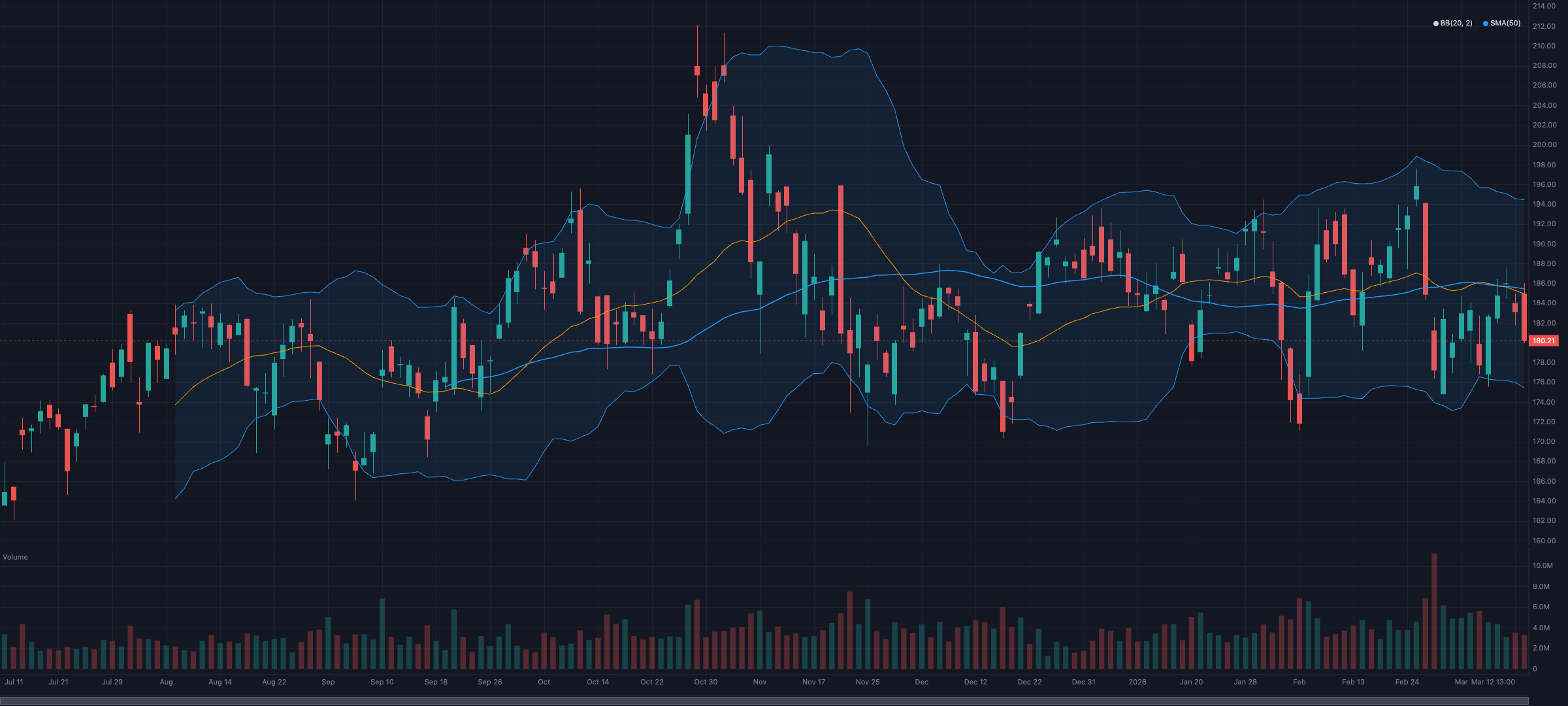
Finance-specialized charting library with native TrendCraft Series<T> support
Downloads
335
Maintainers
Readme
@trendcraft/chart
Finance-specialized charting library with native TrendCraft integration. Pass indicator data, get a chart — no manual series decomposition needed.

Documentation
| Doc | Use it when |
|---|---|
| GUIDE | You want the mental model — data model, coordinate system, render loop, theming, viewport, SSR, accessibility |
| API | You need the full reference — every option, method, type, event |
| PLUGINS | You're writing a custom series renderer or pane primitive |
| LIVE | You're wiring a real-time feed — WebSocket → createLiveCandle → chart |
The rest of this README is a guided tour of the most common features. Reach for the docs above when you need depth.
Install
npm install @trendcraft/chart trendcraftPeer dependencies (all optional):
| Peer | Required version | When needed |
|---|---|---|
| trendcraft | >=0.2.0 | For indicator auto-detection and connectIndicators. Chart works without it on plain { time, value }[] data. |
| react | >=19.0.0 | Only when importing from @trendcraft/chart/react. |
| vue | >=3.3.0 | Only when importing from @trendcraft/chart/vue. |
The chart's TrendCraft integration relies on
livePresets/indicatorPresets/createLiveCandleadded in[email protected]. Earlier core versions will compile but lose auto-pane-placement and theconnectIndicatorspresets.
Quick Start
import { createChart } from '@trendcraft/chart';
import { sma, rsi, bollingerBands, ichimoku, macd } from 'trendcraft'; // optional peer dep
const container = document.getElementById('chart');
if (!container) throw new Error('Chart container not found');
const chart = createChart(container, { theme: 'dark' });
chart.setCandles(candles);
// Indicators auto-detect pane placement, colors, and rendering style
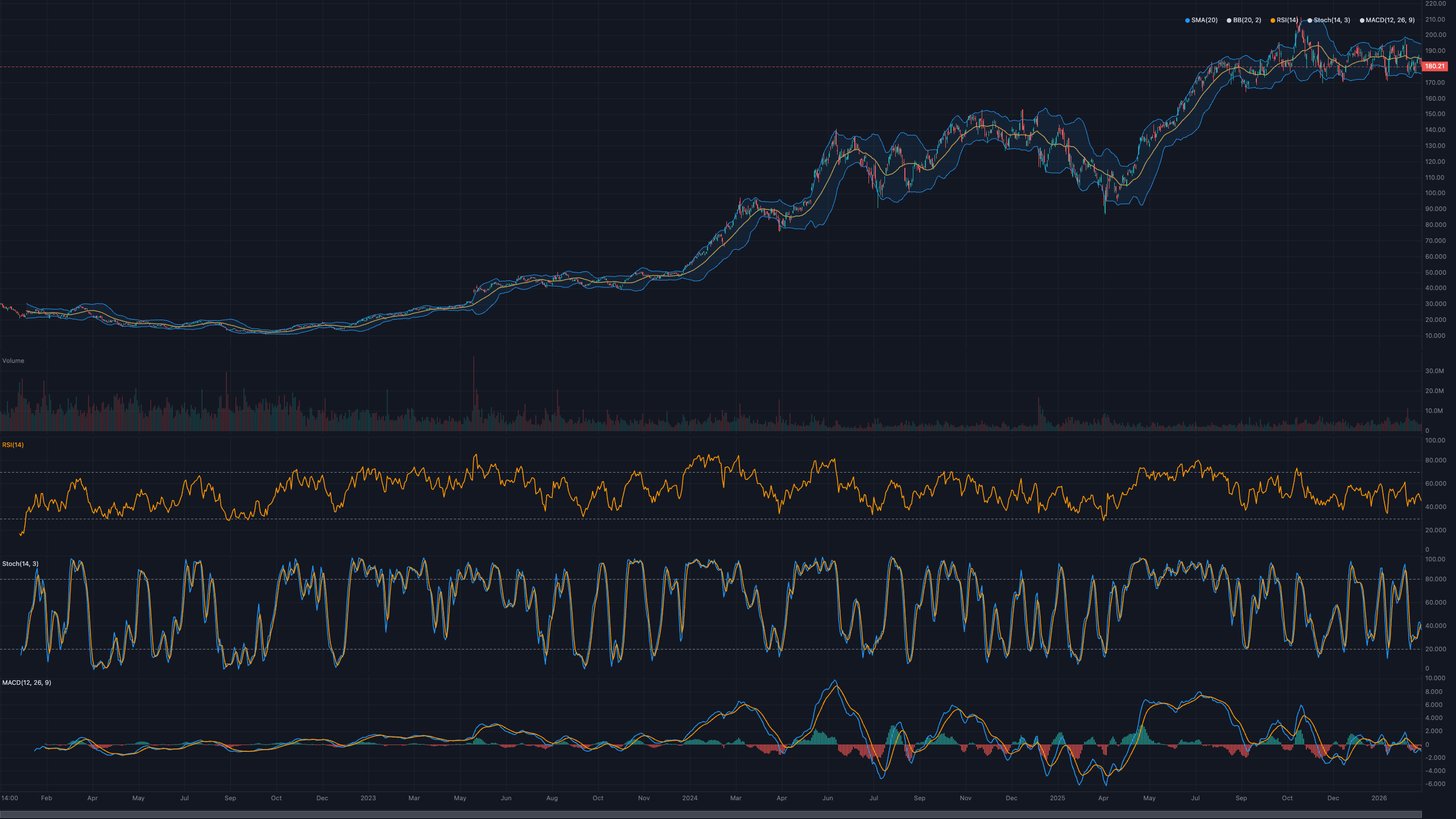
chart.addIndicator(sma(candles, { period: 20 })); // overlay on price chart
chart.addIndicator(bollingerBands(candles)); // bands with fill
chart.addIndicator(ichimoku(candles)); // cloud with 5 lines
chart.addIndicator(rsi(candles)); // subchart, 0-100, ref lines 30/70
chart.addIndicator(macd(candles)); // subchart, histogram + 2 linesNo pane, color, yRange, or label config needed — the library reads __meta from TrendCraft's 130+ indicators.

Chart Types
Switch between different price rendering styles:
const chart = createChart(el, { chartType: 'mountain' }); // or 'candlestick', 'line', 'ohlc'
// Change at runtime
chart.setChartType('line');| Type | Description |
|---|---|
| candlestick | OHLC candles with wicks (default) |
| line | Close price line |
| mountain | Close price with gradient fill |
| ohlc | Traditional OHLC bars |

Without TrendCraft
Works with any { time, value }[] data:
const myData = prices.map(p => ({ time: p.timestamp, value: p.close }));
chart.addIndicator(myData, { pane: 'main', color: '#FF9800', label: 'My Line' });React
Requires React 19+.
Two entry points share the same underlying lifecycle: the <TrendChart> component for simple drop-in use, and the useTrendChart hook for composing the live ChartInstance into your own effects.
Component
import { TrendChart } from '@trendcraft/chart/react';
import { sma, rsi } from 'trendcraft';
<TrendChart
candles={candles}
indicators={[sma(candles, { period: 20 }), rsi(candles)]}
backtest={backtestResult}
theme="dark"
onCrosshairMove={(data) => console.log(data)}
/>All chart features are available as props: indicators, signals, trades, drawings, timeframes, backtest, patterns, scores. The underlying ChartInstance is reachable via ref.
Hook
Use the hook when you need imperative access — drawing tools, live feeds, custom plugins, or anything that takes a ChartInstance as input. chart is null before mount and the live instance after, so it drops straight into useEffect deps.
import { useTrendChart } from '@trendcraft/chart/react';
import { connectIndicators } from '@trendcraft/chart';
import { indicatorPresets } from 'trendcraft';
function MyChart({ candles, liveSource }) {
const { containerRef, chart } = useTrendChart({ candles, theme: 'dark' });
useEffect(() => {
if (!chart) return;
const conn = connectIndicators(chart, {
presets: indicatorPresets,
candles,
live: liveSource,
});
conn.add('rsi');
chart.setDrawingTool('hline');
return () => conn.disconnect();
}, [chart, liveSource]);
return <div ref={containerRef} style={{ width: '100%', height: 400 }} />;
}Vue
Requires Vue 3.3+.
Same dual API: a <TrendChart> component and a useTrendChart composable.
Component
<script setup>
import { TrendChart } from '@trendcraft/chart/vue';
import { sma, rsi } from 'trendcraft';
</script>
<template>
<TrendChart
:candles="candles"
:indicators="[sma(candles, { period: 20 }), rsi(candles)]"
:backtest="backtestResult"
theme="dark"
@crosshairMove="onCrosshairMove"
/>
</template>Composable
chart is a ShallowRef<ChartInstance | null> — do not wrap it in ref(), which would trigger Vue's deep-reactivity proxy and corrupt the chart's internal state.
<script setup>
import { watchEffect } from 'vue';
import { useTrendChart } from '@trendcraft/chart/vue';
import { connectIndicators } from '@trendcraft/chart';
import { indicatorPresets } from 'trendcraft';
const { containerRef, chart } = useTrendChart({
candles: () => props.candles,
theme: 'dark',
});
watchEffect((onCleanup) => {
if (!chart.value) return;
const conn = connectIndicators(chart.value, {
presets: indicatorPresets,
candles: props.candles,
});
conn.add('rsi');
onCleanup(() => conn.disconnect());
});
</script>
<template>
<div ref="containerRef" style="width: 100%; height: 400px" />
</template>Option values accept plain values, refs, or getters — use a getter (() => props.candles) to make a prop reactive inside the composable.
API Reference
createChart(container, options?)
Creates a chart instance attached to a DOM element.
Options
| Option | Type | Default | Description |
|---|---|---|---|
| theme | 'dark' \| 'light' \| ThemeColors | 'dark' | Color theme |
| width | number | container width | Chart width (px) |
| height | number | 400 | Chart height (px) |
| fontSize | number | 11 | Font size (px) |
| priceAxisWidth | number | 60 | Right axis width (px) |
| timeAxisHeight | number | 24 | Bottom axis height (px) |
| priceFormatter | (price: number) => string | auto-precision | Custom price format |
| timeFormatter | (time: number) => string | smart date/time | Custom time format |
| watermark | string | — | Background watermark text |
| legend | boolean | true | Show series legend |
| chartType | 'candlestick' \| 'line' \| 'mountain' \| 'ohlc' | 'candlestick' | Base chart type |
ChartInstance Methods
Data
| Method | Description |
|---|---|
| setCandles(candles) | Set OHLCV candle data |
| updateCandle(candle) | Update last candle or append new one |
| batchUpdates(fn) | Batch multiple mutations into a single render frame |
Indicators
| Method | Description |
|---|---|
| addIndicator(series, config?) | Add indicator with auto-detection. Returns SeriesHandle |
| getAllSeries() | Get info for all series (id, pane, type, label, visible) |
Signals & Trades
| Method | Description |
|---|---|
| addSignals(signals) | Add buy/sell signal markers |
| addTrades(trades) | Add trade entry/exit markers with holding period shading |
Drawings
| Method | Description |
|---|---|
| addDrawing(drawing) | Add a drawing (hline, trendline, fibRetracement) |
| removeDrawing(id) | Remove a drawing by id |
| getDrawings() | Get all drawings |
| setDrawingTool(tool) | Set active drawing tool mode (null to disable) |
Multi-Timeframe
| Method | Description |
|---|---|
| addTimeframe(overlay) | Add higher timeframe candles as semi-transparent overlay |
| removeTimeframe(id) | Remove a timeframe overlay |
Backtest & Analysis (TrendCraft Integration)
| Method | Description |
|---|---|
| addBacktest(result) | Visualize BacktestResult — trade markers, equity curve, summary |
| addPatterns(patterns) | Draw PatternSignal[] — outlines, necklines, targets |
| addScores(scores) | Per-bar score heatmap (0=red, 50=yellow, 100=green) |
Viewport
| Method | Description |
|---|---|
| setVisibleRange(start, end) | Set visible time range |
| fitContent() | Fit all candles in view |
| getVisibleRange() | Get current visible range (start/end time and index) |
| setLayout(config) | Configure multi-pane layout with flex proportions |
Events
| Method | Description |
|---|---|
| on(event, handler) | Subscribe to chart events |
| off(event, handler) | Unsubscribe from chart events |
Theme & Export
| Method | Description |
|---|---|
| setTheme(theme) | Change color theme |
| setChartType(type) | Switch base chart type (candlestick/line/mountain/ohlc) |
| toImage(type?, quality?) | Export chart as image Blob |
| resize(width, height) | Resize chart |
| destroy() | Clean up all resources |
Plugins
| Method | Description |
|---|---|
| registerRenderer(plugin) | Register a custom series renderer plugin |
| registerPrimitive(plugin) | Register a pane primitive plugin |
Keyboard Shortcuts
| Key | Action | |---|---| | ← → | Pan left/right (Shift: 10 bars) | | + / - | Zoom in/out | | Home / End | Jump to start/end | | F | Fit all content | | Alt + H / V / T / F / C | Activate horizontal line / vertical line / trendline / fib retracement / channel | | Ctrl + Alt + H | Hide/show every series (blank chart) | | Escape | Cancel active drawing, drag, long-press crosshair lock, or inertia |
Alt is treated the same as Option on macOS; Ctrl and Cmd are interchangeable. Customize or disable via ChartOptions.hotkeys — pass hotkeys: false to turn off every keyboard shortcut (including the viewport nav keys above), or a partial HotkeyMap to override individual bindings. Matching uses KeyboardEvent.code, so Option+letter on macOS resolves correctly despite the altered character output.
Crosshair Modes
Snap behavior is configurable via ChartOptions.crosshair.mode:
| Mode | y-axis behavior |
|---|---|
| "normal" (default) | Follows the pointer freely |
| "magnet" | Snaps to the active bar's close |
| "magnetOHLC" | Snaps to the nearest of O/H/L/C within snapThreshold pixels (default 12) |
createChart(el, { crosshair: { mode: "magnetOHLC", snapThreshold: 15 } });lockOnLongPress: false disables the touch-only long-press crosshair lock.
Series Auto-Detection
The library inspects the first value in a Series<T> to determine rendering:
| Value Shape | Rendering | Example |
|---|---|---|
| number | Line | SMA, RSI, ATR |
| { upper, middle, lower } | Band with fill | Bollinger Bands, Keltner |
| { tenkan, kijun, senkouA, senkouB } | Ichimoku cloud | Ichimoku |
| { macd, signal, histogram } | Multi-line + histogram | MACD |
| { k, d } | Oscillator lines | Stochastics |
| { adx, plusDi, minusDi } | Multi-line | DMI |
| { sar } | Dot markers | Parabolic SAR |
TrendCraft indicators carry __meta with overlay, label, yRange, and referenceLines for zero-config pane placement. Custom rules can be added via SeriesRegistry.addRule().
Drawings
chart.addDrawing({ id: 'h1', type: 'hline', price: 150, color: '#FF9800' });
chart.addDrawing({
id: 'tl1', type: 'trendline',
startTime: t1, startPrice: 140,
endTime: t2, endPrice: 160,
});
chart.addDrawing({
id: 'fib1', type: 'fibRetracement',
startTime: t1, startPrice: 130,
endTime: t2, endPrice: 170,
});
chart.removeDrawing('h1');Backtest Visualization
import { runBacktest, goldenCrossCondition, rsiBelow } from 'trendcraft';
const result = runBacktest(candles, goldenCrossCondition(), rsiBelow(70), { capital: 100000 });
chart.addBacktest(result);
// → Trade markers colored by exit reason
// → Equity curve subchart with drawdown shading
// → Summary bar (Return, Win%, Sharpe, MaxDD, PF, Trades)
Pattern Visualization
import { doubleTop, headAndShoulders } from 'trendcraft';
chart.addPatterns([...doubleTop(candles), ...headAndShoulders(candles)]);
// → Pattern outlines connecting key points
// → Neckline, target price, pattern name + confidenceScore Heatmap
import { rsi } from 'trendcraft';
chart.addScores(rsi(candles));
// → Each candle's background colored by score (red → yellow → green)Events
chart.on('crosshairMove', (data) => {
// { time, index, ohlcv: { open, high, low, close, volume }, paneId }
});
chart.on('seriesAdded', (data) => { /* { id, label } */ });
chart.on('seriesRemoved', (data) => { /* { id } */ });
chart.on('visibleRangeChange', (data) => { /* { startTime, endTime } */ });Plugin System
Extend the chart with custom renderers and pane-level overlays.

Custom Series Renderer
Define a new series type with defineSeriesRenderer():
import { defineSeriesRenderer } from '@trendcraft/chart';
const renkoRenderer = defineSeriesRenderer({
type: 'renko',
render: ({ ctx, series, timeScale, priceScale, draw }) => {
// draw.x(index) and draw.y(price) handle coordinate conversion
for (let i = timeScale.startIndex; i <= timeScale.endIndex; i++) {
const dp = series.data[i];
if (!dp) continue;
// Custom rendering logic...
}
},
priceRange: (series, start, end) => [minPrice, maxPrice], // optional
formatValue: (series, index) => `${series.data[index]?.value}`, // optional
});
chart.registerRenderer(renkoRenderer);
chart.addIndicator(renkoData, { type: 'renko', pane: 'main' });| Field | Type | Required | Description |
|---|---|---|---|
| type | string | Yes | Unique type name (must not collide with built-in types) |
| render | (context, config) => void | Yes | Render the series onto the canvas |
| priceRange | (series, start, end) => [min, max] | No | Custom Y-axis auto-scaling |
| formatValue | (series, index) => string \| null | No | Custom tooltip formatting |
| init | () => void | No | Called once when plugin is registered |
| destroy | () => void | No | Called on chart.destroy() |
Pane Primitives
Add custom overlays that render below or above series:
import { definePrimitive } from '@trendcraft/chart';
const srZones = definePrimitive({
name: 'srZones',
pane: 'main',
zOrder: 'below',
defaultState: { zones: [{ price: 150, strength: 0.8 }] },
render: ({ ctx, priceScale, draw }, state) => {
for (const zone of state.zones) {
draw.hline(zone.price, { color: `rgba(255,152,0,${zone.strength})` });
}
},
});
chart.registerPrimitive(srZones);| Field | Type | Required | Description |
|---|---|---|---|
| name | string | Yes | Unique identifier |
| pane | string | Yes | Target pane: 'main', a pane id, or 'all' |
| zOrder | 'below' \| 'above' | Yes | Render order relative to series |
| render | (context, state) => void | Yes | Render the primitive |
| defaultState | TState | Yes | Initial state |
| update | (state) => state | No | Called before each render frame |
| destroy | () => void | No | Called on chart.destroy() |
Both SeriesRenderContext and PrimitiveRenderContext include a draw: DrawHelper object with convenient methods: x(), y(), line(), hline(), vline(), circle(), rect(), polygon(), text().
Indicators
Use connectIndicators to attach indicators to a chart — with automatic backfill, optional live streaming, and a handle-based API. The interface is duck-typed — no hard trendcraft dependency required.
import { createChart, connectIndicators, defineIndicator } from '@trendcraft/chart';
import { indicatorPresets } from 'trendcraft';
const chart = createChart(container, { theme: 'dark' });
chart.setCandles(candles);
const conn = connectIndicators(chart, { presets: indicatorPresets, candles });
// Add by preset id (returns an IndicatorHandle)
conn.add('rsi');
const h = conn.add('sma', { period: 20 });
h.setVisible(false);
h.remove();
// Multiple instances of the same preset
conn.add('sma', { period: 5 });
conn.add('sma', { period: 20 });
conn.add('sma', { period: 60 });
// Pre-defined specs are reusable across connections
const sma5 = defineIndicator('sma', { period: 5 });
conn.add(sma5);Live streaming
Pass a LiveCandle-compatible source to stream values in real time. Indicators are back-filled from candles + live.completedCandles, then updated on each tick:
import { createLiveCandle, livePresets } from 'trendcraft';
const live = createLiveCandle({ intervalMs: 60_000, history });
const conn = connectIndicators(chart, {
presets: livePresets,
candles: history,
live,
});
conn.add('rsi');
conn.add('sma', { period: 20 });
// Feed ticks from a WebSocket
ws.on('trade', (t) => live.addTick(t));
conn.disconnect();Multiple instances of the same preset
connectIndicators keys internal state by each instance's snapshotName, so dynamic-name presets ((p) => \sma${p.period}`) can be mounted multiple times. For static-name presets (e.g. emaRibbon`), pass an explicit name:
conn.add('emaRibbon', { periods: [8, 13, 21], snapshotName: 'ribbon-short' });
conn.add('emaRibbon', { periods: [34, 55, 89], snapshotName: 'ribbon-long' });Removing
remove() accepts a snapshot name, a preset id (removes all matching), or a handle:
conn.remove('sma5'); // single instance (snapshot name match)
conn.remove('sma'); // all sma instances (preset id fallback)
conn.remove(myHandle); // handle directly
myHandle.remove(); // or via the handleConnectIndicatorsOptions
| Option | Type | Default | Description |
|---|---|---|---|
| presets | Record<string, IndicatorPresetEntry> | {} | Indicator preset registry |
| candles | readonly SourceCandle[] | [] | Static candles (static mode / backfill) |
| live | LiveSource | — | Live data source; enables streaming mode |
| initHistory | boolean | true | Initialize chart with live.completedCandles when in live mode |
IndicatorConnection
| Method / Property | Description |
|---|---|
| add(presetId, options?) | Add an indicator. Returns IndicatorHandle. |
| add(spec) | Add using a pre-defined IndicatorSpec from defineIndicator(). |
| remove(target) | Remove by snapshot name, preset id (all instances), or handle. |
| list() | All active handles. |
| listByPreset(id) | Handles for a given preset. |
| get(snapshotName) | Look up a single handle. |
| recompute(candles) | Re-run all indicators with new candle data. |
| disconnect() | Unsubscribe events and remove all indicators. |
| connected (readonly) | Whether the connection is still active. |
| mode (readonly) | "static" or "live". |
IndicatorHandle
| Member | Description |
|---|---|
| snapshotName | This instance's unique key (e.g. "sma5"). |
| presetId | The preset id used to build this instance. |
| params | Effective parameters (defaults merged with overrides). |
| series | Underlying SeriesHandle (escape hatch). |
| removed | true once removed. |
| setVisible(visible) | Toggle visibility. |
| remove() | Remove this instance (idempotent). |
Snapshot paths support dot notation: "bb.upper" resolves to snapshot.bb.upper.
Headless API
For server-side processing, custom renderers, or testing:
import {
DataLayer, TimeScale, PriceScale, LayoutEngine,
introspect, autoFormatPrice, lttb,
} from '@trendcraft/chart/headless';
const model = new DataLayer();
model.setCandles(candles);
const result = introspect(myIndicatorData);
// { seriesType: 'band', pane: 'main', rule, preset, yRange, referenceLines }Migrating from 0.1.x
Two headless helpers changed shape in 0.2.0. If your code only uses createChart / connectIndicators / the React or Vue wrappers, no migration is needed.
// 0.1.x
const candles: CandleData[] = decimateCandles(src, start, end, maxBars);
const points: DataPoint[] = lttb(data, 2000);
// 0.2.0
const { candles, originalIndices } = decimateCandles(src, start, end, maxBars);
const { points, originalIndices } = lttb(data, 2000);
// `originalIndices` is an Int32Array mapping each output sample back to its
// position in the input — used internally to keep candles and overlays
// aligned at low zoom. `lttb` also accepts an optional 3rd `indexOffset`
// argument to shift `originalIndices` into the caller's coordinate space.Troubleshooting
Chart is blank — Ensure container has a non-zero height. Set height in options or use CSS height: 100%.
Indicator on wrong pane — Without TrendCraft, number series default to subchart. Use { pane: 'main' } for overlays.
Performance with large datasets — The library auto-decimates via LTTB at high zoom levels. 10K+ candles should maintain 60fps.
Pane won't disappear after removing indicator — Panes auto-remove when their last series is removed. If using addTrades/addBacktest, the equity pane persists.
License
MIT