
@trevixal/ui
v1.0.5
Published
Optional prebuilt UI for Trevixal: accessible toolbar and themes. Headless-first, bring your own UI if you prefer.
Downloads
526

Maintainers
 adityabhalsod
Readme
@trevixal/ui




Documentation · Live editor · Changelog · Issues
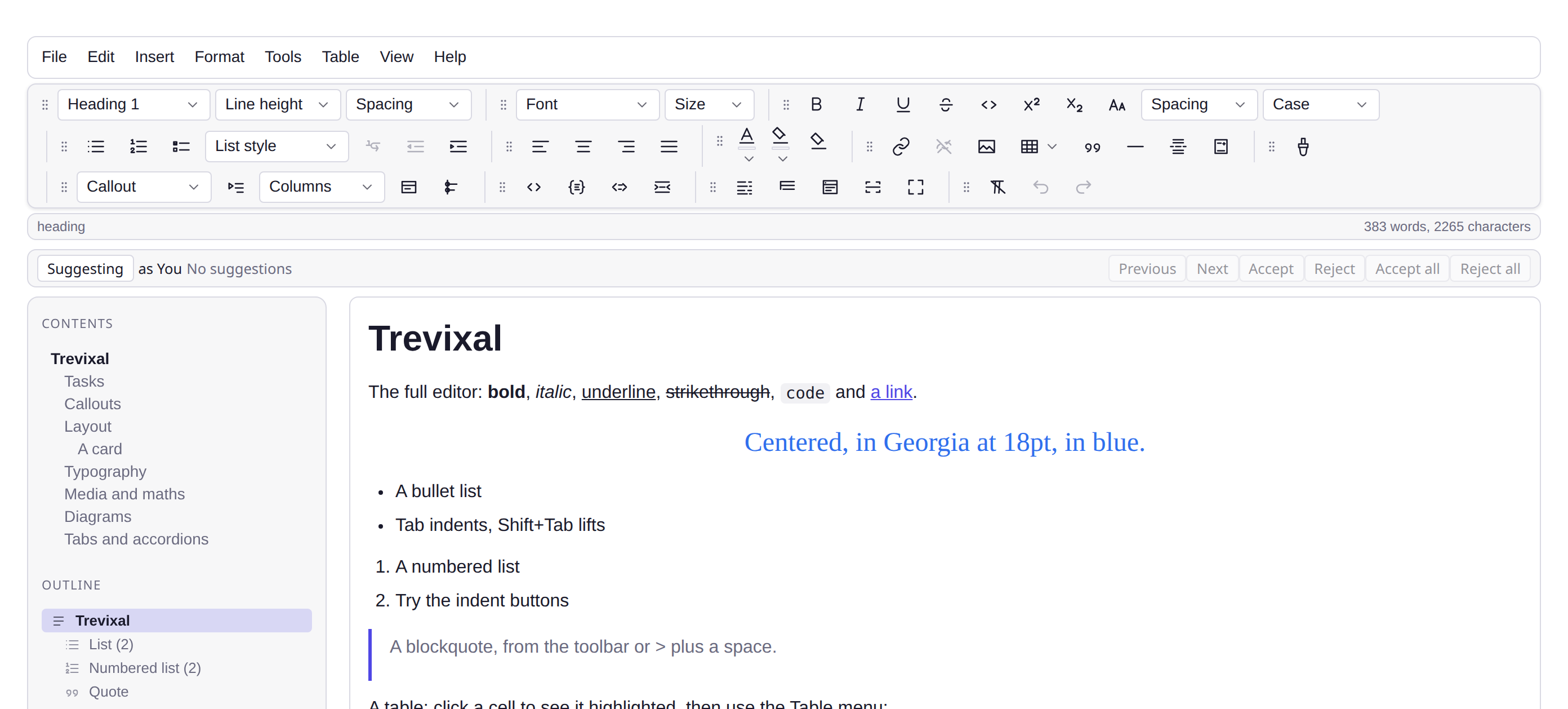
Features
- Menubar, toolbar, status bar, dialogs and sidebar panels
- An SCSS design system with light, dark and preset themes
- Accessible by construction: roving tabindex, ARIA state, focus return
- Entirely optional; the engine ships no UI
- 50.0 kB minified and gzipped, with TypeScript types in the package
The editing chrome for the Trevixal editor: menubar, toolbar, dialogs, status bar and an SCSS design system. Entirely optional. The engine ships no UI, and you can build your own against the same snapshot API.
npm install @trevixal/uiEverything at once
import { createEditorUI } from '@trevixal/ui'
import { tableUICommands } from '@trevixal/extension-table'
import '@trevixal/ui/styles.css'

createEditorUI(editor, {
  container: document.querySelector('#chrome'),
  tableCommands: tableUICommands(),        // enables the Table menu + grid picker
  images: { pickFiles, insertImage },      // enables the image button
})
That mounts:
- Menubar: File, Edit, Insert, Format, Tools, Table, with shortcuts shown
- Toolbar: block format, font family and size, marks, lists and indent, alignment, text and background color, link/image/table, undo/redo
- Dialogs: link, image, source code, special characters, word count
- Status bar: element path and live word/character counts
@trevixal/ui deliberately does not depend on the table or image
packages: you pass in the capabilities you want, and menu entries with no
handler render disabled rather than doing nothing.
Menus that report state
An entry that switches something on shows a tick while it is on, and says so
through aria-checked on a menuitemcheckbox. The chrome the entry drives
belongs to the host, so only the host can answer for it:
createEditorUI(editor, {
  container,
  viewActions: {
    toggleFocusMode: () => focus.toggle(),
    isViewToggleOn: (toggle) => (toggle === 'focusMode' ? focus.isActive : false),
    activeWidth: () => currentWidth,   // the four width entries as one radio group
    activeTheme: () => 'themeDark',    // and the theme entries as another
  },
})
Leave a question unanswered and the entry stays a plain command, exactly as before. Nothing here becomes required.
The state is recomputed as the menu opens, not on the next transaction. Half of what these entries report is chrome (a panel, a split view, read-only, the theme) and none of that changes the document, so a menu refreshed only by editing shows the state the editor was in at the last keystroke.
Or piece by piece
createMenubar, createToolbar, createStatusBar, createSelectControl,
createColorControl, createTableGridControl, createSuggestionPopup,
createDropdown, openDialog, openCharacterPicker.
Layouts are data, so extending one needs no changes here:
import { createToolbar, defaultToolbarGroups } from '@trevixal/ui'

createToolbar(editor, container, {
  groups: [
    ...defaultToolbarGroups(),
    { name: 'custom', items: [{ name: 'shout', label: 'Shout', icon: 'bold', run: (e) => e.commands.insertText('!!!') }] },
  ],
})
Groups can be rearranged by their grips, Office-style. The order comes back
through onReorder, and groupOrder restores it, without hiding groups it
does not mention, so a remembered order survives a new group being added:
createToolbar(editor, container, {
  reorderable: true,
  groupOrder: JSON.parse(localStorage.getItem('toolbar-order') ?? 'null') ?? undefined,
  onReorder: (order) => localStorage.setItem('toolbar-order', JSON.stringify(order)),
})
Theming
Every color and size is a CSS custom property, so overrides need no build step:
.trevixal { --tvx-color-accent: rebeccapurple; }Dark mode follows prefers-color-scheme and can be forced with
data-trevixal-theme="dark". The SCSS sources are published too
(@trevixal/ui/scss/*).
Whitespace
The surface is white-space: pre-wrap, so a space is kept exactly where it was
typed. Under the default normal a run of spaces collapses to one and a space
at the end of a line is dropped when it is drawn, so typing a space at the
end of a paragraph moved nothing on screen, and the caret sat still until the
next character arrived. The space was in the document the whole time; only the
rendering was hiding it. pre-wrap rather than pre, so text still wraps at
the edge of the column; a <pre> inside the document keeps its own pre from
the user-agent sheet, which applies to that element directly and so outranks
this inherited value.
Scrollbars and the browser's own furniture
The palette also sets color-scheme, which is what the browser reads for
everything it draws itself, scrollbars, form controls, the canvas behind
them. Tokens alone do not reach any of that, which is how a dark editor ends
up with a bright white scrollbar down its side.
On top of that, every surface inside the editor gets a slim bar in the
theme's own colours. scrollbar-width and scrollbar-color inherit, so one
declaration on the editor root reaches every scroller under it; the
::-webkit-scrollbar half, which does not inherit, is written against the
kit's own classes for older engines. A panel wanting the quieter
hover-revealed bar includes slim-scrollbar and outweighs this.
The viewport's own scrollbar is painted from the root element, which sits
above the editor, so the kit sets color-scheme there when you have put
data-trevixal-theme on <html>, and leaves the rest of that page's chrome
to you:
html { scrollbar-width: thin; scrollbar-color: var(--tvx-color-border) transparent; }Translation
Every label the chrome renders goes through a catalogue keyed by what the thing is, not by the English it happens to use:
import { createEditorUI, defaultMessages } from '@trevixal/ui'

createEditorUI(editor, {
  container,
  messages: { 'menu.file': 'Fichier', 'toolbar.bold': 'Gras' },
})
Anything you leave out keeps its English, so a partial catalogue is a working
one rather than a broken build. defaultMessages() returns every key with the
text it would otherwise show, print it to see what there is to translate, or
to write a starting file:
console.log(JSON.stringify(defaultMessages(), null, 2)) // 268 keysIt is derived from the menus and toolbar rather than written out beside them, so the key list is complete by construction and there is no second file to keep in step. Keying on names rather than English is the point: a catalogue keyed on the words breaks the day somebody rewords a label, and breaks silently. The translation simply stops being found.
Most items reuse their label as their accessible name, so translating
toolbar.bold translates both. Only a name that genuinely differs from its
label gets a toolbar.<name>.aria key of its own.
Accessibility
WAI-ARIA menubar and toolbar patterns: roving tabindex, arrow-key navigation,
aria-pressed/aria-checked state, Escape to dismiss, and controls that
never steal focus from the editor. Toolbar grips work from the keyboard too:
Space picks a group up, the arrow keys move it, Enter drops it, Escape puts it
back, and a live region announces each step.
License
Apache-2.0