
@triago/cli
v0.4.0
Published
Human-in-the-loop decision surface for CLI coding agents: the agent posts a card of findings, you triage them in a browser with the keyboard, and your decisions come back as structured data. Local-only, MCP-native.

Maintainers
 priyanshun
Readme
triago


A local decision surface for CLI coding agents. The agent posts a card, you triage it in a browser, and your decisions come back to the agent as structured data. Nothing leaves your machine.
Before you install a server that reads your source: it binds 127.0.0.1, has no
install scripts, makes no network calls at runtime, and ships from CI with npm
provenance so the tarball is traceable to a public commit. Four runtime
dependencies. A card's markdown is treated as untrusted — raw HTML is escaped
into visible text rather than sanitised, so agent output cannot introduce markup
into the page. SECURITY.md states the threat model, and is honest
about what those badges do and do not certify.
Terminals are good at streaming work and bad at two things agents do constantly:
showing you twelve findings with hierarchy, and letting you respond to each one.
Today that response has to be typed as prose referring to item numbers — so in
practice you accept the batch or skim it, exactly where per-item judgment matters
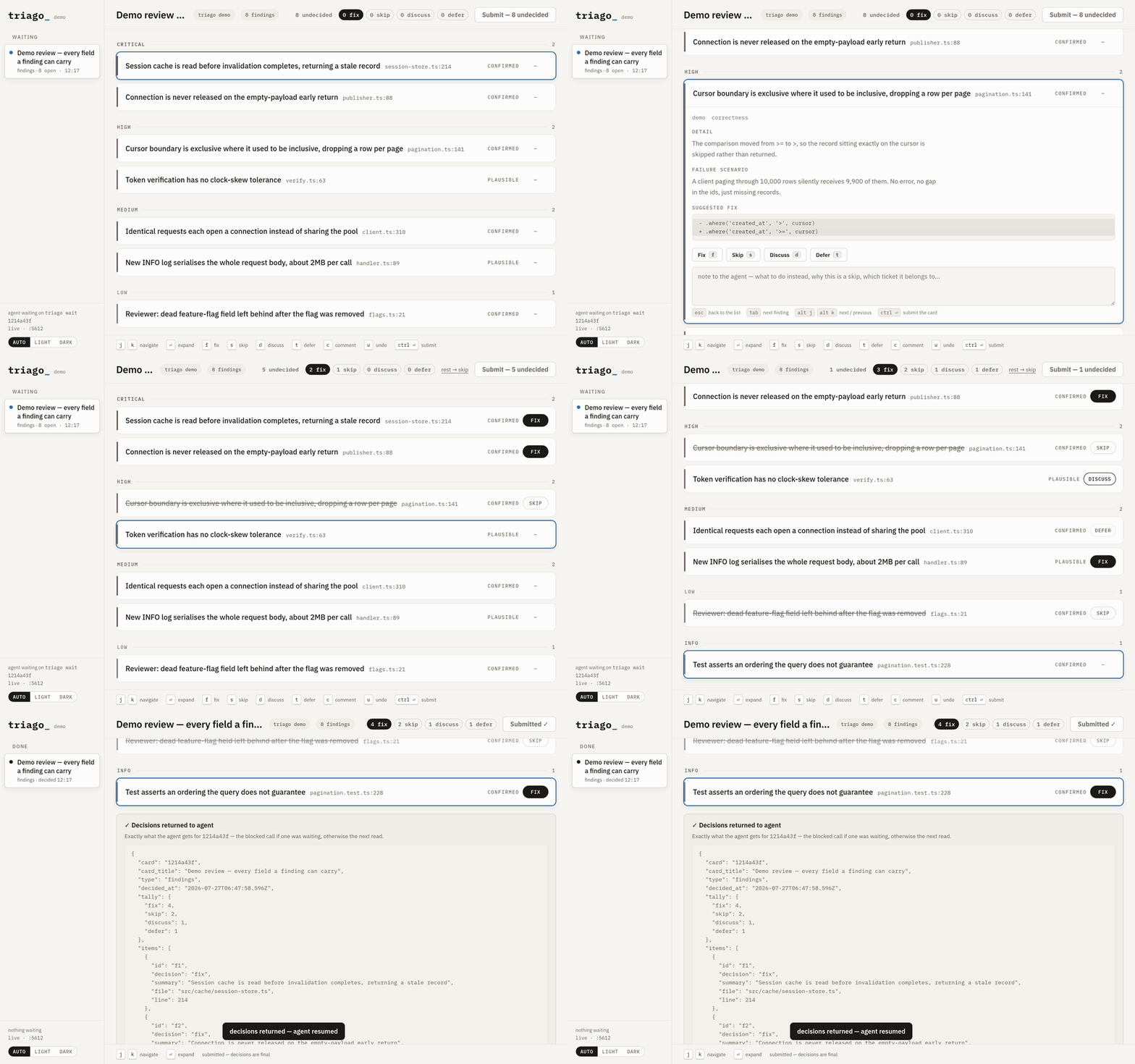
most. triago turns that into an inbox: j/k to move, f/s/d/t/a to decide,
ctrl ⏎ to submit, and the agent picks up a decision per item.
triago is not a client. It shows no transcript, runs no model, and never touches your repo — it renders what an agent hands it and returns what you decided.
Install
In Claude Code, install it as a plugin. Two commands, and nothing touches
your PATH:
/plugin marketplace add priyanshuN/triago
/plugin install triago@triago
Claude Code fetches the package and starts the server itself, so there is no
global install to keep current and no version manager anywhere in the chain —
which removes the failure the manual route is prone to, described under wiring
it to your agent. Restart the session, or /reload-plugins
--force if you would rather not.
The plugin is the npm package below — same tarball, same version number —
so there is only ever one thing to update. Do that with /plugin update
triago@triago: third-party marketplaces do not auto-update unless you switch it
on under /plugin → Marketplaces.
Codex takes the same marketplace — it reads .claude-plugin/marketplace.json
as a compatibility path, so the plugin installs there unchanged:
codex plugin marketplace add priyanshuN/triago
codex plugin add triago@triago
Everywhere else — another MCP client, the CLI on its own, a shell script, a Makefile. Wiring it to your agent has the config:
npm i -g @triago/cliRequires Node 20 or newer. That puts both triago and triago-mcp on your PATH — the commands are
unscoped, only the package name is. npx @triago/cli@latest demo works too, if you would rather
not install anything.
The package is scoped because npm refuses the bare name
triago: it is too close to an existing package calledtiag, so the registry will not create it for anyone. The scope is owned by this project, so only it can publish there.
Or from a checkout, if you would rather read it first:
git clone https://github.com/priyanshuN/triago && cd triago
npm install && npm run build
ln -s "$PWD/bin/triago" ~/.local/bin/triago
ln -s "$PWD/bin/triago-mcp" ~/.local/bin/triago-mcp
Quickstart
triago demoThat posts a sample card so you can see the thing before writing a payload. It starts the server on demand — there is no service to install — opens a tab (or prints the URL, if one is already open), and leaves the card there for you to triage.
For real use, point it at your own findings and block until they are answered:
triago findings review.json --waitreview.json is either {"title": "...", "findings": [...]} or a bare array;
only summary is required per finding:
[
  {
    "severity": "high",
    "verdict": "CONFIRMED",
    "summary": "Retry re-sends the whole batch when a single item fails",
    "file": "src/queue/retry.ts",
    "line": 197,
    "body": "Why this is wrong…",
    "failure_scenario": "Batch of 40, one fails → all 40 re-sent → the request exceeds the size limit and the whole batch is lost.",
    "suggested_fix": "- if (batch.failed) retry(batch)\n+ if (batch.failed) retry(batch.failedItems)"
  }
]
When you hit submit, the blocked command prints this and exits 0:
{
  "card": "8712dddd",
  "tally": { "fix": 6, "skip": 1, "discuss": 2, "defer": 1, "agent": 0 },
  "global_comment": "Fix the marked ones now, re-run the suite after.",
  "items": [
    { "id": "f1", "decision": "fix", "summary": "…", "file": "src/client.ts", "line": 148 },
    { "id": "f5", "decision": "discuss", "comment": "not for this release", "summary": "…" }
  ]
}
Cards
findings — the anchor. Grouped by severity or repo, one keystroke per item, per-item comments, a note for the whole review. Submit locks the card and shows the exact payload the agent received.
doc — markdown to read comfortably (a design write-up, an impact analysis),
with a comment box and one Acknowledge button. triago doc design.md --wait.
A card holds up to 500 findings. There is no virtualisation and none is needed at that size: a 300-finding card is a 197KB payload that fetches in ~27ms and 2,500 DOM nodes, with a decision dispatching in 0.7ms and twenty navigation keystrokes in 1.2ms.
The rail keeps Waiting above Done, newest first, so whatever still owes you an answer is at the top; older decided cards fold behind a toggle. Each row carries a delete control, times are shown on your own clock, and the footer has a light / dark / auto theme switch — auto follows the OS, and an explicit choice overrides it in both directions.
Submitting freezes a card. The decisions were handed to an agent that may have acted on them already, so a record that could change afterwards would be a record that disagrees with what happened: the decision buttons go, your notes stay visible as prose, and the server refuses a second submission.
Keyboard
| | |
|---|---|
| j k / arrows | move between findings |
| ⏎ or o | expand detail, scenario, suggested fix |
| f s d t | fix / skip / discuss / defer — press again to clear |
| a | agent's call — hand this one back for the agent to decide |
| u | undo this decision |
| c | comment on this finding |
| ctrl ⏎ | submit |
Inside a comment box the global keys would just type themselves, so the box has its own exits:
| | |
|---|---|
| esc | back to the list, staying on this finding |
| tab / shift tab | on to the next / previous finding |
| alt j / alt k | same, for fingers already trained on j/k |
| ctrl ⏎ | submit the whole card, from anywhere |
The five decisions
| | | |---|---| | fix | act on it now | | skip | not a real problem, or not worth doing at all | | discuss | needs a conversation before anything happens | | defer | real, but not now — file it as tracked follow-up work and move on | | agent | your call — the agent decides this one itself and says what it chose |
defer exists because skip plus a comment cannot tell an agent the difference
between "this isn't a problem" and "this is a problem for later". What filing
means is yours to define (an issue, a ticket comment, a line in a plan file); triago
just makes the distinction explicit in the returned payload.
What a fix costs depends on whose code it is. On your own branch it is an edit. On a review of someone else's pull request the agent has no business touching their branch, so acting on it means posting the finding as a review comment — same verb, different destination. The shipped policy says so, but it is worth knowing when you triage a card built from a PR you do not own: you are deciding what gets said, not what gets changed.
After every decision, focus jumps to the next undecided finding, so a twelve
item review is twelve keystrokes. Submit stays disabled until nothing is
undecided; rest → skip handles the tail when you have made the calls that
matter.
When you have no calls to make, that requirement used to force you to invent
some. Not every card wants a per-item opinion — sometimes the honest answer to
all twelve is you decide, and faking that as twelve skips is a lie the agent
then acts on. agent says the real thing, and all → agent in the header
applies it to everything still undecided in one click, so a card you are happy to
delegate is one click and ctrl ⏎. The same button reads rest → agent once you
have decided some of them, which is the mixed case: call the three that matter,
hand back the other nine. What comes back is still a complete payload with a
decision per item — the agent is told to choose one of the other four for each,
act on it, and say what it chose, so nothing goes quiet. The global note is where
to put the one constraint you do have.
CLI
triago findings <file.json|->   post a findings card
triago doc <file.md|->          post a markdown card
triago wait <id>                block until submitted (exit 0 + JSON, exit 3 on timeout)
triago show <id>                print a card and its decisions
triago ls                       list cards
triago open [id]                open the browser surface (hands the token over)
triago rm <id…>                 delete cards
triago prune                    bulk delete — prints the list, --yes to do it
triago status | triago stop        server state / shut it down
triago --version                print the version
Flags: --title, --source, --session, --group-by severity|repo|none,
--wait [secs], --timeout <secs>, --json, --ack-label. prune also takes
--older-than <days>, --session <k>, --include-open and --yes.
Deleting an open card takes --force, because an agent may be parked on it.
Rather than leave that call hanging until its own timeout, the server wakes it
with a 410 so it exits knowing the card is gone. prune is a dry run until you
add --yes — there is no undo, and the alternative is learning the flags by
destroying something.
Four ways the answer gets back, in the order you should reach for them:
- Decisions are always written to
~/.triago/cards/<id>/decisions.json. triago wait <id>blocks and prints them (exit 3 if you take longer than the budget, which is not an error — the card stays open).- Walk away: the agent ends its turn, and any later
triago show <id>picks the decisions up. - In tmux, triago can type a one-line notice into the pane the card was posted from, which wakes an agent that already ended its turn (opt-in, below).
An unanswered card is inert. Nothing hangs, nothing retries in the background.
Wiring it to your agent
triago gives an agent a capability; your instruction file decides when it gets used. Do both — the second half is what stops long findings lists going back to the terminal out of habit.
Claude Code
The plugin route above already does this — skip to Codex unless you have a reason to register the server by hand. The rest of this section is that reason, and the failure it invites.
claude mcp add --scope user triago -- "$(command -v triago-mcp)"   # every project, not just this one
claude mcp list                                       # triago: … - ✔ Connected
command -v records the absolute path rather than the bare name, which matters
more than it looks. If you use nvm, registering triago-mcp by name will fail
with ENOENT — nvm puts its bin on PATH from your shell profile, and an
editor or desktop app launched from a dock or launcher never runs that profile,
so the agent looks for a command it genuinely cannot see. The failure gives no
hint at the cause. Resolving the path once, in the shell where nvm is active,
sidesteps it for every version manager. Re-run the command after switching Node
versions: a global install lives under the version that installed it — install
under one and register under another and you will run the old build indefinitely,
with nothing to say so.
The plugin has none of these problems, because Claude Code resolves the path itself rather than asking your shell.
To check the way the agent will see it rather than the way your shell does, spawn
it with your shell's PATH removed:
env -i HOME="$HOME" PATH=/usr/local/bin:/usr/bin:/bin "$(command -v triago-mcp)" </dev/nullTool calls are capped at about 60 seconds by default, which is shorter than a
real triage, so raise it once in ~/.claude/settings.json:
{ "env": { "MCP_TOOL_TIMEOUT": "600000" } }Codex
Codex has plugins and marketplaces of its own, and the Install
section above is the shorter route — it reads .claude-plugin/marketplace.json
as a compatibility path, so triago's marketplace works there with no separate
manifest.
Register the server by hand only if you want it outside the plugin. Install with
npm i -g @triago/cli first.
codex mcp add triago -- "$(command -v triago-mcp)"
codex mcp get triago
Do not do both. codex plugin list and codex mcp list are separate views, so a
plugin install plus a manual registration gives every session two identical sets
of tools with nothing warning you. codex mcp remove triago drops the manual one.
Codex takes its timeouts per server in ~/.codex/config.toml:
[mcp_servers.triago]
# Absolute path, for the reason in the Claude Code section above: a bare name is
# resolved against the agent's PATH, which is not your shell's.
command = "/usr/local/bin/triago-mcp"   # `command -v triago-mcp` prints yours
startup_timeout_sec = 20
tool_timeout_sec = 600
Any other agent
If it speaks MCP, point it at the triago-mcp binary (stdio). If it does not, it
almost certainly runs shell commands, which is enough — triago findings x.json
--wait prints the decisions to stdout and exits 0, and that works from aider,
opencode, a Makefile, or a shell script with no integration at all.
Telling the agent when to use it
If your agent speaks MCP, you don't have to. The server hands the client an
instructions block that reaches the model before it sees a single tool call:
when a card is warranted (more than about five findings, or a document past ~80
lines), when to stay in the terminal, what each of the five decisions obliges it
to do, and what to do if posting fails or the call times out. That policy ships
with the install instead of living in your config, so triago behaves the same on
a machine that has never heard of it.
Agents that only run shell commands never see that block. For those — or to state
the policy explicitly in a repo where you want it written down — add a rule to
whatever instruction file the agent reads (CLAUDE.md, AGENTS.md, a system
prompt). Something like:
Findings lists longer than five items, or judgment documents over ~80 lines, go to a triago card (
triago findings <file> --wait, ortriago_post_findings) instead of being printed. Act on the returned decisions per item: fix means act on it (edit it if the code is ours, raise it on the pull request if it is not), skip means drop it, discuss means stop and ask, defer means record it as tracked follow-up work, and agent means the call is ours to make — decide it, act, and say what we chose. Short output stays in the terminal.
Be explicit about what each decision obliges the agent to do. Without that,
defer quietly becomes skip and the card was pointless.
The MCP tools
For agents that speak MCP this is the better interface: the post tool blocks and returns the decisions as the tool result, so there is no ladder at all.
Tools: triago_post_findings, triago_post_doc, triago_await_decisions,
triago_list_cards. Their JSON Schemas are generated from the same zod definitions
the server validates against, so the agent and the browser can never disagree
about what a card is.
On a client timeout the post tool hands back the card id and a hint to call
triago_await_decisions, which is safe to call repeatedly — that is the designed
fallback, not an error. wait_seconds defaults to 45 so it degrades cleanly on
clients you have not tuned.
How it runs
There is no daemon to install and nothing to add to your login items. Every
entry point — each CLI command, the MCP shim's startup — probes
127.0.0.1:5599/healthz and spawns the server detached if nothing answers. The
first card of the day brings it up; a reboot needs no autostart because the next
invocation does it again. One process (~40MB idle) serves every session until you
run triago stop.
The port bind is the lock: if something is already there, triago reuses it, and if
that something is a different protocol version (after an upgrade) triago asks it to
stand down and starts the new one. Cards and decisions are files, so a crash
mid-wait costs nothing — the server rescans ~/.triago on start and the wait is
re-issued.
Security
triago holds review data and source excerpts, so it is not open to every process on your machine:
- binds
127.0.0.1only; - every
/apirequest needs the bearer token in~/.triago/token(mode 0600), compared in constant time.triago openhands it to the browser once through the URL fragment, which is never sent to a server; - the
Hostheader is checked against a localhost allowlist, which is what stops a hostile page from resolving its own name to 127.0.0.1 and talking to triago; - a strict CSP (
script-src 'self'), and rendered markdown is stripped of anything executable before it reaches the DOM; - config values are never run through a shell — argv arrays only;
- editor deep-links and tmux injection are off until you turn them on;
- the interface serves its own fonts. A webfont fetched from a CDN would tell a third party each time you opened a review, and the CSP above blocks it anyway;
- no telemetry, no network calls, no analytics. There is no phone-home to
disable. One precision, because the claim should be exact: installed as a
plugin, the server is launched with
npx, which contacts the npm registry the first time it runs a version you do not have cached. That is the install fetching the package, and it is the same requestnpm i -gmakes — but it happens at first launch rather than at install time, so it is worth naming rather than leaving you to discover it. The server itself, once running, makes no outbound request in either route.
Config
~/.triago/config.json, all optional:
{
  "open_browser": "first-card",
  "editor": { "enabled": true, "command": "code -g {abs}:{line}" },
  "tmux": { "inject": true },
  "notify": true,
  "session_regex": "[A-Z][A-Z0-9]+-\\d+",
  "repo_roots": { "myrepo": "/home/me/code/myrepo" }
}
open_browser is first-card (open a tab only when none is listening), always
or never. A tab that has been opened but never activated may not connect, so
"none is listening" can stay true and every further card would open another tab —
open_browser_cooldown_sec (default 300) is the backstop, and it is remembered
across server restarts. Set TRIAGO_NO_BROWSER=1 in scripts, CI or test runs to
suppress opening entirely; the card is still posted, and the response says why no
tab appeared. editor.command is an argv template — {abs}, {file}, {line};
IntelliJ is idea --line {line} {abs}, Vim is xterm -e vim +{line} {abs}. A
finding's path is resolved against repo_roots and is refused if it escapes
them. session_regex picks the session key out of the current git branch, which
is how cards group in the sidebar.
tmux.inject types a line into the pane that posted the card. Point it at an
agent's pane, not a shell prompt — a shell will try to run the notice.
What triago is not
Not a diff reviewer. triago is for output an agent generated as a list of items you have to answer, not for annotating a patch line by line — that is a human originating comments on an artifact, the opposite direction of flow. If you want line comments on a diff, your code host already does it well; triago has nothing to add there.
Developing
npm install && npm run build     # dist/ carries the server and the prebuilt UI
npm test                         # integration over HTTP, MCP over stdio, unit for policy
npm run dev:web                  # Vite on :5600, proxying the API to :5599
The suite covers auth and Host rejection, long-poll wake-up, CLI exit codes, restart-from-disk, the browser-open policy and the MCP handshake, on Node 20, 22 and 24. TESTING.md is the manual walkthrough for what a test cannot judge — whether triage actually feels fast, the editor deep-link, tmux wake-up, and MCP from a real client. DESIGN.md explains why the code is shaped the way it is.
Contributing
Yes, please. CONTRIBUTING.md is written so you can tell before spending an evening whether a change will be merged: how to get it running, the five things about the codebase that place most changes, what a good PR looks like — and a straight list of what will be turned down, which is the part worth reading first.
good first issue
issues name the file and say what "done" means.
Discussions is for anything
you would rather ask than file. Security problems go through the private route
in SECURITY.md, never an issue.
MIT, no CLA. Everyone is expected to follow the Code of Conduct.
Status
Today: findings and doc cards, the CLI with its full return ladder, the MCP adapter, a Claude Code plugin, token auth, and a test suite that runs on Node 20, 22 and 24.
It was dogfooded on itself immediately — the first card triago ever displayed was
a review of its own implementation, and the seven items marked fix were fixed
before anything else shipped. Four of those were defects that reading the code
would not have caught.
Next: question cards, for when
an agent needs answers rather than decisions. The first production review through
this tool came back nine discuss to one fix, and every one of those comments
was an answer — people were already using a findings card as a question card,
because it was the only surface that collected a response per item.
MIT © priyanshuN
Set in IBM Plex, bundled with the interface under the SIL Open Font License.