
@trohde/earos
v1.8.7
Published
Schema-driven editor and CLI for EaROS architecture assessment rubrics and evaluations
Downloads
1,691

Maintainers
 trohde
Readme
@trohde/earos
CLI and web editor for the EaROS architecture assessment framework
EaROS (Enterprise Architecture Rubric Operational Standard) is a structured framework for evaluating architecture artifacts consistently — by humans, AI agents, or both. This package gives you the CLI to scaffold and manage an EaROS workspace and a browser-based editor to create rubrics, run assessments, and author artifacts.
Quick Start
npm install -g @trohde/earos
earos init my-architecture --icons
cd my-architecture && earos
That's it. Your workspace opens in the browser, ready to assess.
Pass --icons to download the official architecture icon packages from AWS, Azure, and GCP into ./icons during workspace initialization. The initializer creates stable Mermaid-friendly aliases under ./icons/aws/, ./icons/azure/, and ./icons/gcp/.
In an existing EaROS workspace, run earos init . --icons to fetch or refresh the icon sets without re-scaffolding the workspace.
Override download URLs with environment variables if needed:
EAROS_AWS_ICON_PACKAGE_URL/EAROS_AWS_ICON_PAGE_URLEAROS_AZURE_ICON_PACKAGE_URL/EAROS_AZURE_ICON_PAGE_URLEAROS_GCP_ICON_PACKAGE_URL/EAROS_GCP_ICON_PAGE_URL
What earos init Creates
| Path | Purpose |
|------|---------|
| core/ | Core meta-rubric — universal foundation, 9 dimensions |
| profiles/ | Artifact-specific profiles (5 bundled: solution-architecture, reference-architecture, adr, capability-map, roadmap) |
| overlays/ | Cross-cutting overlays (3 bundled: security, data-governance, regulatory) |
| standard/schemas/ | JSON schemas for rubrics, evaluations, and artifacts |
| templates/ | Blank scaffolds for new profiles and evaluations |
| evaluations/ | Your evaluation records go here |
| calibration/ | Calibration artifacts and results |
| .agents/skills/ | 10 EaROS skills for any AI coding agent |
| earos.manifest.yaml | Single source of truth — inventory of all rubric files |
| AGENTS.md | Project guide for AI agents (agent-agnostic) |
The workspace is agent-agnostic — the .agents/skills/ directory works with any AI coding agent that reads skill files (Claude Code, Cursor, Copilot Workspace, and others).
CLI Commands
| Command | Description |
|---------|-------------|
| earos | Start the web editor (Express server, opens browser) |
| earos init [dir] [--icons] | Scaffold a complete EaROS workspace in dir and optionally download architecture icon packages from AWS, Azure, and GCP into icons/, with stable aliases in icons/aws/, icons/azure/, and icons/gcp/ |
| earos validate <file> | Validate any EaROS YAML (rubric, evaluation, or artifact) against schemas (exit 0/1) |
| earos manifest | Regenerate earos.manifest.yaml by scanning the filesystem |
| earos manifest add <file> | Add a single file to the manifest |
| earos manifest check | Verify the manifest matches the filesystem (exits non-zero on drift) |
| earos --help | Show help |
Validate exit codes
| Code | Meaning |
|------|---------|
| 0 | File is valid |
| 1 | Validation errors found (printed to stderr) |
The Editor
Running earos opens a browser-based editor with a 3×2 home screen:
| Audience | Cards | |----------|-------| | Governance Teams | Create Rubric, Edit Rubric | | Reviewers | New Assessment (guided wizard), Continue Assessment | | Architects | Create Artifact, Edit Artifact |
Key editor features:
- Manifest-driven sidebar — browse and load any rubric, profile, or overlay from your workspace
- Live YAML preview — right panel updates in real time as you edit the form
- Schema validation — status bar shows errors in real time against the EaROS JSON schemas
- Kind selector — switches the form between
core_rubric,profile,overlay,evaluation, andartifact— reshaping validation and field layout automatically - Import / Export — drag-and-drop YAML import; export as
<rubric_id>.yaml - Context-aware help — inline guidance tied to the EaROS standard
AI Agent Skills
The initialized workspace includes 10 bundled skills in .agents/skills/ that any AI coding agent can use:
| Skill | Purpose |
|-------|---------|
| earos-assess | Run a full 8-step evaluation on any architecture artifact |
| earos-review | Audit an existing evaluation for over-scoring and unsupported claims |
| earos-template-fill | Guide authors through writing an assessment-ready document |
| earos-artifact-gen | Interview-driven artifact creation (produces schema-compliant YAML) |
| earos-create | Create new rubrics (profiles, overlays, or core) through guided interview |
| earos-profile-author | Technical YAML authoring guide for v2 field structure |
| earos-calibrate | Run calibration exercises and compute inter-rater reliability |
| earos-report | Generate executive reports from evaluation records |
| earos-validate | Health check — validates all YAMLs against schemas |
| earos-remediate | Generate prioritized improvement plans from evaluation results |
See the EaROS repository for full skill documentation.
The EaROS Framework
EaROS uses a three-layer model:
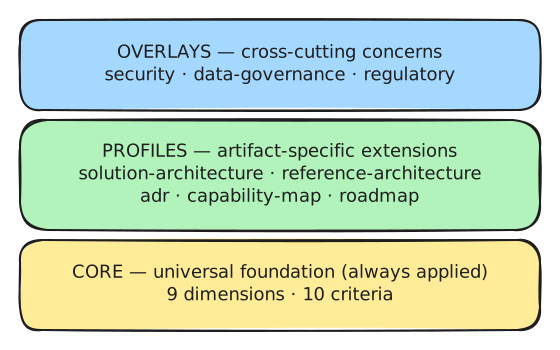
Scoring uses a 0–4 ordinal scale (0 = Absent → 4 = Strong) with explicit gate types that prevent weak scores from being hidden by weighted averages:
| Gate | Effect |
|------|--------|
| advisory | Triggers a recommendation |
| major | Caps the pass status |
| critical | Blocks pass entirely; forces Reject |
Status outcomes: Pass · Conditional Pass · Rework Required · Reject · Not Reviewable
For the complete standard — scoring model, gate logic, status thresholds, DAG evaluation flow, and calibration protocol — see the EaROS repository.
Links
- Repository: github.com/ThomasRohde/EAROS
- Issues: github.com/ThomasRohde/EAROS/issues
License
CC BY 4.0 — Thomas Rohde