
@ts-org/jenkins-cli
v3.1.4
Published
Jenkins deployment CLI
Downloads
271

Maintainers
 dot-env
Readme
Jenkins CLI
A lightweight Jenkins deployment tool that helps you trigger parameterized Jenkins builds from the command line, either interactively or non-interactively.
✨ Features
- Interactive CLI flow for selecting branches and deployment environments.
- Smart triggering: automatically stops running builds and reuses identical queued tasks.
- Flexible parameterized builds with support for extra runtime parameters.
- Global
--debugflag to print Jenkins request details. - Rich command set covering common operations for Jobs, Builds, Queue, and more.
- Project-level config via
jenkins-cli.yamlorpackage.json.
📦 Installation
pnpm install -g @ts-org/jenkins-cli🚀 Usage
Run from your project root:
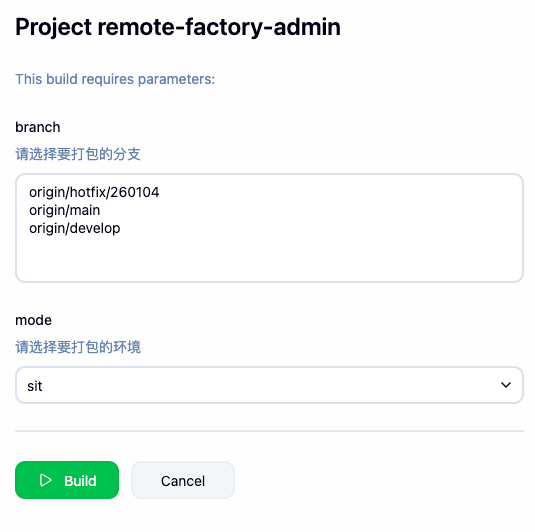
jenkins-cliThe CLI will auto-load your config, then list Git branches and deployment environments for you to choose from.
⚙️ Configuration
Create jenkins-cli.yaml in your project root:
# yaml-language-server: $schema=https://cdn.jsdelivr.net/npm/@ts-org/jenkins-cli@latest/schemas/jenkins.json

# Jenkins API URL format: http(s)://username:token@host:port
apiToken: http://user:[email protected]

# Jenkins job name (can be overridden with -j, or provided via function reference)
job: your-project-job

# Deployment environments (passed to Jenkins as the `mode` parameter, or provided via function reference)
# The options must match your Jenkins configuration.
# If you configure a mode that does not exist in Jenkins (for example `prod`),
# Jenkins may return HTTP 500 when `mode=prod` is submitted.
modes:
  - dev
  - sit
  - uat
It is recommended to add # yaml-language-server: $schema=https://cdn.jsdelivr.net/npm/@ts-org/jenkins-cli@latest/schemas/jenkins.json at the top of jenkins-cli.yaml for a better editing experience, as shown above.
Dynamic job / modes
job and modes support function references in the form path:exportName. The function receives answers and returns the final value.
Example:
job: jenkins-utils.ts:dynamicJob
modes: jenkins-utils.ts:dynamicModes
export function dynamicJob(answers: Record<string, unknown>) {
return answers.isElectron ? 'remote-client-web' : 'remote-web-order'
}
export function dynamicModes(answers: Record<string, unknown>) {
return Number(answers.buildNumber) > 100 ? ['dev', 'sit', 'uat', 'prod'] : ['dev', 'sit', 'uat']
}Extended Interactive Parameters
With the configs field, you can add custom interactive prompts. Their results are passed to Jenkins as build parameters.
type: supportsinput,number,confirm,list,rawlist,checkbox,password, and more.choices,default,validate,when,filter,transformer: can be dynamically loaded from local TS/JS files.path:exportName: auto-resolves exported values; calls them if they are functions (async supported).
offset: negative values adjust prompt order.-1: inserted afterbranch, beforemodes<= -2: inserted beforebranch
name: parameter key. Avoid reserved names such asbranch,mode,modes.
Example:
configs:
  - type: number
    name: buildNumber
    message: 'Select build number:'
    offset: -2
  - type: input
    name: version
    message: 'Enter version:'
    default: '1.0.0'
    filter: src/config.ts:filterVersion
    transformer: src/config.ts:transformVersion
  - type: list
    name: service
    message: 'Select service:'
    choices: src/config.ts:getServices
  - type: confirm
    name: smokeTest
    message: 'Enable smoke test?'
    when: src/config.ts:whenSmokeTest
  - type: input
    name: ticket
    message: 'Enter ticket ID:'
    validate: src/config.ts:validateTicket
Corresponding src/config.ts:
export async function getServices() {
  return ['user-center', 'order-service']
}

export function filterVersion(input: unknown, answers: Record<string, unknown>) {
  return String(input ?? '').trim()
}

export function transformVersion(
  input: unknown,
  answers: Record<string, unknown>,
  meta: { isFinal?: boolean },
) {
  const value = String(input ?? '')
  return value ? `v${value}` : value
}

export function whenSmokeTest(answers: { mode?: string }) {
  return answers.mode !== 'prod'
}

export function validateTicket(input: unknown, answers: Record<string, unknown>) {
  return /^(feat|fix|refactor)-[a-zA-Z0-9]+$/.test(input) || 'Invalid ticket format'
}
Complete parameter details for the four functions:
when(answers)answers: all answers collected so far (keys are promptnamevalues).- Returns
boolean | Promise<boolean>to decide whether to show the prompt.
validate(input, answers)input: raw value currently entered by the user.answers: all answers collected so far.- Return
trueto pass; return astringas an error message;Promise<true | string>is also supported.
filter(input, answers)input: raw value currently entered by the user.answers: all answers collected so far.- Returns the transformed value (sync or async).
transformer(input, answers, meta)input: raw value currently entered by the user.answers: all answers collected so far.meta: rendering metadata (for exampleisFinal), which may vary slightly across versions.- Returns display text only and does not modify the value in
answers(sync or async).
Tip: You can also put configuration under the
jenkins-clifield inpackage.json.Lookup order:
jenkins-cli.yaml>package.json> ancestor directoryjenkins-cli.yaml.
🤖 Command Reference
build (non-interactive trigger)
Useful for CI or other scripted scenarios.
# Trigger a build for the dev environment
jenkins-cli build -b origin/develop -m dev

# Trigger multiple environments at once
jenkins-cli build -b origin/develop -m dev,sit

# Pass extra parameters
jenkins-cli build -b origin/develop -m dev --param version=1.2.3 --param force=true
Note: by default, the CLI reads git config user.name and appends it as triggered_by.
To override it, pass --param triggered_by=YourName explicitly.
builds - build management
# Show the latest 20 builds
jenkins-cli builds

# Show running builds
jenkins-cli builds active

# Show all running builds on Jenkins
jenkins-cli builds active -a
changes - change logs
# Show change logs for the latest 20 builds
jenkins-cli changes

# Show change logs for the latest 50 builds
jenkins-cli changes -n 50

# Show change logs for a specific build
jenkins-cli changes 1234
config - job configuration
# Read current job XML config
jenkins-cli config show

# Output as JSON
jenkins-cli config show -f json

# Back up current job config
jenkins-cli config backup -d ./jenkins-backup

# Back up a specific job config
jenkins-cli config backup -d ./jenkins-backup -j remote-factory-admin

# Back up multiple job configs filtered by glob
jenkins-cli config backup -d ./jenkins-backup --filter 'remote-*'

# Back up all job configs
jenkins-cli config backup -d ./jenkins-backup -a
plugin - plugin management
# Show enabled plugins
jenkins-cli plugin show

# Back up enabled plugin list
jenkins-cli plugin backup -d ./jenkins-backup
backup - full Jenkins backup
# Back up Jenkins global config, jobs, plugins, and credentials
jenkins-cli backup -d ./jenkins-backup
console - view logs
Supports live log following, enabled by default.
# Show logs for a specific build number; follow if running, otherwise print once
jenkins-cli console 1234

# Show logs for the latest build; follow if running, otherwise print once
jenkins-cli console last

# Print current logs only, without following
jenkins-cli console last --no-follow

# Show logs from the latest successful build
jenkins-cli console last -s success

# Show logs from the latest failed build
jenkins-cli console last -s failed
job - job management
# List all jobs (supports glob filtering)
jenkins-cli job list --search 'project-*'

# Show current job info
jenkins-cli job info
me - user information
# Verify API token and show current user
jenkins-cli me
params - job parameters
# Show parameter definitions for the current job
jenkins-cli params
queue - pending build queue management
# Show pending build queue
jenkins-cli queue list

# Cancel one queued item
jenkins-cli queue cancel 5678
stop - stop builds
# Stop one build
jenkins-cli stop 1234

# Clear queue and stop all running builds for current job
jenkins-cli stop -a

# Stop all builds and queue items on Jenkins (use with caution)
jenkins-cli stop -A
view - view management
# Show all views
jenkins-cli view list

# Show jobs in a view
jenkins-cli view show MyView

# Add a job to a view
jenkins-cli view add MyView my-job

# Remove a job from a view
jenkins-cli view remove MyView my-job

# Edit jobs in a view (check/uncheck)
jenkins-cli view edit MyView

# Create a view
jenkins-cli view create MyView

# Delete a view
jenkins-cli view delete MyView
workspace - workspace
# Show workspace for current job (reads `job` from jenkins-cli.yaml by default)
jenkins-cli ws

# Show subdirectory (current job)
jenkins-cli ws -p dist

# Specify job
jenkins-cli ws -j my-job

# Show file contents
jenkins-cli ws cat dist/index.html

# Show file contents for a specific job
jenkins-cli ws cat dist/index.html -j my-job

# Save file locally
jenkins-cli ws cat dist/index.html -o ./index.html

# Download and open with default app (useful for images)
jenkins-cli ws cat public/favicon.ico --open

# Wipe workspace (will prompt for confirmation)
jenkins-cli ws wipe

# Wipe workspace for a specific job
jenkins-cli ws wipe -j my-job
❓ FAQ
Q: Why does stop or queue cancel return 403 Forbidden?
A: Most likely the Jenkins user lacks permission (requires Job > Cancel). Make sure you use an API token instead of a password, and verify Jenkins CSRF settings. This tool handles CSRF automatically, but permission issues must be fixed manually.