
@tsxper/log-stream
v2.1.0
Published
Stream-based NodeJS logger


Readme
Streams Logger




@tsxper/log-stream is a TypeScript stream-based logger.
Main features of the @tsxper/log-stream are:
- each log record is represented as JSON;
- simplicity;
- small size;
- supporting 2 streams with exclusive stream for errors;
- back pressure support;
- "compact" and colored "visual" output formats;
- logging scopes;
- logging data structures for debugging;
- easy streams replacement;
- circular references safety;
- easy configuration spreading through cloning;
It supports any stream that implements WriteStreamSimplified interface.
interface WriteStreamSimplified {
  write(str: Uint8Array | string): boolean;
  once(event: "drain", listener: () => void): unknown;
}
Configuration
Create Logger instance
const logger = new Logger(LOG_LEVEL_INFO, 'my service');This will create a new logger instance with a scope "my service" that will write all logs of all levels up to INFO (this excludes only DEBUG) into default "stdout" and "stderr" output streams.
Output Formats
Currently 2 output formats are supported: "compact" (default) and "visual" (optional dependency)
Compact Format

Compact format contains a JSON string on a new line. Compact format message decoded:
- t [required], time (ms);
- l [required], log level;
- s [required], scope;
- n [required], name (log message);
- d [optional], data;
- e [optional], error;
const logger = new Logger(LOG_LEVEL_INFO, 'my service scope');Visual Format
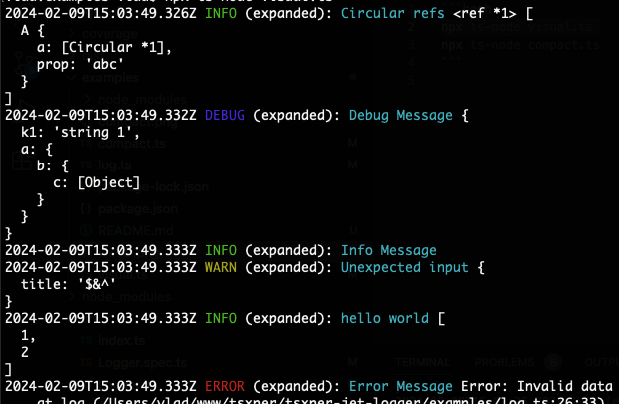
Install the visual formatter.
npm i @tsxper/log-stream-formatter-visual -DSee tsxper/log-stream-formatter-visual docs on the GitHub for details.
node server.js | npx @tsxper/log-stream-formatter-visualOptional, replace the default formatter.
const logger = new Logger(LOG_LEVEL_INFO, 'my service scope');
const formatter = new FormatterVisual();
logger.setFormatter(formatter.formatter.bind(formatter));
Log Levels
Possible log levels are:
- LOG_LEVEL_NONE, or 0, no logs are logged;
- LOG_LEVEL_ERROR, or 1, only "error" logs are logged;
- LOG_LEVEL_WARN, or 2, "error" and "warn" logs are logged;
- LOG_LEVEL_INFO, or 3, "error", "warn" and "info" logs are logged;
- LOG_LEVEL_DEBUG, or 4, "error", "warn", "info" and "debug" logs are logged;
// JS example
logger.debug('debug message', [1, 2]);
logger.log('info message');
logger.warn('warn message');
logger.error('error message', new Error('error'));
// TS interface
debug(name: string, data?: unknown): boolean;
log(name: string, data?: unknown): boolean;
warn(name: string, data?: unknown): boolean;
error(name: string, data: Error): boolean;Each logging method returns a boolean "true" when a log message was successfully enqueued.
Log Scopes
Log scope can be set in a constructor or later in setScope()
constructor(logLevel?: LOG_LEVEL, scope?: string);
setScope(scope: string): this;
Logging Objects
In "compact" output format all data objects are converted into JSON strings and are logged "as is". In "visual" output format or when data objects contains circular refs, a "depth" parameter is applied (by default depth=2).
setDepth(depth: number): this;Circular Refs. In case passed data object contains circular refs, such object is converted into its string representation with denoted circular references.
Log Streams
Two logs streams are supported: general logs stream and error log stream. Default log stream for error and general logs is process.stdout. It's possible to change error stream to process.stderr.
// replace log streams
static replaceLogStreams(stdOut: NodeJS.WritableStream, stdErr: NodeJS.WritableStream): void;
Calling Logger.replaceLogStreams() will make all existing Logger instances write into the new streams.
Note. Calling "Logger.replaceLogStreams()"" does not call "stream.destroy()" on previously used streams.
Handle Backslashes
During write procedure into default streams, JSON string may become invalid because of stream strips slashes.
Example:
"line\\n" can be written as "line\n".
This behavior will make JSON invalid for further parsing (Uncaught SyntaxError: Bad control character).
To prevent this, double slashes are added by default.
To disable adding extra slashes, call Logger.setDoubleSlashes(false).
static setDoubleSlashes(enabled: boolean): voidClone Logger
Cloning a logger instance makes easy to create a new logger with a new scope but existing settings (like formatter, depth).
const logger2 = logger1.clone('new scope');Backpressure Support
At a peak usage, a stream can report that it is not ready to receive new data anymore. In a meanwhile Logger can continue accepting new log messages and puts them into a buffer. All new messages are buffering and will be sent into the stream as soon as the stream reports readiness ("drain" event) to receive new porting of data.
Default buffer size (heigh watermark) is 100 000 items for both ("err" and "out") streams. This can be changed by calling "Logger.setBufferHeighWatermark(newNumber)". In case when backpressure event occurs, "Logger.getIsBackpressure(target)" call will return "true".
type TARGET = 'err' | 'out';
static getIsBackpressure(target: TARGET): boolean;
Formatters
Output format is configurable through setting custom formatting function.
setFormatter(formatter: LOG_FORMATTER): this;