
@ttsc/evidence
v0.31.1
Published
Evidence-graph lint contributor for @ttsc/lint: declare provenance with a JSDoc @evidence tag and fail the build when it is missing or dangling.

Maintainers
 samchon
Readme
@ttsc/evidence






Every specification becomes a compile-time obligation.
Citing the evidence and describing the reason why are mandatory, so you get:
- 100% coverage of every requirement.
- 100% compliance with every principle.
/**
 * @evidence docs/discount.md#coupon-stacking States the per-issuer stacking limit this section defines, in the buyer's words.
 * @evidence POST:/orders/{orderId}/coupons Explains the rejection this endpoint returns for an over-stacked coupon set.
 * @evidence {@link hooks.useCouponStacking} Renders the limit this hook resolves.
 * @evidence .agents/skills/principles/SKILL.md#no-hard-coding Renders limits from props instead of branching on known issuer names.
 * @evidenceExclude .agents/skills/principles/SKILL.md#fix-root-causes-not-symptoms No failure to fix.
 */
export function CouponStackingNotice(props: IProps): JSX.Element;
@evidence <target> <reason> is the agent's explicit claim about what this code implements and why. @evidenceExclude records why an obligation does not apply.
A target is one of four kinds:
- Markdown: a file, or a section of one.
- Prisma: a model, a column, or a relation.
- Swagger: an operation, method and path together.
- TypeScript: a type, a function, or a property, written as an inline link.
Leave one obligation unanswered and the build stops.
$ npx ttsc
error TS16411: [evidence/graph] Missing acknowledgement for 'docs/discount.md#coupon-stacking'
  (Markdown H2 'Coupon Stacking' at docs/discount.md:3)
  in Claim 1 reference 1 (markdown, symbols: h2, h3).

...

Found 5 errors.
Missing obligations appear in the same build as type errors. The error list is the agent's task list.
Benchmark
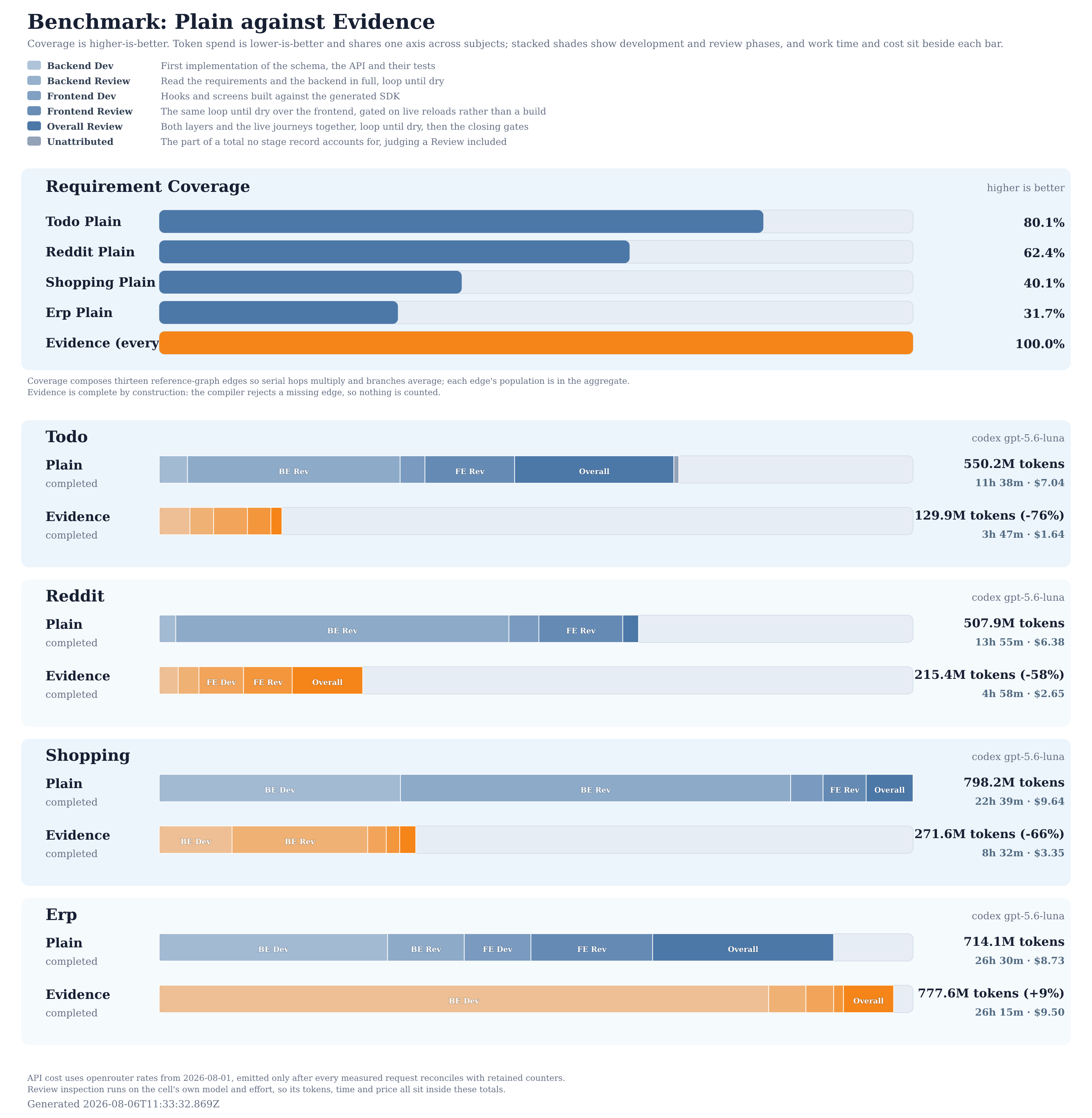
One agent built each subject twice. Same inputs, same engine, same model; only this plugin differs.
- Plain: omissions are invisible, so review hunts them.
- Read everything, fix every finding, restart until a round finds nothing.
- The loop until dry eats 90–95% of all tokens.
- Coverage still lands at 51.6–85.5%, falling as the subject grows.
- Evidence: omissions are compile errors, so review reads the tag list.
- One pass, judging whether each reason is true.
- Review takes 15–41% of the tokens.
- Coverage lands at 100% on every subject.
The benchmark guide breaks each run down by phase, and samchon/evidence-benchmark-results keeps the raw sessions.
Setup
Install
npm install -D typescript ttsc @ttsc/lint
npm install -D @ttsc/evidence
This is a rule contributor to @ttsc/lint, so it runs on ttsc rather than on stock tsc with ESLint.
Configure
// lint.config.ts
import {
  evidence,
  type ITtscEvidenceGraphConfig,
  type ITtscEvidenceRules,
} from "@ttsc/evidence";
import type { ITtscLintConfig } from "@ttsc/lint";

const graph: ITtscEvidenceGraphConfig = {
  claims: [
    {
      type: "typescript",
      files: ["src/components/**/*.tsx"],
      symbol: "function",
      reference: {
        type: "markdown",
        files: ["docs/**/*.md"],
        symbol: ["h2", "h3"],
      },
    },
  ],
};

export default {
  plugins: { evidence },
  rules: {
    "evidence/graph": ["error", graph],
    "evidence/review": "error",
  },
} satisfies ITtscLintConfig<ITtscEvidenceRules>;
One claim: the components under src implement the docs, so every H2 and H3 under docs must be cited by a component. Run npx ttsc and the error count is the backlog. Passing ITtscEvidenceRules to ITtscLintConfig gives every Evidence rule exact option checking.
The configuration reference has every claim option and the four rules beside evidence/graph.
Tags
The configuration is written once. The tags are written forever: @evidence cites, @evidenceReview verifies, and @evidenceExclude declines. The tag reference has the full grammar.
A false tag removes the error, not the problem. @evidenceReview asks for a separate statement of what was verified, which a human then judges:
/**
 * @evidence docs/discount.md#coupon-stacking States the per-issuer limit.
 * @evidenceReview docs/discount.md#coupon-stacking #a1b2c3d
 *                 Verified against policy section 3.
*/- Reviews match the same declaration and target.
- The fingerprint expires when the cited content changes.
Normalized Swagger operation fingerprints decode local component URI fragments before interpreting JSON Pointer tokens, including array indices. Upgrading can expire reviews of operations using encoded pointers, array elements, or malformed references that previously selected a literal property. Re-read those operations and their referenced contracts before replacing a fingerprint.
Raw OpenAPI 3.1 and 3.2 schema references retain their original targets through version normalization, including pointers into schema structures the converter relocates. Foreign, missing and malformed schema references do not bind to a local schema with the same final name. Reference-shaped example, default, constant, enum and extension values remain data. Reviews affected by these earlier interpretations also need to be read again before their fingerprints are replaced.
The compiler handles omissions. Humans handle falsehoods.
Spec-Driven Development
Requirements are the handoff: whether a human or an AI wrote them, a human must review them last. That reviewed layer is the source of truth, the evidence the AI builds everything else from.
Each arrow is one claim from lint.config.ts, pointing at the evidence it cites.
- Hand over the requirements, and the agent writes the rest.
- Hand over raw idea notes, and it writes the requirements too.
The compiler checks everything below: a dropped idea or a skipped requirement is a compile error, so nothing vanishes on the way down.
Even requirements cite their evidence, in comments, so the rendered document stays clean.
Backend, frontend, and even novels below are this same shape, drawn in detail.
Start with principles
100% compliance with every principle.
## No hard coding
## No monkey patching
## Use the conventional solution
## Fix root causes, not symptoms
Make them a checklist:
{
  name: "every function answers every engineering principle",
  type: "typescript",
  files: ["src/**/*.ts"],
  symbol: "function",
  reference: {
    type: "markdown",
    files: [".agents/skills/principles/SKILL.md"],
    symbol: "h2",
    checklist: true,
    requireReview: true,
  },
}
checklist changes the denominator from principles to functions times principles. Every selected function must answer every principle, with @evidence as CouponStackingNotice does for no-hard-coding or with @evidenceExclude as it does for fix-root-causes-not-symptoms; the two principles it leaves unanswered above would fail the build.
One missing answer fails the build. Adding a principle creates a new obligation on every selected function, and requireReview expires every affected review when that principle changes.
Backend
Real config:
api/lint.config.tsandbackend/test/lint.config.ts
The DB schema is Prisma, the rest is TypeScript, and one graph spans both:
- The DB schema cites the documents; no table without a documented reason.
- Operations and API schemas cite the DB layer and the documents behind it.
- Tests cite the operations; an untested operation is an open obligation.
Frontend
Real config:
frontend/lint.config.ts
The source layer is the backend's own Swagger output: a graph can start from what another project publishes.
- Hooks cite the operations they call.
- Screens cite the hooks they render.
- Journeys cite the screens they walk through.
Screens and journeys also cite the documents, so every screen traces back to a requirement.
Novels
Real config:
napoleon-imperator/lint.config.ts
The graph reads no meaning, only obligations and citations, so it works on any text. Humans review only the settings (characters, world rules, history), and the novel follows. The principles are universal literary fundamentals, not something written per work.
- Every layer cites the principles for its literary purpose.
- Every layer cites the settings for facts, rules, and knowledge.
- Scripts and prose cite treatments for cause and consequence.
- Prose cites the script it executes, exactly.
Editing a setting expires every review on it, so a revision leaves no stale scene behind. samchon/novels runs this graph on 25 principles, 350 setting commitments, and 742 scenes.
Sponsors

Thanks for your support.
Your donation encourages @ttsc/evidence development.
References
ttsc: the TypeScript-Go toolchain this plugin runs on.@ttsc/lint: the lint engine that links this rule into the compiler.- Guide Documents
- Benchmark Diagram
samchon/evidence-benchmark-results