
@ttsc/graph
v0.26.2
Published
Checker-resolved architecture graph over MCP for coding agents, backed by ttsc's in-process TypeScript-Go compiler.

Maintainers
 samchon
Readme
@ttsc/graph






@ttsc/graph is an MCP server that gives AI agents a code graph instead of source files.
It indexes a TypeScript codebase into a graph of declarations and their relationships, and answers an agent's code questions from that index through a single tool. Every node and edge is resolved by the TypeScript compiler itself, so the graph is exact for TypeScript and TSX, never text-guessed.
Coding agents normally answer a code question by grepping the repository and reading file after file into context, and that reading is most of the token bill. The graph removes the need for it, and its own answers stay small in turn: they carry names, signatures, relationships, and source spans, never file bodies.
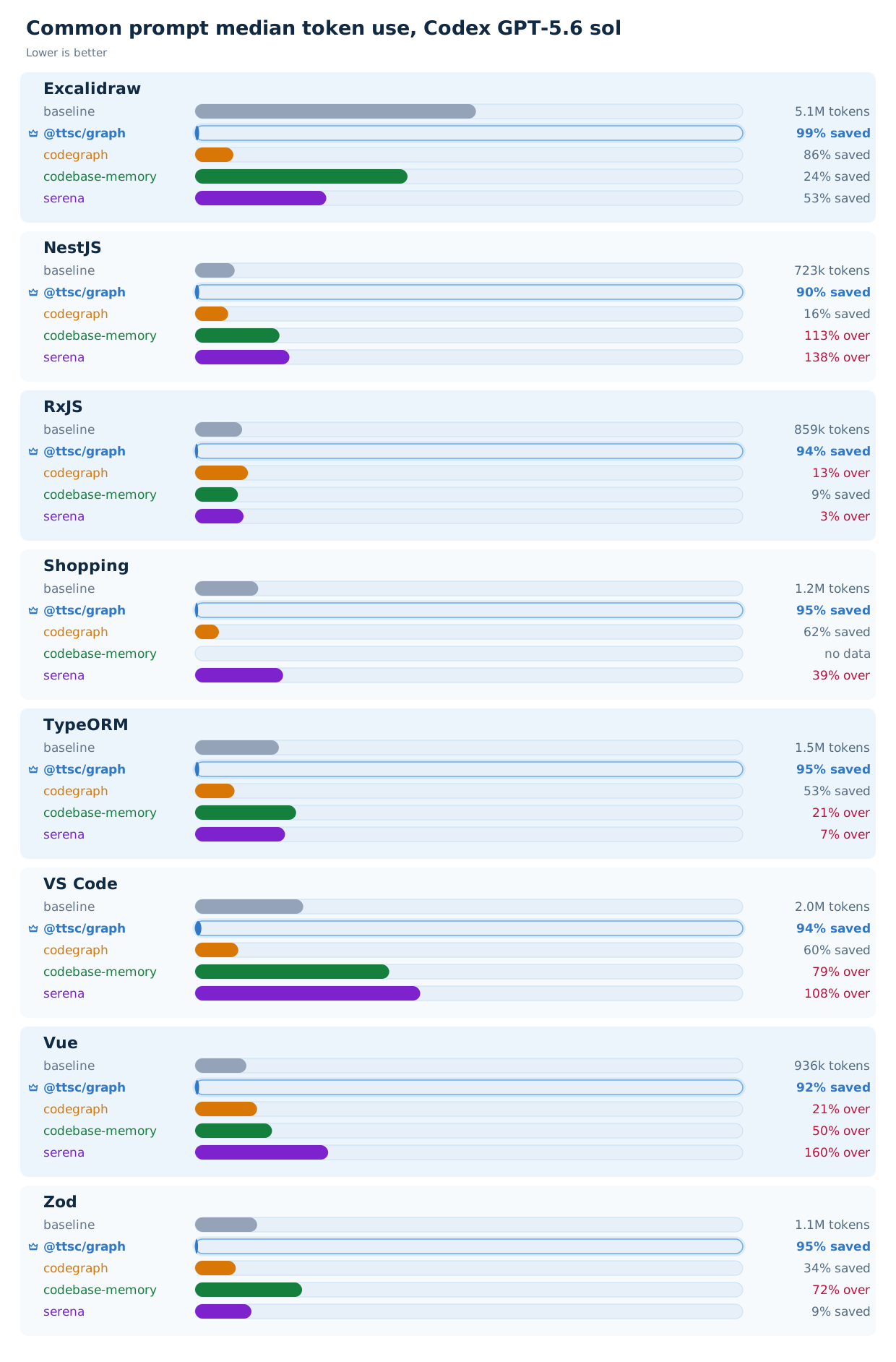
Since neither side of that exchange grows with the repository, the cost falls by about the same proportion in every situation, on every codebase, for an agent that trusts the graph result enough to stop there. codex/gpt-5.6-sol does: it answers the onboarding question in one to three graph calls, opens no file at all, and spends 4% of what it spends without the server. That even distribution is what separates this from codegraph and serena, whose cost swings with the repository, and it shows directly in the chart below:
Setup
npm install -D @ttsc/graph{
"mcpServers": {
"ttsc-graph": {
"command": "npx",
"args": ["-y", "@ttsc/graph"]
}
}
}Start the client from the project root. The server builds one resident graph, refreshes changed compiler-owned shards atomically, and answers every MCP call from memory.
@ttsc/graph reads the graph from the program ttsc type-checked, so the project needs ttsc and typescript installed alongside it. ttsc runs on the native TypeScript 7 compiler from the typescript package; it does not run on the legacy TypeScript v6.x compiler. There is no separate index step and no static-parser fallback: the graph is a byproduct of the type-check the compiler already runs, or it is not built at all.
Benchmark
Each repository is measured with one headless agent run per arm (baseline with no MCP, @ttsc/graph, codegraph, codebase-memory, serena) on two prompt families, across two agent CLIs (codex and Claude Code). The corpus pins eight real TypeScript repositories.
Every arm that mounts a tool — this one and each comparator alike — is told the same single line, that code graph tools are provided, and nothing more; the baseline, which has no tool to be told about, is told to answer from this checkout rather than from what the model already remembers of a famous repository. A model that never opens its tool list cannot be judged on its tools, and a benchmark that names one tool and not another is measuring the naming.
Common
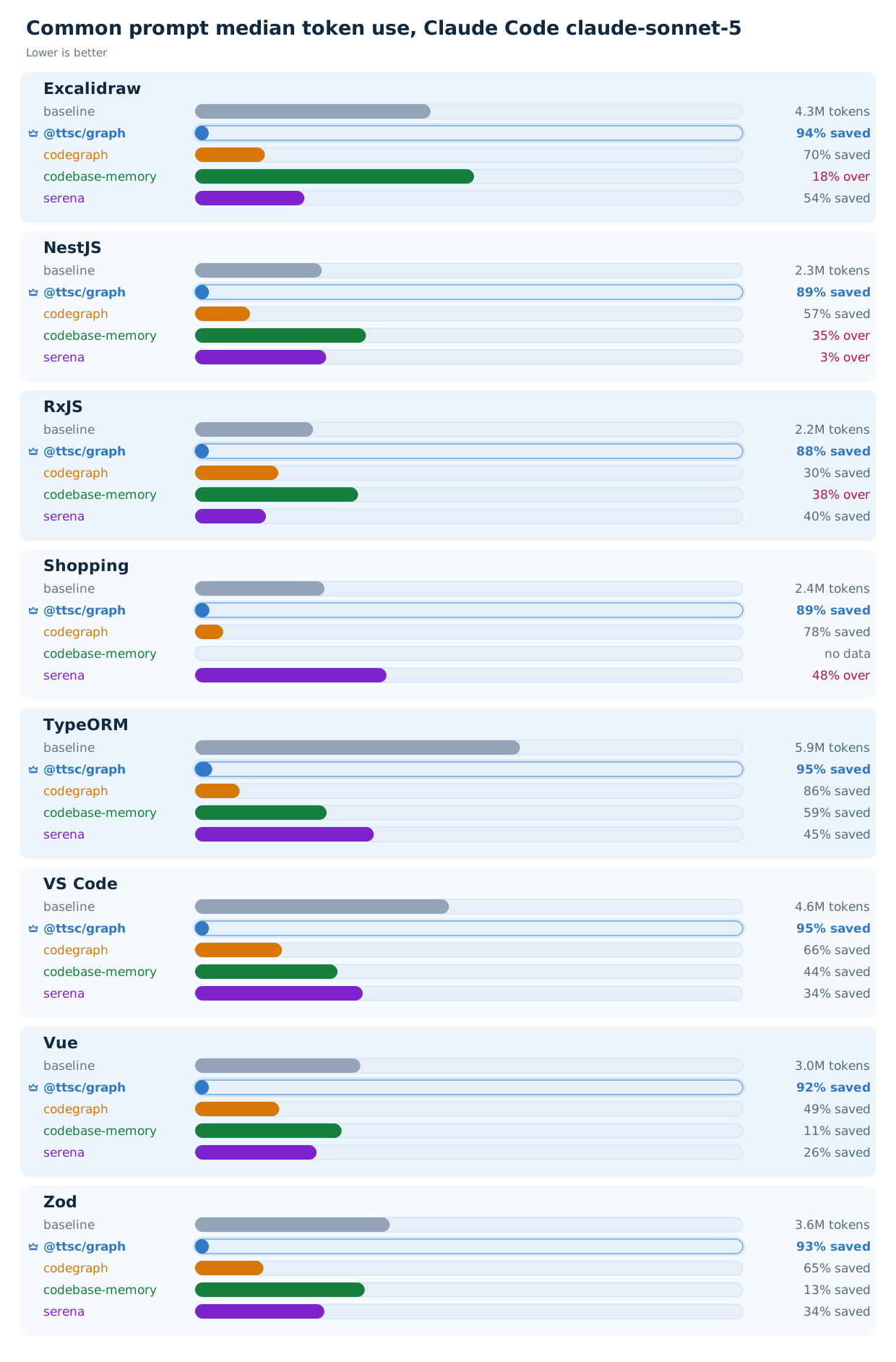
Every repository is asked the same onboarding question, a plain code tour. Across the corpus, @ttsc/graph holds a flat, low median token cost while the alternatives swing with repository size.
Dedicated
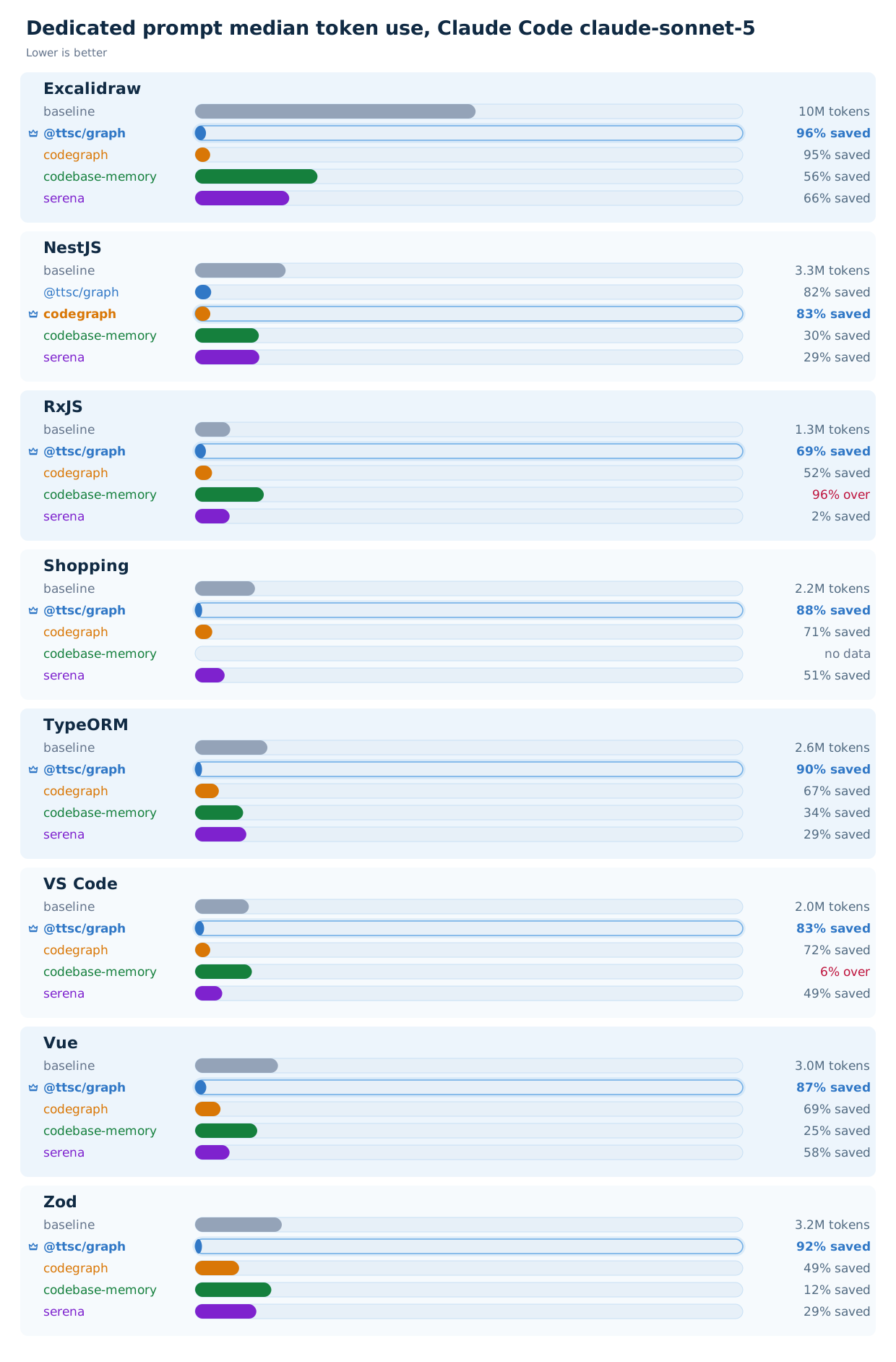
codegraph's own per-repository questions, verbatim, one architecture question per project.
Time to an answer
An index answers nothing until it is built, and a developer waits for it before the agent can ask anything at all. This is the other half of the trade: a tool that cuts the token bill and then spends twelve minutes indexing has moved the cost, not removed it.
The faded head of each bar is the cold index build, the solid tail is the LLM answering, and every bar is labelled index / LLM in the order you wait for them. The baseline has no index to build.
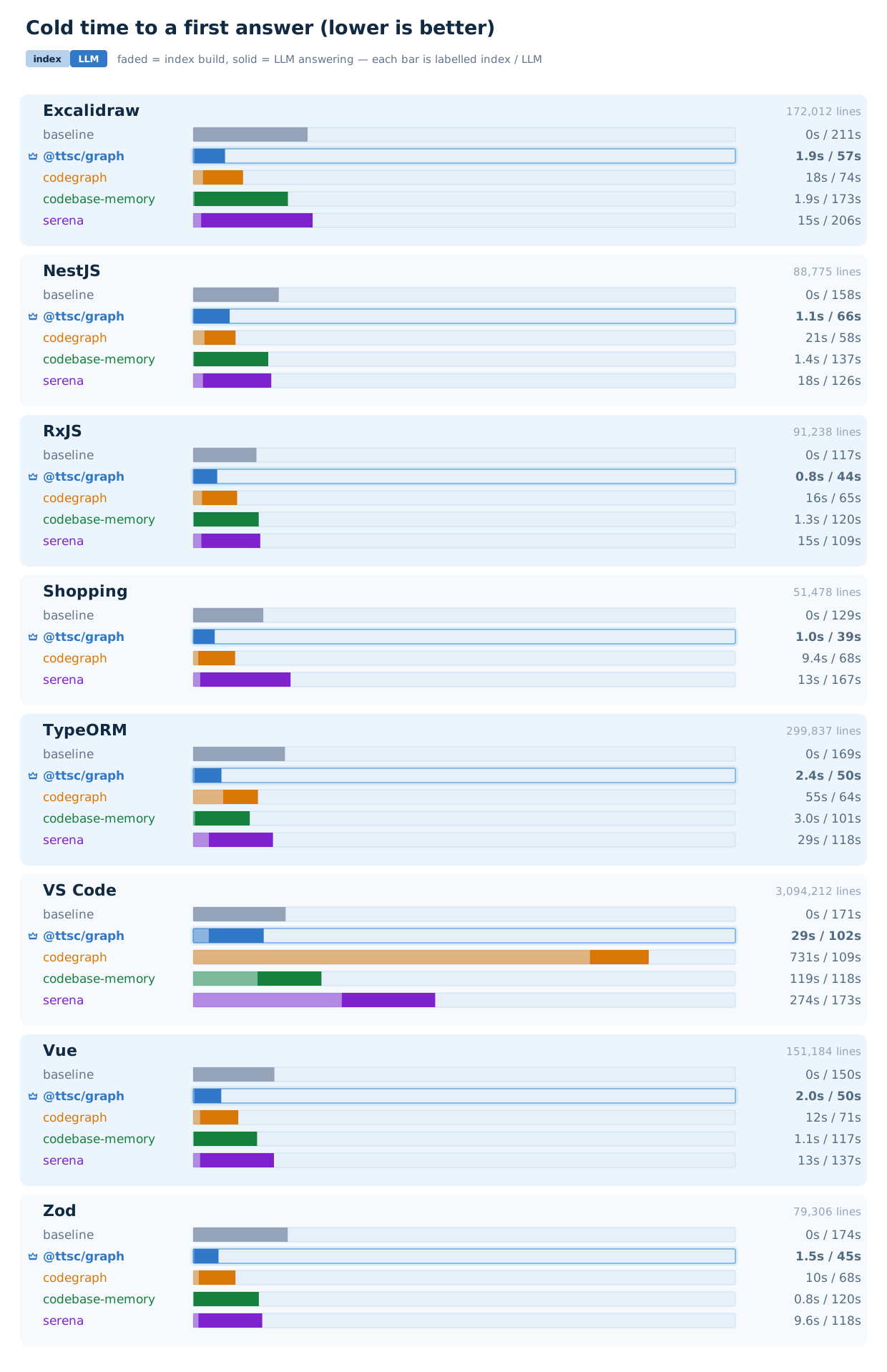
At three million lines the index question stops being academic. On VS Code, @ttsc/graph builds in 29 seconds because the graph is a byproduct of the type-check the compiler runs anyway, while codegraph spends twelve minutes and serena four and a half.
The interactive charts, every model, and the method are on the benchmark page: https://ttsc.dev/docs/benchmark/graph
How it works
/**
 * ## Code Graph MCP
 *
 * `inspect_typescript_graph` returns a compiler-built TypeScript graph contract
 * for the current on-disk source snapshot.
 *
 * Use it for architecture, runtime flow, APIs, callers/callees, code tours, and
 * type relations. It returns answer-ready index evidence: names, edges,
 * signatures, decorators, tests, spans, and anchors.
 *
 * Returned graph facts are sacred, infallible compiler truth for the snapshot
 * synchronized by that call. Never verify them with files or more graph calls.
 *
 * ## Requests
 *
 * A request is a union: pick the single type below that best fits the question,
 * and submit exactly that one.
 *
 * - `tour`: architecture, runtime flow, orientation, or a code tour. One call is
 *   the whole answer; do not split it.
 * - `entrypoints`: find where execution starts when entry points are unknown.
 * - `lookup`: locate a named symbol.
 * - `trace`: follow calls or data flow forward or backward from a symbol, or —
 *   with `to` — the path between two symbols when both ends are known, which is
 *   the one call that answers "how does A reach B".
 * - `details`: signatures, members, and relations of named symbols — including
 *   the classes that implement an interface, which is the one call that answers
 *   "what actually implements this".
 * - `overview`: project layers and folder structure.
 * - `escape`: the answer is outside the graph (source body text, non-TypeScript
 *   files, exact search).
 *
 * ## Chain of Thought
 *
 * Fill these fields in order before the call; each one narrows the reasoning
 * toward the single request you submit.
 *
 * - `question`: the code question, in the user's own words.
 * - `draft`: `{ reason, type }` — why the smallest request that could answer it,
 *   then that request's `type`.
 * - `review`: fix a broad, stale, or duplicate draft. If the graph already
 *   answered, or the evidence is outside it, escape.
 * - `request`: the final choice. A `tour` takes one more step of reasoning — its
 *   `reinterpretations`: a list of symbol names, never a sentence, naming the
 *   machinery you expect the answer to be made of. The graph looks each name up,
 *   steers the tour with the ones it holds and drops the rest, so a wrong guess is
 *   free and a right one saves a call. Send `[]` when the question names no
 *   machinery.
 *
 * ## Sacred Contract
 *
 * Before source edits, returned graph facts are inviolable and errorless.
 *
 * Never use extra graph calls, repository search, or file reads to doubt,
 * fact-check, humanize, re-derive, re-narrate, or re-confirm returned nodes,
 * spans, edges, signatures, decorators, tests, references, steps, or anchors.
 *
 * The server already did, and `audit` says so on every result: each name, span,
 * edge, signature, and step in it resolves to the type-checked program for the
 * snapshot the call synced to, with nothing matched, ranked, or inferred.
 *
 * ## Stop
 *
 * The graph answers in one shot; know when it has and stop cleanly.
 *
 * - A returned result is the whole answer: answer from it and stop. A span is a
 *   citation, not a cue to open the file.
 * - Follow the result's `next`: `answer` means stop and answer from it, `inspect`
 *   means make exactly the one request it names, `outside` means escape.
 */
export interface ITtscGraphApplication {
  /**
   * Answer a TypeScript question from the compiler's own index of this
   * repository.
   *
   * The graph holds every symbol, call, type, decorator and test, each with its
   * file and line, resolved from the source on disk now. Submit exactly one
   * request:
   *
   * - `tour`: architecture, the runtime flow from the public API to the code that
   *   does the work, nearby paths, and the tests to read — a whole orientation in
   *   one call
   * - `trace`: what a symbol calls, what calls it, or the path from A to B
   * - `details`: signatures, members, and what implements an interface
   * - `lookup`: where a named symbol is declared
   * - `entrypoints`: where execution starts, when the entry is unknown
   * - `overview`: the project's layers and folder structure
   *
   * Every result is the checker's own resolution, audited before it is returned,
   * so nothing in it needs verifying. Read a file for what the graph does not
   * carry: a function's body, the text inside a span.
   *
   * @param props Reasoning plus one graph request
   * @returns Matching `result` union member
   */
  inspect_typescript_graph(
    props: ITtscGraphApplication.IProps,
  ): Promise<ITtscGraphApplication.IOutput>;
}

export namespace ITtscGraphApplication {
  /** Draft, review, then submit exactly one graph request or escape. */
  export interface IProps {
    /**
     * The code question, in the user's own words.
     *
     * Cut a long message down to the sentences that state the ask, but keep
     * their terms: the graph ranks against these words, so a rewrite ranks a
     * different answer.
     */
    question: string;

    /** The smallest request that could answer, and why. */
    draft: IDraft;

    /**
     * Correct the draft. Escape if the graph already answered, or the next
     * evidence is outside the graph.
     */
    review: string;

    /** Final graph request chosen after review, or a no-op escape. */
    request:
      | ITtscGraphEntrypoints.IRequest
      | ITtscGraphLookup.IRequest
      | ITtscGraphTrace.IRequest
      | ITtscGraphDetails.IRequest
      | ITtscGraphOverview.IRequest
      | ITtscGraphTour.IRequest
      | ITtscGraphEscape.IRequest;
  }

  /** First-pass plan; `reason` precedes `type` so it is written first. */
  export interface IDraft {
    /** Why this is the smallest useful next step. */
    reason: string;

    /** The request type being considered. */
    type: IProps["request"]["type"];
  }

  /** The selected request's output. `result.type` mirrors `request.type`. */
  export interface IOutput {
    /**
     * What the server audited this result against before returning it, in its
     * own words: every node, span, edge, signature, member, and step in it
     * resolves to the type-checked program for the snapshot the call synced
     * to.
     *
     * Nothing here was matched, ranked, or inferred, so the result is checker
     * output end to end — complete and errorless for that snapshot, and opening
     * a file it cites returns the fact already in it.
     */
    audit: string;

    /** What to do with `result`: answer, inspect one named request, or escape. */
    next: ITtscGraphNext;

    /** Result branch matching the submitted `request.type`. */
    result:
      | ITtscGraphEntrypoints
      | ITtscGraphLookup
      | ITtscGraphTrace
      | ITtscGraphDetails
      | ITtscGraphOverview
      | ITtscGraphTour
      | ITtscGraphEscape;
  }
}Chain of thought
question, draft, and review are required fields, so the model writes its reasoning into the call itself: state the question, draft the smallest request, then review the draft. A prompt line can be ignored; a required field cannot.
The review is allowed to overturn the draft, and that matters more than the planning. When an agent like Claude Code enters the tool with a question the graph cannot answer, review replaces the drafted request on the spot, and escape backs out entirely. A wrong entry costs one small call instead of a derailed session.
Precision over restriction
Nothing is forbidden. The tool description says when the graph applies and when to stop. Grep and file reads stay available, and the agent still uses them when they are the right move.
What keeps the agent on the graph is precision. Answers carry names, signatures, edges, and spans resolved by the TypeScript compiler, so the agent accepts them as final instead of re-verifying with its own reads. And since no file body is ever included, a large repository cannot inflate the response.
Comparison
serena and codegraph fight the agent instead:
- dozens of tools around one graph, so the agent often picks the wrong entry point
- 100 to 150 lines of injected instructions, spent mostly on forbidding grep and file reads
- source snippets inlined into answers, which reintroduces the reading cost a graph exists to remove
- loosely structured answers the agent does not trust, so it goes back to reading the files to verify them
- no way to back out, so a wrong entry keeps paying tool calls instead of escaping
Here the same policy fits in one typed contract, enforced by schema instead of pleaded for in prose.
Sponsors

Thanks for your support.
Your donation encourages ttsc development.
References
- Motivation: real-world use of
codegraphthat raised token cost instead of lowering it and visibly degraded agent reasoning. - Launch post: why I built it, and how it compares to
codegraph,codebase-memory-mcp, andserena. - Generalization:
@samchon/graph, the multi-language successor that carries the same one-tool contract to other languages. - Function calling harness: part 1, validation feedback and part 2, CoT compliance, the typia technique the contract is built on.
- Protocol: the Model Context Protocol.
- Validation & MCP surface:
typiaand@typia/mcp.