
@tumaet/apollon
v5.3.0
Published
Embeddable UML modeling editor. Mounts into any DOM node — works inside Angular, Vue, Svelte, vanilla JS, or React hosts.


Readme
@tumaet/apollon




Embeddable UML modeling editor for the web. Mounts into any DOM node and works inside Angular, Vue, Svelte, vanilla JS, or React.


API reference · Examples · GitHub
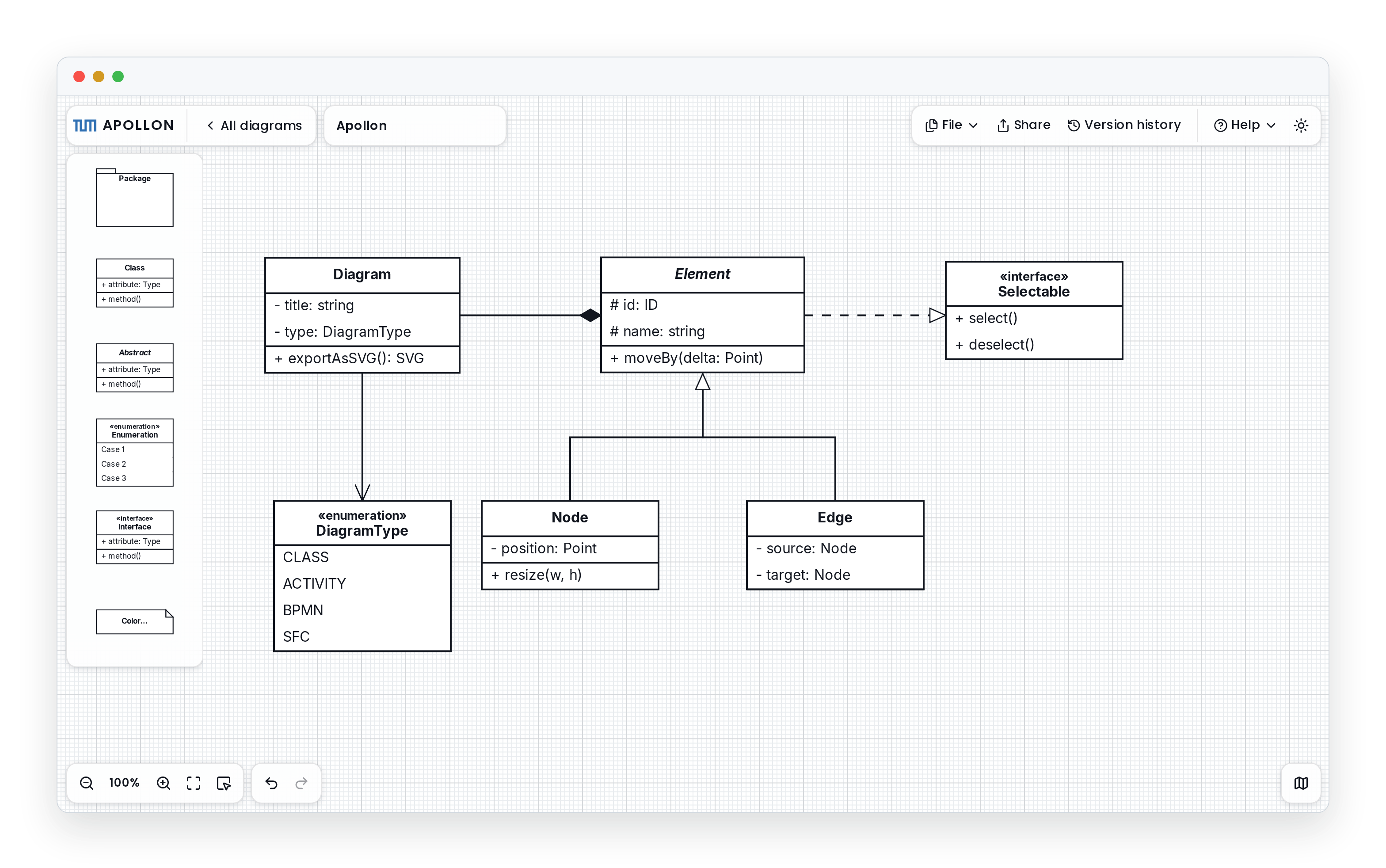
Apollon is the modeling editor behind Artemis, TUM's interactive learning platform. The API is imperative: you call new ApollonEditor(container, options) and the editor renders its own React tree inside that node, so your own code never touches React. In a React app, render the <Apollon> component instead.
Features
- 13 diagram types: class, object, activity, use case, communication, component, deployment, Petri net, reachability graph, syntax tree, flowchart, BPMN, and SFC.
- Framework-agnostic: one imperative API for Angular, Vue, Svelte, and vanilla JS, plus a React component, hooks, and provider.
- Real-time collaboration: opt-in multi-user editing over Yjs, with any transport you like (WebSocket, WebRTC, BroadcastChannel).
- Export: SVG and JSON are built in. Generate PNG and PDF from the SVG (see Export).
- Canvas overlays: inject your own toolbars, banners, and rails into the editor canvas; Apollon measures reserving controls and places them with the built-in chrome —
<ApollonControl>(React) oraddControl/getRegionElement(any framework). See Overlay controls. - Internationalization: override the editor UI strings exposed in
ApollonLabels(tooltips, aria-labels, edit/assessment popovers) vialabels/setLabels/useLabels. See i18n. - Assessment mode: attach scores and feedback to elements. This is the grading workflow Artemis uses.
- TypeScript: type definitions are included.
Install
npm install @tumaet/apollonnpm 7+, pnpm 8+, and Bun resolve the required peer dependencies automatically. Yarn never installs peers — list them explicitly there:
npm install @tumaet/apollon react react-dom @xyflow/react yjs y-protocolsimport { ApollonEditor } from "@tumaet/apollon"
import "@tumaet/apollon/style.css"Apollon ships one build with every runtime dependency left external — the React family (react, react-dom, @xyflow/react), the CRDT singletons (yjs, y-protocols), and Apollon's own UI deps (@base-ui/react, lucide-react, @dnd-kit, zustand, @chenglou/pretext), which arrive transitively when you install the package. Your bundler resolves and de-duplicates each one against your app's node_modules, and your bundle analyzer / SBOM tooling sees them as the real packages they are — never a copy inlined invisibly into one chunk. This works from any framework with a bundler (Angular, Vue, Svelte, React).
The required peers, and what each powers:
| Peer | Range | Powers |
| --------------- | --------- | ----------------------------------------------------- |
| react | ^19.0.0 | the editor's rendering |
| react-dom | ^19.0.0 | the editor's rendering |
| @xyflow/react | ^12.9.0 | the diagram canvas |
| yjs | ^13.6.0 | the document model, undo/redo, and live collaboration |
| y-protocols | ^1.0.6 | collaboration sync/awareness |
Keeping these external means a host that already uses React or Yjs shares a single instance with the editor instead of loading a private, possibly mismatched copy — no duplicate payload, and no "Invalid hook call" or cross-instance-document errors.
Non-React hosts (Angular, Vue, Svelte, vanilla)
The API is imperative — new ApollonEditor(container, options) — and the editor renders its own React tree inside the container, so your own code never imports or touches React. You still install the React peers (the editor uses them internally), but Apollon is the only thing on the page that does.
React hosts
Import the <Apollon> component, hooks, and provider from the same entry: import { Apollon } from "@tumaet/apollon". They render on the React you already have. Because the package is side-effect-free except for CSS, non-React hosts tree-shake the component and hooks out automatically.
⚠️ Give the container an explicit, non-zero height (
600px,80vh, or a sized flex/grid child). The canvas sizes itself to its parent, so with no resolvable height it collapses to zero pixels and renders blank. This is the most common embedding mistake. See Troubleshooting.
Quick start
import { ApollonEditor, UMLDiagramType } from "@tumaet/apollon"
import "@tumaet/apollon/style.css"

const container = document.getElementById("apollon")
if (!container) throw new Error("#apollon container missing")

const editor = new ApollonEditor(container, {
  type: UMLDiagramType.ClassDiagram,
})

const subscriptionId = editor.subscribeToModelChange((model) => {
  // persist / broadcast the latest diagram JSON
})

const { svg } = await editor.exportAsSVG()

editor.unsubscribe(subscriptionId)
editor.destroy()
The editor is client-only. In SSR frameworks (Next.js, Remix, SvelteKit, Nuxt), construct it from a client-side effect, never during render. Always call editor.destroy() before re-mounting on the same container.
Embedding examples
React
Render the <Apollon> component from @tumaet/apollon. It owns the editor's lifecycle: it constructs on mount and destroys on unmount.
import { Apollon } from "@tumaet/apollon"
import type { UMLModel } from "@tumaet/apollon"
import "@tumaet/apollon/style.css"

export function DiagramEditor({ initialModel }: { initialModel?: UMLModel }) {
  return (
    <Apollon
      style={{ height: 600 }}
      defaultModel={initialModel}
      onMount={(editor) => {
        const id = editor.subscribeToModelChange((model) => {
          localStorage.setItem("diagram", JSON.stringify(model))
        })
        return () => editor.unsubscribe(id)
      }}
    />
  )
}
Reach the instance through ref, the onMount(editor) callback, or the useApollonEditor() hook. See the React embedding guide for hooks, the provider, and SSR.
Angular (17.3+ signal-based)
import {
  Component,
  DestroyRef,
  ElementRef,
  afterNextRender,
  inject,
  input,
  viewChild,
} from "@angular/core"
import { ApollonEditor, type UMLModel } from "@tumaet/apollon"
import "@tumaet/apollon/style.css"

@Component({
  selector: "app-diagram-editor",
  template: `<div #host style="width: 100%; height: 100%"></div>`,
})
export class DiagramEditorComponent {
  readonly initialModel = input<UMLModel>()
  private host = viewChild.required<ElementRef<HTMLDivElement>>("host")

  constructor() {
    const destroyRef = inject(DestroyRef)
    afterNextRender(() => {
      const editor = new ApollonEditor(this.host().nativeElement, {
        model: this.initialModel(),
      })
      const subId = editor.subscribeToModelChange((model) => {
        localStorage.setItem("diagram", JSON.stringify(model))
      })
      destroyRef.onDestroy(() => {
        editor.unsubscribe(subId)
        editor.destroy()
      })
    })
  }
}
afterNextRender runs only in the browser, so this is SSR-safe.
Vanilla JS / CDN
yjs and y-protocols are required peers, but on the CDN path esm.sh resolves and serves them from the import URL automatically — there is nothing extra to load. (With a bundler you install the peers yourself.)
<link rel="stylesheet" href="https://esm.sh/@tumaet/[email protected]/style.css" />
<div id="apollon" style="width: 100%; height: 600px"></div>

<script type="module">
  import { ApollonEditor } from "https://esm.sh/@tumaet/[email protected]"

  const saved = localStorage.getItem("diagram")
  const editor = new ApollonEditor(document.getElementById("apollon"), {
    model: saved ? JSON.parse(saved) : undefined,
  })

  editor.subscribeToModelChange((model) => {
    localStorage.setItem("diagram", JSON.stringify(model))
  })
</script>
⚠️ Pin an exact version, as the URLs above do. An unpinned CDN URL resolves to
latest, so a new major can land on the next page refresh and break your embed.
Supported diagrams
Class, Object, Activity, Use Case, Communication, Component, Deployment, Petri Net, Reachability Graph, Syntax Tree, Flowchart, BPMN, SFC. The UMLDiagramType enum holds the exact string values.
Real-time collaboration
Collaboration is opt-in and transport-agnostic. Set collaborationEnabled: true, then wire up your transport:
const editor = new ApollonEditor(container, { collaborationEnabled: true })

// Outbound: the editor calls back when it has bytes to send.
editor.sendBroadcastMessage((base64) => transport.send(base64))

// Inbound: forward every received frame back to the editor.
transport.onMessage((base64) => editor.receiveBroadcastedMessage(base64))
To let the library render participant presence, live cursors, and remote node/edge selection highlights, pass the optional collaboration UI config:
const editor = new ApollonEditor(container, {
  collaborationEnabled: true,
  collaboration: {
    enabled: true,
    user: { name: "Ada", color: "#1c7ed6" },
  },
})
Any Yjs-compatible transport works: y-websocket, y-webrtc, BroadcastChannel, or your own relay. Cursor and selection awareness travel on the same channel. See Collaboration.
Export
- SVG:
await editor.exportAsSVG(options)resolves to{ svg, clip }.svgMode: "web"(the default) keeps CSS variables for theme-adaptive output;"compat"inlines them for PDF and Inkscape. - JSON:
editor.modelreturns theUMLModel, and assigning it back is round-trip safe. UseimportDiagram(json)to normalize older v2/v3 models first. - Headless:
ApollonEditor.exportModelAsSvg(model, options)renders a model without a mounted editor. - PNG / PDF: not built in, but the library ships
svgToPng/svgToPdfrenderers under@tumaet/apollon/export(PNG via@resvg/resvg-wasm, PDF viasvg2pdf.js+jspdf— optional dependencies that install automatically with the package). The standalone server in this repo renders server-side instead, with@napi-rs/canvas(PNG) andpdfmake(PDF).
See Export for the full ExportOptions.
Theming
Theme the editor through the --apollon-* CSS custom properties (typed via
createApollonTheme) plus a data-theme light/dark switch — framework-agnostic,
Tailwind-free. A first rebrand is three tokens: primary, background,
foreground.
import { Apollon, createApollonTheme } from "@tumaet/apollon"

declare const dark: boolean // your app's light/dark state
;<Apollon
  style={{ height: "80vh" }}
  theme={createApollonTheme({
    primary: "#ff5722",
    background: "#fff",
    foreground: "#1a1a1a",
  })}
  dataTheme={dark ? "dark" : undefined}
/>
See Theming (or
THEMING.md) for the full contract, dark mode, and host patterns.
Documentation
- Library overview: install, quickstart, embedding
- Theming: the
--apollon-*contract,createApollonTheme, light/dark - API reference: the full
ApollonEditorand<Apollon>surface - Troubleshooting: blank canvas, SSR, duplicate React, and other gotchas
The server-side wire protocol is exposed through the @tumaet/apollon/internals subpath. It is unstable and not covered by SemVer.
Related
- Source and issues: https://github.com/ls1intum/Apollon
- Live editor: https://apollon.aet.cit.tum.de
- The standalone web editor, collaboration server, and VS Code extension live in the same monorepo.
License
MIT. See LICENSE.