
@uplab/vendure-plugin-exchange-rates
v0.1.4
Published
Exchange rates for Vendure in any base currency, from the ECB, Frankfurter, Monobank, the NBU or your own source, overridable per currency in the dashboard


Readme
@uplab/vendure-plugin-exchange-rates



Exchange rates in your shop's base currency, for a Vendure shop that prices in one currency and shows or charges in others. Rates come from a source you choose — the European Central Bank, Frankfurter, Monobank, the National Bank of Ukraine, fixed rates or your own — are re-based onto your currency, refreshed on a schedule, served on the Shop API, and can be overridden per currency in the dashboard.
The plugin stores and serves rates; it does not touch Vendure prices or orders — your storefront, feed or payment code converts with them. Vendure's own per-currency variant prices are unaffected.
Contents
Install · Use cases · Sources · Base currency · Options · Dashboard · GraphQL API · In your own code · Event · Database · Limitations
Install
npm install @uplab/vendure-plugin-exchange-rates
# or
pnpm add @uplab/vendure-plugin-exchange-rates
import { DefaultSchedulerPlugin, VendureConfig } from '@vendure/core';
import { EcbExchangeRateSource, ExchangeRatesPlugin } from '@uplab/vendure-plugin-exchange-rates';
export const config: VendureConfig = {
// ...
plugins: [
DefaultSchedulerPlugin.init(), // runs the scheduled refresh
ExchangeRatesPlugin.init({ source: new EcbExchangeRateSource() }),
],
};Rates are stored in the default channel's currency; see Base currency to pin another.
@vendure/core, @nestjs/* and typeorm are peers. The dashboard pages need @vendure/dashboard (an
optional peer): its Vite plugin discovers the extension — restart the dashboard dev server after
installing.
First deploy. Generate and run a migration for the new currency_exchange_rate table. On the API
server's first boot the plugin fills the empty table from the source (startup waits for it, up to the
source's timeout); if the source is unreachable then, the table stays empty until the next scheduled
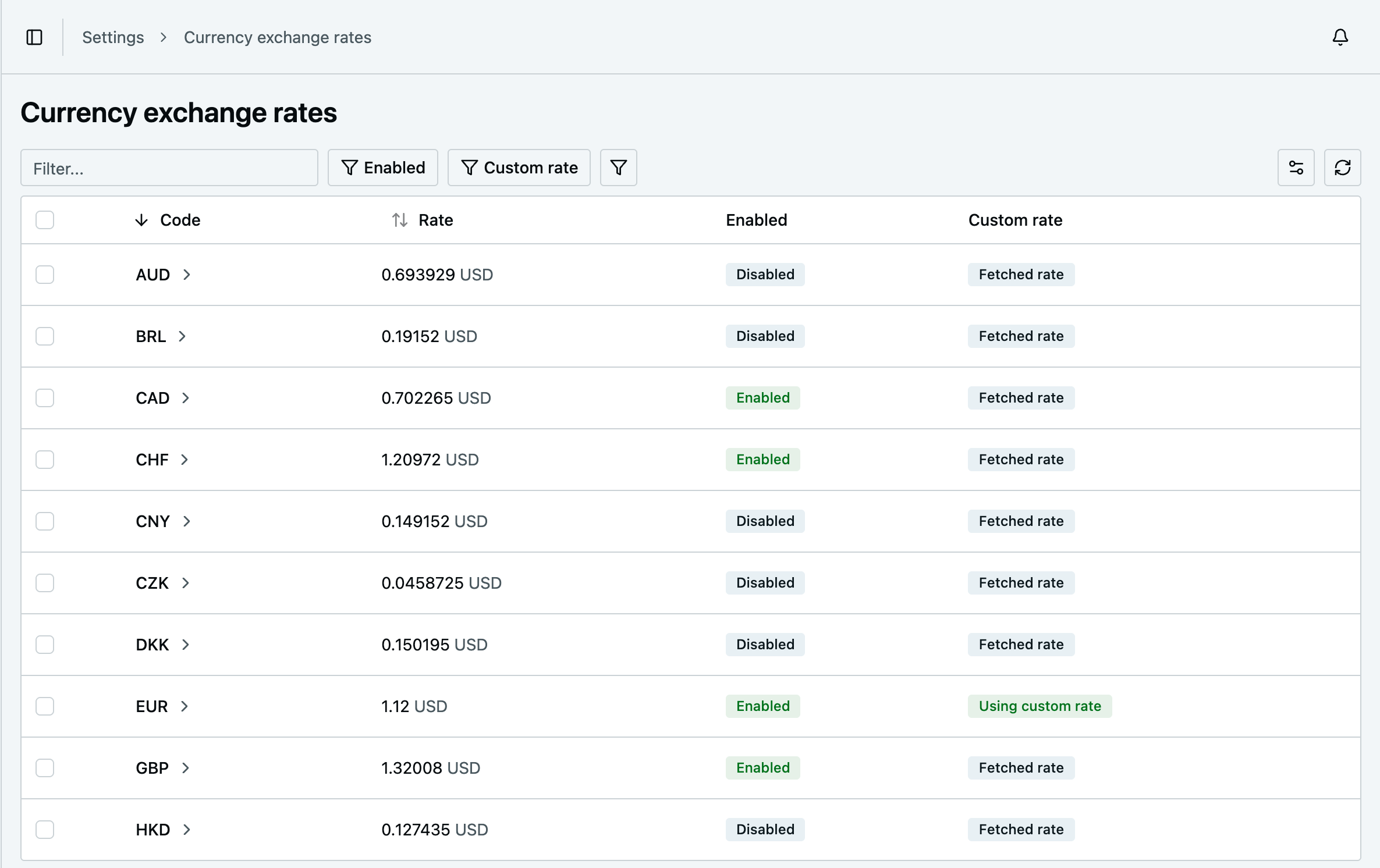
refresh. Every currency arrives disabled — enable the ones you sell in under Settings → Currency
exchange rates. Until you do, the storefront sees no rates and stays in your base currency.
Use cases
Show prices in the visitor's currency. The storefront reads the enabled rates once:
query {
  currencyExchangeRates {
    items {
      code
      rate # base-currency units per one unit, e.g. a USD shop: EUR → 1.12
    }
  }
}
type Rate = { code: string; rate: number };
/** `rates` = the query's items, [] until an admin enables a currency. */
export function convertPrice(priceInMinorUnits: number, rates: Rate[], code: string): number | undefined {
const rate = rates.find((r) => r.code === code)?.rate;
// Vendure prices are minor units: base minor units ÷ rate = target minor units. undefined → show the base.
return rate ? Math.round(priceInMinorUnits / rate) : undefined;
}This assumes both currencies have 1/100 minor units. When they differ (JPY has none, KWD and BHD have 1/1000), multiply the result by 10^(target digits − base digits).
Charge in a foreign currency. A PaymentMethodHandler gets the service in init and converts the
amount it is asked to collect:
import { CurrencyCode, LanguageCode, PaymentMethodHandler } from '@vendure/core';
import { CurrencyExchangeRateService } from '@uplab/vendure-plugin-exchange-rates';

let rates: CurrencyExchangeRateService;

export const eurCardHandler = new PaymentMethodHandler({
  code: 'eur-card',
  description: [{ languageCode: LanguageCode.en, value: 'Card, billed in EUR' }],
  args: {},
  init: (injector) => {
    rates = injector.get(CurrencyExchangeRateService);
  },
  createPayment: async (ctx, _order, amount) => {
    const rate = await rates.getRate(ctx, CurrencyCode.EUR, { requireEnabled: true });
    const amountInCents = rate ? Math.round(amount / rate) : undefined; // undefined → bill in the base
    // …call your payment provider with amountInCents
    return { amount, state: 'Authorized', metadata: { amountInCents } };
  },
  settlePayment: () => ({ success: true }),
});
Price a product feed in another currency (Google Merchant, Meta, …) even if the storefront does not
offer it: getRate(ctx, CurrencyCode.EUR, { requireEnabled: false }).
Pin a rate. Turn on Use custom rate for a currency: the storefront and your code use your number until you turn it off, while the fetched rate keeps updating underneath.
Fixed rates only. source: new StaticExchangeRateSource({ base: CurrencyCode.USD, rates: { EUR: 1.12 } }).
Keep the sync on, so a number you change in config is picked up on the next refresh; pin any currency in
the meantime with Use custom rate.
Sources
| Source | Base | Rates |
| ------------------------------- | -------------- | ---------------------------------------------------------------------------------------------------------------- |
| EcbExchangeRateSource | EUR | The ECB's euro reference rates: ~30 major currencies, every working day around 16:00 CET. Free, no key. |
| FrankfurterExchangeRateSource | EUR, or base | Frankfurter: the same ECB rates as JSON. Free, no key, can be self-hosted (apiUrl). |
| StaticExchangeRateSource | yours | The numbers you pass: { base, rates }. In e2e tests, set source.config before a sync — no network. |
| MonobankExchangeRateSource | UAH | Ukrainian bank rates, buy/sell/mid. |
| NbuExchangeRateSource | UAH | Ukrainian official rates, ~40 currencies. |
The network sources take apiUrl and timeout (default 10 s). Whatever a source returns, only Vendure
CurrencyCodes with a positive finite rate are stored — metals, the SDR and garbage are dropped. If the
source fails or returns nothing usable, the stored rates stay as they are.
Cross rates. A source that quotes against another base is re-based onto yours: with the ECB and a USD
shop, GBP = (EUR per GBP) / (EUR per USD), and EUR itself is added. This needs the source to quote your
base currency — the ECB does not quote UAH, for instance, so a UAH shop uses a Ukrainian source. Rates are
stored per unit with 8 decimals, so a weak currency against a strong base keeps few significant digits
(LBP in USD: 0.00001117); a rate that does not fit decimal(19, 8) is dropped.
Ukrainian sources
MonobankExchangeRateSource— Monobank's public rates.side: 'buy'(default) is what the bank pays you for the currency — the lower rate, so a UAH price converted with it never comes up short; or'sell','mid'. Rate-limited; cached 5 minutes.NbuExchangeRateSource— the National Bank of Ukraine's official rate, set once per business day.
Both quote against UAH, so they suit a UAH shop. They also work for a shop in a currency they quote (USD, EUR, …), but the ECB is the more natural choice there.
Your own source
import { CurrencyCode } from '@vendure/core';
import {
  ExchangeRateSource,
  ExchangeRateSourceError,
  ExchangeRateSourceResult,
} from '@uplab/vendure-plugin-exchange-rates';

type Observation = { d: string } & Record<string, { v: string } | string>;

/** Rates of the Bank of Canada: CAD per one unit. */
export class BankOfCanadaExchangeRateSource implements ExchangeRateSource {
  readonly name = 'bank-of-canada';

  async fetchRates(): Promise<ExchangeRateSourceResult> {
    const res = await fetch('https://www.bankofcanada.ca/valet/observations/group/FX_RATES_DAILY/json?recent=1', {
      signal: AbortSignal.timeout(10_000), // the API server waits for the first fetch on boot
    });
    if (!res.ok) throw new ExchangeRateSourceError(`HTTP ${res.status}`, { source: this.name, status: res.status });
    const body = (await res.json()) as { observations?: Observation[] };
    if (!body.observations?.length) throw new ExchangeRateSourceError('No observations', { source: this.name });
    // `recent=1` is the last value of every series, discontinued ones included: keep the newest day.
    const latest = body.observations.reduce((a, b) => (a.d > b.d ? a : b));
    const quotes = Object.entries(latest)
      .filter(([series]) => /^FX[A-Z]{3}CAD$/.test(series))
      .map(([series, value]) => ({
        currencyCode: series.slice(2, 5) as CurrencyCode,
        rate: Number((value as { v: string }).v),
      }));
    return { base: CurrencyCode.CAD, quotes };
  }
}
A source returns its base and quotes { currencyCode, rate }, rate being base units per one unit;
the plugin re-bases them onto the shop's currency. Throw on failure — never return an empty list to mean
"failed" — and give the request a timeout, since the API server waits for the first fetch on boot. If the
source needs services, implement init(injector) (and destroy()); the plugin calls init before the
first fetch.
Combining sources
When a source rate-limits or is down, fall back to another — the first one that answers wins:
import { RequestContext } from '@vendure/core';
import {
  EcbExchangeRateSource,
  ExchangeRateSource,
  ExchangeRateSourceResult,
  FrankfurterExchangeRateSource,
} from '@uplab/vendure-plugin-exchange-rates';

export class FallbackExchangeRateSource implements ExchangeRateSource {
  readonly name = 'fallback';
  constructor(private readonly sources: ExchangeRateSource[]) {}

  async fetchRates(ctx: RequestContext): Promise<ExchangeRateSourceResult> {
    let lastError: unknown;
    for (const source of this.sources) {
      try {
        return await source.fetchRates(ctx);
      } catch (e) {
        lastError = e;
      }
    }
    throw lastError;
  }
}

export const source = new FallbackExchangeRateSource([
  new EcbExchangeRateSource(),
  new FrankfurterExchangeRateSource(),
]);
To add a currency a source does not quote, merge the quotes of several sources in the same base (a
StaticExchangeRateSource last); when two quotes share a code, the last one wins. Forward init/destroy
if the inner sources need them.
Base currency
Rates are stored and served in one base currency: baseCurrency if you set it, otherwise the default
channel's defaultCurrencyCode, read on every sync and lookup.
ExchangeRatesPlugin.init({ source: new MonobankExchangeRateSource(), baseCurrency: CurrencyCode.UAH });When the base changes, the Shop API and getRate return nothing until a sync re-bases the table. The API
server does that on boot, so changing the option needs nothing more; after changing the default channel's
currency, run the task (see Options) or restart. The sync moves every currency to the new
base, keeps whether it is enabled, drops its custom rate (it was in the old base) and deletes the
currencies the new base does not cover.
Options
| Option | Type | Default |
| -------------- | --------------------------------------------------------- | --------------------------------- |
| source | ExchangeRateSource — required | — |
| baseCurrency | CurrencyCode | the default channel's currency |
| sync | { schedule?: ScheduledTaskConfig['schedule'] } \| false | { schedule: '40 2-23/3 * * *' } |
sync registers the scheduled task currency-exchange-rate-updater (SYNC_TASK_ID, every 3 hours). It
needs a scheduler plugin such as DefaultSchedulerPlugin, and runs in the worker — so the worker needs the
plugin in its config too. sync: false leaves it out; you can still call CurrencyExchangeRateSyncService.syncRates(ctx).
To refresh now, run it under System → Scheduled tasks (or
runScheduledTask(id: "currency-exchange-rate-updater")); its last run there tells you the sync is alive.
A sync moves a row's updatedAt only when its rate changes. A currency the source stops quoting keeps its
last rate; if it is enabled, every sync logs a warning.
Dashboard
Settings → Currency exchange rates lists every stored currency with its rate and base, whether it is enabled and whether a custom rate is in use. A currency's page shows the fetched rate and lets you enable it and set a custom rate.
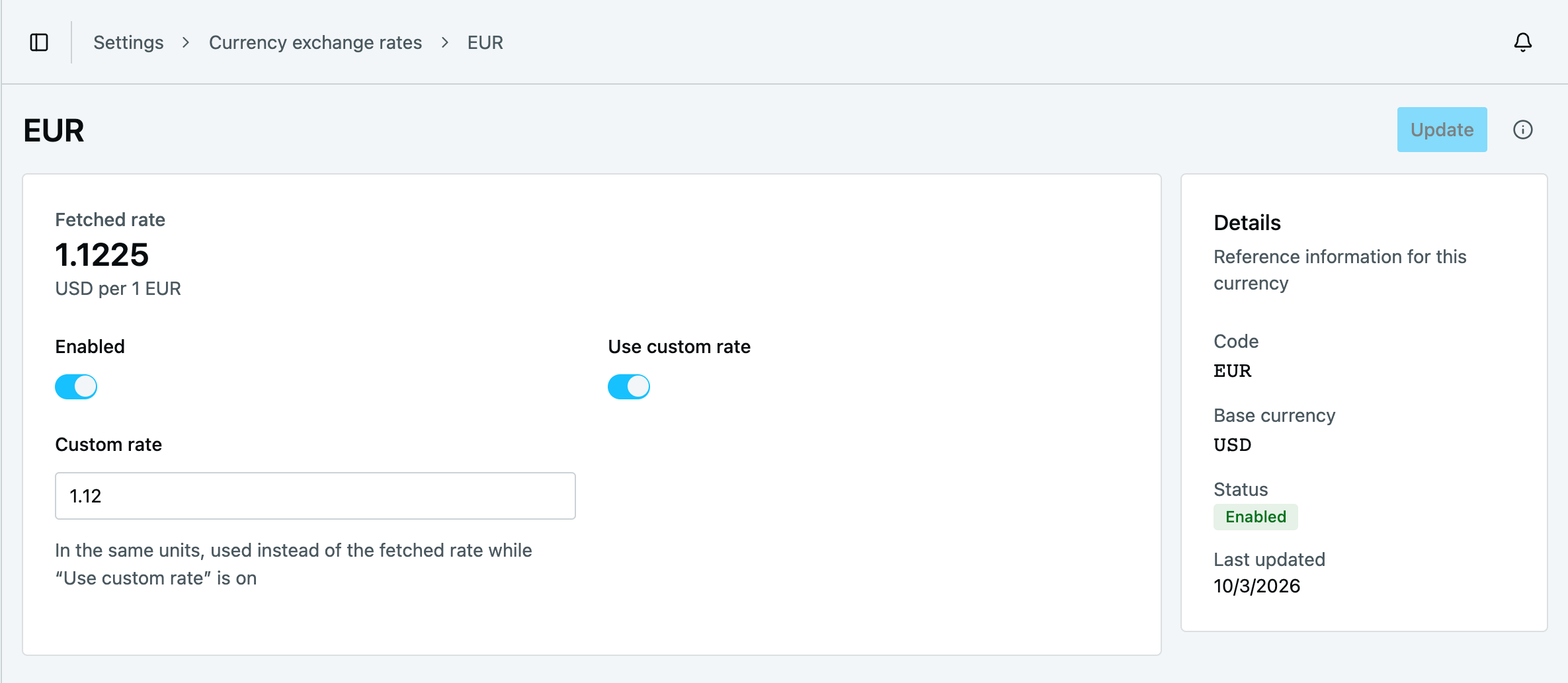
Rates are shop settings: listing needs ReadSettings, editing UpdateSettings — no extra role setup.
GraphQL API
Shop (public)
currencyExchangeRates(options: CurrencyExchangeRateListOptions): CurrencyExchangeRateList!
# items: { id, code, baseCurrency, rate, enabled, createdAt, updatedAt }
# enabled currencies in the current base only, whatever the filter
rate is the custom rate while one is in use, otherwise the fetched one.
Admin
currencyExchangeRates(options: CurrencyExchangeRateListOptions): CurrencyExchangeRateList!          # ReadSettings
currencyExchangeRate(id: ID!): CurrencyExchangeRate                                                 # ReadSettings
updateCurrencyExchangeRate(input: { id, enabled, useCustomRate, customRate }): CurrencyExchangeRate! # UpdateSettings
In the Admin API rate is always the fetched rate; useCustomRate and customRate are separate fields.
Turning on useCustomRate without a positive customRate is rejected.
In your own code
| Export | Use |
| --------------------------------- | ------------------------------------------------------------------------------------------------------------------------------------- |
| CurrencyExchangeRateService | getRate(ctx, code, { requireEnabled }) → base units per unit or undefined; getBaseCurrency(ctx); findAll, findOne, update |
| CurrencyExchangeRateSyncService | syncRates(ctx) — refresh now |
| effectiveRate(row) | The rate to convert with for a row you loaded yourself, or undefined if it is not usable |
requireEnabled is your policy: true for anything the customer is billed in, false for internal uses.
Event
CurrencyExchangeRateEvent is published once the transaction has committed: type: 'synced' when a sync
changed anything, or when the plugin adopts rows without a base on boot, with every rate now stored in the
base currency; 'updated' with the one rate an admin saved. Use it to drop caches that embed the rates —
subscribe in onModuleInit, which runs before any plugin's bootstrap, so the boot event is not missed.
Events stay in the process that published them: a scheduled sync publishes in the worker, the boot adoption
in whichever process adopted the rows. Register the subscriber in both, and keep a cache it must drop
shared between them (e.g. Redis), or let it expire:
import { OnModuleInit } from '@nestjs/common';
import { EventBus, PluginCommonModule, VendurePlugin } from '@vendure/core';
import { CurrencyExchangeRateEvent } from '@uplab/vendure-plugin-exchange-rates';

@VendurePlugin({ imports: [PluginCommonModule] })
export class RatesCachePlugin implements OnModuleInit {
  constructor(private readonly eventBus: EventBus) {}

  onModuleInit() {
    this.eventBus.ofType(CurrencyExchangeRateEvent).subscribe(() => {
      // drop whatever caches the rates, e.g. a cached Shop API response
    });
  }
}
Database
One table, currency_exchange_rate:
| Column | Type |
| --------------- | -------------------------------------------- |
| code | varchar, unique |
| baseCurrency | varchar — the currency rate is counted in¹ |
| rate | decimal(19, 8) — the fetched one |
| enabled | boolean, default false |
| useCustomRate | boolean, default false |
| customRate | decimal(19, 8), nullable |
¹ Nullable so that a generated migration can add it to a filled table. On the next boot (and in every sync) the plugin gives rows without one the current base, keeping their custom rates — it assumes they are already in that base, so change the base only after the upgrade has booted once.
A sync updates rate and inserts new currencies, in one transaction; on a base change it
also rewrites baseCurrency, clears custom rates and deletes the currencies the new base does not cover.
Limitations
- One base currency — channels that sell in different currencies share the rates of the default
channel's (or
baseCurrency). - Rates are global — one table, not per channel: anyone with
UpdateSettingsin any channel can change them. - Filtering and sorting on
rateuse the fetched rate, while the returnedrateis the effective one. - Dashboard 3.7.0–3.7.3 in dev mode can render a blank page with two or more dashboard extensions
(for example together with
@uplab/vendure-plugin-unified-slug). It is a Vendure bug, fixed in 3.7.4 (vendure#5459); production builds are fine.
Changelog
See CHANGELOG.md.
License
MIT