
@ustaxcourt/payment-portal
v1.0.1
Published
USTC Payment Portal client for Pay.gov integration


Readme
USTC Payment Portal
This package makes SOAP requests to the pay.gov hosted collection pages service.
The application is intended to handle API requests from USTC applications and then make requests to Pay.gov on its behalf.
Using as a dev dependency
npm install --save-dev @ustaxcourt/payment-portal
npx payment-portal start
See docs/using-as-dev-dependency.md for the complete guide: port configuration, type imports, and troubleshooting.
Workflow
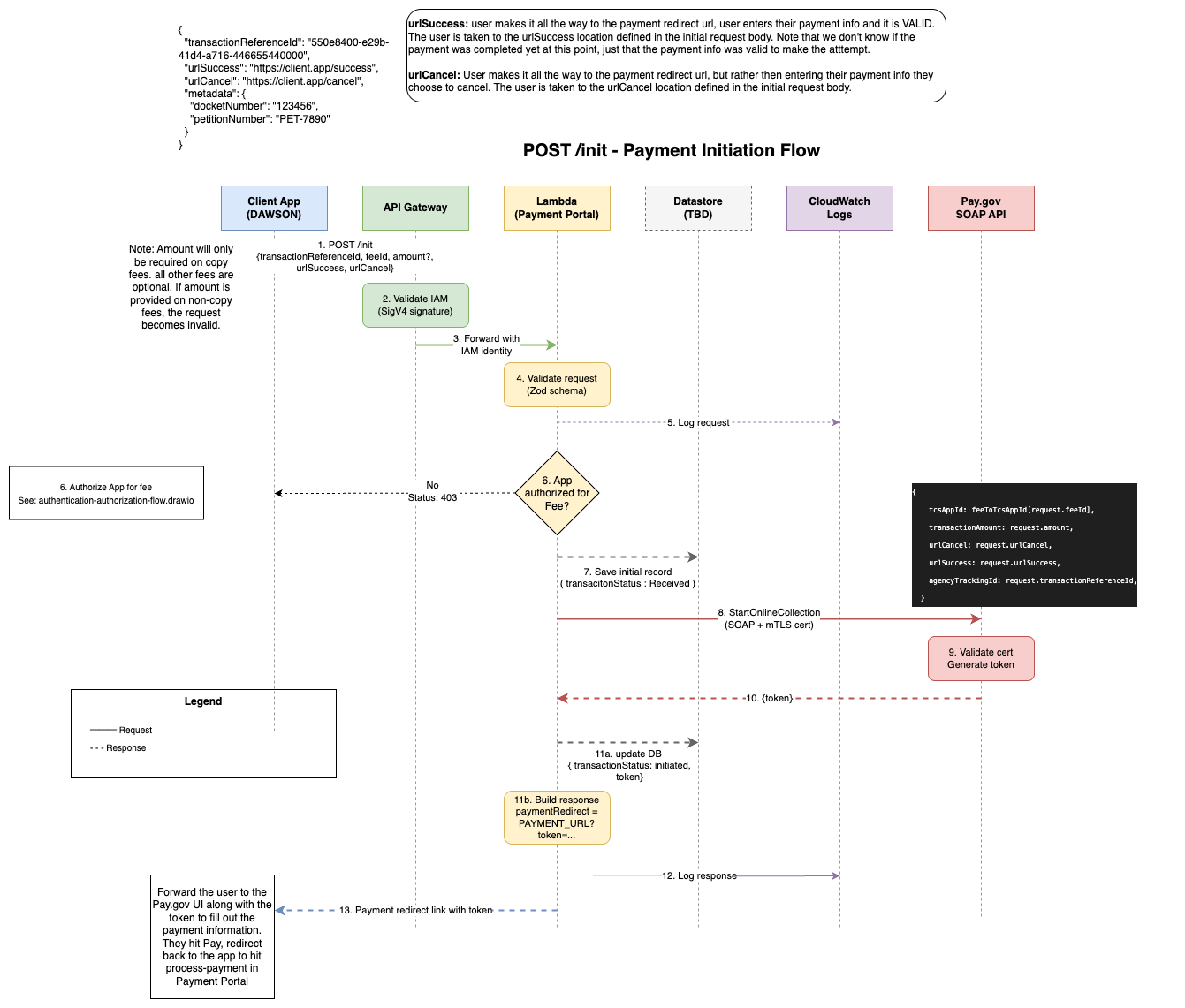
Initiate a Transaction
An application makes a request to initiate a transaction to the Payment Portal. This request includes some key information:
- Fee (
feeparameter): The stable key identifying the type of fee the Application wishes to charge (e.g.,PETITION_FILING_FEE). Internally referred to as a FeeKey — a client-facing identifier that remains consistent across fee versions. The Portal maintains the list of valid keys. - TransactionReferenceId: A unique identifier generated by the Application to use in future API calls that refer back to the specific thing the User is paying for (e.g., a DAWSON Petitions Fee for Docket Number 123-12). This must be a UUID.
- Metadata: This is an object with N number of Key/Value pairs. Different fees will require values for specific keys. For example,
{ "DocketNumber": "123-12" }may be used for a Petitions Fee payment request.
- Fee (
The Portal authenticates the application via AWS Signature Version 4
The Portal checks its own permission system to authorize the Application to initiate a Transaction to the Specified Fee
Once authorized, the Portal also makes sure there is not already a Successful transaction for the specified
TransactionReferenceId.If there isn't, then the Portal generates a unique
agencyTrackingIdand starts keeping track of this transaction in its own database.The portal then performs a
startOnlineCollectionrequest to Pay.gov with the transaction information derived from the Fee.Pay.gov responds with a token, which the portal uses to generate a redirect URL to Pay.gov to enter in payment information.
The token and URL are returned to the original App, which stores the token and forwards the user to the redirect URL.
The user enters their payment information on Pay.gov and either submits or cancels, which sends them back to the corresonding success or cancel URL specified in the original request.
Process Payment on a Transaction
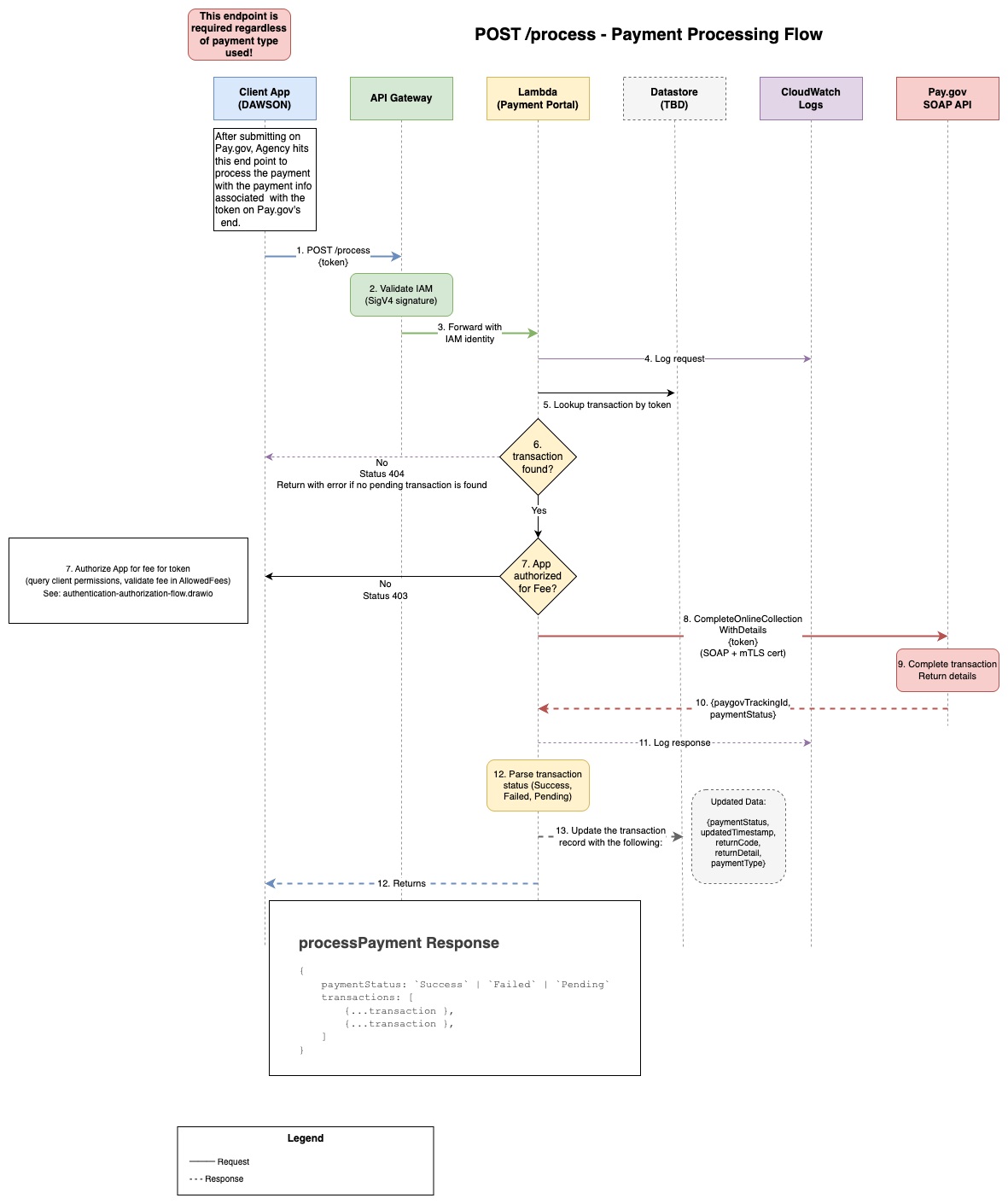
- Once back on the originating app, the app makes another request to the Payment Portal to process the transaction with the
token - Once authenticated, the Portal makes sure the App has the authority to process transactions for the Fee of the transaction that is associated with the
token. - Once authorized, the payment portal calls Pay.gov to perform a
completeOnlineCollectionWithDetailswith the token. - Pay.gov responds with a Pay.gov Tracking ID for future, Transaction Status
- The Portal updates the transaction information in the database
- The Portal responds to the Application the derived Payment Status as well as any transactions that share the transaction's
transactionReferenceId.
Get Details about a Payment
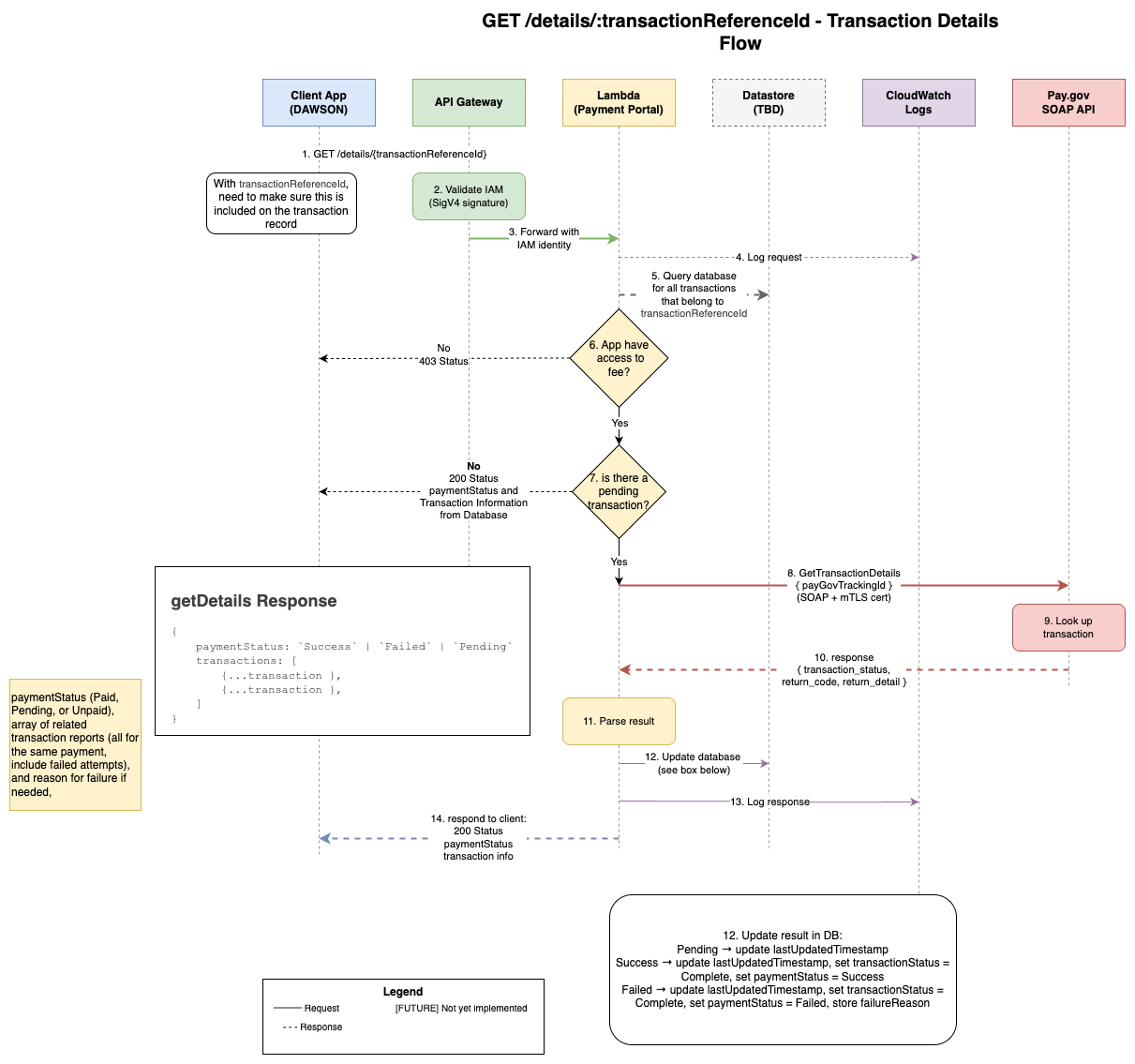
- At any time the App may request information for their unique
transactionReferenceIdby calling thegetDetailsAPI. - Once authenticated, the Portal ensures the App has access to the Fee that is associated with the specified
transactionReferenceId. - And once authorized, the Portal checks to see if there is a transaction with a
Pendingstatus. If so, the Portal will call Pay.gov withgetDetailsto see if the transaction status has resolved, updating its database accordingly. - Then the Portal will respond with the most up-to-date Payment Status as well as any transactions that share the transaction's
transactionReferenceId.
Environment Variables
The .env file in this repo is for local development only — it provides the variables a developer needs to run the service against the local mock Pay.gov server. Deployed environments (dev, stg, prod) get their configuration from Terraform and AWS Secrets Manager — see terraform/environments/ and ADR 0007.
For local setup instructions, see running-locally.md. The full list of variables a developer needs is in .env.example, with inline comments where the purpose isn't obvious from the name.
How the environment layer is structured
A few variables have semantic meaning beyond just "set this value":
APP_ENVidentifies the deployment topology — one oflocal,dev,stg,prod, ortest. Read it viagetAppEnv()/isLocal()/isDeployed()fromsrc/config/appEnv.ts, not directly fromprocess.env.NODE_ENVis the Node runtime mode —development,production, ortest. Set automatically by Jest in test runs. Reserved for Node, Express, knex, and other libraries that consume it.LOCAL_DEV=truebypasses SigV4 auth for local development. Do not set in deployed environments.LOG_LEVEL(optional) overrides the default log level. Valid values:trace,debug,info,warn,error,fatal,silent. See Logging for details.
The dev server should be configured to point to the USTC Pay.gov test server, which is managed in a separate repository.
Deployment
This gets deployed to the USTC Website AWS Account using Terraform. You will need credentials loaded in order to perform this operation. And you will need the above environment variables specified.
See the terraform/ directory for deployment configuration and instructions.
Testing
npm run test            # unit tests
npm run test:integration # integration tests against a running local stack
Publishing to npmjs.org
This package is published to npmjs.org as @ustaxcourt/payment-portal and can be installed via:
npm install --save-dev @ustaxcourt/payment-portalPublishing Process
- Make changes on a feature branch
- Add a changeset to document your changes:
npx changeset add- Select the package and bump type (patch/minor/major)
- Write a concise summary for the changelog
- Open a PR and merge to
main - Review and merge the "Version Packages" PR that Changesets automatically creates
- Automatic publish via GitHub Actions to npm with provenance
For detailed instructions, see PUBLISHING.md.