
@valkyrianlabs/payload-markdown
v1.5.0
Published
Structured Markdown editing and rendering for Payload CMS with CodeMirror, Shiki, directives, themes, and server-first output.


Readme




Payload Markdown
Structured Markdown editing and rendering for Payload CMS.
@valkyrianlabs/payload-markdown gives Payload a Markdown-first authoring system with a CodeMirror editor, Shiki-powered code blocks, registry-backed directives, local SVG icon packs, buttons, cards, table-of-contents generation, autocomplete, diagnostics, and server-first rendering.
No bloated rich text editor.
No JSON-shaped content prison.
No MDX ceremony for common docs/blog layouts.
Just portable Markdown that renders like a real system.
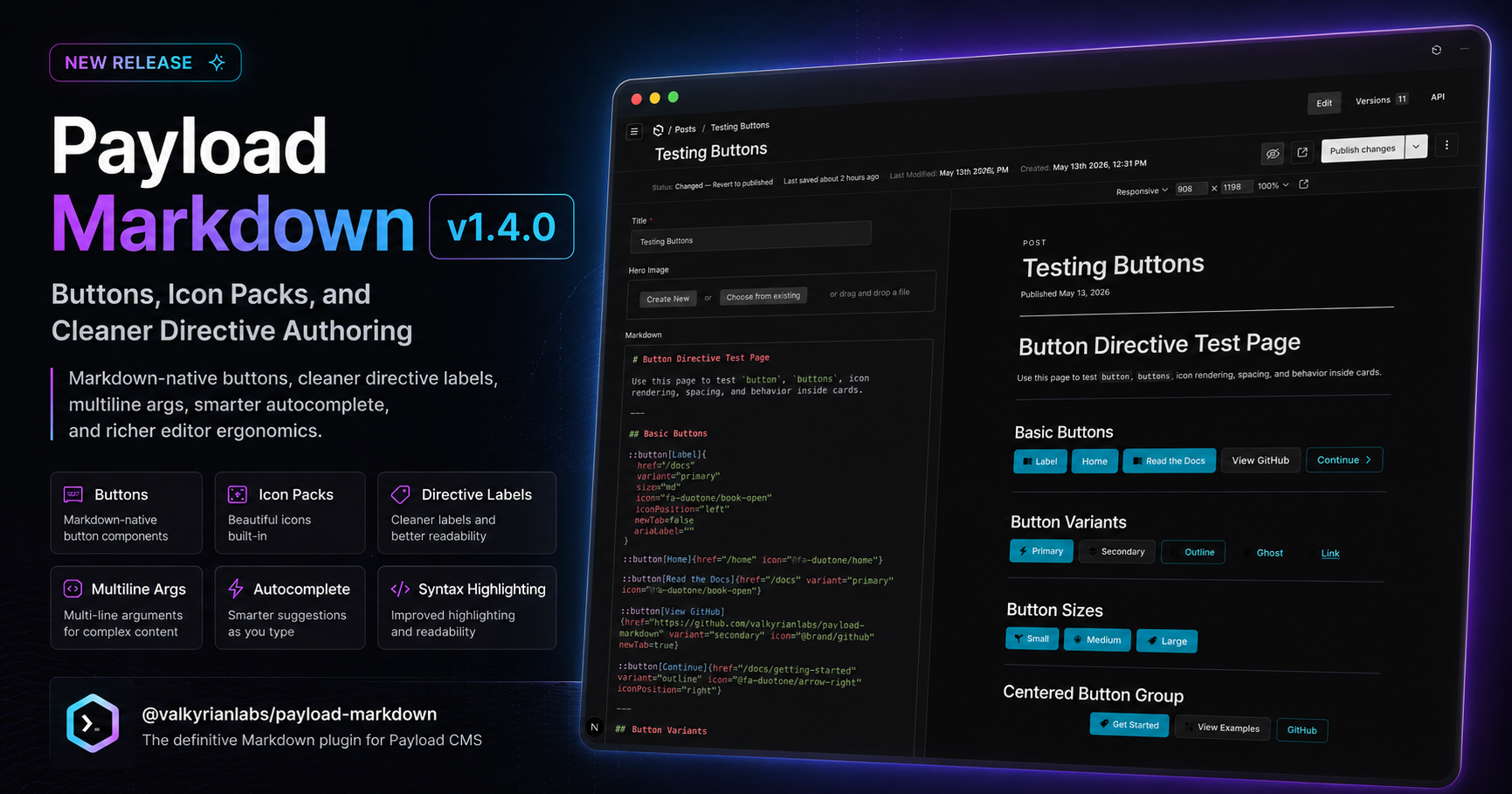
Payload Markdown now feels much closer to a Markdown-native design system: readable [Title] directive labels, expanded multiline args, local icon packs, button primitives, smarter autocomplete, richer card linking, and editor readability aids without giving up portable Markdown.
Install
pnpm add @valkyrianlabs/payload-markdown
📖 Explore the Docs
Full setup, directive syntax, theme configuration, code block options, editor behavior, and migration notes live in the docs.
Why this exists
Most CMS content systems eventually force you into one of two weak paths:
- heavy rich text editors with fragile JSON-shaped content
- bare Markdown fields with no structure, no layout, and no serious authoring support
This plugin takes the third path:
- Markdown stays the source of truth
- structure lives directly in the content
- rendering is production-ready by default
- directives provide layout, buttons, cards, and common calls to action without turning content into a page-builder blob
- themes provide clean visual control without runtime Tailwind roulette
- autocomplete, syntax highlighting, closing labels, and diagnostics make authoring fast instead of fussy
Write fast. Render clean. Stay in control.
What you get
- Drop-in fields — Markdown fields for Payload collections
- Markdown blocks — block support for Payload layouts
- Editor UX — CodeMirror-powered editing
- Code rendering — Shiki-powered highlighting
- Server-first output — clean rendering without client ceremony
- Structured directives — callouts, details, TOCs, steps, cards, buttons, tabs, and layouts
- Buttons —
::buttonleaf directives and:::buttonsgroups - Icon packs — local SVG packs referenced as
@pack/name - Autocomplete — directive snippets, placeholders, and editor-only snippet variants
- Diagnostics — lightweight authoring warnings
- Heading anchors — automatic IDs and table-of-contents support
- Themes — themeable directive output with stable hooks
- Card links —
linkScopeandnewTabcontrols for card and cards layouts - Scoped config — global and collection-level overrides
- Portable storage — clean Markdown source
- AI-friendly workflow — content that agents and humans can edit sanely
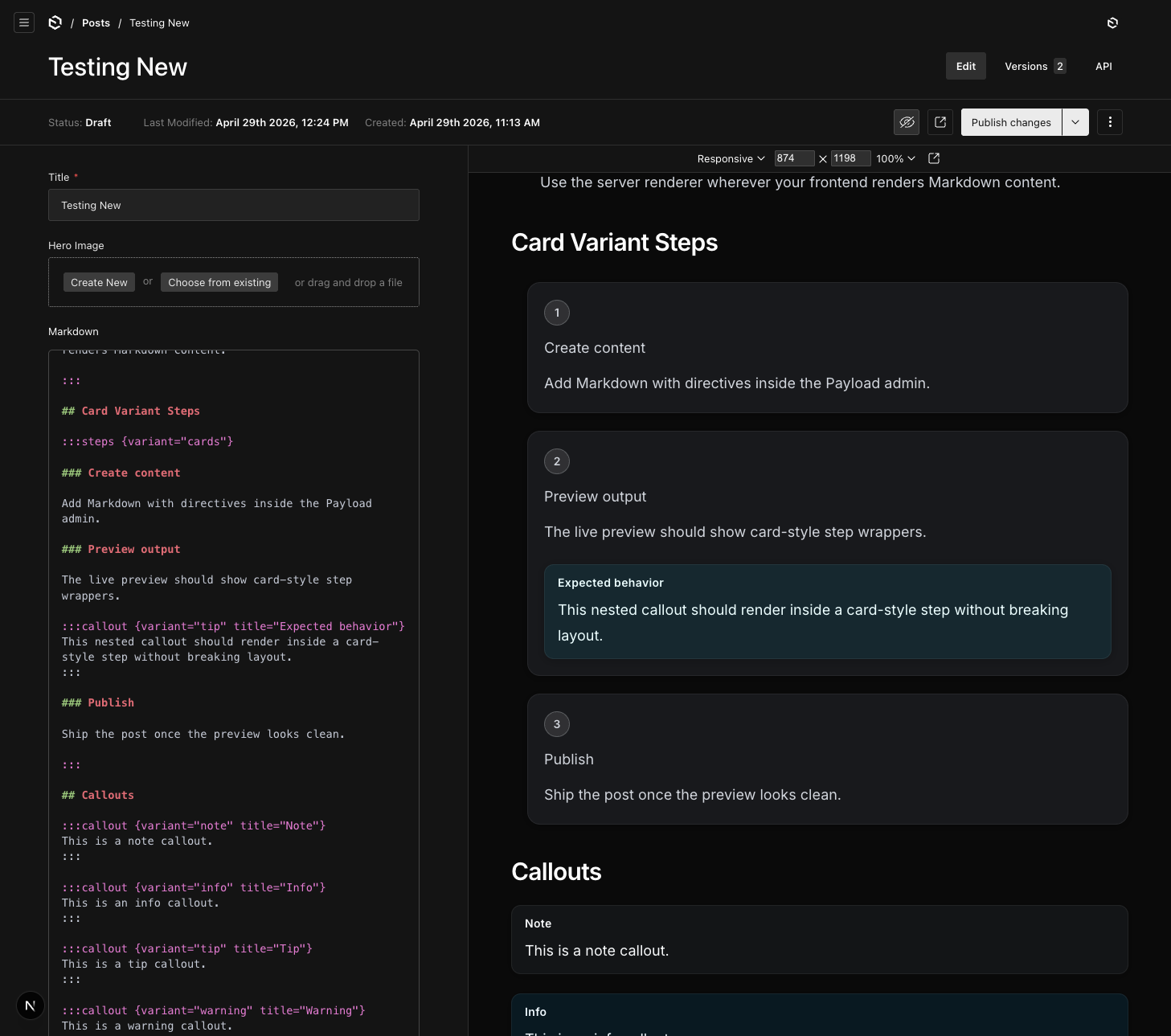
payload-markdown renders structured Markdown directly inside the Payload admin preview, including callouts, details, TOCs, steps, cards, buttons, tabs, themes, icons, and code blocks — without turning your content into JSON-shaped sludge.
v1.4 authoring primitives
New examples prefer labels for visible titles and expanded attrs for anything non-trivial:
:::card[Fast Setup]{
  href="/getting-started/installation"
  linkScope="title"
  icon="@fa-duotone/bolt"
}
Install, configure, ship.

:::buttons{
  align="center"
  stack="mobile"
  gap="md"
}
::button[Read Docs]{
  href="/docs"
  variant="primary"
  icon="@fa-duotone/book-open"
}

::button[GitHub]{
  href="https://github.com/valkyrianlabs/payload-markdown"
  variant="secondary"
  icon="@brand/github"
  newTab=true
}
:::

:::
The older title="" form remains compatible, but [Title] keeps visible content out of the argument list. Card and cards directives support scoped linking through linkScope; use linkScope="title" when a card body contains buttons or links.
Editor completion can expose shortcuts such as ::button, ::button_icon, and ::button_full, but generated Markdown always uses the canonical ::button directive. Syntax highlighting now distinguishes directive names, labels, arg names, arg values, and leaf-vs-container directives, while closing labels make nested ::: blocks easier to scan.
Directive system
Payload Markdown supports structured directives for real content layouts:
:::callout:::details:::toc:::steps:::cards:::card::button:::buttons:::tabs:::tab:::section:::2col:::3col:::cell
Directives are plain Markdown. They stay readable in Git, easy to review in PRs, and simple for AI/editor tooling to maintain.
See the docs for directive syntax, supported attributes, nesting behavior, themes, and examples:
Themes
Directive themes are first-class.
Themes live beside config, not inside it. Theme objects use classes, not className.
Default themes are included automatically. You only define custom themes when you want to extend or override the built-ins.
Themes can be configured globally or scoped per collection, then selected directly from Markdown using directive attributes.
Stable classes and data attributes are emitted for overrides, including data-directive, data-theme, and vl-md-* hook classes.
Code config
Code block rendering has its own top-level code namespace.
Use it to configure Shiki languages, the Shiki theme, line numbers, enhanced rendering, and full-bleed code behavior.
Legacy config.options still works, but code is the preferred API.
Migration mapping:
config.options.langs→code.langsconfig.options.lineNumbers→code.lineNumbersconfig.options.theme→code.shikiThemeconfig.options.enhancedCodeBlocks→code.enhancedconfig.fullBleedCode→code.fullBleed
Quick setup
Register the plugin in your Payload config, enable it for one or more collections, then render Markdown content with the server renderer.
The full setup guide covers:
- plugin registration
- collection configuration
- field mode
- block mode
- server rendering
- scoped config
- themes
- code block options
Editor experience
The editor is built on CodeMirror and includes:
- Markdown syntax highlighting
- directive autocomplete, including snippet variants such as
::button_icon - directive snippets with canonical Markdown output
- snippet placeholders/tabstops
- theme-aware attribute suggestions
- highlighting for directive labels and expanded arg blocks
- visual closing labels for nested directive blocks
- lightweight diagnostics for malformed directives
- warnings for unknown directives, invalid variants, invalid themes, malformed attrs, and common structural issues
The goal is simple: author Markdown like text, but get enough tooling that complex docs stay pleasant.
Tailwind setup
For best rendering defaults, enable Tailwind Typography and scan the plugin output.
Required pieces:
- install
@tailwindcss/typography - enable the typography plugin
- add the plugin
distdirectory to Tailwind sources
Theme class strings defined in your app config should also live in scanned source files.
Runtime arbitrary Tailwind classes inside CMS-authored Markdown are not the recommended styling path. Use directive theme="..." values and configure named themes in source.
Built for docs, blogs, and technical content
Use one Markdown field to author:
- release notes
- documentation pages
- technical blog posts
- plugin docs
- install guides
- API walkthroughs
- landing-page sections
The content stays readable in Git and editable in Payload.
Philosophy
- Markdown should stay the source of truth
- content should remain portable
- structure should be readable in plain text
- rich layouts should not require a page builder
- defaults should look good without locking you in
- styling should be centralized, themeable, and overridable
- the renderer should respect its container
- AI and human editors should both be able to work with the content
If that aligns with how you build, this will feel right.