
@vanillagreen/pi-background-tasks
v1.6.2
Published
Pi extension for explicit non-blocking background shell tasks, log tails, and completion wakeups.

Maintainers
 vanillagreencom
Readme
pi-background-tasks
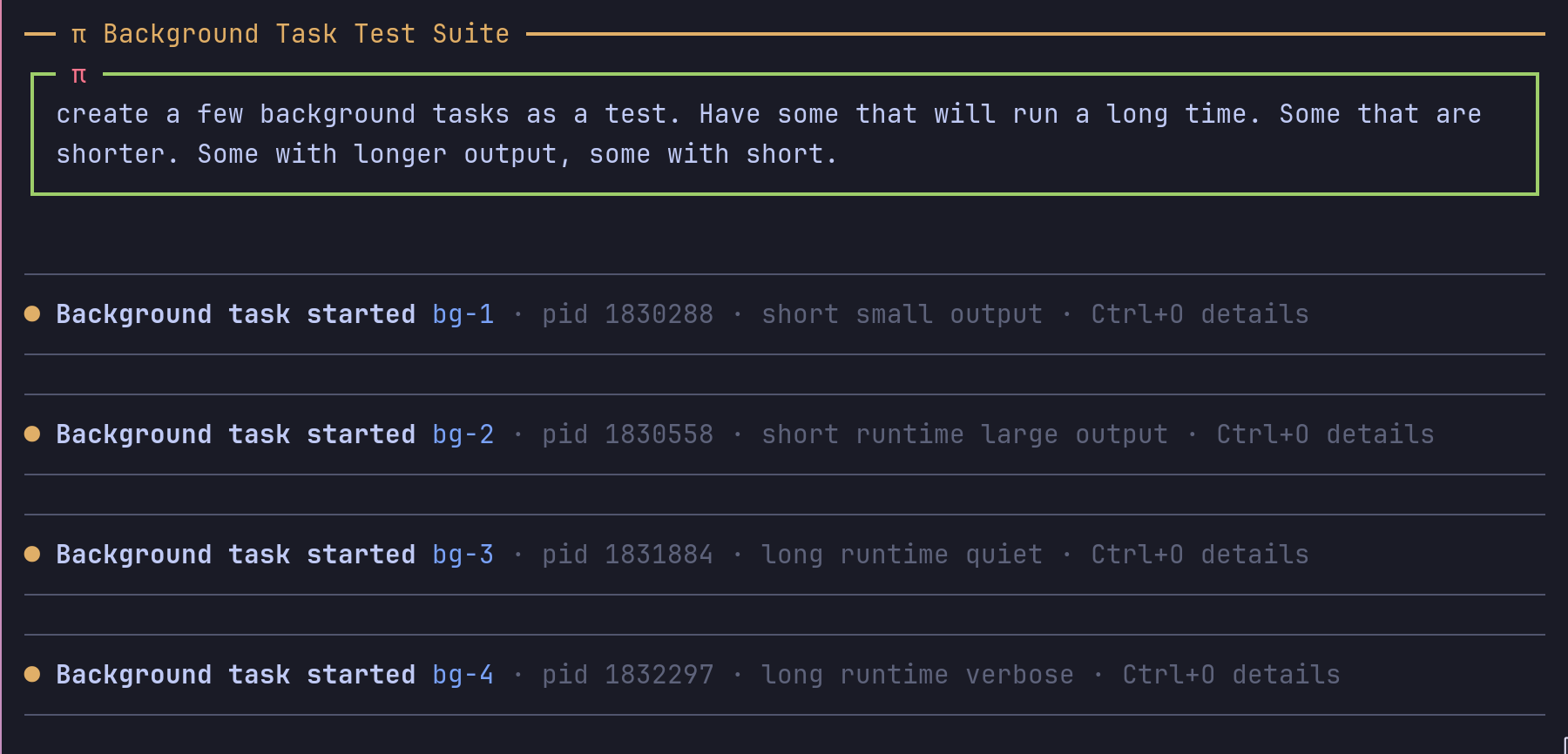
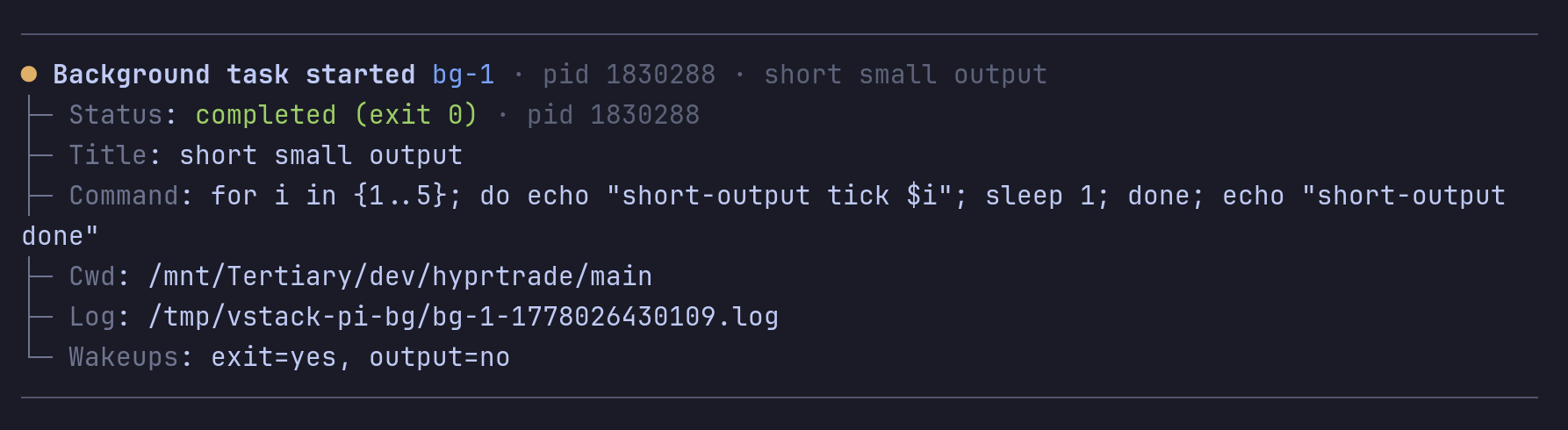

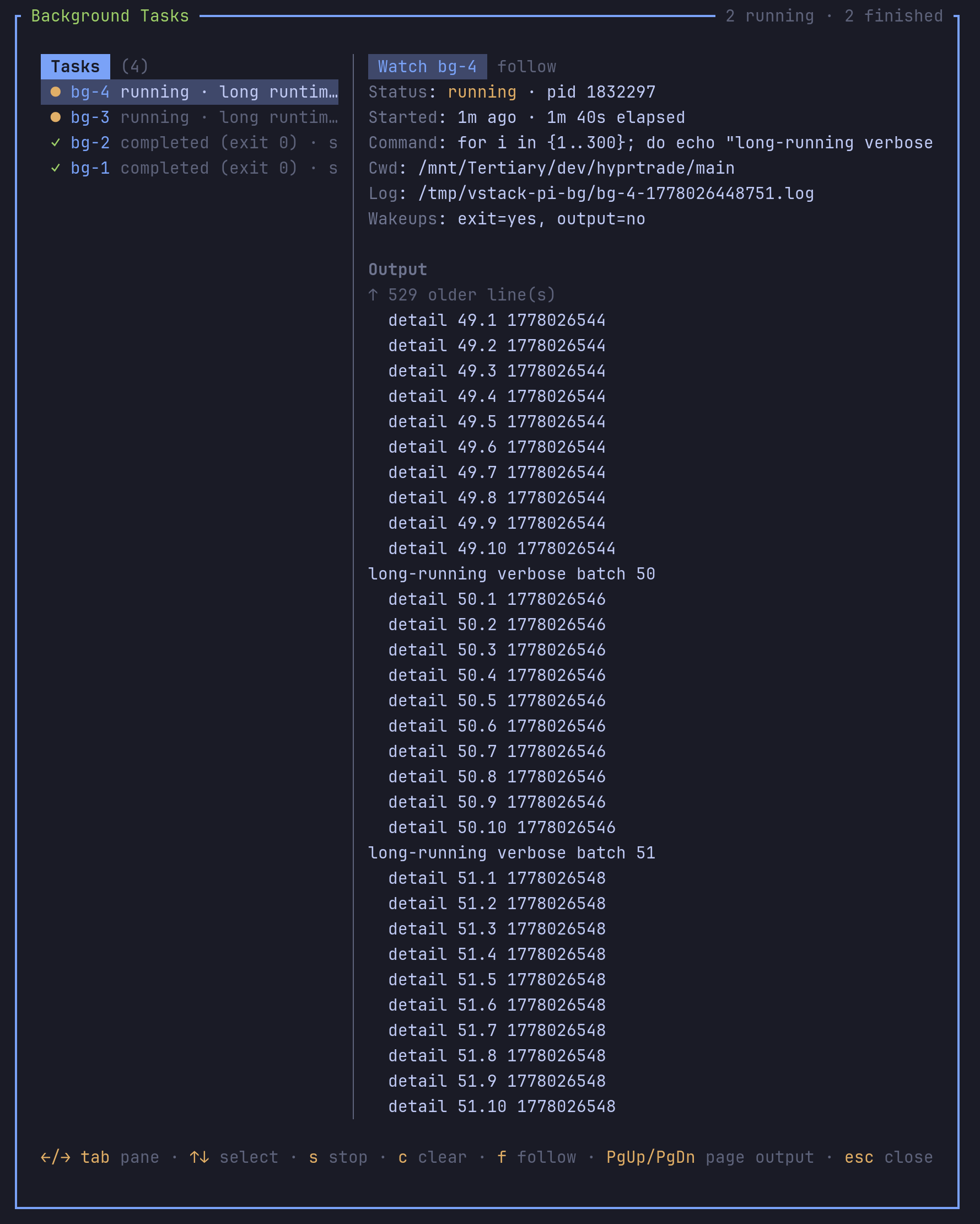
Run shell commands in the background without blocking the conversation.
Highlights
bg_taskspawns, lists, tails, stops, and clears background commands./bgopens an interactive dashboard with task logs, details, and controls./bg:nextor the shortcut sends the next bash command to the background.- Blocking monitors (
watch,tail -f,journalctl -f, polling loops) auto-background before they freeze the turn. - Exit and output-match wakeups bring the agent back when work finishes or important text appears.
- Optional resource controls lower CPU/I/O priority via
systemd-runornice/ionicefallback. - Full logs stay on disk even when chat/tool output is truncated.
- Session sidecar state restores task history across reloads and resumes.
- Inline mini-dashboard shows live task state; full dashboard handles larger fleets without bloating chat history.
pi-session-bridgecan publish structuredbg_task.*activity events as a side channel, not chat messages.
Install
Via npm:
pi install npm:@vanillagreen/pi-background-tasksVia vstack:
cargo install --git https://github.com/vanillagreencom/vstack.git vstack
vstack add vanillagreencom/vstack --pi-extension pi-background-tasks --harness pi -y
Restart Pi after installation.
Commands
| Command | Action |
| --- | --- |
| /bg | Open the dashboard. |
| /bg:next | Arm the next bash command for backgrounding. |
| /bg:run <command> | Spawn a background shell task. |
| /bg:list | Show tracked tasks. |
| /bg log <id\|pid> | Show a task log tail. |
| /bg watch <id\|pid> | Open the dashboard focused on a task. |
| /bg:stop <id\|pid> | Terminate a running task. |
| /bg:clear | Remove finished tasks. |
Arguments support autocomplete, including task IDs.
Auto-background
Bash commands matching obvious monitor patterns are intercepted before they start and run as a background task instead. The foreground bash tool returns a short acknowledgement with the task id, PID, and log path so the agent turn keeps moving.
Built-in matches: watch ..., tail -f, journalctl -f, Pi-bridge/tmux polling loops, and shell loops with sleep that monitor session state.
Interception covers the agent's bash tool, interactive !/!! commands, and — since Pi 0.83.0 — bash issued directly over RPC. An RPC caller gets the same acknowledgement text in place of the command output, and the interactive task widget keeps tracking the session that owns it.
Use the arm-next-bash shortcut or /bg:next to force the next bash command into the background even if it doesn't match the built-in patterns. Only applies to commands not yet started.
Settings
Open /extensions:settings; settings appear under the Background Tasks tab.
Project settings in .pi/settings.json apply only after Pi marks the workspace trusted; before trust, vstack Pi extensions read user/global settings only.
Glyph style: each package exposes glyphStyle (unicode default, ascii for terminal-safe chrome). @vanillagreen/pi-tool-renderer.globalGlyphStyleOverride=ascii forces ASCII chrome across vstack Pi extensions while leaving tool/model/user content unchanged.
Execution
| Setting | What it does |
| --- | --- |
| Enable background tasks | Master toggle for bg_task, auto-backgrounding, and the widget. |
| Default timeout | Spawn timeout. 0 disables. |
| Auto-background blocking bash monitors | Auto-divert long-running bash commands into bg_task. |
| Extra auto-background patterns | Newline-separated regexes for project-specific monitors. |
| Shortcut arming window | Seconds the arm-next-bash shortcut / /bg:next stays armed. |
| Force-kill grace | Milliseconds between SIGTERM and SIGKILL. |
| Resource controls | Opt-in lower-priority execution for spawned background tasks. Off by default; when off, spawn/stop behavior is unchanged. |
| Resource control mode | auto prefers a probed systemd-run --user transient service on Linux, then nice/ionice fallback. systemd-run, nice-ionice, and off force one path. |
| Apply controls to bg_task | Apply controls to explicit bg_task and /bg:run spawns. |
| Apply controls to auto-backgrounded bash | Apply controls to bash commands diverted by auto-backgrounding, /bg next, or the arm-next-bash shortcut. |
| CPU weight / I/O weight | systemd-run CPUWeight= / IOWeight= values (1-10000). Lower values yield resources. Defaults are 100. |
| Nice value | systemd-run Nice= and nice fallback value (-20 to 19). Default 10 lowers CPU priority. |
| ionice class / level | systemd-run IOSchedulingClass= / IOSchedulingPriority= and ionice fallback. Default best-effort level 7 lowers I/O priority. |
| Warn on resource-control fallback | Show at most one warning/diagnostic when configured controls fall back or no-op because helpers are unavailable. |
Wakeups
| Setting | What it does | | --- | --- | | Shortcut output wakeups | Wake the agent on new output from shortcut-forced tasks. | | Output settle delay | Debounce before output wakeups fire. |
Output
| Setting | What it does |
| --- | --- |
| In-memory output buffer | Per-task in-memory cap. Logs always keep full output. |
| Wakeup output tail | Characters included in output/exit wakeup messages. Default 2000; wakes are steer messages that bypass pi-output-policy, so this is the per-wake transcript budget. Raise only for monitors whose verbose inline tail is genuinely useful. |
| Dashboard/log tail | Characters shown in dashboard and log actions. Default 10000; truncated tool output points at the full log file. |
| Output wake budget (count) | Maximum output wakes per task before further output wakes are suppressed and a single "wake budget exhausted; inspect log" notice is emitted. Set 0 to disable. Exit wakes are unaffected. |
| Output wake budget (bytes) | Cumulative inline output-tail bytes per task before output wakes are suppressed. Set 0 to disable. |
UI
| Setting | What it does |
| --- | --- |
| Show task widget | Compact background-task widget. Manual hide wins over task lifecycle refreshes until you toggle it back in. |
| Widget placement | Above or below the editor. |
| Tool output style | compact one-liner or stacked rows with expandable details. |
| Expanded tool log lines | Maximum lines shown when expanding log output. |
| Dashboard output line cap | Maximum lines in the interactive dashboard viewport. |
| Mini-dashboard default mode | compact, expanded, or hidden at session start; runtime hide/show is user-controlled for the rest of the session. |
| Mini-dashboard finished retention | Seconds finished tasks stay visible in the inline widget. |
| Background next bash shortcut | Configurable. |
| Mini-dashboard toggle shortcut | Configurable show/hide toggle; toggling back in restores the last visible mode. |
| Dashboard shortcut | Configurable. |
Storage
| Setting | What it does |
| --- | --- |
| Task log directory | Override log file location. PI_BG_TASK_DIR env var still wins. |
Diagnostics
Routine wake/persistence diagnostics are written only when PI_BG_TASK_DEBUG=1, PI_BG_TASK_DIAGNOSTICS=1, or PI_BG_TASK_DIAGNOSTIC_LOG=/path/to/log is set. They go to a log file (default: $TMPDIR/vstack-pi-bg/diagnostics.log) instead of stdout/stderr so active TUI widgets cannot be corrupted by raw terminal output.
Notes
Tasks are scoped to the current Pi runtime and stopped on session shutdown. Shells start in their own process group so /bg:stop and shutdown terminate children. Tasks inherit Pi's environment and working directory. Resource controls are disabled by default; when enabled, systemd-run tasks persist their transient service unit so /bg:stop, timeouts, and shutdown stop the actual workload, not just the wrapper process.
Exit wakeups are durable across session restarts and PID reuse — if a task ends while Pi is gone, the next session replays the missed wake. Output wakes scheduled before stop / clear are voided.
Output wakeups are transcript-budget-safe by default: each wake carries one ~2 KB tail (outputAlertMaxChars) plus a compact task manifest, a chatty task is capped to 20 output wakes / 20 KB cumulative inline bytes before further wakes are suppressed (outputWakeBudgetMaxWakes / outputWakeBudgetMaxBytes), and unset notifyMode defaults to transition (or first-match-only when notifyPattern is set) so identical poller output does not wake the agent repeatedly. Set notifyMode: "always" and/or raise the wake budget when you really do want every-update wakes.
Activity broker publication is best-effort and requires pi-session-bridge in the same Pi runtime. Broker events are side-channel vstack_activity stream rows, not chat messages.
See DEVELOPMENT.md for the bg_task tool surface, wake-metadata schema, activity broker mapping, and orphan/PID-reuse identity probe.
Attribution
Locally owned by vstack, based on the MIT-licensed @ifi/pi-background-tasks from ifiokjr/oh-pi. See THIRD_PARTY_NOTICES.md.