npm package discovery and stats viewer.

Discover Tips

  • General search

    [free text search, go nuts!]

  • Package details

    pkg:[package-name]

  • User packages

    @[username]

Sponsor

Optimize Toolset

I’ve always been into building performant and accessible sites, but lately I’ve been taking it extremely seriously. So much so that I’ve been building a tool to help me optimize and monitor the sites that I build to make sure that I’m making an attempt to offer the best experience to those who visit them. If you’re into performant, accessible and SEO friendly sites, you might like it too! You can check it out at Optimize Toolset.

About

Hi, 👋, I’m Ryan Hefner  and I built this site for me, and you! The goal of this site was to provide an easy way for me to check the stats on my npm packages, both for prioritizing issues and updates, and to give me a little kick in the pants to keep up on stuff.

As I was building it, I realized that I was actually using the tool to build the tool, and figured I might as well put this out there and hopefully others will find it to be a fast and useful way to search and browse npm packages as I have.

If you’re interested in other things I’m working on, follow me on Twitter or check out the open source projects I’ve been publishing on GitHub.

I am also working on a Twitter bot for this site to tweet the most popular, newest, random packages from npm. Please follow that account now and it will start sending out packages soon–ish.

Open Software & Tools

This site wouldn’t be possible without the immense generosity and tireless efforts from the people who make contributions to the world and share their work via open source initiatives. Thank you 🙏

© 2026 – Pkg Stats / Ryan Hefner

@vanillagreen/pi-codex-minimal-tools

v1.0.8

Published

Minimal Codex/OpenAI native tools for Pi: image_generation, view_image, apply_patch

Readme

pi-codex-minimal-tools

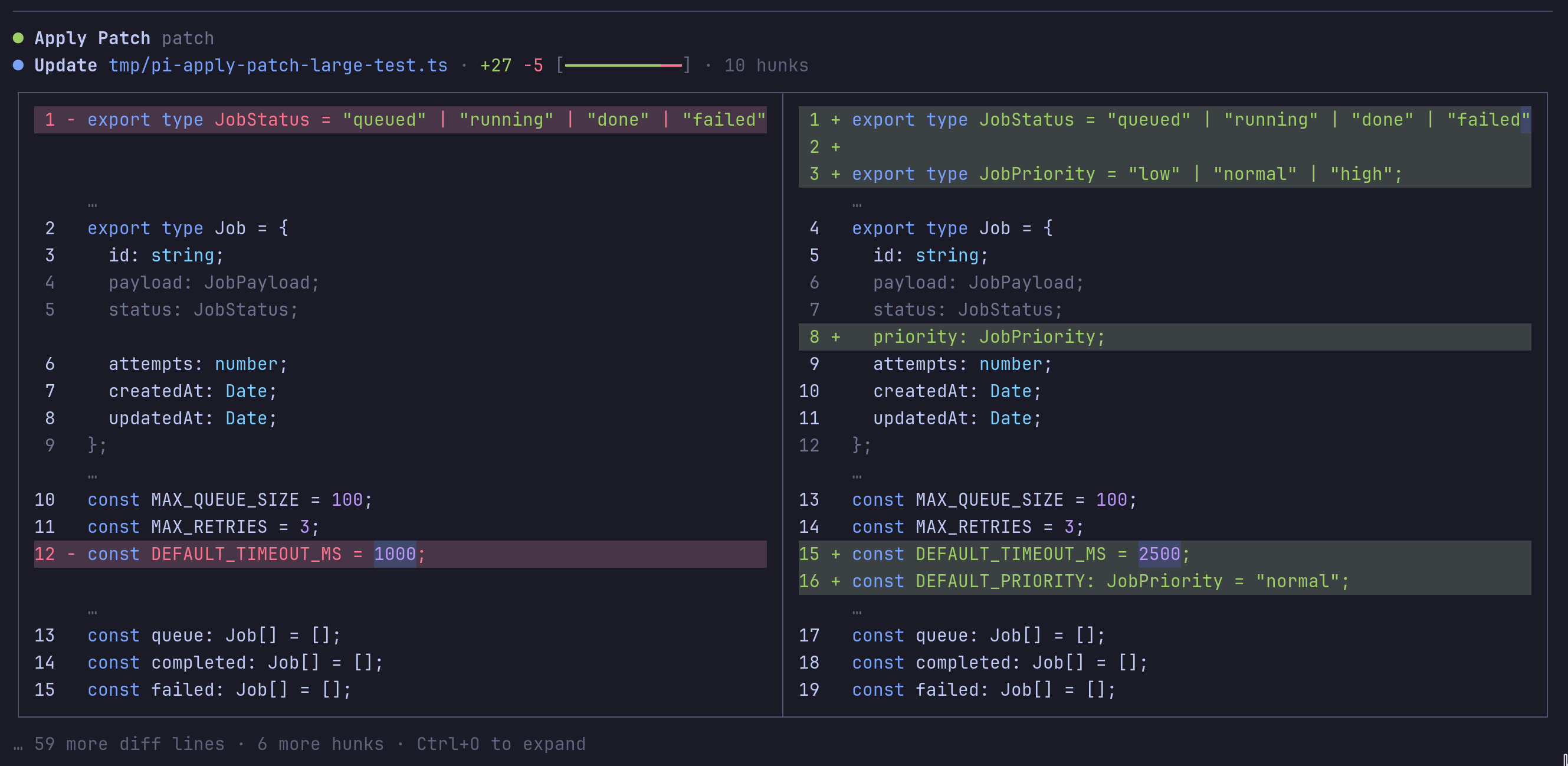
apply_patch side-by-side diff rendering

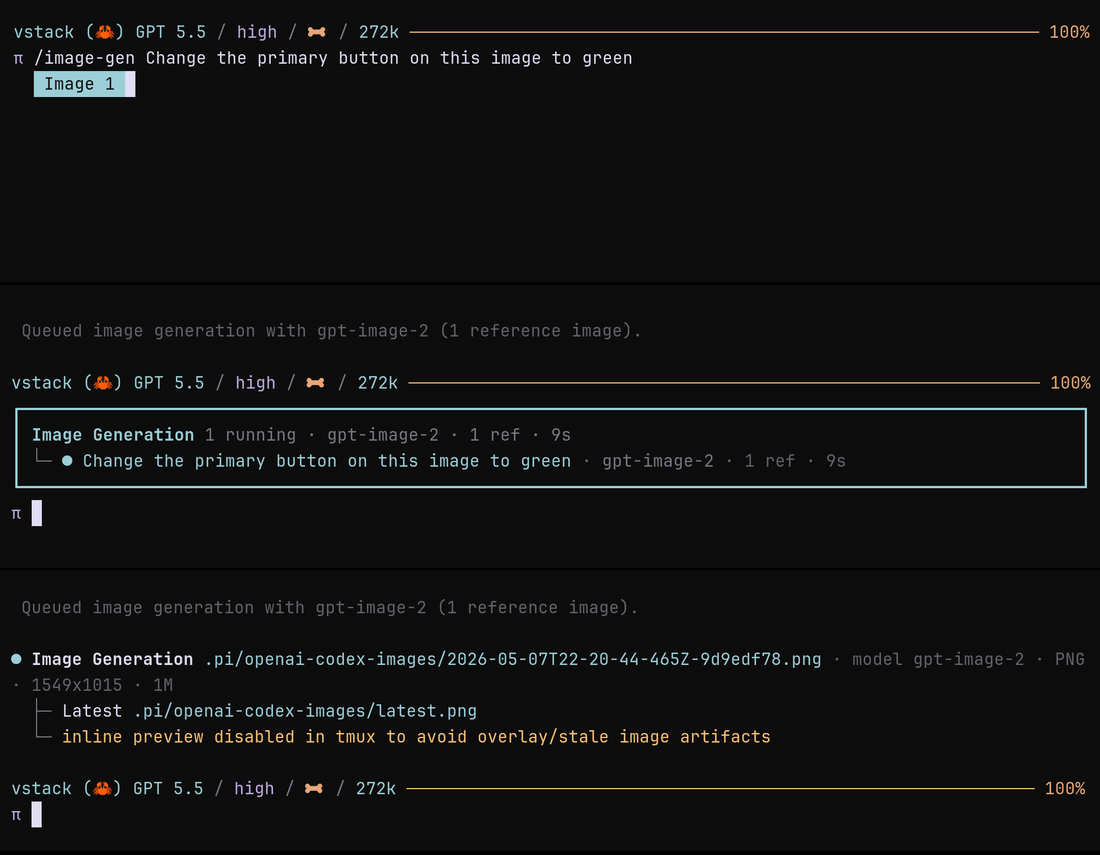
image_generation lifecycle

Minimal Codex/OpenAI tool augmentation for Pi. This package adds the useful Codex-style tools without replacing Pi native tools like read, grep, find, ls, bash, edit, or write.

Implemented features:

  • view_image — validate and return a local image file as model image content.
  • apply_patch — local Codex-style patch application with the public argument shape { input: string }.
  • image_generation — native OpenAI Codex image generation on supported models.
  • /image-gen — non-blocking background image generation/editing via Codex OAuth, with a live status card and saved-image completion output.
  • /codex-minimal-tools — opens the extension-manager settings popup when pi-extension-manager is installed; otherwise prints status and active package tools inline.
  • Capability gating that only adds/removes this package's tools and preserves Pi native tools.
  • OpenAI active-model gating: package tools are only active for OpenAI/OpenAI-Codex-like models, even if other providers support images.
  • Native-aware OpenAI Codex provider shim for active in-chat image_generation tools, including response-stream capture for image_generation_call results.
  • Generated image saving under imageOutputDir with short timestamp/uuid filenames, latest.<ext> mirrors, metadata, and inline previews when the terminal image protocol is available. Tmux sessions show the saved paths and skip inline image drawing to avoid stale overlay artifacts.
  • Optional direct OpenAI Images API fallback when directImageApiFallback is enabled and OPENAI_API_KEY is set.

web_search moved to the pi-web-tools package. Old pi-codex-minimal-tools web-search settings are ignored after this migration. This package's Codex provider shim still calls Pi's normal provider payload hook, so pi-web-tools keeps ownership of web-search provider selection, native rewrite gating, and direct-provider fallbacks.

Install

Via npm:

pi install npm:@vanillagreen/pi-codex-minimal-tools

Via vstack:

cargo install --git https://github.com/vanillagreencom/vstack.git vstack
vstack add vanillagreencom/vstack --pi-extension pi-codex-minimal-tools --harness pi -y

Restart Pi after installation.

Commands

| Command | Action | | --- | --- | | /codex-minimal-tools | Open the extension-manager settings popup (falls back to inline status when the manager is not installed). | | /codex-minimal-tools:doctor | Run lightweight self-checks. | | /image-gen <prompt> [reference.png] | Queue background Codex OAuth image generation/editing with the configured GPT Image model. Shows a live status card and posts the saved image path when complete without holding the current turn open. Reference images may be written as @reference.png or pasted as bare local PNG/JPEG/WebP paths such as /tmp/pi-clipboard-*.png. |

Arguments support autocomplete.

/image-gen uses the openai-codex/gpt-5.5 Responses route with the configured imageModel (default gpt-image-2) and Codex/ChatGPT OAuth headers from Pi's model registry. It does not require OPENAI_API_KEY. The normal in-chat image_generation tool remains in-stream; use /image-gen when you want image work to continue in the background.

Settings

When pi-extension-manager is installed, settings appear under Codex Minimal Tools in /extensions:settings. Values are read from:

{
  "vstack": {
    "extensionManager": {
      "config": {
        "@vanillagreen/pi-codex-minimal-tools": {}
      }
    }
  }
}

Project .pi/settings.json overrides user ~/.pi/agent/settings.json.

General

| Key | Default | What it does | | --- | --- | --- | | enabled | true | Master switch. Registers image_generation, view_image, and apply_patch so Pi knows about them. Tools only activate on OpenAI/Codex-like models; they stay hidden on Anthropic / Claude-bridge sessions even when registered. Requires reload. | | autoEnable | true | Active-tool-set management. When a supported model is selected, automatically push this package's enabled tools onto the model's active tool list while preserving Pi native tools (read, grep, find, ls, bash, edit, write). Turn off if you want to add tools manually via Pi's tool toggling. |

Provider

| Key | Default | What it does | | --- | --- | --- | | nativeProviderTools | true | Registers the OpenAI Codex provider shim and rewrites active image_generation to OpenAI's Responses-API native {type:"image_generation"} spec instead of sending it as a generic function tool. The shim captures returned image_generation_call.result images, saves them, and displays an inline preview. Does not affect view_image, apply_patch, or pi-web-tools web-search routing. Requires reload. |

Images

| Key | Default | What it does | | --- | --- | --- | | imageGeneration | true | Expose the image_generation tool on supported OpenAI Codex image-capable models. Disabling hides the tool entirely. | | imageOutputDir | .pi/openai-codex-images | Directory for saved generated images. Resolved relative to the workspace/repo root unless absolute. The latest image is also mirrored as latest.<ext>. | | imageModel | gpt-image-2 | Requested GPT Image model for native Codex image_generation, background /image-gen, and the optional direct OpenAI Images API fallback. Pick from gpt-image-2, gpt-image-1.5, gpt-image-1. | | directImageApiFallback | false | Allow direct OpenAI Images API generation with OPENAI_API_KEY when native Codex image_generation is unavailable (e.g. non-Codex provider, or nativeProviderTools off). Off by default to keep image generation tied to the active provider. | | viewImage | false | Expose the view_image tool on image-capable models. Off by default — Pi's built-in read already returns image content blocks for image files, so view_image is mainly Codex-CLI prompt parity rather than a functional necessity. Turn on if a model is trained against the view_image name and you want it to use that name. | | viewImageWorkspaceOnly | false | Reject view_image paths outside ctx.cwd. Off by default so Pi's clipboard-paste flow keeps working (clipboard images are written to /tmp/pi-clipboard-*.png). Turn on for stricter sandboxing; note that Pi's read tool does not enforce this either, so it's mostly defense-in-depth. |

Patch

| Key | Default | What it does | | --- | --- | --- | | applyPatchEnabled | true | Expose the apply_patch tool on OpenAI/Codex-like models. Pi's edit/write stay available unless strictPatchMode is enabled. | | strictPatchMode | false | Block edit and write on supported models so all edits must go through apply_patch. Off by default; turn on if a model misuses edit and you want to force the patch path. | | allowAbsolutePatchPaths | false | Permit absolute paths in apply_patch. Off by default so relative paths stay anchored to ctx.cwd. | | deferApplyPatchRendering | true | Don't define renderers for apply_patch; let pi-tool-renderer (preferred) or Pi's fallback renderer handle display. Avoids duplicate formatting when pi-tool-renderer is installed. Requires reload. |

autoEnable vs nativeProviderTools

These two settings sound similar but operate on different layers:

  • autoEnable decides which tools the model sees (active-tool-set management). It's about Pi-side tool routing.
  • nativeProviderTools decides how image_generation is encoded and captured (function tool vs. OpenAI Responses-API native tool plus provider-stream image capture). It's about openai-codex only.

You can have one on and the other off:

  • autoEnable=on, nativeProviderTools=off → model sees image_generation, but on openai-codex it goes as a generic function tool and won't generate images.
  • autoEnable=off, nativeProviderTools=on → you manually add image_generation to the active set; when you do, it's encoded natively.

Reloading

If this package is already loaded in a running Pi session, use /reload after installing/updating it so Pi loads the new extension code and command/tool registrations. Starting a new Pi process also works.

apply_patch rendering

apply_patch is registered with:

  • tool name exactly apply_patch
  • primary argument key input
  • no renderCall / renderResult by default

This lets pi-tool-renderer attach its existing applyPatchRenderer hook. Without that package, Pi's fallback renderer still shows the raw success/error text.

Development

cd pi-extensions/pi-codex-minimal-tools
npm install
npm run check