
@vanillagreen/pi-qol
v1.7.4
Published
Pi quality-of-life extension: compact statusline/π prompt, reliable multiline input, styled pasted-image chips, session naming/search/context import, scheduled prompts, handoff, permission prompts, notifications, custom compaction, and a collapsed-thinkin

Maintainers
 vanillagreencom
Readme
pi-qol
Quality-of-life extension for Pi: compact statusline, multiline input, session naming and search, scheduled prompts, notifications, and a permission gate.
Highlights
- Compact statusline with repo, branch, model, thinking level, and context percent; can be disabled.
- Newline-insert in the editor (multi-line drafts without auto-submit), with a fallback binding for terminals that can't distinguish the primary key.
- Sessions auto-name from your first prompt.
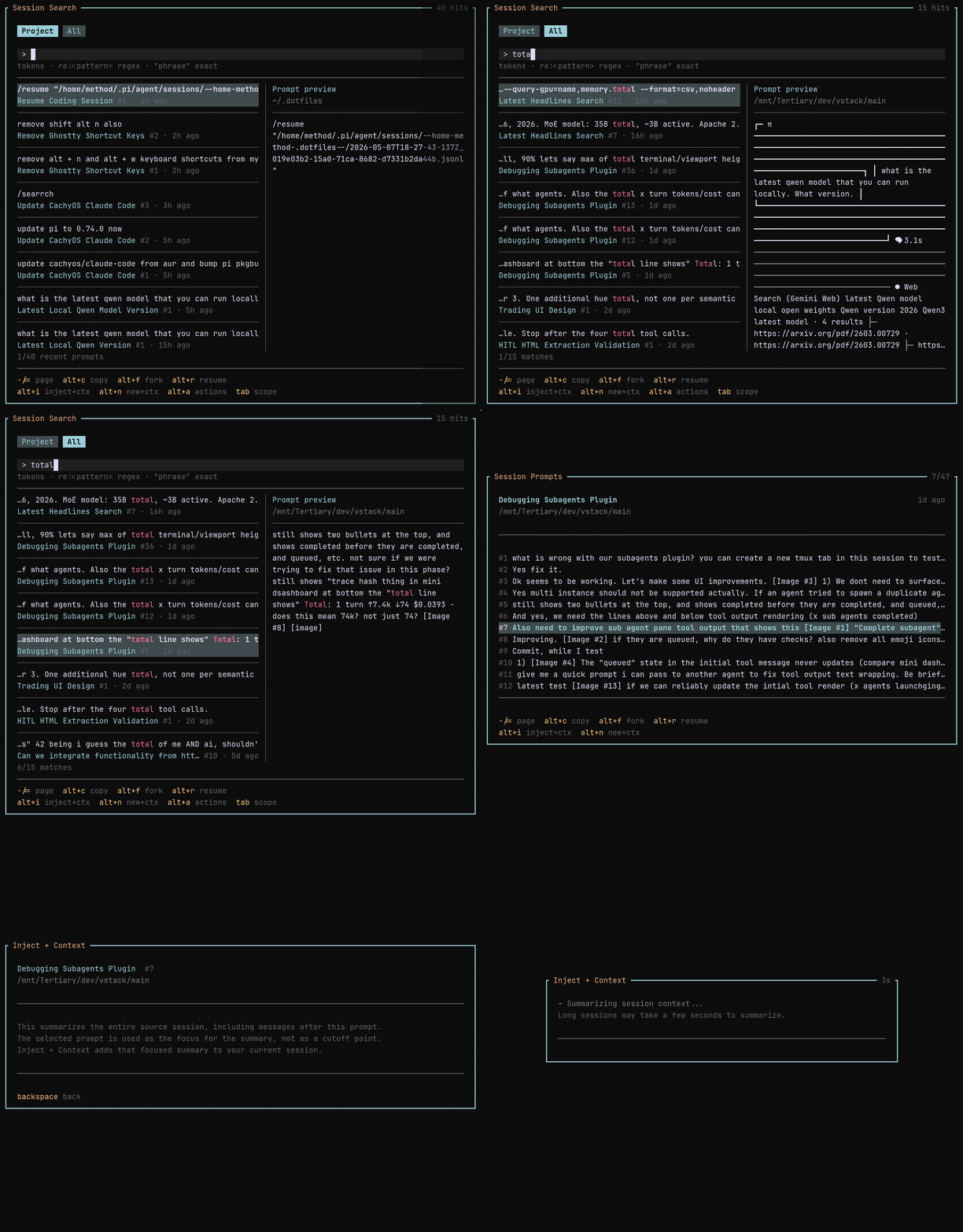
/renameoverrides anytime. /searchbrowses previous sessions with snippet previews; the configured shortcut opens it instantly.- Session search reads prompt snippets line-by-line, so very large session JSONL files do not have to be materialized just to browse, search, or import context.
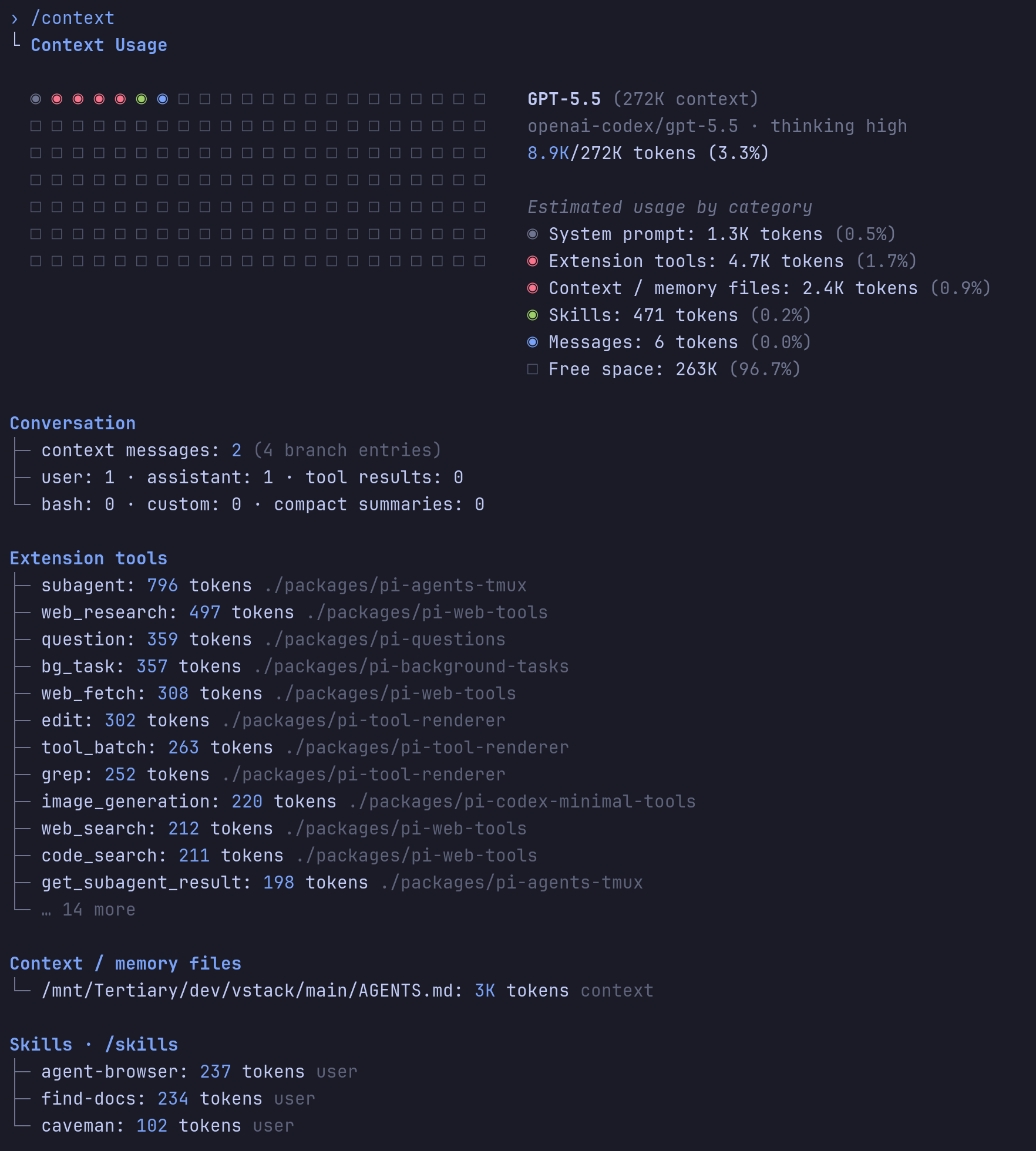
/contextshows a Claude-style context-window breakdown./handoff <goal>drafts a focused prompt for a new session./schedule 20m <message>or/schedule 1h45m <message>sends a delayed prompt without invoking the model until the timer fires.- Optional rate-limit auto-resume sends a configurable continuation after reset.
- Permission gate prompts before risky
bashcommands. Default match:rm -Rf. - Notifications for ready, questions, blocked states, and task completion.
- Thinking timer next to collapsed
Thinking...labels. - Caveman badge and a mode-cycling shortcut when
pi-cavemanis loaded. - Subagent-name badge in
pi-agents-tmuxchild panes.
Install
Via npm:
pi install npm:@vanillagreen/pi-qolVia vstack:
cargo install --git https://github.com/vanillagreencom/vstack.git vstack
vstack add vanillagreencom/vstack --pi-extension pi-qol --harness pi -y
Restart Pi after installation.
Commands
| Command | Action |
| --- | --- |
| /qol | Open settings (or print status if extension-manager isn't installed). |
| /qol notify-test | Send a test notification. |
| /rename [name] | Set or show the current session's name. |
| /qol:rename | Regenerate the session name from the first prompt. |
| /qol:rename:full | Regenerate from the full conversation. |
| /context | Show context-window usage with category breakdown. |
| /search [query] | Open previous-session search. |
| /search:refresh | Refresh the session search cache. |
| /handoff <goal> | Draft a handoff prompt for a new session. |
| /schedule <delay> <message> | Send a user message after a timer without invoking the model now. Example: /schedule 1h45m retry the previous request. |
Arguments support autocomplete.
/schedule accepts ms, s, m, h, and d units; bare numbers mean minutes. Compact composite durations are accepted in largest-to-smallest order, like 1h45m, 45m10s, or 1h45m30s. Pending prompts render above the statusline like steering/follow-up previews until they are sent or cancelled. Manage pending prompts with /schedule list and /schedule cancel <id|all>. Schedules are stored in the Pi session and re-armed on reload/resume; if Pi is not running at the due time, an overdue prompt sends when that session is next loaded.
Settings
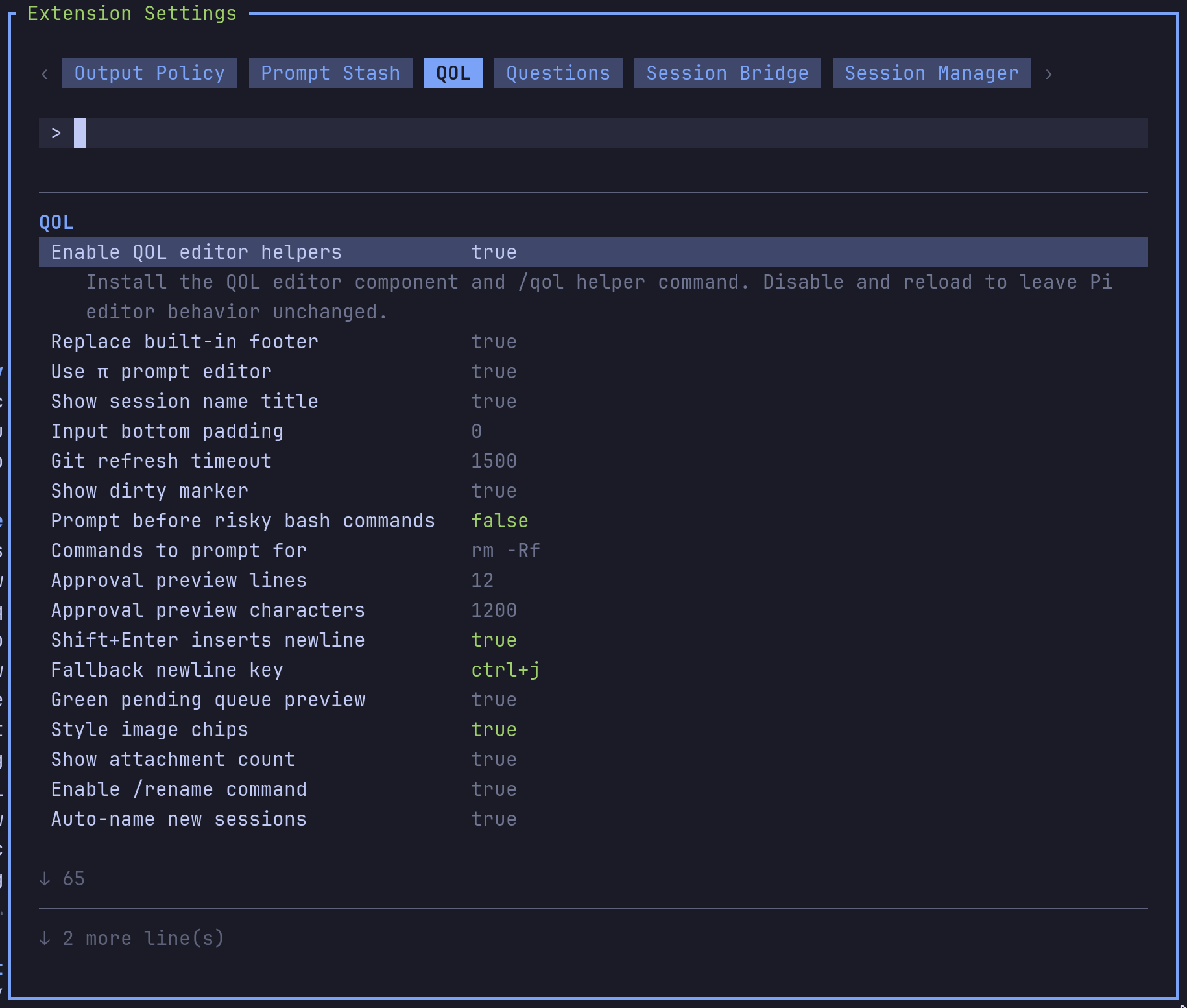
Open /extensions:settings; settings appear under the QOL tab. Names below match the labels shown there.
Project settings in .pi/settings.json apply only after Pi marks the workspace trusted; before trust, vstack Pi extensions read user/global settings only.
Glyph style: each package exposes glyphStyle (unicode default, ascii for terminal-safe chrome). @vanillagreen/pi-tool-renderer.globalGlyphStyleOverride=ascii forces ASCII chrome across vstack Pi extensions while leaving tool/model/user content unchanged.
Statusline
| Setting | What it does |
| --- | --- |
| Enable QOL editor helpers | Master toggle for QOL statusline, commands, notifications, search, compaction, and editor helpers. |
| Show compact statusline | Render or disable the QOL statusline row. |
| Replace built-in footer | Hide Pi's default footer while the QOL statusline is enabled. |
| Use π prompt editor | Use the compact prompt editor. |
| Show session name title | Show the session name above the prompt and in the tmux pane title; refreshes as soon as Pi reports a session metadata change. |
| Sync session name to tmux window name | Rename the tmux window to π <session>. |
| Input bottom padding | Blank lines below the prompt. |
| Show dirty marker | Append * to the branch when the worktree is dirty. |
Input
| Setting | What it does |
| --- | --- |
| shift+enter inserts newline | Insert a newline instead of submitting. |
| Fallback newline key | Alternate binding for terminals that can't send the primary one. |
| Style pending queue preview | Highlight Pi's pending-queue preview with a green left bar. |
| Style image chips | Render [Image #N] placeholders as distinct chips. |
| Show attachment count | Show a status badge when the draft has image placeholders. |
Session
| Setting | What it does |
| --- | --- |
| Enable /rename command | Register the /rename command. |
| Enable /schedule command | Register /schedule for timer-based prompts, useful for retrying after rate limits reset. |
| Auto-resume after rate limits | Send the configured continuation after a detected reset; cancels on newer turn. |
| Auto-name new sessions | Generate a friendly session name from the first prompt. |
| Auto-rename model | Model used for title generation. |
| Auto-rename fallback model | Model tried when the primary fails. |
| Deterministic fallback | Title-case words, truncated prompt, or none if all model calls fail. |
| Auto-rename prefix | Optional static prefix on every generated name. |
| Notify on auto-rename | Show a notification when auto-renaming. |
Advanced: input cap, title length, output tokens, timeout, custom prompt template, and debug logging.
Handoff
| Setting | What it does |
| --- | --- |
| Enable /handoff command | Register the /handoff command. |
| Review handoff prompt | Open an editor to edit the generated prompt before creating the session. |
Context window
| Setting | What it does |
| --- | --- |
| Enable /context command | Register /context. |
/context also estimates the serialized payload size of the messages that would be sent on the next request. When that payload crosses Transcript-risk warn budget (chars) a Transcript risk block appears below the compact buffer section even if token count is still under the context window — useful for catching large blob-shaped tool outputs that inflate the request long before token count alone would page anyone. If transcript-risk estimation itself errors, /context shows a sanitized error in the same block rather than silently hiding the warning.
Session search
| Setting | What it does |
| --- | --- |
| Enable session search | Register /search and the overlay. |
| Session search shortcut | Configurable; set to none to disable. |
| Result limit | Max matching prompts returned. |
| Visible session rows | Rows shown before scrolling; defaults to 8. |
| Preview snippets | Matching snippets shown on the preview screen. |
| Session cache TTL | Seconds before the session list refreshes; 0 keeps it until you run /search:refresh. |
Summary settings (model, max tokens, input cap) tune the summarizer when you import context from a previous session.
Notifications
Master toggle: Enable notifications.
Triggers (notify when): ready, direction needed, question popups, all tasks complete, critical/blocked.
Channels: terminal bell, Mute bell sound, native terminal notifications (OSC 777/99 or Windows toast), tmux display-message, tmux window marking, OSC passthrough, and an optional in-Pi UI notice.
Tuning: cooldown seconds, title, ready message, body length, tmux durations.
Notes:
- Terminal notification protocol picks between OSC 99 (Kitty) and OSC 777 automatically.
- Bell when tmux window active is off so you don't get bells while looking at Pi.
- Mute bell sound keeps notification routing enabled but suppresses QOL-emitted BEL bytes and uses ST terminators for OSC 777/99 where supported. Terminals or operating systems may still play their own sound for native notifications outside QOL control.
- tmux native via client TTY sends OSC notifications to attached tmux clients so notifications still appear when the Pi window is inactive.
Use /qol notify-test to verify your terminal/tmux setup, including silent behavior with Mute bell sound enabled.
Permission gate
| Setting | What it does |
| --- | --- |
| Prompt before risky bash commands | Ask before bash commands matching the command list. |
| Commands to prompt for | Comma-separated literal fragments or /regex/flags. |
| Approval preview lines | Cap the approval-prompt preview height. |
| Approval preview characters | Cap the approval-prompt preview width. |
Off by default. When enabled, non-interactive matches are blocked.
Compaction
| Setting | What it does |
| --- | --- |
| Custom compaction summaries | Use QOL summaries instead of Pi's default, with Pi-standard transient provider retries when available. |
| Compaction model | Summarizer model. Defaults to current, meaning Pi's active model; set a provider/model when you want a dedicated larger-context summarizer. Thinking suffixes through :max are accepted, and Pi-resolved header/environment authentication is forwarded. |
| Compaction detail profile | concise, balanced, or exhaustive. |
| Include previous summary | Pass the previous summary for iterative continuity. |
| Fallback to Pi default compaction | Run Pi's default compaction if QOL's fails. |
| Show compaction notifications | Notify on compaction start/fail/complete. |
| Custom branch summaries | Use the QOL summarizer for /tree branch summaries. |
| Remote compaction endpoint | Call a remote HTTP summarizer instead of a model. |
| Idle compaction trigger | Auto-compact after the session sits idle above a token threshold. |
Idle thresholds (token threshold, idle delay, fixed token limit, percent limit) tune when idle compaction fires.
Long-session budget guard
For long autonomous runs the agent may not go idle, so idle compaction may never fire and the transcript can grow until provider/buffer limits hit. The budget guard runs on agent_end (not idle) and starts a compaction immediately when context usage crosses a percent of the model window or an absolute token limit. It fires once per threshold crossing — repeated agent_end events above the same threshold do not retrigger it, and the crossing key resets on a successful compaction or on a transient compaction failure (so the next agent_end retries).
| Setting | What it does | Default |
| --- | --- | --- |
| Long-session budget guard | Master toggle for the agent_end budget guard. | on |
| Budget guard percent | Context-window percentage that fires the guard. -1 disables percent-based firing. | 85 |
| Budget guard token limit | Absolute tokens that fire the guard. -1 uses percent only. | -1 |
| Chunked compaction input cap | Max serialized characters per summarization request. Long transcripts are chunked, summarized chunk-by-chunk, then tree-reduced — every model/remote request (chunk + every reduce pass) is bounded so the compaction call itself cannot exceed provider buffer limits. 0 disables chunking. | 240000 |
| Write pre-compaction handoff artifact | Before compaction, write ~/.pi/agent/vstack/sessions/<session>/pi-qol/handoff/<timestamp>.json plus a latest.json pointer containing previous summary, last task state, and referenced files/artifacts. Write failures surface as a QOL warning notification and a handoffArtifactError field in the compaction details. | on |
| Transcript-risk warn budget (chars) | /context shows a warning when the serialized payload of messages-to-send exceeds this many characters, even if tokens are still below the context window. 0 disables. | 600000 |
When the budget guard fires it injects a sentinel into the compaction request so the QOL bounded handler always runs — chunked summarizer + handoff artifact — even if Custom compaction summaries is off. Manual compactions (/tree, idle compaction, user-triggered) still only use the QOL handler when Custom compaction summaries is on; otherwise they fall through to Pi's default compaction with no handoff artifact and no chunking. If you want every compaction to use the QOL bounded path, turn Custom compaction summaries on.
While budget-guard compaction is running, QOL keeps a persistent status line above the prompt (and in the normal status footer when the compact statusline is disabled). After Pi prints the compacted-summary block, the line changes to QOL budget guard finalizing compaction… until ctx.compact() reports completion, so long reload/finalization gaps do not look frozen.
Recommended values for long autonomous runs:
- Keep Long-session budget guard on. Lower Budget guard percent to
75if your provider buffers are tight. - Optionally turn Custom compaction summaries on so user-initiated and idle compactions also use the QOL chunked summarizer + handoff artifact. (Budget-guard-triggered compactions always use them regardless of this setting.)
- Lower Chunked compaction input cap to ~
120000when the summarizer model has a small context window.
Thinking
| Setting | What it does |
| --- | --- |
| Hidden thinking label | Label shown when thinking blocks are hidden. |
| Show thinking timer | Show elapsed time next to collapsed Thinking... labels. |
| Working indicator mode | animated ticks every 80ms; switch to static if you see flashes when the chat overflows. |