
@vanillagreen/pi-session-bridge
v1.4.0
Published
Pi extension and CLI for controlling visible interactive Pi sessions over a structured Unix-socket side channel.
Downloads
338

Maintainers
 vanillagreencom
Readme
pi-session-bridge
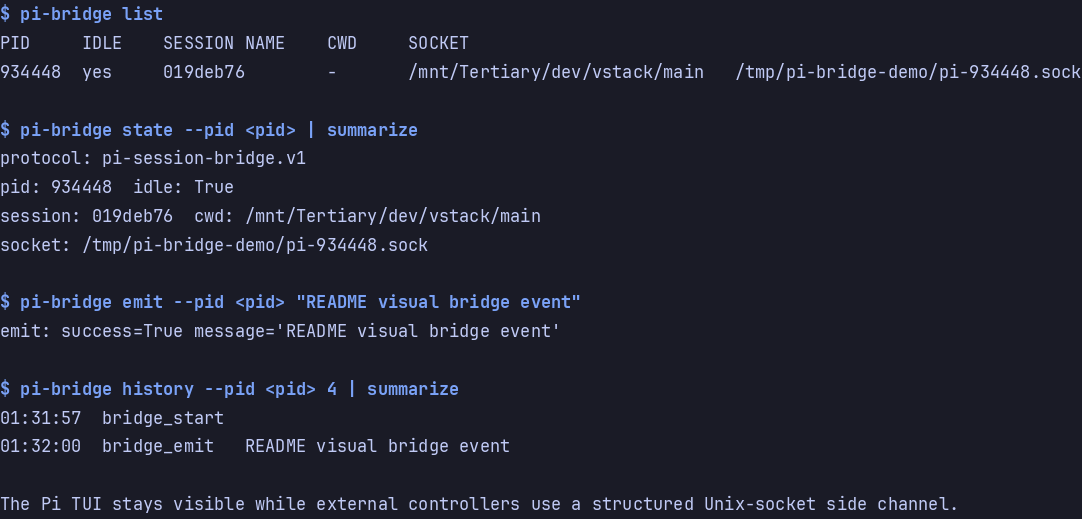
Control a running Pi session from outside the TUI. The interactive Pi terminal stays visible while local clients send prompts, steering, follow-ups, and questions through pi-bridge.
Highlights
- External clients send prompts, steering, follow-ups, and aborts through the bridge.
- Subscribe to live Pi events (messages, tool calls, session metadata changes, agent end) without scraping panes.
- Local extensions can publish activity updates to bridge clients without adding chat messages.
- Discover active Pi sessions through registry files; target by pid, cwd, session, or name.
pi-bridgeCLI handles common operations; contributor-facing protocol notes live inDEVELOPMENT.md.- When
pi-questionsis loaded, external clients can list, answer, and reject pending questions.
Install
Via npm:
pi install npm:@vanillagreen/pi-session-bridgeVia vstack:
cargo install --git https://github.com/vanillagreencom/vstack.git vstack
vstack add vanillagreencom/vstack --pi-extension pi-session-bridge --harness pi -y
Restart Pi after installation.
pi-bridge is symlinked into the install scope's bin/ (.pi/bin/pi-bridge project, ~/.pi/agent/bin/pi-bridge global). Add the directory to PATH or run by path.
Commands
| Command | Action |
| --- | --- |
| /bridge:status | Show socket and registry paths. |
| /bridge:ping [text] | Emit a bridge_pong event without calling a model. |
pi-bridge CLI
pi-bridge list
pi-bridge state --pid <pid>
pi-bridge commands --pid <pid>
pi-bridge stream --pid <pid>
pi-bridge history --pid <pid> 20
pi-bridge history --pid <pid> 20 --event message_update --since 2026-05-21T00:00:00Z
pi-bridge history --pid <pid> 20 --raw
pi-bridge send --pid <pid> "message for the agent"
pi-bridge steer --pid <pid> "steer current work"
pi-bridge follow-up --pid <pid> "after you finish, do this"
pi-bridge questions --pid <pid>
pi-bridge answer --pid <pid> --request-id que_... --answers '[["Stop here"]]'
pi-bridge reject --pid <pid> --request-id que_...
pi-bridge emit --pid <pid> "hello"
If exactly one active bridge exists, target flags are optional. Filters: --pid, --socket, --session, --name, --cwd.
Compact vs raw history
pi-bridge history and the stream channel default to compact event previews so large tool outputs do not overwhelm the TUI or bridge clients.
Pass --raw (or --verbose) to pi-bridge history when you need the full stored payload:
--event NAME— only return events with that name (e.g.tool_execution_end).--since TS— only return events withtimestamp >= TS(ISO 8601, ms precision).--max-bytes N— cap response payload (default ~1 MiB; older events trimmed first, the most recent envelope is always included).
The history response includes enough metadata for callers to page further or request raw payloads when needed.
Raw protocol
Most users should use the pi-bridge CLI. Custom client authors can use the local socket protocol; request/response examples and event-envelope details are in DEVELOPMENT.md.
Activity broker
Local Pi extensions can publish activity updates that pi-bridge stream exposes to connected clients. This is used by vstack extensions for agent progress, background tasks, and questions without adding messages to the conversation. Contributor-facing broker details are in DEVELOPMENT.md.
Slash command notes
pi-bridge send uses a hybrid slash dispatch path:
- Plain text sends a normal user message.
/skill:<name> ...and prompt templates expand before being sent, matching Pi's editor behavior, including positional and all-argument defaults (${N:-default},${@:-default},${ARGUMENTS:-default}).- Repeated skill sends in the same Pi session use a short reminder instead of resending the entire skill body.
- Extension/TUI commands, such as
/bridge:pingand/tasks:add, are delivered to Pi's own editor so they behave like typed commands. - If command delivery fails, the bridge falls back to sending the text as a normal message.
Settings
Open /extensions:settings; settings appear under the Session Bridge tab.
Project settings in .pi/settings.json apply only after Pi marks the workspace trusted; before trust, vstack Pi extensions read user/global settings only.
| Setting | What it does |
| --- | --- |
| Enable session bridge | Master toggle for bridge socket registration, CLI access, and status reporting. |
| Bridge directory | Override the sockets/registry directory. PI_BRIDGE_DIR env var still wins. |
| Event history limit | Events retained for history clients. |
| Max bytes per event | Maximum bytes per compact event envelope before payload is collapsed to a descriptor. |
| Max history bytes | Total bytes retained across the in-memory event history before older envelopes are evicted. |
| Max history response bytes | Maximum bytes returned in a single history response; older envelopes drop first. |
| Event preview bytes | Bytes of delta/result/output retained as *Preview strings inside compact events. |
| Spill raw events | When true, oversized payloads spill to the per-session JSONL so history --raw can rehydrate them. |
| Max raw spill bytes | Cap on stored raw event payloads for history --raw. |
| Max request line bytes | Maximum JSONL request size accepted. |
| Registry heartbeat | Ms between registry file updates. |
| Notify on start | In-TUI notification when the bridge starts. |
| Show status badge | Show bridge:<pid> in the Pi footer. |
Security
The socket can trigger real agent work in the owning Pi process. Keep PI_BRIDGE_DIR private. Don't expose the socket to other users or untrusted containers.