npm package discovery and stats viewer.

Discover Tips

  • General search

    [free text search, go nuts!]

  • Package details

    pkg:[package-name]

  • User packages

    @[username]

Sponsor

Optimize Toolset

I’ve always been into building performant and accessible sites, but lately I’ve been taking it extremely seriously. So much so that I’ve been building a tool to help me optimize and monitor the sites that I build to make sure that I’m making an attempt to offer the best experience to those who visit them. If you’re into performant, accessible and SEO friendly sites, you might like it too! You can check it out at Optimize Toolset.

About

Hi, 👋, I’m Ryan Hefner  and I built this site for me, and you! The goal of this site was to provide an easy way for me to check the stats on my npm packages, both for prioritizing issues and updates, and to give me a little kick in the pants to keep up on stuff.

As I was building it, I realized that I was actually using the tool to build the tool, and figured I might as well put this out there and hopefully others will find it to be a fast and useful way to search and browse npm packages as I have.

If you’re interested in other things I’m working on, follow me on Twitter or check out the open source projects I’ve been publishing on GitHub.

I am also working on a Twitter bot for this site to tweet the most popular, newest, random packages from npm. Please follow that account now and it will start sending out packages soon–ish.

Open Software & Tools

This site wouldn’t be possible without the immense generosity and tireless efforts from the people who make contributions to the world and share their work via open source initiatives. Thank you 🙏

© 2026 – Pkg Stats / Ryan Hefner

@vanillagreen/pi-session-manager

v1.2.0

Published

Polished Pi session manager overlay for browsing, searching, resuming, renaming, and safely deleting sessions.

Downloads

743

Readme

pi-session-manager

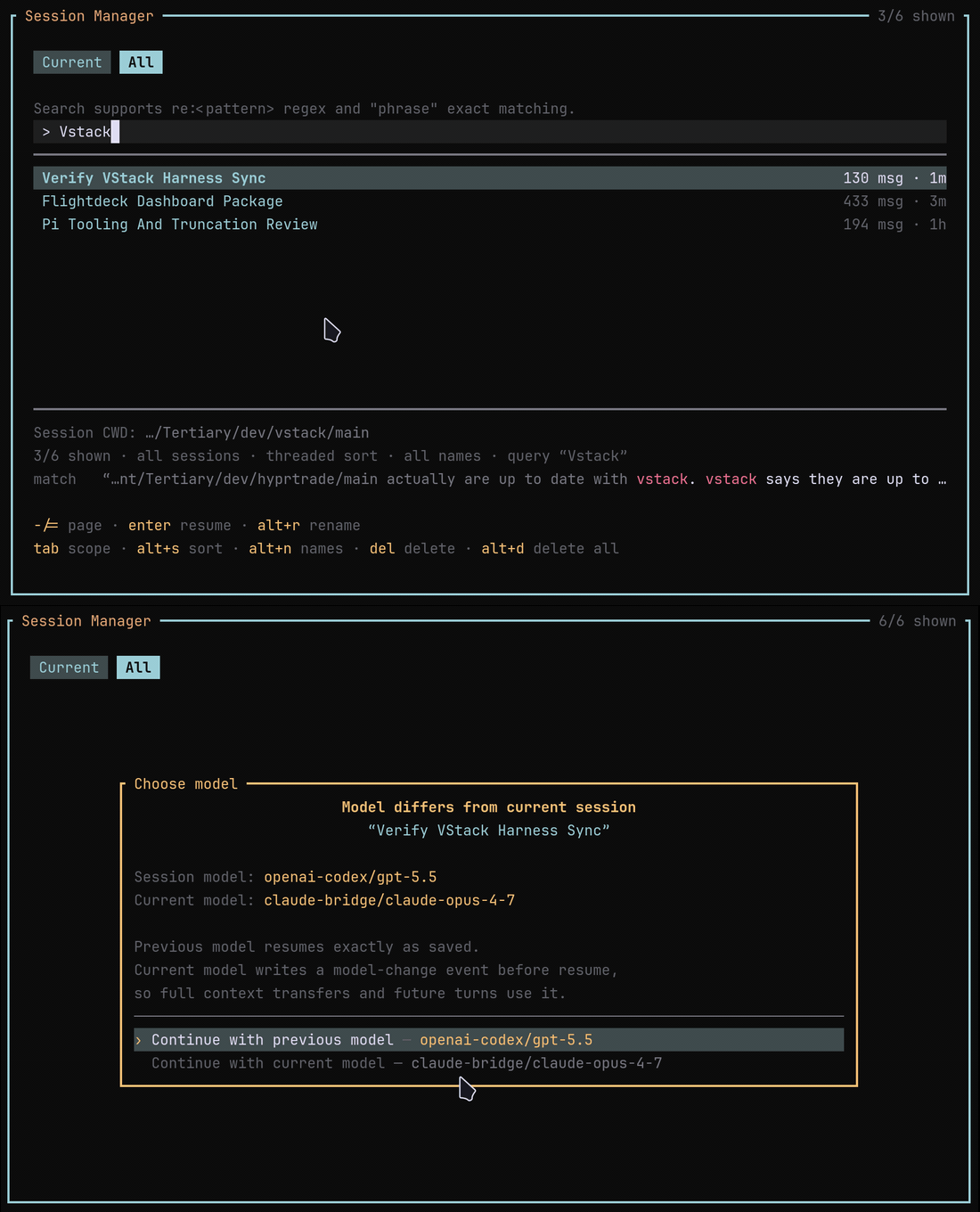
Session Manager overlay and model-change confirmation

Polished session manager overlay for Pi. It complements Pi's built-in /resume picker with vstack settings, inline management actions, and guarded rendering for long or control-character-heavy session text.

Install

Via npm:

pi install npm:@vanillagreen/pi-session-manager

Via vstack:

cargo install --git https://github.com/vanillagreencom/vstack.git vstack
vstack add vanillagreencom/vstack --pi-extension pi-session-manager --harness pi -y

Restart Pi after installation.

What it provides

  • Browse current-project sessions or all sessions.
  • Search by tokens, quoted phrases, or re:<regex> using the same prompt-first matching logic as the session search popup: user prompts are matched first, with session title/name fallback.
  • Threaded lineage view using Pi parentSession relationships when there is no active search.
  • Resume through ctx.switchSession(), preserving the session's saved model by default. If the current active model differs, a confirmation popup explains the models and lets you continue with either one.
  • Rename sessions using Pi session-info entries; current-session renames go through pi.setSessionName().
  • Delete one session or all shown deletable sessions with confirmation, current-session protection, visible delete counts, and optional trash CLI fallback.
  • Clean one-line rendering for names, prompts, and paths.

No SQLite, FTS, or native runtime dependencies are used; Pi's SessionManager.list() / listAll() APIs provide the index data.

Commands

| Command | Action | | --- | --- | | /sessions | Open the manager using the configured default scope; switch Current/All with the tabs. | | /sessions:resume-pending <id> | Internal recovery command inserted into the editor when a resume action must be confirmed by pressing Enter. |

Keys

| Key | Action | | --- | --- | | / | Move selection. | | - / = | Page the list. | | Home / End | Jump to first/last result. | | Enter | Resume selected session. If the session model differs from the current active model, choose which model to continue with. | | Alt+R | Rename selected session inline. | | Delete | Delete selected session after confirmation. | | Alt+D | Delete all shown deletable sessions after confirmation. | | Tab | Toggle current/all scope. | | Alt+S | Cycle threaded/recent/relevance sort. | | Alt+N | Toggle named-only filter. | | Esc / Ctrl+C | Clear search, cancel rename/delete/model selection, or close. |

The global shortcut defaults to F1 and opens the manager popup directly. Set shortcutKey to none to disable it.

Settings

Settings are exposed through pi-extension-manager under vstack.extensionManager.config.@vanillagreen/pi-session-manager.

| Key | Default | Notes | | --- | --- | --- | | enabled | true | Registers commands and shortcut after reload. | | shortcutKey | f1 | Opens the manager popup directly. Set to none to disable. | | defaultScope | current | Initial Current/All tab when opening /sessions. | | defaultSort | threaded | threaded, recent, or relevance. | | visibleRows | 12 | List rows before scrolling. | | overlayWidth | 112 | Preferred overlay width in terminal columns. | | deleteUsesTrash | true | Try trash before unlink when deleting. |

Notes

  • Session titles mirror Pi /resume: explicit session name, first user message, then filename.
  • Search filters the shown list. Delete-all acts only on the currently shown, deletable sessions.
  • If sessionDir or PI_CODING_AGENT_SESSION_DIR is configured, current scope filters by session cwd; all scope shows every session in that directory.
  • Pi's built-in /resume, /tree, /fork, /clone, and /name remain available.