
@vasoyaprince14/sql-analyzer
v1.5.3
Published
🚀 Enterprise SQL database analyzer with AI insights, security auditing, performance optimization, real-time monitoring, and beautiful reports

Maintainers
 vasoyaprince14
Keywords
Readme
SQL Analyzer 🚀






A comprehensive, enterprise-grade SQL database analyzer with AI insights, ML predictions, compliance auditing, and predictive maintenance. Perfect for database administrators, developers, DevOps teams, and enterprise organizations.
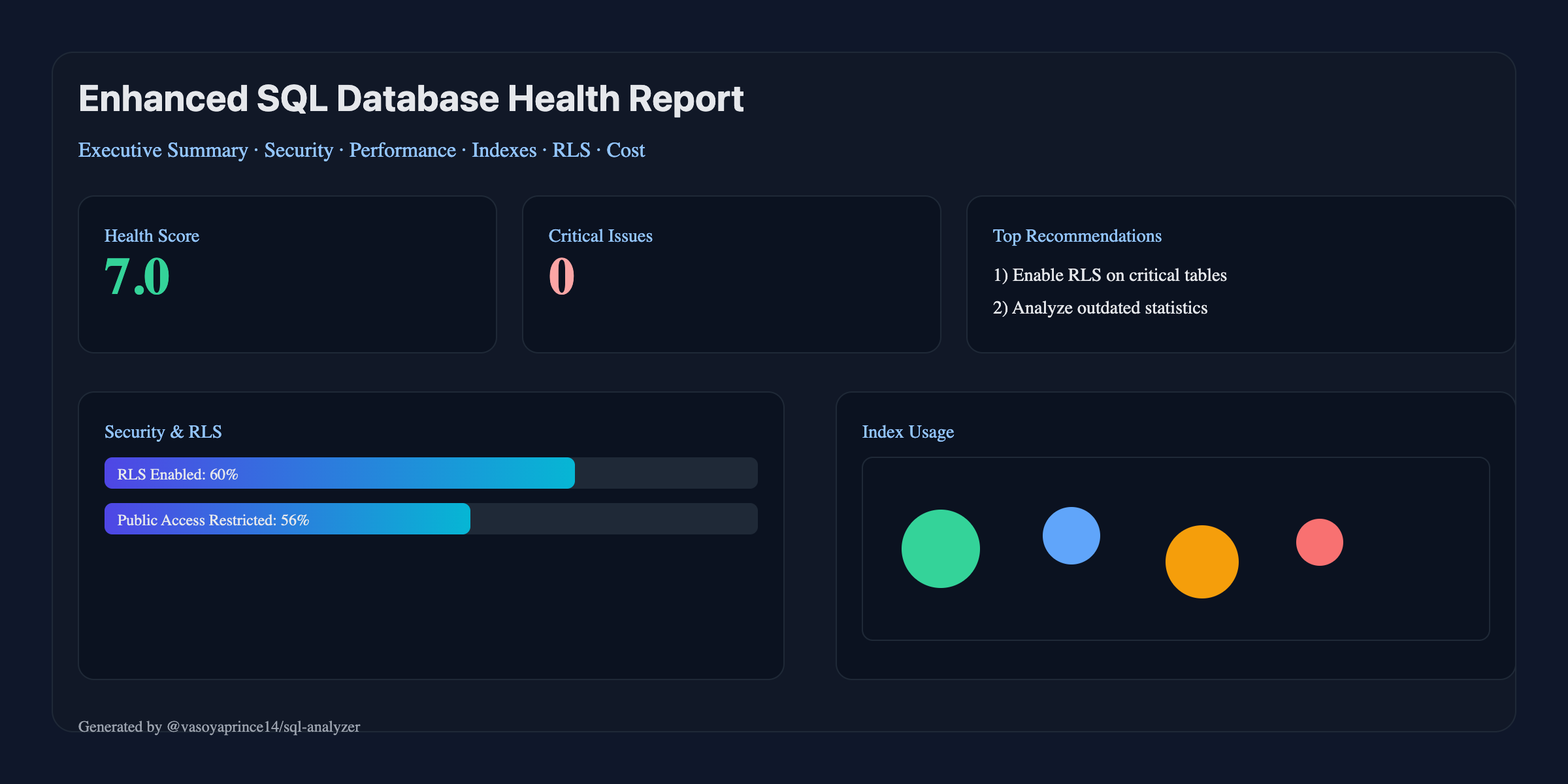
✨ Key Features
🏢 Enterprise Features (NEW in v1.5.0)
- Compliance Frameworks: Built-in SOX, GDPR, and HIPAA compliance auditing
- Governance & Risk Management: Policy-based access control and risk assessment
- Intelligent Recommendations: AI-driven optimization with ROI analysis and business impact
- Audit Trail & Compliance: Comprehensive logging and compliance reporting
- Enterprise CLI Commands:
enterprise,ml,compliance,predict,anomaly
🧠 Machine Learning Capabilities (NEW in v1.5.0)
- Performance Prediction: ML-based forecasting for 1h to 30d timeframes
- Anomaly Detection: Intelligent issue identification with configurable thresholds
- Capacity Planning: Resource utilization forecasting and scaling recommendations
- Query Pattern Analysis: Performance optimization insights and trends
- Predictive Maintenance: Proactive database health management
🔍 Comprehensive Database Analysis
- Schema Health Assessment: Table structure, normalization, relationships, and naming conventions
- Index Analysis: Unused, missing, duplicate, and oversized indexes with performance impact
- Security Audit: Row-Level Security (RLS) policies, permissions, vulnerabilities, and access controls
- Performance Analysis: Query performance, table bloat detection, trigger analysis, and connection monitoring
- Configuration Review: Database settings optimization and best practices validation
🗄️ Multi-Database Support
- PostgreSQL ✅ Full support (built-in)
- MySQL/MariaDB ✅ Full support (mysql2 driver)
- SQL Server ✅ Full support (mssql driver)
- Oracle ✅ Full support (oracledb driver)
- Auto-detection of database type with
sql-analyzer detect
🎯 Advanced Reporting
- Interactive HTML Reports: Modern, responsive design with charts, graphs, and detailed insights
- Executive Dashboards: High-level metrics and KPIs for stakeholders
- Before/After Comparisons: Show expected improvements from optimizations
- Multiple Formats: HTML, CLI, JSON, Markdown, CSV, XML outputs
- Custom Branding: Company logos, colors, and professional presentation
🔒 Security-First Approach
- Row-Level Security Analysis: Comprehensive RLS policy evaluation
- Permission Auditing: Over-privilege detection and access control review
- Vulnerability Scanning: SQL injection risks and security best practices
- Compliance Reporting: Generate reports for SOX, GDPR, HIPAA, PCI-DSS, SOC2
⚡ Performance Optimization
- Query Performance Analysis: Identify slow queries and optimization opportunities
- Index Optimization: Smart index recommendations with impact analysis
- Table Maintenance: Bloat detection and cleanup recommendations
- Configuration Tuning: Memory, connection, and performance parameter optimization
🤖 AI-Powered Insights (Optional)
- OpenAI Integration: Intelligent analysis and recommendations
- Smart Prioritization: AI-driven risk assessment and optimization roadmaps
- Cost Analysis: Predict savings and performance improvements
- Implementation Planning: AI-generated step-by-step optimization plans
🚀 Enterprise Features
- Monitoring & Alerting: Automated health checks with Slack/email notifications
- CI/CD Integration: Quality gates, regression detection, SARIF output
- External Integrations: Jira, Slack, Datadog, Prometheus
- Backup & Recovery Analysis: Backup compliance and RPO assessment
- Migration Planning: Database upgrade and optimization roadmaps
🚀 Quick Start
Installation
# Install globally for CLI usage
npm install -g @vasoyaprince14/sql-analyzer

# Or install as a project dependency
npm install @vasoyaprince14/sql-analyzer
Interactive Wizard (recommended)
# Runs a guided setup: pick analysis type, format, DB URL, AI key and model
# Note: running without arguments auto-launches the setup wizard
sql-analyzer        # same as: sql-analyzer setup
Basic Usage
# Zero-install (recommended to try)
npx --yes @vasoyaprince14/sql-analyzer sql-analyzer health -c "postgresql://user:pass@localhost:5432/mydb" --format html -o ./reports

# Generate comprehensive HTML report
sql-analyzer health -c "postgresql://user:pass@localhost:5432/mydb" --format html -o ./reports

# Quick CLI analysis
sql-analyzer health -c "postgresql://user:pass@localhost:5432/mydb" --format cli

# JSON output for automation
sql-analyzer health -c "postgresql://user:pass@localhost:5432/mydb" --format json
New Features (v1.5.2)
# ⚡ Quick health check (fast analysis)
sql-analyzer quick -c "postgresql://user:pass@localhost:5432/mydb"

# 📊 Batch analysis of multiple databases
sql-analyzer batch --databases "postgresql://db1,postgresql://db2,postgresql://db3" --quick

# 🗄️ Cache management
sql-analyzer cache --stats
sql-analyzer cache --clear
🔥 What's New (v1.5.2)
⚡ Quick Health Check (NEW)
- Fast Analysis: Get database health scores in seconds, not minutes
- Lightweight: Minimal resource usage with essential checks only
- Smart Caching: Intelligent result caching for faster subsequent runs
- CLI Command:
sql-analyzer quickfor rapid health assessment
📊 Batch Analysis (NEW)
- Multi-Database: Analyze multiple databases simultaneously
- Parallel Processing: Configurable concurrency for optimal performance
- Smart Caching: Shared cache across batch operations
- Comprehensive Reports: HTML, JSON, and CLI output formats
- CLI Command:
sql-analyzer batchfor enterprise-scale analysis
🗄️ Smart Caching System (NEW)
- Intelligent Caching: Automatic result caching with TTL and compression
- Memory + Disk: Hybrid caching for optimal performance
- Cache Management: Clear, invalidate, and monitor cache usage
- CLI Command:
sql-analyzer cachefor cache management
📦 Package Size Optimization
- Reduced Size: 33% smaller package (474.1 kB vs 1.4 MB unpacked)
- No Source Maps: Removed source maps from production builds
- Optimized Assets: Compressed images and optimized code
- Tree Shaking: Better dead code elimination
🔥 What's New (v1.5.0)
🏢 Enterprise Edition Features
- Compliance Auditing: Built-in SOX, GDPR, and HIPAA compliance frameworks
- Governance & Risk Management: Policy-based access control and risk assessment
- Intelligent Recommendations Engine: AI-driven optimization with business impact analysis
- Audit Trail Management: Comprehensive logging and compliance reporting
🧠 Machine Learning Capabilities
- Performance Prediction: ML-based forecasting for multiple timeframes
- Anomaly Detection: Intelligent issue identification with severity classification
- Capacity Planning: Resource utilization forecasting and scaling recommendations
- Query Pattern Analysis: Performance optimization insights and trends
- Predictive Maintenance: Proactive database health management
🔧 Enhanced CLI Commands
enterprise- Run enterprise analysis and governanceml- Generate ML insights and predictionscompliance- Audit compliance frameworkspredict- Performance predictions and capacity planninganomaly- Detect and analyze database anomalies
📊 Advanced Analytics
- Real-time Monitoring: Live metric collection and analysis
- Trend Analysis: Historical data analysis and pattern recognition
- Correlation Analysis: Identify relationships between different metrics
- ROI Assessment: Business impact and cost-benefit analysis
🏢 Enterprise Features
Compliance Auditing
# Run SOX compliance audit
sql-analyzer compliance --frameworks SOX --detailed

# Audit multiple frameworks
sql-analyzer compliance --frameworks SOX,GDPR,HIPAA --output json

# Generate compliance report
sql-analyzer compliance --frameworks SOX --output html -o ./compliance-reports
Machine Learning Insights
# Generate performance predictions
sql-analyzer predict --timeframe 7d --metrics cpu,memory,connections

# Detect anomalies
sql-analyzer anomaly --severity high --detailed

# ML-powered analysis
sql-analyzer ml --predictions 24h --anomalies --capacity --queries
Enterprise Analysis
# Comprehensive enterprise analysis
sql-analyzer enterprise --compliance SOX,GDPR --governance --recommendations

# Generate enterprise report
sql-analyzer enterprise --output html -o ./enterprise-reports
🔧 Advanced Usage
Configuration
# Use preset configurations
sql-analyzer health --preset production -c "postgresql://..."

# Custom configuration
sql-analyzer health --custom-config ./config.json -c "postgresql://..."

# Environment-based configuration
export DATABASE_URL="postgresql://..."
export OPENAI_API_KEY="your-key"
sql-analyzer health
CI/CD Integration
# Quality gates with failure conditions
sql-analyzer health -c "postgresql://..." --fail-on-critical --min-score 7.0

# Baseline comparison
sql-analyzer health -c "postgresql://..." --baseline ./baseline.json --fail-on-regression

# SARIF output for GitHub
sql-analyzer health -c "postgresql://..." --sarif -o ./results.sarif
Notifications
# Slack notifications
sql-analyzer health -c "postgresql://..." --notify-webhook "https://hooks.slack.com/..." --notify-on critical

# Custom notification conditions
sql-analyzer health -c "postgresql://..." --notify-webhook "..." --notify-on regression
📊 Report Features
Executive Dashboard
- Health Score: Overall database health rating (0-10)
- Security Status: Vulnerability count and risk assessment
- Performance Metrics: Connection usage, query performance, index efficiency
- Cost Analysis: Storage usage, optimization savings potential
Detailed Sections
🔍 Schema Health Analysis
- Table structure validation
- Normalization assessment
- Foreign key integrity checks
- Data type optimization
- Naming convention analysis
🛡️ Security Analysis
- Row-Level Security (RLS) policy review
- User permissions audit
- Public access detection
- SQL injection risk assessment
- Security best practices validation
⚡ Performance Analysis
- Query performance evaluation
- Index usage and optimization
- Table bloat detection
- Connection pool analysis
- Memory configuration review
🔧 Configuration Analysis
- Database parameter optimization
- Memory settings review
- Security configuration audit
- Performance tuning recommendations
📅 Maintenance Scheduling
- Automated maintenance scripts
- VACUUM and ANALYZE scheduling
- Index maintenance recommendations
- Backup verification procedures
📈 Trends & Insights
- Growth projections
- Performance trends
- Optimization roadmap
- Implementation timeline
🎯 Use Cases
For Database Administrators
- Health Monitoring: Regular database health assessments
- Performance Tuning: Identify and resolve performance bottlenecks
- Security Auditing: Ensure compliance with security policies
- Capacity Planning: Predict growth and resource requirements
For Development Teams
- Code Reviews: Analyze database changes before deployment
- Performance Testing: Identify performance regressions early
- Security Compliance: Validate security best practices
- Documentation: Generate reports for compliance and auditing
For DevOps/CI-CD
- Automated Testing: Integrate into CI/CD pipelines
- Quality Gates: Fail builds on critical issues
- Monitoring: Track database health over time
- Alerting: Get notified of performance or security issues
🔧 CLI Commands
Health Analysis
# Basic health audit
sql-analyzer health -c "postgresql://user:pass@host:port/db"

# With progress indicator
sql-analyzer health -c "postgresql://user:pass@host:port/db" --progress

# Custom output directory
sql-analyzer health -c "postgresql://user:pass@host:port/db" -o ./my-reports

# With AI insights (requires OpenAI API key)
OPENAI_API_KEY=your-key sql-analyzer health -c "postgresql://user:pass@host:port/db" --ai

# Choose format (html|cli|json|md)
sql-analyzer health -c "$DATABASE_URL" --format json

# Fail CI if critical issues found
sql-analyzer health -c "$DATABASE_URL" --fail-on-critical

# Require minimum health score
sql-analyzer health -c "$DATABASE_URL" --min-score 8.0
New Commands (v1.4.0)
🔍 Database Detection
# Auto-detect database type
sql-analyzer detect -c "mysql://user:pass@localhost/db" --test-connection
📊 Monitoring Setup
# Set up monitoring & alerting
sql-analyzer monitor -c "$DATABASE_URL" --enable-metrics --slack-webhook "$SLACK_WEBHOOK"
🔒 Compliance Audit
# Run SOX compliance audit
sql-analyzer compliance -c "$DATABASE_URL" -f SOX --format html
🔗 Integration Management
# Set up Jira and Slack integrations
sql-analyzer integrate --jira "https://company.atlassian.net" --jira-token "$TOKEN" --test
Configuration Management
# Interactive setup wizard
sql-analyzer setup

# Initialize configuration file
sql-analyzer config --init

# Validate configuration
sql-analyzer config --validate

# Show current configuration
sql-analyzer config --show
Other Commands
# Show examples
sql-analyzer examples

# Schema/performance placeholders (future)
sql-analyzer schema --help
sql-analyzer performance --help
Quality Gates (CI/CD)
# Fail on critical issues
sql-analyzer health -c "$DB_URL" --fail-on-critical

# Minimum health score requirement
sql-analyzer health -c "$DB_URL" --min-score 8.0

# Generate artifact reports
sql-analyzer health -c "$DB_URL" --format html --output ./artifacts/
⚙️ Configuration
Environment Variables
# Database connection
DATABASE_URL=postgresql://user:pass@localhost:5432/mydb

# AI Integration (optional)
OPENAI_API_KEY=your-openai-api-key
OPENAI_MODEL=gpt-4

# Analysis settings
SECURITY_LEVEL=strict
ENABLE_AI_INSIGHTS=true
REPORT_FORMAT=html
OUTPUT_PATH=./reports
Configuration File
Create a sql-analyzer.config.json:
{
  "database": {
    "host": "localhost",
    "port": 5432,
    "database": "mydb",
    "user": "postgres",
    "password": "password",
    "ssl": false
  },
  "ai": {
    "enabled": true,
    "provider": "openai",
    "apiKey": "your-api-key",
    "model": "gpt-4"
  },
  "analysis": {
    "includeSchema": true,
    "includeTriggers": true,
    "includeProcedures": true,
    "includeRLS": true,
    "securityLevel": "strict"
  },
  "reporting": {
    "format": "html",
    "includeCharts": true,
    "includeBeforeAfter": true,
    "customBranding": {
      "companyName": "Your Company"
    }
  }
}
Configuration Presets
development: Verbose output, no cachingproduction: Optimized for production useci: JSON output, optimized for CI/CDcomprehensive: Full analysis with AI insights
🧭 Report Details for Developers
- Schema health findings reference your actual tables/columns (PK/FK checks, naming, data type suggestions).
- Index analysis leverages pg_stat views to suggest missing/unused/duplicate/oversized indexes.
- Performance issues include lock contention and outdated statistics based on live pg_stat data.
- Security audit enumerates RLS policies and PUBLIC-granted tables.
- Cost section estimates storage usage and potential savings; all numbers are derived from system catalogs.
To keep reports offline-friendly, the HTML avoids external CDNs; charts are summarized via metric cards.
🤖 AI Integration
OpenAI Integration
# Enable AI insights
OPENAI_API_KEY=your-key sql-analyzer health -c "$DATABASE_URL" --ai

# Note: model selection is not exposed via CLI; a default suitable model is used.
AI Features
- Intelligent Analysis: Context-aware recommendations
- Risk Assessment: AI-powered security and performance risk evaluation
- Cost Optimization: Smart cost-saving suggestions
- Implementation Planning: Step-by-step optimization roadmaps
📈 API Reference
Main Classes
EnhancedSQLAnalyzer
// Create analyzer instance
const analyzer = new EnhancedSQLAnalyzer(connectionConfig, options);

// Perform analysis
const report = await analyzer.analyze();

// Generate summary
const summary = analyzer.generateSummary(report);

// Quick analysis (static method)
const result = await EnhancedSQLAnalyzer.quickAnalysis(connectionString, options);

// CI/CD analysis (static method)
const ciResult = await EnhancedSQLAnalyzer.ciAnalysis(connectionString);
ConfigManager
// Create from environment
const config = ConfigManager.fromEnvironment();

// Load from file
const config = await ConfigManager.fromFile('./config.json');

// Validate configuration
const validation = config.validateConfig();

// Update configuration
config.updateConfig({ ai: { enabled: true } });
Types & Interfaces
interface AnalysisSummary {
  overallScore: number;
  totalIssues: number;
  criticalIssues: number;
  securityRisk: 'low' | 'medium' | 'high' | 'critical';
  performanceRisk: 'low' | 'medium' | 'high' | 'critical';
  costSavingsPotential: number;
  topRecommendations: string[];
  estimatedImplementationTime: string;
  riskLevel: 'low' | 'medium' | 'high' | 'critical';
}

interface AnalysisOptions {
  format?: 'cli' | 'html' | 'json';
  outputPath?: string;
  includeAI?: boolean;
  preset?: 'development' | 'production' | 'ci' | 'comprehensive';
  customConfig?: Partial<SqlAnalyzerConfig>;
}
🧪 Testing
Unit Tests
# Run all tests
npm test

# Run with coverage
npm run test:coverage

# Watch mode
npm run test:watch
📦 Publishing to npm (Maintainers)
Requires npm account with 2FA enabled and publish rights to
@vasoyaprince14scope.
- Prepare release
npm ci
npm run type-check
npm run build
npm test- Update version and changelog
# choose one
npm version patch   # 1.0.1
# npm version minor # 1.1.0
# npm version major # 2.0.0
git push && git push --tags- Publish
# public scoped package (2FA OTP will be prompted if enabled)
npm publish --access public
You can also use the shortcuts in package.json:
npm run release        # patch
npm run release:minor  # minor
npm run release:major  # major
Notes:
- The
prepublishOnlyhook enforces tests, lint, and type-check before publish. - Only
dist, docs, examples, and core files are shipped via thefileswhitelist.
Integration Testing
# Test with Docker PostgreSQL
docker run -d --name test-pg -p 5432:5432 -e POSTGRES_PASSWORD=test postgres:15

# Run health analysis
sql-analyzer health -c "postgresql://postgres:test@localhost:5432/postgres"
CI/CD Integration
GitHub Actions
name: Database Health Check
on: [push, pull_request]

jobs:
  database-health:
    runs-on: ubuntu-latest
    services:
      postgres:
        image: postgres:15
        env:
          POSTGRES_PASSWORD: postgres
        options: >-
          --health-cmd pg_isready
          --health-interval 10s
          --health-timeout 5s
          --health-retries 5

    steps:
      - uses: actions/checkout@v3
      - uses: actions/setup-node@v3
        with:
          node-version: '18'
      - name: Run Database Analysis
        run: |
          npx --yes -p @vasoyaprince14/sql-analyzer sql-analyzer health \
            -c "postgresql://postgres:postgres@localhost:5432/postgres" \
            --format json \
            --fail-on-critical
        env:
          OPENAI_API_KEY: ${{ secrets.OPENAI_API_KEY }}
Quality Gates
# Fail build on critical issues
sql-analyzer health -c "$DB_URL" --fail-on-critical

# Require minimum health score
sql-analyzer health -c "$DB_URL" --min-score 8.0

# Generate artifact reports
sql-analyzer health -c "$DB_URL" --format html --output ./artifacts/
🔌 Database Support
Currently Supported
- ✅ PostgreSQL (9.6+) - Full support
- Schema analysis
- Index optimization
- RLS policy auditing
- Performance analysis
- Security scanning
Planned Support
- 🔄 MySQL (8.0+) - In development
- 🔄 SQL Server (2017+) - Planned
- 🔄 Oracle (12c+) - Planned
- 🔄 SQLite - Planned
🛡️ Security & Privacy
Data Privacy
- No Data Storage: Analysis is performed locally, no data sent to external services
- Optional AI: AI features are opt-in and only use metadata, not actual data
- Secure Connections: All database connections use secure protocols
Security Best Practices
- Least Privilege: Run with minimal required database permissions
- Audit Logging: All operations are logged for security auditing
- Configuration Validation: Secure configuration validation and recommendations
Protecting Your GitHub (Maintainers)
- Enable 2FA for your GitHub and npm accounts
- Add branch protection on
main: required PR reviews, required status checks (CI), block force-pushes and deletions - Require signed commits and verified authors (optional but recommended)
- Limit GitHub Actions permissions (read-all by default) and use environment protection for publish
- Store secrets in GitHub Secrets only; rotate npm tokens regularly; use organization SSO if available
- Enable Dependabot alerts and security updates; enable CodeQL code scanning
- Add CODEOWNERS to enforce reviews from maintainers
🚀 Performance
Benchmarks
- Small Databases (< 1GB): ~30 seconds
- Medium Databases (1-10GB): ~2-5 minutes
- Large Databases (10GB+): ~10-20 minutes
Optimization
- Concurrent Analysis: Multiple checks run in parallel
- Smart Sampling: Large tables are sampled for performance
- Caching: Results can be cached for faster subsequent runs
📚 Examples
Basic Usage
import { EnhancedSQLAnalyzer } from '@vasoyaprince14/sql-analyzer';

// Simple health check
const summary = await EnhancedSQLAnalyzer.quickAnalysis(
  'postgresql://user:pass@localhost/db'
);

if (summary.criticalIssues > 0) {
  console.log(`⚠️ Found ${summary.criticalIssues} critical issues!`);
}
Advanced Configuration
import { EnhancedSQLAnalyzer, ConfigManager } from '@vasoyaprince14/sql-analyzer';

// Custom configuration
const analyzer = new EnhancedSQLAnalyzer(
  { connectionString: process.env.DATABASE_URL },
  {
    preset: 'comprehensive',
    customConfig: {
      ai: {
        enabled: true,
        apiKey: process.env.OPENAI_API_KEY
      },
      analysis: {
        securityLevel: 'strict',
        includeAIInsights: true
      },
      reporting: {
        format: 'html',
        customBranding: {
          companyName: 'Acme Corp',
          colors: {
            primary: '#007bff',
            secondary: '#6c757d'
          }
        }
      }
    }
  }
);

// Perform analysis with progress monitoring
const result = await analyzer.analyzeAndReport({
  returnReport: true,
  onProgress: (step, progress) => {
    console.log(`${step}: ${progress}%`);
  }
});

console.log('Analysis complete!', result.summary);
CI/CD Integration
import { EnhancedSQLAnalyzer } from '@vasoyaprince14/sql-analyzer';

// CI/CD quality gate
async function checkDatabaseHealth() {
  try {
    const result = await EnhancedSQLAnalyzer.ciAnalysis(
      process.env.DATABASE_URL
    );

    if (!result.passed) {
      console.error(`❌ Database health check failed:`);
      console.error(`- Health Score: ${result.score}/10`);
      console.error(`- Critical Issues: ${result.criticalIssues}`);
      process.exit(1);
    }

    console.log(`✅ Database health check passed!`);
    console.log(`- Health Score: ${result.score}/10`);
    console.log(`- Report: ${result.reportPath}`);
  } catch (error) {
    console.error('Database health check failed:', error.message);
    process.exit(1);
  }
}

checkDatabaseHealth();
🤝 Contributing
We welcome contributions! Please see our Contributing Guide for details.
Development Setup
# Clone repository
git clone https://github.com/vasoyaprince14/sql-optimizer.git
cd sql-optimizer

# Install dependencies
npm install

# Run in development mode
npm run dev

# Run tests
npm test

# Build for production
npm run build
Adding Database Support
// Implement DatabaseClient interface
class MySQLClient implements DatabaseClient {
  async connect(): Promise<void> { /* ... */ }
  async disconnect(): Promise<void> { /* ... */ }
  async query(sql: string): Promise<any> { /* ... */ }
}

// Register with analyzer
analyzer.registerDatabaseClient('mysql', MySQLClient);
📜 License
This project is licensed under the MIT License - see the LICENSE file for details.
🙏 Acknowledgments
- PostgreSQL community for excellent documentation
- OpenAI for providing powerful AI capabilities
- Chart.js for beautiful data visualizations
- All contributors who help improve this tool
📞 Support
🎯 Roadmap
Version 1.5.0
- [ ] SQLite support
- [ ] MongoDB and Redis analysis
- [ ] Advanced query optimization
- [ ] Machine learning-based recommendations
- [ ] Real-time monitoring dashboard
Version 1.6.0
- [ ] Cloud database support (AWS RDS, Azure SQL, GCP Cloud SQL)
- [ ] Container and Kubernetes integration
- [ ] Advanced compliance frameworks
- [ ] Custom rule engine
- [ ] API endpoints for programmatic access
⭐ Star this repository if you find it helpful!
Made with ❤️ by Prince Vasoya, Shreya Chauhan