
@venmail/avnac-vue
v0.1.20
Published
[](https://github.com/VenMail/avnac-vue/actions/workflows/deploy-pages.yml) [](https://www.npmjs.com/pa


Readme
Avnac Vue


Avnac Vue is a Vue 3 + Fabric.js clone and adaptation of the original React Avnac editor.
It keeps the browser-first canvas editing model while exposing Vue single-file components (SFCs) that can be embedded in VenSuite, Venmail, and other Vue 3 applications. It includes slide editing, text and shape tools, image search/upload flows, AI-assisted slide generation, charts, diagrams, infographics, PPTX import/export, animation, present mode, and local document serialization.
🌐 Try It Online (Live Demo)
https://venmail.github.io/avnac-vue/
The demo loads the full editor in the browser — no install needed. You can try:
- Slide editing with canvas objects (text, shapes, images)
- AI-assisted slide generation
- Image search (Unsplash) and file uploads
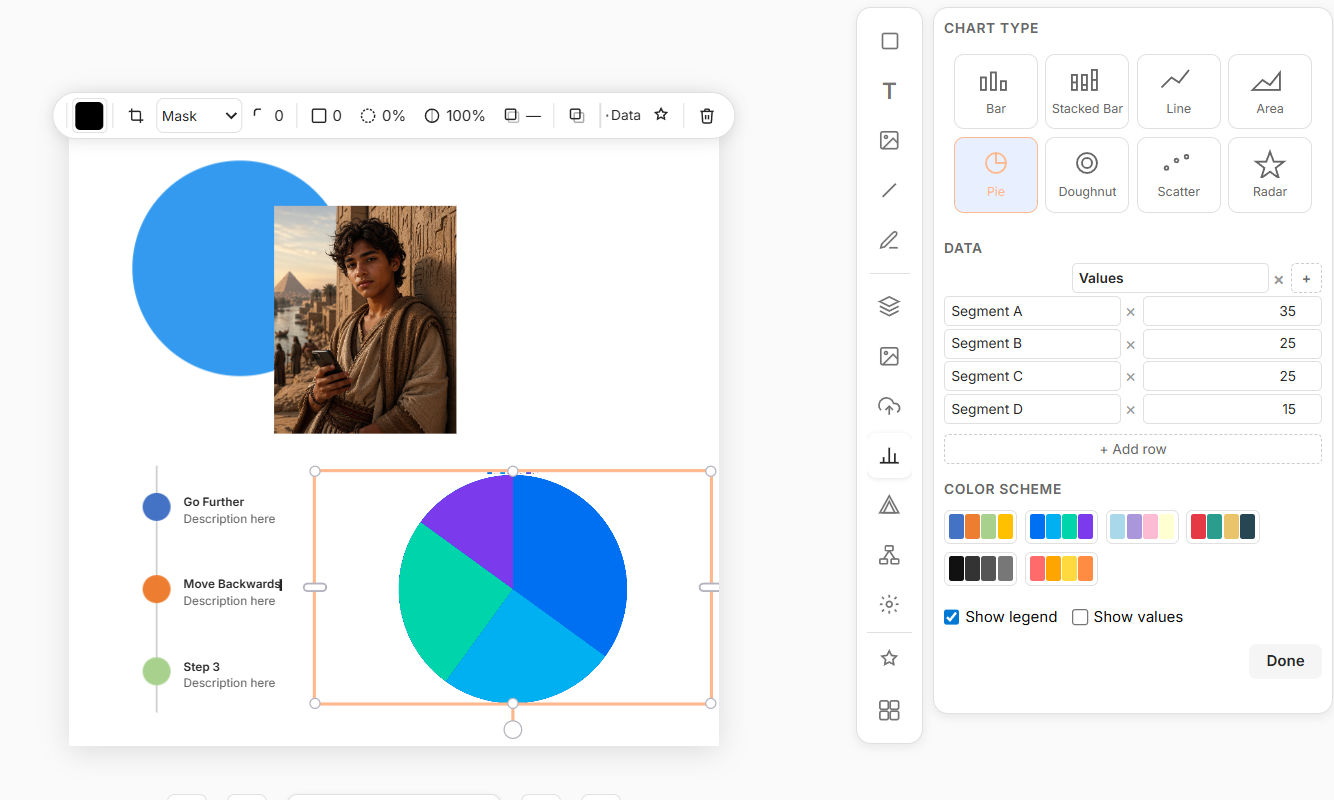
- Charts: Bar, Stacked Bar, Line, Area, Pie, Doughnut, Scatter, Radar
- Diagrams and infographic templates: Pyramid, Funnel, Timeline, Chevron, Venn, Cycle, Accordion, 2×2 Matrix
- Present mode and animations (motion.dev)
- PPTX import/export
- Cross-canvas copy/paste from the system clipboard
Auto-deployed from
mainon every push via GitHub Actions.
Screenshots
What’s New vs the Original Avnac (React)
The original Avnac is a React + Vite presentation editor. Avnac Vue is a ground-up Vue 3 adaptation with additional features built for production embedding in Venmail products.
Feature Comparison
| Area | Original Avnac (React) | Avnac Vue |
|---|---|---|
| Framework | React + Vite + TypeScript | Vue 3 + Vite + TypeScript |
| Integration | React component library | Vue SFCs — embeds into VenSuite & Venmail |
| AI slide generation | React-based panels | Vue floating panels, improved error/loading states |
| Images & uploads | Image uploads + Unsplash search | Vue panels with refined layout, dark-mode contrast & sizing fixes |
| Clipboard | Basic clipboard support | Paste plain text and images from system clipboard into canvas |
| Cross-canvas copy/paste | Not available | Full cross-canvas copy/paste via system clipboard |
| Animations | Not available | motion.dev animation runtime, timeline panel, PPTX anim export |
| Present mode | Not available | Full fullscreen present mode with slide navigation |
| Charts | Basic chart rendering | Bar, Stacked Bar, Line, Area, Pie, Doughnut, Scatter, Radar with data dialog |
| Diagrams & infographics | Not available | Pyramid, Funnel, Timeline, Chevron, Venn, Cycle, Accordion, 2×2 Matrix |
| PPTX import/export | Basic PPTX support | Improved import (images, lines, charts), corrected animation XML export |
| Flat-group architecture | Standard canvas groups | Flat-group model for direct text editing inside groups |
| Smart objects | Standard shape editing | Smart object editor — stroke width sync, background popover |
| Dark mode | Standard contrast | Editor dark mode contrast fixes tuned for Vue build |
| Line endings | Standard text behavior | Multiple line-ending types in the editor |
| Panels UX | Floating panels (React) | Escape/close behavior, focus handling, improved panel positioning |
| Packaging | React component library build | Ships Vue SFCs for host-app compilation |
New Feature Highlights in Avnac Vue
- Vue 3 SFC API — embed the editor in any Vue 3 / VenSuite / Venmail app with minimal setup.
- System clipboard integration — paste plain text and images from the OS clipboard directly onto the canvas.
- Cross-canvas copy/paste — copy objects and paste them between separate editor instances or browser tabs.
- motion.dev animation runtime — per-slide and per-object animations; export correctly to PPTX.
- Full present mode — fullscreen slide presentation with keyboard and click navigation.
- Chart data dialog — edit datasets, choose chart kind (Bar/Line/Pie/Radar/etc.), live canvas sync.
- Diagrams and infographics — 8 ready-to-use layout templates (Pyramid, Funnel, Venn, Cycle, etc.).
- Improved PPTX pipeline — corrected animation XML, shape ID tracking, better image/line import.
- Flat-group architecture — direct text editing inside grouped canvas objects without ungrouping.
- Smart object editor polish — stroke width sync, background popover positioning.
- Dark mode contrast — targeted contrast fixes for the editor UI in dark environments.
- Resilient AI and network handling — AI endpoint fixes, improved error recovery in panels.
Installation
npm install avnac-vueThe package ships Vue SFCs. Your host app’s Vite/webpack build compiles them.
Development
npm install
npm run dev

# Type checking
npm run typecheck

# Tests
npm test
Local dev runs at http://localhost:5173.
CI / CD
| Workflow | Trigger | Result |
|---|---|---|
| publish.yml | Push a version tag | Publishes to npm |
| deploy-pages.yml | Push to main | Deploys live demo to GitHub Pages |
| screenshots.yml | After each Pages deploy | Captures and commits fresh screenshots |
Keywords
avnac, avnac-vue, vue clone, vue presentation editor, vue slide editor, vue canvas editor, fabric.js editor, browser design editor, AI slide generator, presentation builder, PPTX editor, Venmail, VenSuite, image upload editor, Unsplash image search, diagram editor, infographic editor, animation editor, present mode, motion.dev, clipboard paste, cross-canvas copy paste.