
@verseblocks/pptb-table-logic-map
v1.0.0
Published
See everything that runs on a Dataverse table: plugins, workflows, cloud flows, business rules, form scripts, PCF, data rules - organized by event and pipeline stage. Exports Markdown/JSON and is invokable by AI agents through the PPTB MCP server.

Maintainers
 verseblocks-admin
Readme
Table Logic Map
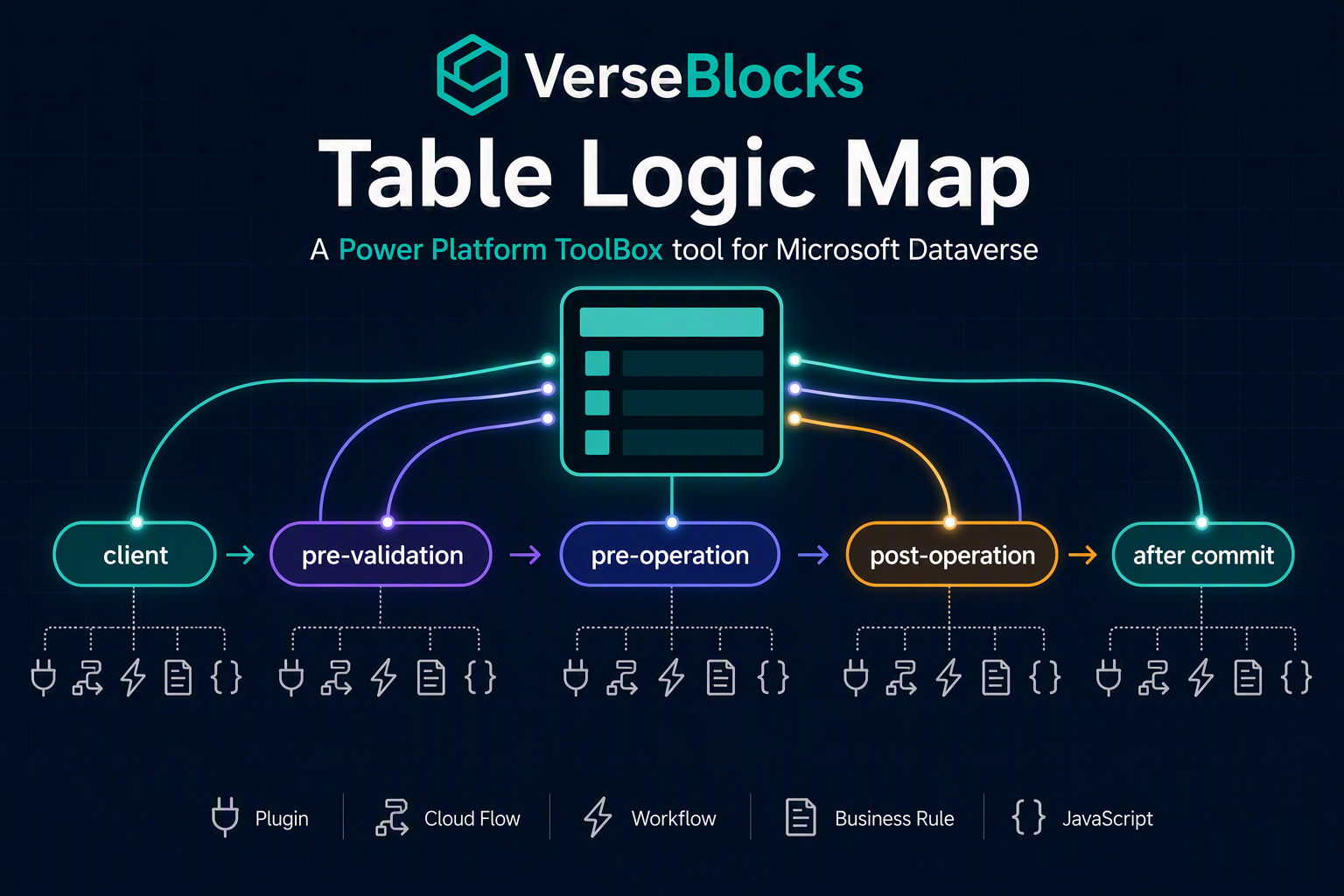
Pick a Dataverse table and see everything that runs because of it, organized the way the platform actually executes it:
- Server pipeline by message and stage – plugin steps (with images, filtering attributes, rank), real-time workflows, custom APIs and actions
- After commit – asynchronous plugins, background workflows, Power Automate cloud flows (with trigger message, scope and filtering attributes)
- Form-time logic – business rules, JavaScript handlers (onload/onsave/onchange and control events), PCF controls, web resources, IFrames, subgrids and quick view forms per form
- Data rules – required columns, alternate keys, duplicate detection rules, cascade behaviours, field security profiles, formula/rollup/calculated/autonumber columns, effective auditing
- What else touches the table – flows that read or write it without being triggered by it, model-driven apps that include it, and a dependency cross-check so nothing is silently missing
- Smells – synchronous Update steps without filtering attributes, stacked sync logic, disabled clutter, real-time workflow + plugin ordering ambiguity, unfiltered Update flows, multi-level cascade deletes, business rule + JS on the same field
Export the whole map as Markdown (wiki-ready, with Mermaid diagrams), JSON (schemaVersion: 1) or a single self-contained HTML file (opens in a browser or Microsoft Word, prints to PDF, works offline), and let AI assistants ask for it through the Power Platform ToolBox MCP server – the tool is agent-invokable in both windowed and headless mode.
Published by VerseBlocks for Power Platform ToolBox.
Why
"What fires when an Account is created?" is the first question anyone asks when inheriting an environment, and answering it today means six tools and a lot of clicking. Table Logic Map assembles the answer in one view, in execution order, with enough identity (GUIDs, names, deep links) to jump straight to the maker portal.
| Who | Job | |---|---| | Developer debugging "why did this field change?" | Find every server-side and client-side piece of logic that can write the column (Columns tab → Touched by) | | Consultant onboarding | Inventory logic on the core tables and export it as documentation (Markdown for the wiki, HTML for the client hand-off) | | Architect reviewing performance | Spot sync plugins + real-time workflows + flows stacked on Update (Pipeline tab + smells) | | AI assistant (via PPTB MCP) | Retrieve a structured logic map to reason about a change (headless invocation) |
Installing
- Open Power Platform ToolBox → Marketplace → search for Table Logic Map → Install.
- Or install from npm through Debug → Install from npm:
@verseblocks/pptb-table-logic-map.
The tool uses a single Dataverse connection and needs no CSP exceptions; everything goes through PPTB's dataverseAPI.
Using the tool
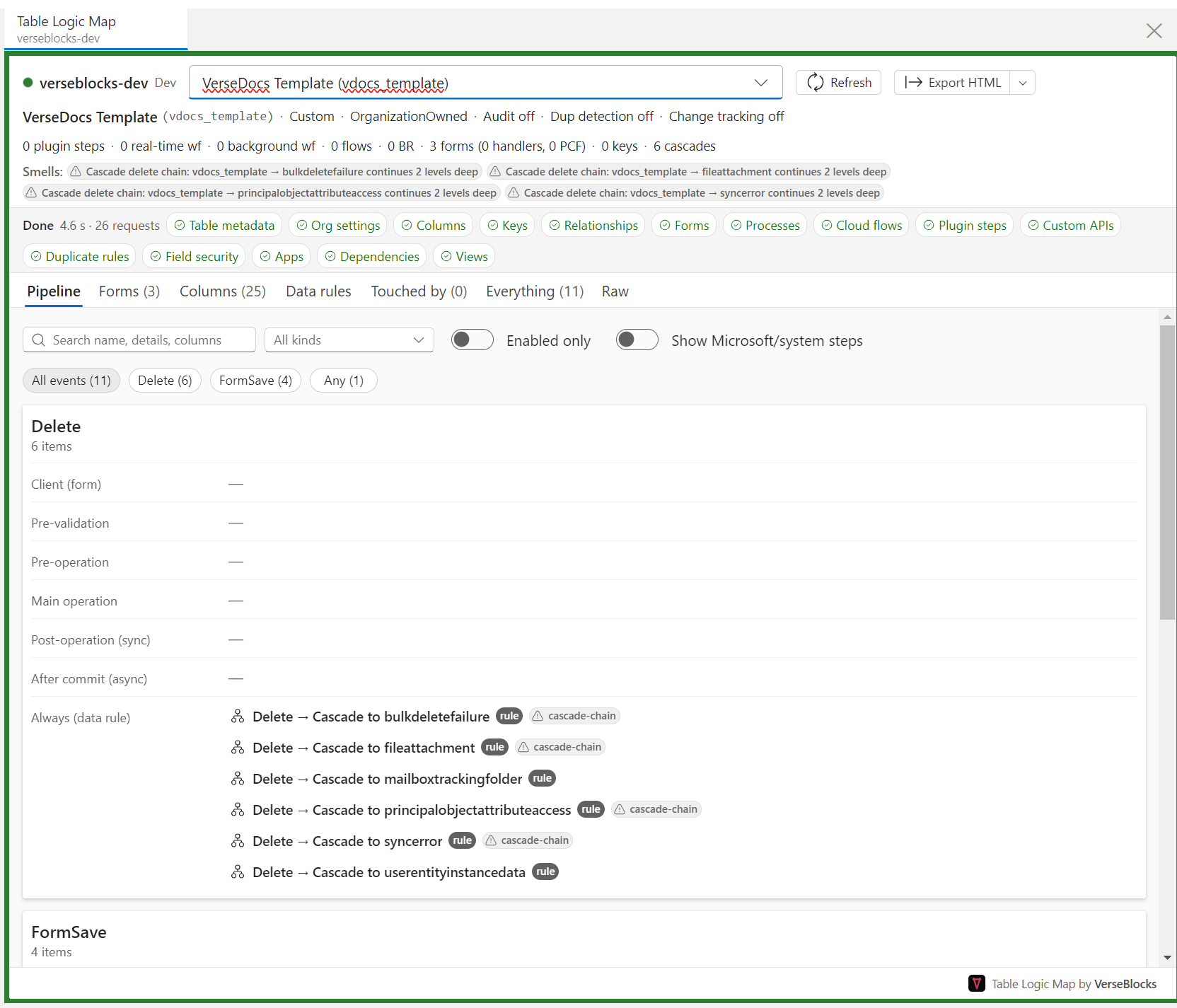
The Pipeline tab is the default view: pick a table and every piece of logic is laid out by event, then by the stage the platform runs it in. The header carries the table's facts and counts, the strip below it shows each of the fifteen sources completing independently, and smells are surfaced as badges before you go looking for them.
- Pick a table (search by display or logical name; the last 10 tables per environment are remembered).
- The header appears as soon as the table metadata arrives; every tab fills in progressively as its source completes. Sources fail independently – a missing privilege on plugin steps produces a warning banner, not a failed map.
- Tabs:
- Pipeline – event pills (Create, Update, Delete, Assign, SetState, custom messages…) → stage rows (client, pre-validation, pre-operation, main operation, post-operation, after commit) → compact items with kind, mode (sync/async/real-time/background), rank, enabled state, filtering-attribute chips and smell badges.
- Forms – one card per form: libraries, handlers (event, attribute/control, function, library, enabled, pass execution context, parameters), PCF controls and components, business rules applied.
- Columns – every column with type, required, secured, audited, source type, autonumber, and two chip columns: Triggers (what fires when it changes) and Touched by (what reads/writes it).
- Data rules – alternate keys, duplicate rules (with conditions), cascade tree, field security profiles, effective audit status, required columns.
- Touched by – flows and actions that read or write this table without being triggered by it.
- Everything – a flat, filterable grid of all items (export preview).
- Raw – the redacted source data per source.
- Select any item to open the detail pane: all details, Open in browser (maker portal / classic record), Copy as Markdown.
- Export → Markdown, JSON or HTML, optionally with a pipeline diagram per event (Include diagrams).
Columns: what triggers a field, and what writes to it
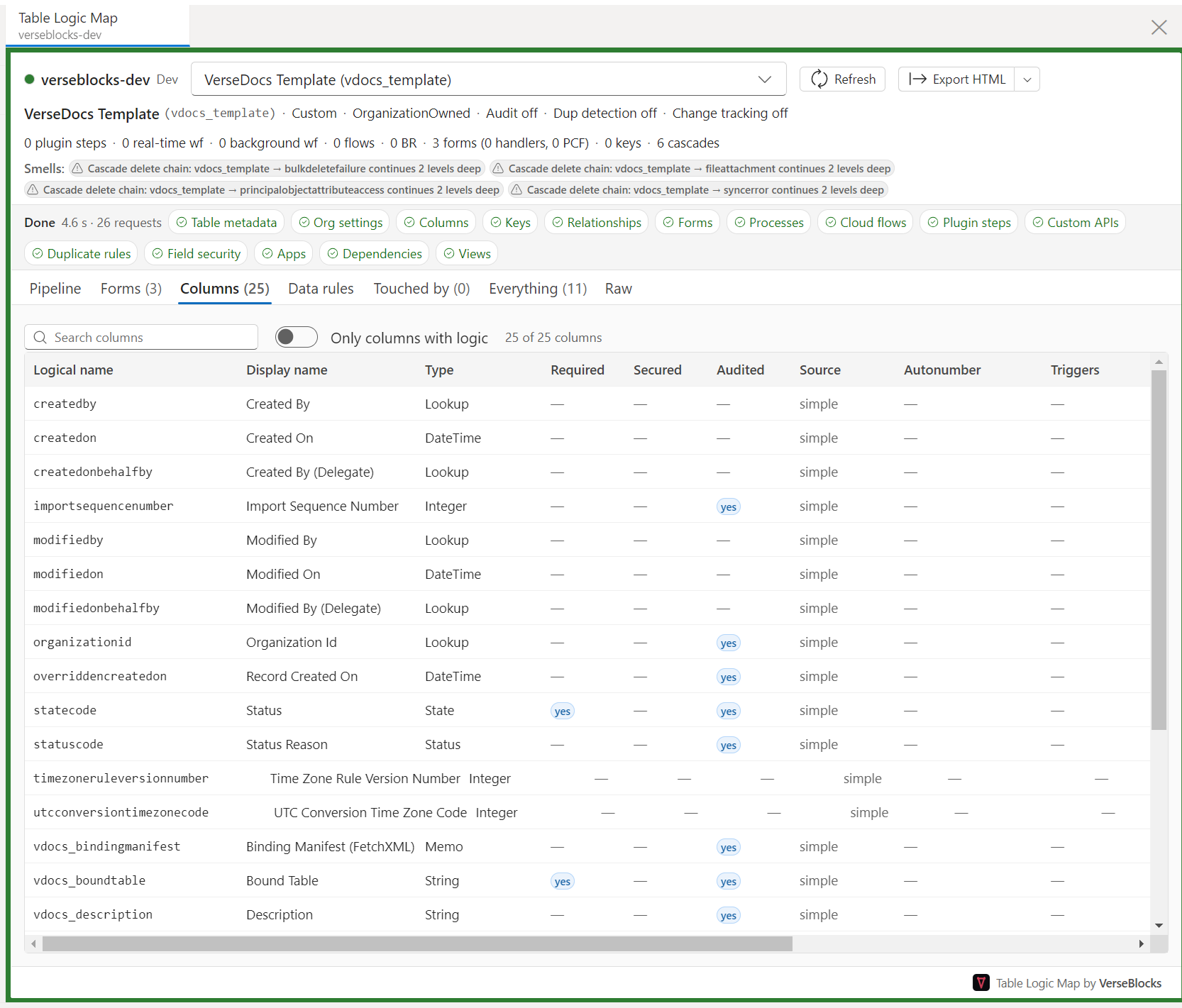
The quickest way to answer "why did this field change?". Each column carries its type, required, secured and audited flags, whether it is simple, calculated, rollup or formula, and two chip columns linking it to the logic that triggers on it or writes to it. Only columns with logic hides the rest.
Forms: the client-side half
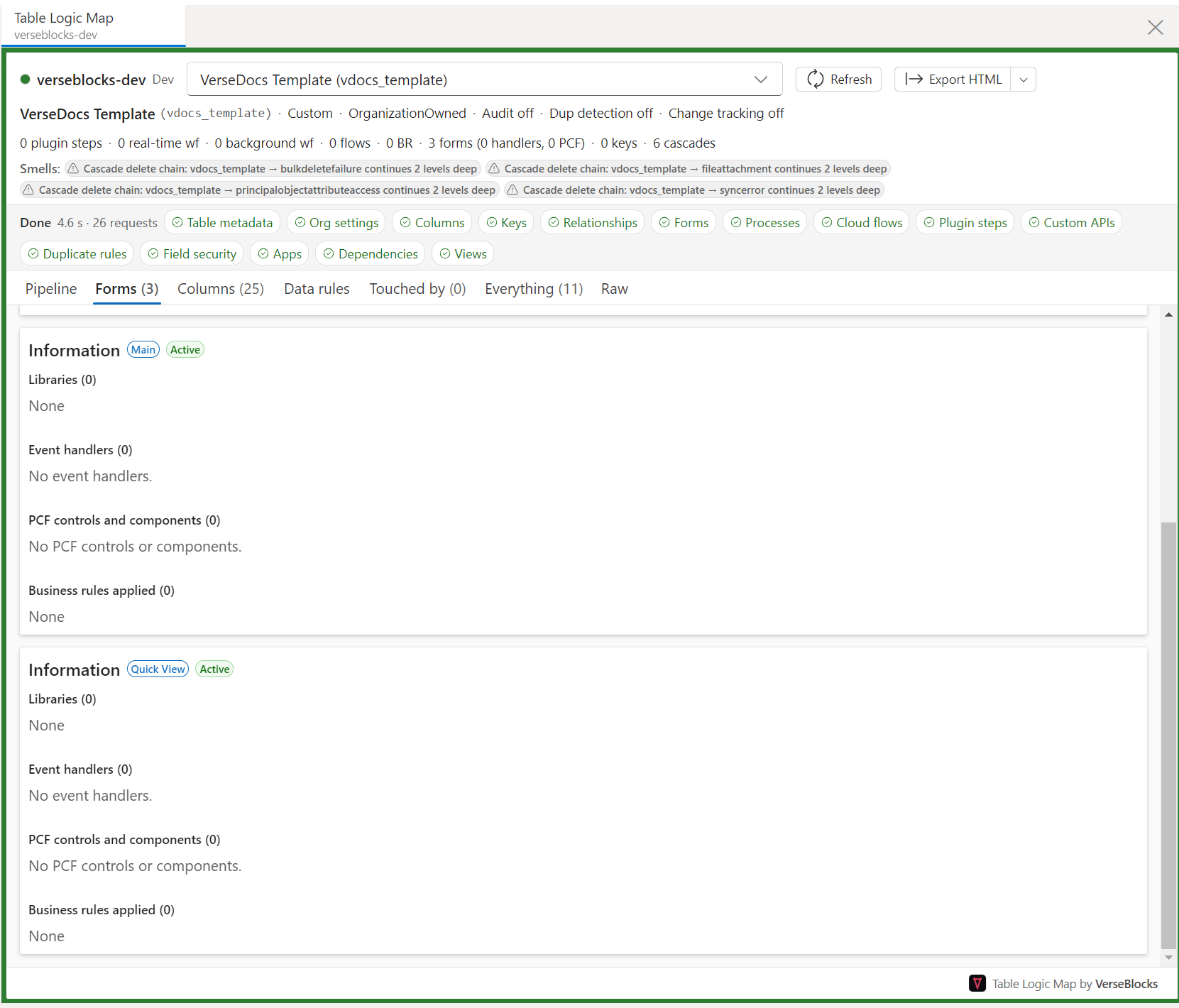
One card per form, listing the JavaScript libraries and event handlers, the PCF controls and embedded components, and the business rules that apply. This is the logic that never appears in a plugin registration tool.
Export formats
| Format | What it is for |
|---|---|
| Markdown (.md) | The diffable source of truth: paste into a wiki, commit to git, review changes between two runs. Diagrams are Mermaid code blocks. |
| JSON (.json) | The structured map (schemaVersion: 1) for scripts, pipelines and AI assistants. |
| HTML (.html) | The client-ready deliverable: one self-contained file with inline styles and inline SVG diagrams, no network access needed. It renders in any browser, opens in Microsoft Word (which converts the HTML, so save as .docx there if you need one) and prints to PDF. |
All three contain the same map, honour the current view filters and are deterministic, so re-exporting the same table produces the same bytes.
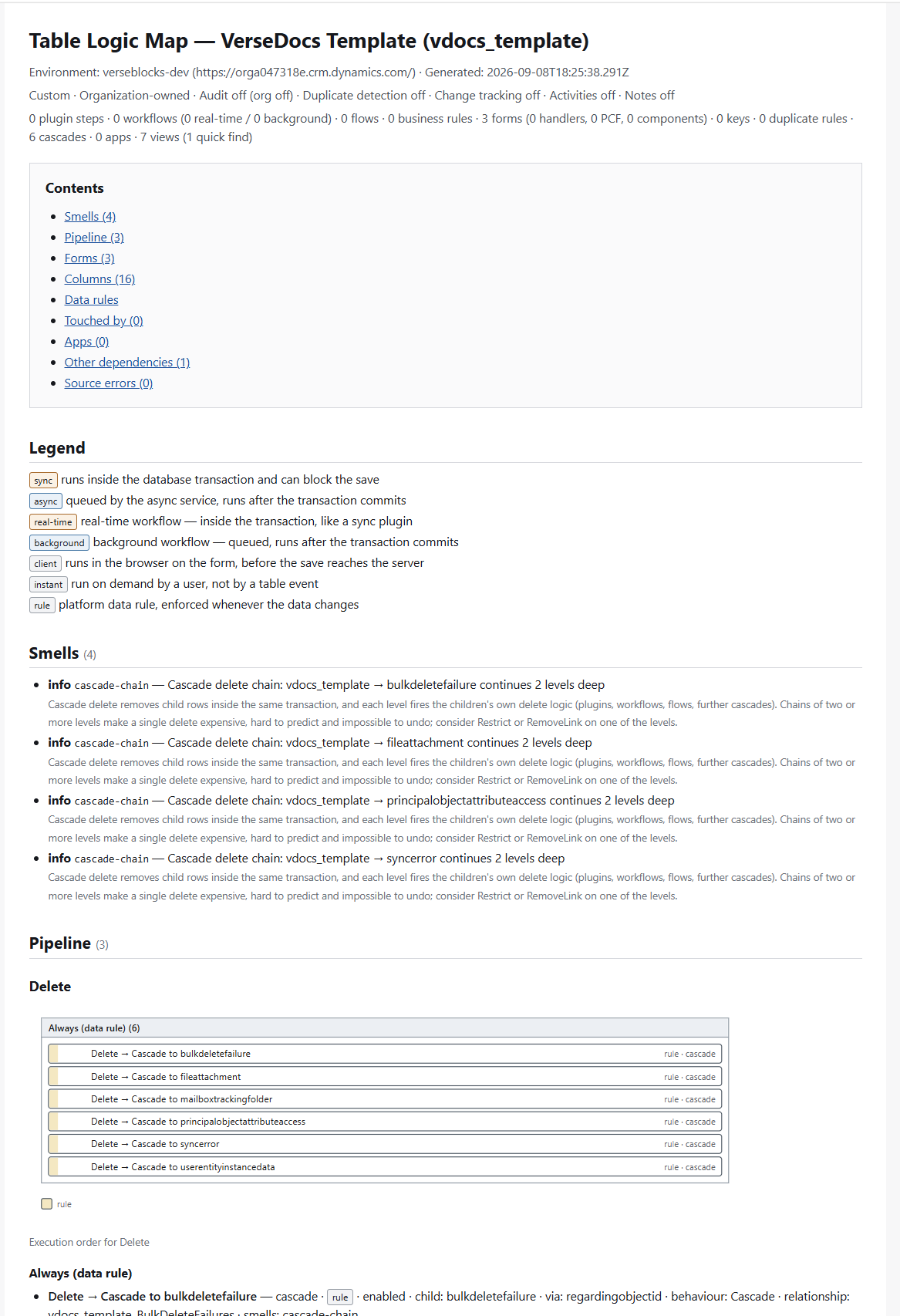
The HTML export opens with a linked table of contents and a legend explaining what each execution mode means, then repeats every section of the app. Each smell states not just what it found but why it matters. See a full example rendered from the project's test fixture.
Exact vs. heuristic
Everything is read-only metadata. Where the platform does not expose structured information, the tool parses definitions and labels the result heuristic in the UI and exports:
| Source | What is exact | What is heuristic |
|---|---|---|
| Plugin steps, images, service endpoints | Everything (registration metadata) | – |
| Custom APIs / actions | Binding, implementation | – |
| Classic workflows | Triggers, mode, stages, scope | Columns touched (parsed from XAML) |
| Business rules | Scope, form, state | Actions and columns (parsed from XAML) |
| Business process flows | Stages/steps/fields (parsed from XAML) | clientdata designer JSON |
| Cloud flows | Trigger table/message/filtering attributes/scope, Dataverse actions on tables | Action-performed / row-selected trigger detection |
| Forms | Libraries, handlers, PCF, well-known components | Unknown control class ids (shown verbatim) |
| Columns | Required, secured, audited, source type, autonumber | Columns referenced by formula columns |
| Keys, cascades, duplicate rules, field security, apps, dependencies | Everything | – |
Full details and the outcome of every platform verification are in docs/verified.md.
Privileges
Read access to the queried system tables is required – in practice System Customizer or System Administrator. With fewer privileges the map still renders; sources that hit a 403 are listed in the Source errors banner (for example "Plugin steps: insufficient privileges – this map is missing server-side plugins").
Redaction policy
- Plugin secure configuration is never fetched.
- Plugin unsecure configuration is shown in the detail pane inside the app, but never leaves it: the Markdown, JSON and HTML exports and the MCP/agent payload all write
[configuration omitted]in its place. (The export API accepts an explicitincludeConfigurationoption for callers that need it; nothing in the UI or the headless entry sets it.) - Webhook / service endpoint URLs have their query strings redacted.
- Cloud flow
clientdatais parsed in memory; only trigger and Dataverse-action summaries are kept. Full definitions are never exported (they may contain hard-coded secrets). - IFrame and web resource URLs have query strings redacted in exports.
Agent / MCP usage
The tool declares agents.invokable: true in pptb.config.json with both windowed and headless execution modes (headless is the default). With the PPTB MCP server running, an assistant calls table-logic-map with:
{ "entityName": "account", "includeSystemSteps": false, "events": ["Create", "Update"] }and receives { "logicMap": { …schemaVersion 1… }, "markdown": "…" }. Inputs are validated: entityName must be a table logical name, event names are matched case-insensitively (Custom:<message> / Message:<message> for custom API, action and other SDK messages) and unknown events come back as { "error": "Unknown event(s): …" } instead of an empty map. includeDiagrams: true adds the Mermaid diagrams to the Markdown. Headless runs need a saved connection name (__pptb.connectionName) so PPTB can resolve the environment; windowed runs open the tool, build the map and return the same payload. See docs/mcp-testing.md for MCP Inspector steps.
Other tools can launch it with prefill:
await toolboxAPI.invocation.launchTool('@verseblocks/pptb-table-logic-map', { entityName: 'contoso_project' });Known limitations (v1)
- Cloud flows that are not solution-aware are not in the
workflowtable and are not shown. - Canvas apps, custom pages, column masking rules, SLAs, routing rules and Power Pages table permissions are not scanned yet.
- Plugin code is not analysed – only registration metadata (steps, images, filtering attributes).
- Cross-environment comparison is out of scope (use an environment diff tool).
Development
npm install
npm run dev-watch      # builds dist/headless.js once, then rebuilds the UI bundle on save
                       # (load the project ROOT in PPTB Debug → Load Local Tool)
npm run dev-watch:headless   # optional second terminal: rebuild dist/headless.js on save too
npm test               # Vitest unit tests (parsers, classifier, exporters, data layer)
npm run build          # typecheck + UI bundle + headless bundle
npm run validate:offline
Architecture: a UI-free domain layer (src/domain, src/sources, src/parsers, src/classify, src/export) is shared by the React/Fluent UI (src/ui) and the headless MCP entry (src/headless.ts → dist/headless.js). See CLAUDE.md for conventions.
License
MIT © 2026 VerseBlocks