
@vheins/local-memory-mcp
v0.46.0
Published
MCP Local Memory Service for coding copilot agents


Readme
@vheins/local-memory-mcp




MCP Local Memory Service is a high-performance Model Context Protocol (MCP) server that provides long-term, high-signal memory for AI Agents (such as Claude Desktop, Cursor, or Windsurf).
Built with a Local-First philosophy, this service stores architectural decisions, code patterns, and critical facts locally on your machine using SQLite and AI-powered Semantic Search.
🚀 Key Features
- 🧠 Semantic Search (V2): Find memories based on meaning, not just keywords, using the
all-MiniLM-L6-v2model locally with hybrid TF-IDF + vector ranking. - 🔄 Tech-Stack Affinity: Share knowledge across repositories intelligently based on technology tags.
- 🛡️ Anti-Hallucination Guard: Strict similarity thresholds and decision conflict detection.
- 🧩 Knowledge Graph: Structured entities, relations, and observations with auto-extraction via offline NLP.
- 🕰️ Time Tunnel: Query memories with natural language dates ("yesterday", "last week").
- 📉 Soul Maintenance: Biological-style memory decay with tag immunization — automatically archives obsolete memories.
- 🤖 Agentic Tools: One-call session context (
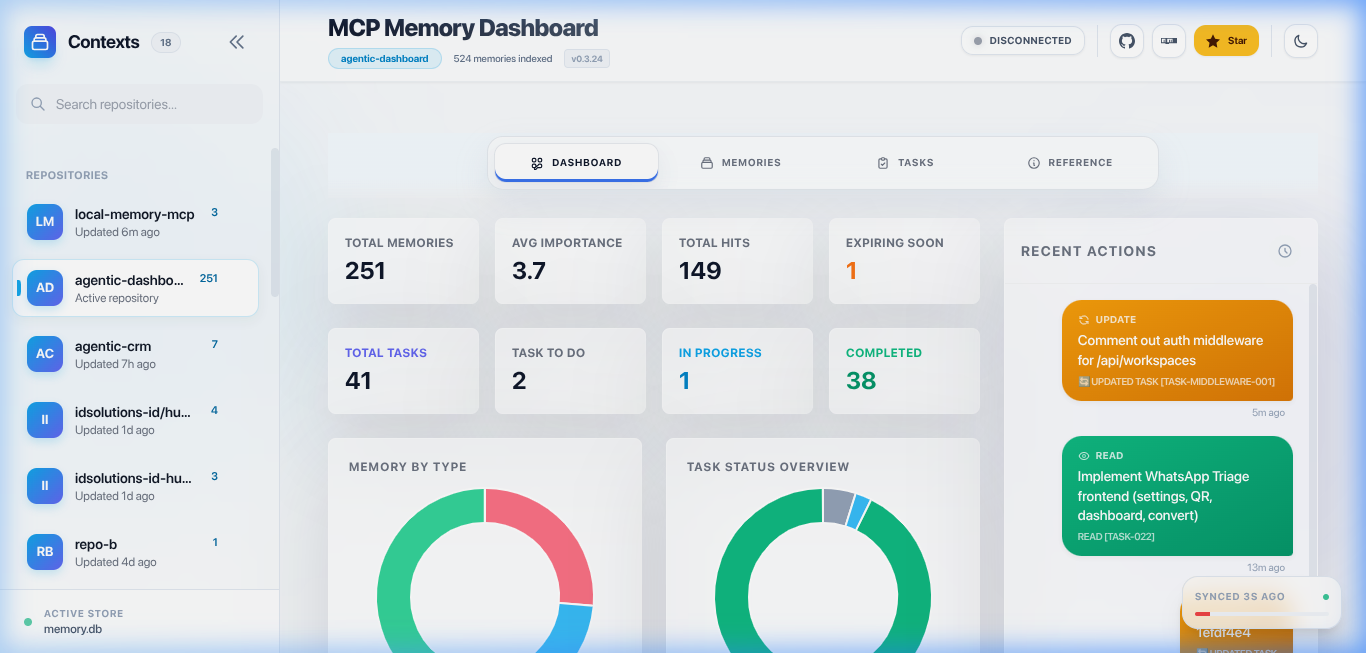
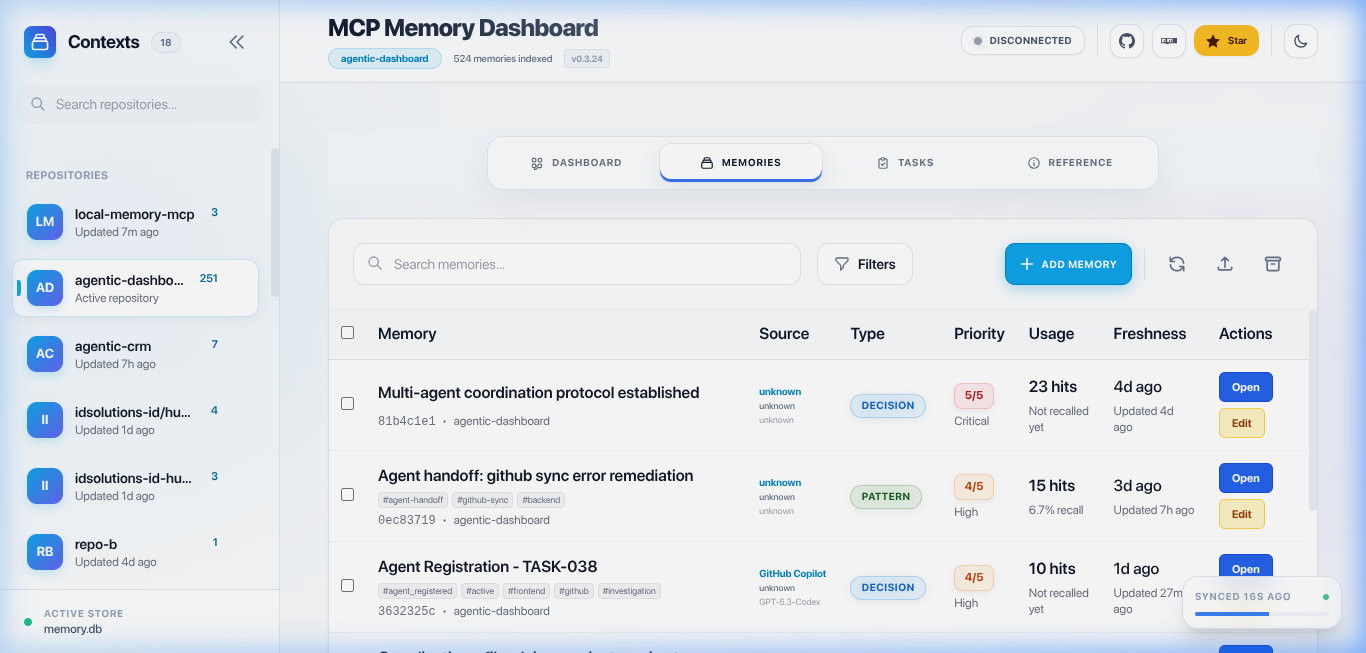
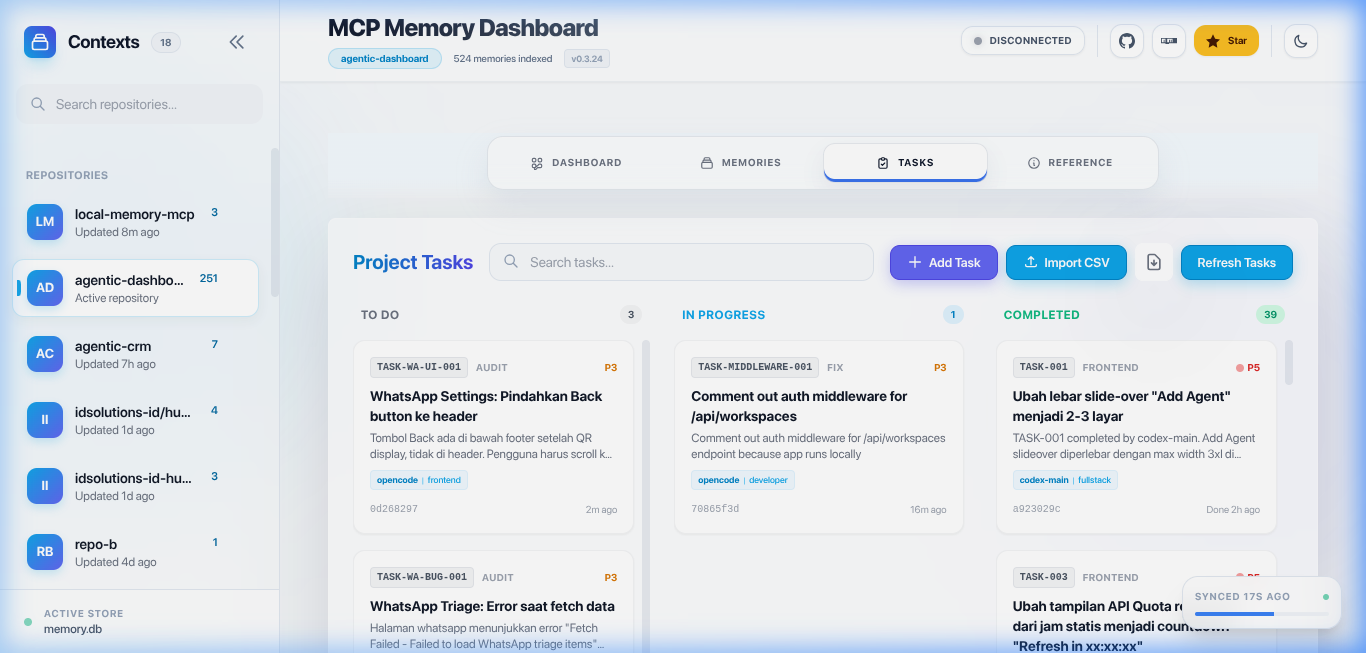
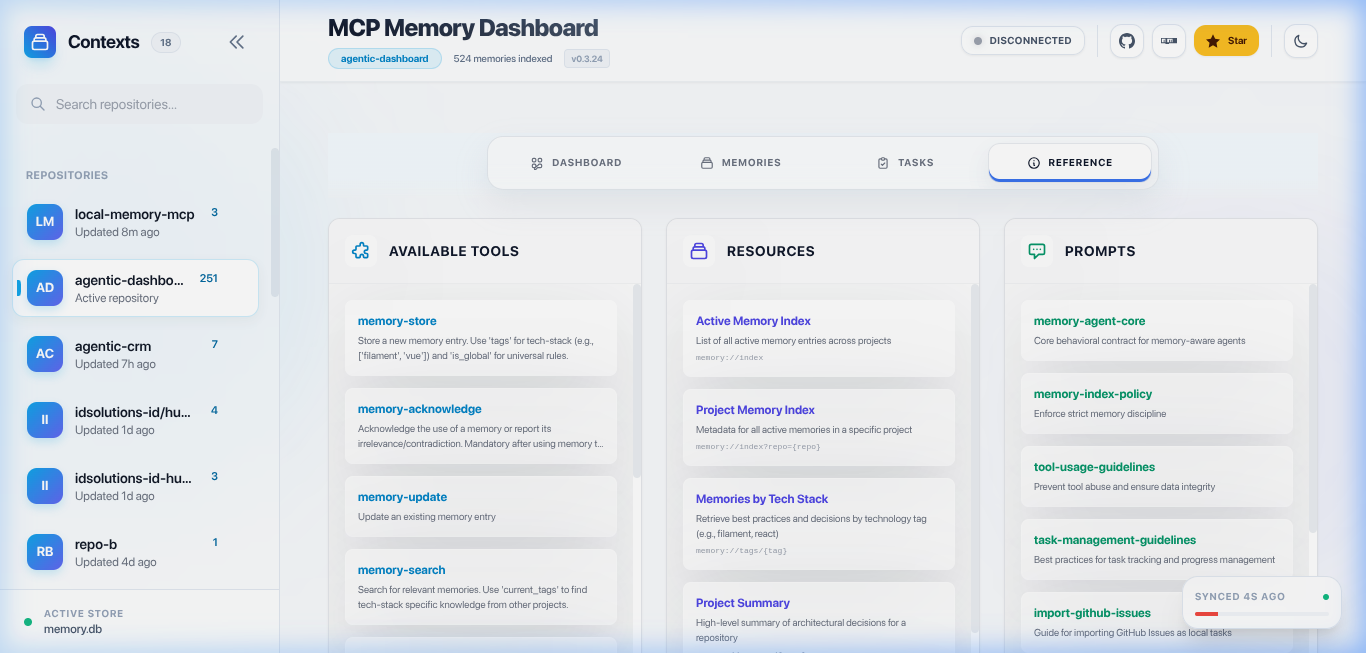
agent-context), structured decision logging viamemory-write(type: "decision"), LLM-driven knowledge synthesis (synthesize), and per-repo project summaries (repo-summarize). - 📊 Glassy Dashboard: Visualize memories, tasks, handoffs, knowledge graph, and interaction logs through a modern Svelte 5 interface.
- 🔍 Codebase Index: Index and query source code structure — search for functions, classes, interfaces, types, and enums across your projects. Uses tree-sitter WASM for fast parsing with incremental updates.
- 🧭 Codebase Search & Trace: A single unified tool (
codebase-read) with auto-detected modes — search ranked symbols (query), trace a symbol's definition and call sites (name), list the symbols declared in a file (filePath), or explore the architecture overview (depth).codebase-indexbuilds and refreshes the tree-sitter index.
🔌 MCP Usage & Configuration
Add this service to your AI Agent (Claude Desktop, Cursor, Windsurf, etc.) using one of the methods below.
💡 Recommendation: If your MCP runs frequently (agents, CI, automation), avoid
npxand use a global or local install instead. It reduces unnecessary NPM downloads and speeds up Agent startup.
🚀 Quick Start (Zero Setup)
Best for first-time users or quick testing. This uses npx to run the server without any permanent setup.
"local-memory": {
  "command": "npx",
  "args": ["-y", "@vheins/local-memory-mcp"],
  "type": "stdio"
}- Uses
npx: Automatically handles the execution. - Tradeoff: May re-download the package in some environments and is not optimal for frequent execution.
⚡ Recommended for Production / Frequent Usage
This method ensures the fastest startup times and maximum reliability for daily use.
Install globally:
npm install -g @vheins/local-memory-mcpAdd to your configuration:
"local-memory": {
  "command": "local-memory-mcp",
  "type": "stdio"
}
- Faster startup: No network checks required on every start.
- No repeated downloads: Saves bandwidth and avoids NPM registry dependency.
- Better for automation: More stable for heavy-duty Agent workflows.
🧠 How It Works (Important Insight)
- npx usage: When you use
npx, it often performs a network request to check for the latest version or re-downloads the package if it's not in the cache. Since MCP clients start and stop tools frequently, this can lead to hundreds of unnecessary downloads. - Installed binary: By installing the package, you keep a permanent copy on your disk. The Agent reuses this local version instantly, providing a much smoother experience.
Database Maintenance: Reclaim Disk Space
After pruning or large data cleanups, SQLite can retain freed pages in its freelist for reuse instead of shrinking the database file. VACUUM_ON_STARTUP (default: false) opts into a one-time conversion to auto_vacuum=INCREMENTAL, followed by a full VACUUM that reclaims those pages before the MCP server accepts requests.
One-off CLI startup
Close other MCP clients and dashboard processes using the same database first: a full VACUUM needs a write lock and can delay startup. Use the same MEMORY_DB_PATH setting as your normal server if you have overridden the database location.
Run one of these commands in a POSIX shell (macOS/Linux):
# With the globally installed package
VACUUM_ON_STARTUP=true local-memory-mcp

# Alternatively, without a global install
VACUUM_ON_STARTUP=true npx @vheins/local-memory-mcp
The variable applies only to that invocation. This is not a maintenance-and-exit command: after the pass, the normal stdio MCP server continues running. Check the [Server] VACUUM_ON_STARTUP ran log and its changed, skipped, and reason fields; stop the standalone server with Ctrl+C after the pass finishes, then restart your normal client.
Claude Desktop / Cursor configuration
For Claude Desktop, open Settings → Developer → Edit Config (claude_desktop_config.json). Merge this entry into your existing mcpServers object; preserve other servers and any existing env values such as MEMORY_DB_PATH:
{
	"mcpServers": {
		"local-memory": {
			"command": "npx",
			"args": ["-y", "@vheins/local-memory-mcp"],
			"env": {
				"VACUUM_ON_STARTUP": "true"
			}
		}
	}
}
For Cursor, use the same configuration in .cursor/mcp.json (project) or ~/.cursor/mcp.json (global), adding "type": "stdio" inside the local-memory entry. For a global package install in either client, use "command": "local-memory-mcp" and remove args.
Restart the client to apply the setting. Enable it for one planned reclamation startup, then remove/unset VACUUM_ON_STARTUP (or set it to "false") so ordinary startups stay fast and do not retry an expensive conversion or encounter unnecessary write-lock contention.
Safety and limitations
- Disk headroom: with the default guard, available space on the database filesystem must be at least 2 × database size + 16 MiB. Database size is
page_count × page_size; the temporary rewrite and WAL need extra room. Insufficient space producesskipped: true,reason: "insufficient_disk". If the filesystem free-space probe is unavailable, the implementation proceeds rather than blocking, so verify headroom yourself. - Idempotent: an already-INCREMENTAL database returns
changed: false,reason: "already_incremental"; it does not run another fullVACUUMor reclaim newly freed pages through this flag. Subsequent bounded incremental reclamation is part of the startup maintenance sweep in thefullruntime profile. - Never-throw startup pass: conversion errors are logged and returned as
skipped: true,reason: "error", rather than aborting startup. In-memory databases are skipped withreason: "in_memory". This is not a guarantee that unrelated server startup operations cannot fail. - Scope: the flag applies to normal MCP server startup in every runtime profile, not the standalone dashboard. It does not impose a maintenance timeout or remove the cost of a full database rewrite.
📊 Glassy Dashboard
Visualize and manage your Agent's memory through a modern web interface.
| Dashboard Overview | Memories Management |
| :-------------------------------------------------------------------------------------------------------------: | :-------------------------------------------------------------------------------------------------------------: |
|  |
|  |
|
| Task Tracking | Available Tools & Reference |
| :----------------------------------------------------------------------------------------------------: | :----------------------------------------------------------------------------------------------------------------------: |
|  |
|  |
|
How to Run
local-memory-mcp dashboardIf not installed globally, use: npx @vheins/local-memory-mcp dashboard
Developer Workflow (Dashboard UI)
The dashboard UI is built with Svelte 5 + Vite. Source files live in src/dashboard/ui/.
# Start the API server (port 3456)
# Note: `npm run dashboard` serves the compiled bundle — run `npm run build` once first (`dist/dashboard/public/`)
npm run dashboard

# In a separate terminal, start the Svelte dev server (port 5173)
npm run dashboard:dev
# → Open http://localhost:5173 (proxies /api to :3456)

# Build Svelte UI for production (output → dist/dashboard/public/)
npm run dashboard:build

# Full production build (Svelte + TypeScript)
npm run build
The server serves the compiled Svelte build from
dist/dashboard/public/in production.
Auto-launch Dashboard in IDEs
The dashboard can auto-start when you open a project in VS Code, Cursor, Windsurf, Zed, or JetBrains IDEs.
📖 Documentation
- Getting Started & Setup — Installation & client configuration
- Tool Reference & Usage Guide — Complete tool docs with examples and workflows
- Troubleshooting Guide — Fix common issues
- Features & How It Works — Semantic search, anti-hallucination, memory decay
- Hybrid Search Logic — How search scoring works
- Dashboard Guide — Web UI for memory & task management
- Codebase Index — Feature Overview — Index, search, and trace source code symbols
- Feature Deep-Dives — memory, task, standard, handoff, agentic, knowledge graph, codebase index
- Codebase Index — API Reference — Complete MCP tool documentation for the 2 unified Codebase Index tools (
codebase-index+codebase-read) - MCP Protocol Reference — Technical protocol details
- Claude Code Integration — Setup for Claude Code CLI
- Codex (OpenAI) Integration — Setup for Codex CLI
- Kiro Integration — Setup for Kiro IDE
- Auto-Start Dashboard in IDEs — tasks.json for VS Code, Cursor, Windsurf, Zed, JetBrains
User documentation lives on the GitHub Wiki (
https://github.com/vheins/local-memory-mcp/wiki/Home). Contributor & developer docs (testing standard, API references, ops runbooks, design/optimization, audits) live in.agents/documents/.
🇮🇩 Indonesian version available:
README.id.md& docs on the Wiki underid/
🤝 Community & Support
- Contribution Guidelines — How to report issues and contribute code
- Code of Conduct — Community standards for all contributors
- Security Policy — How to report a security vulnerability
- Support — Where to get help (docs, issues, integrations)
⚠️ Disclaimer
THE SOFTWARE IS PROVIDED "AS IS", WITHOUT WARRANTY OF ANY KIND, express or implied, including but not limited to the warranties of merchantability, fitness for a particular purpose and noninfringement. In no event shall the authors or copyright holders be liable for any claim, damages or other liability, whether in an action of contract, tort or otherwise, arising from, out of or in connection with the software or the use or other dealings in the software.
⚖️ License
MIT © Muhammad Rheza Alfin — see the full text in LICENSE.md.
🙏 Acknowledgements
Knowledge Graph inspired by Beledarian/mcp-local-memory — the structured entity/relation graph concept builds on this project, reimplemented with its own schema and offline NLP extraction.
Codebase Index inspired by DeusData/codebase-memory-mcp — the codebase indexing/search/trace capabilities build on this concept, reimplemented with tree-sitter WASM and unified tools.